Manufacturing Automation Is Bigger Than Machines
Most manufacturers picture robots, conveyors, and CNC equipment when they hear the word automation. That picture is incomplete. The bigger opportunity for most small and mid-sized manufacturers sits in the paperwork, emails, and spreadsheets that move between departments every single day.
If you already run production equipment with some level of automation, you’ve likely optimized the physical side of your operation. Parts move, machines cut, and cells run with less manual intervention than they did a decade ago. But walk into the office next to that shop floor, and you’ll usually find a different story: someone retyping an RFQ into a spreadsheet, another person emailing a production report by hand, and a third person calling the floor to check on order status.
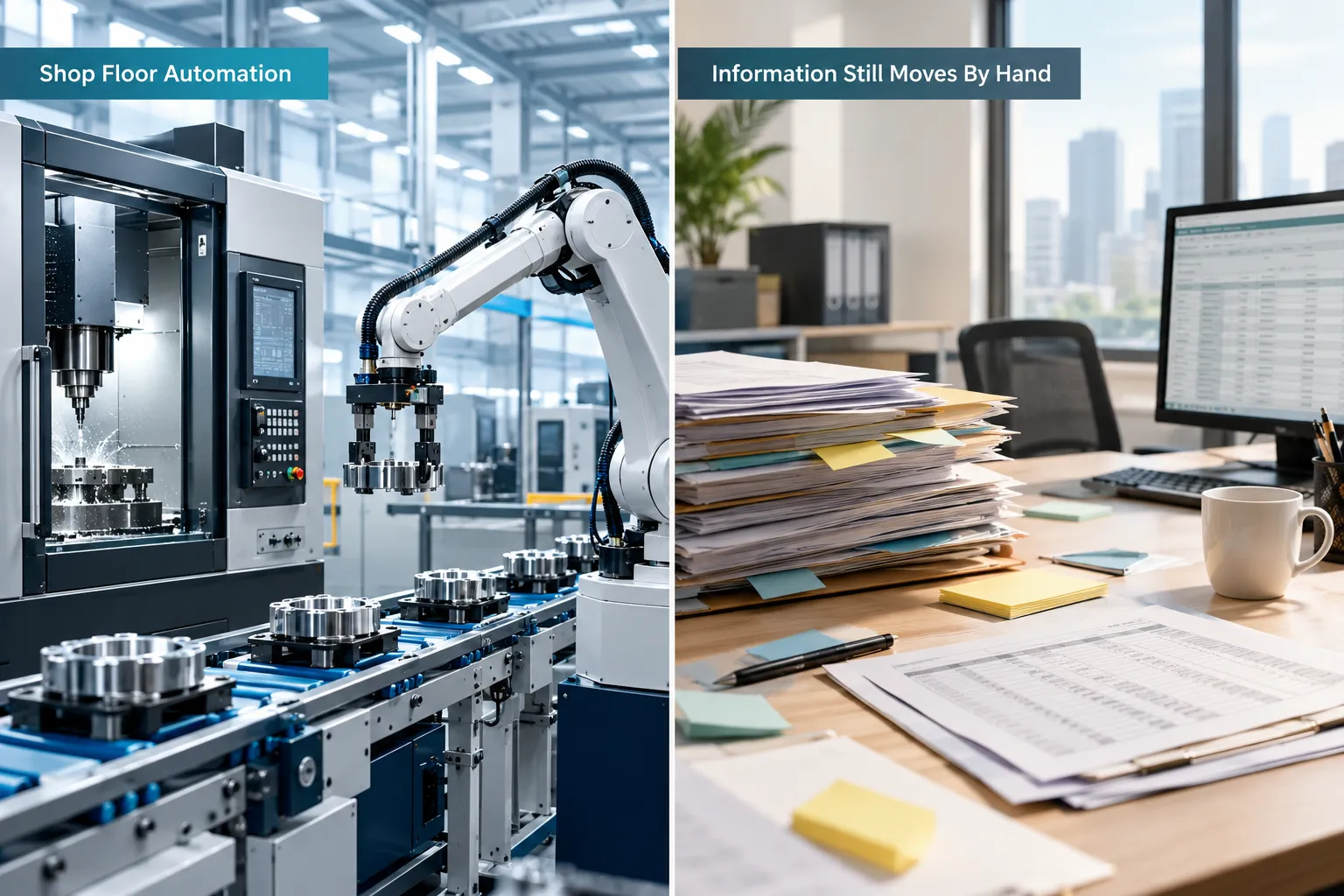
That gap between an automated shop floor and a manual office is where AI automation for manufacturing earns its keep. This article walks through seven manufacturing workflows most ready for this kind of automation. Each one follows the same pattern: what happens manually today, what could be automated, where AI specifically helps, and where a person needs to stay in control.
Your machines may already be automated. The next opportunity is automating the repetitive information and administrative work surrounding them.
Workflow #1: RFQ Intake and Quote Preparation
Manual RFQ processing is one of the most common time drains in manufacturing sales, and it’s a strong first candidate for AI manufacturing automation. Requests for quotes typically arrive as emails, attached PDFs, or spreadsheets, each formatted a little differently, and someone has to read through them and pull out the details before an estimator can even start pricing.
A better workflow looks like this: RFQ arrives, AI extracts the information, documents get organized, the estimator is notified, and the quote workflow begins automatically. AI is well suited to this step because RFQs rarely arrive in a clean, consistent format. It can read the email or attached document and pull out details like:
- Customer name and contact information
- Part number and revision
- Requested quantities
- Specifications and tolerances
- Deadline for the quote
- Requested delivery date
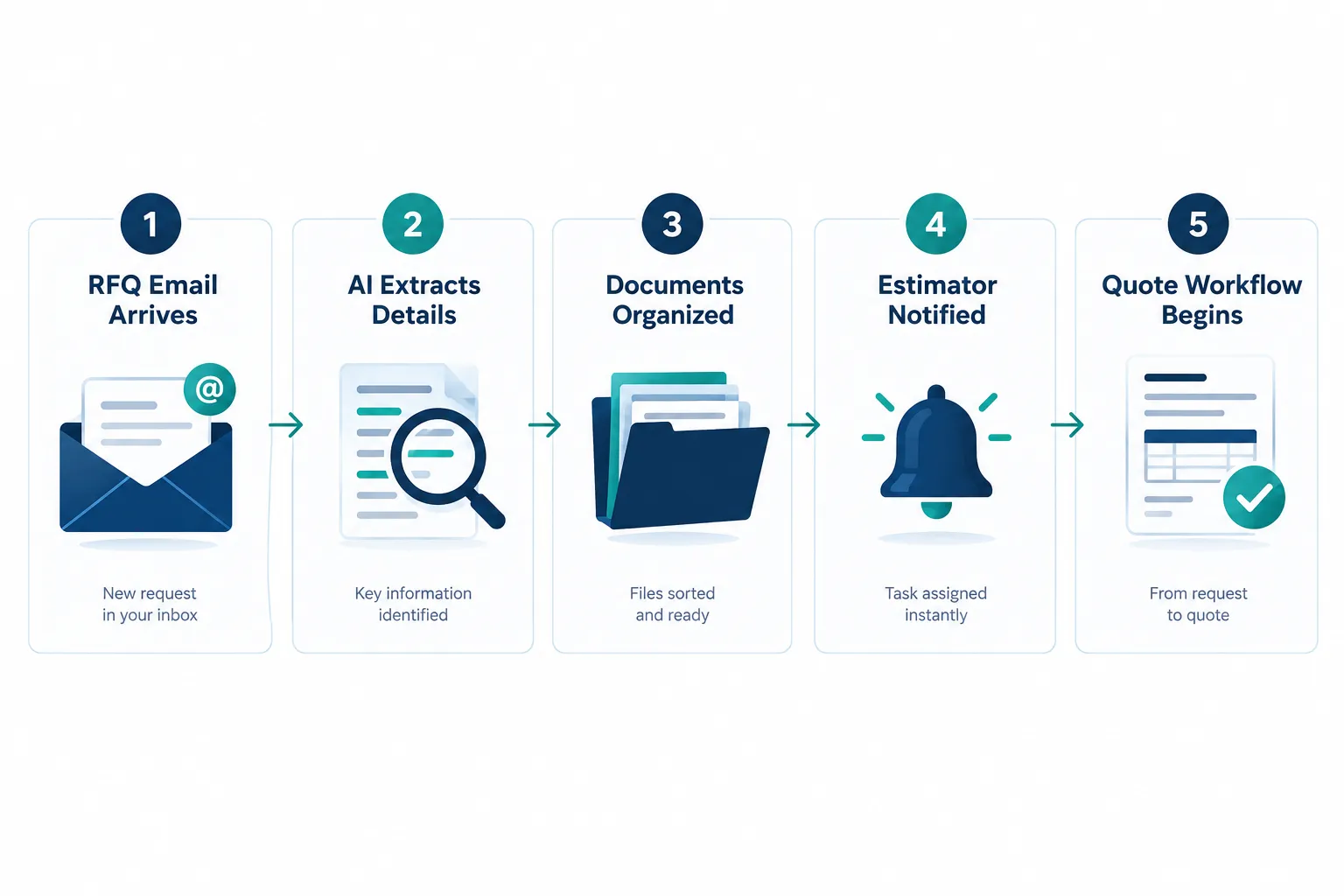
What stays human: the estimator’s judgment on pricing, margin, lead time commitments, and any negotiation with the customer. AI automation shortens the time between “the RFQ landed in someone’s inbox” and “the estimator has everything they need to start pricing.” It doesn’t set the price, and it shouldn’t.
Workflow #2: Production Reporting
Traditional production reporting looks like this: someone collects data from the floor, builds a spreadsheet, manually writes a summary, then emails it to a distribution list. That process repeats daily or weekly, and it consumes hours from people who could be doing more valuable work.
Manufacturing data automation flips the sequence. Production data gets collected automatically from the systems already tracking it, a dashboard or report builds itself, and the system sends an exception notification only when something needs attention, like a line running behind schedule or a machine posting unusual downtime. The goal isn’t a prettier report. It’s spending less time creating reports and more time acting on what they reveal.
Pull quote: “A report nobody has time to read isn’t a management tool. It’s a task waiting to be automated.”
Human role: interpreting the exceptions, deciding what corrective action to take, and communicating decisions to the team. AI and automation surface the information faster. People still decide what to do with it.
Workflow #3: Work Orders and Production Documentation
Repetitive work orders and the documents that travel with them create constant manual handoffs between the office and the floor. Someone prints instructions, walks them out, updates a version when specs change, and then has to track down who has the outdated copy. Multiply that across dozens of active jobs, and it becomes a full-time job in itself.
Manufacturing workflow automation can route work orders, instructions, supporting documents, revisions, and status updates to the right person or terminal automatically, based on job status. When a revision comes in, the system pushes the updated version and flags the outdated one, instead of relying on someone to remember to make the swap.
What this changes for the business:
- Fewer delays between the shop floor and the office
- Less time spent chasing down the “current” version of a document
- Fewer errors caused by someone working from an outdated spec
Human role: engineering judgment on what the revision means for the job in progress, and any decision about pausing or adjusting a run mid-production. Automation moves the paperwork. People still make the production call.
Workflow #4: Inventory and Material Updates
Manual inventory updates are a common source of errors in manufacturing, mostly because the same information gets typed into more than one system. A material gets pulled from stock, someone updates a spreadsheet, then someone else updates the ERP, and the two don’t always match by the end of the week.
Workflow automation can connect inventory events directly to the systems you already use, so the update happens once and flows everywhere it needs to go. Typical triggers include:
- An inventory update after material is consumed on a job
- A reorder notification when stock crosses a threshold
- A material request tied to a specific work order
- A shortage alert sent to purchasing before it becomes a production stoppage
- An automatic ERP update reflecting current stock levels
- A purchasing notification summarizing what needs attention
It’s worth being direct about the boundary here: AI automation should flag and notify. It should not make uncontrolled purchasing decisions on its own. Someone in purchasing still approves the order, picks the vendor, and signs off on the spend. Automation just makes sure that person finds out about the problem before it stalls a production line.
Workflow #5: Quality Documentation
Quality paperwork is repetitive by design, and that repetition is exactly what makes it a good automation candidate. Inspection forms, nonconformance records, supporting documents, recurring reports, approvals, and routing information all follow predictable patterns, even when the specific findings change from job to job.
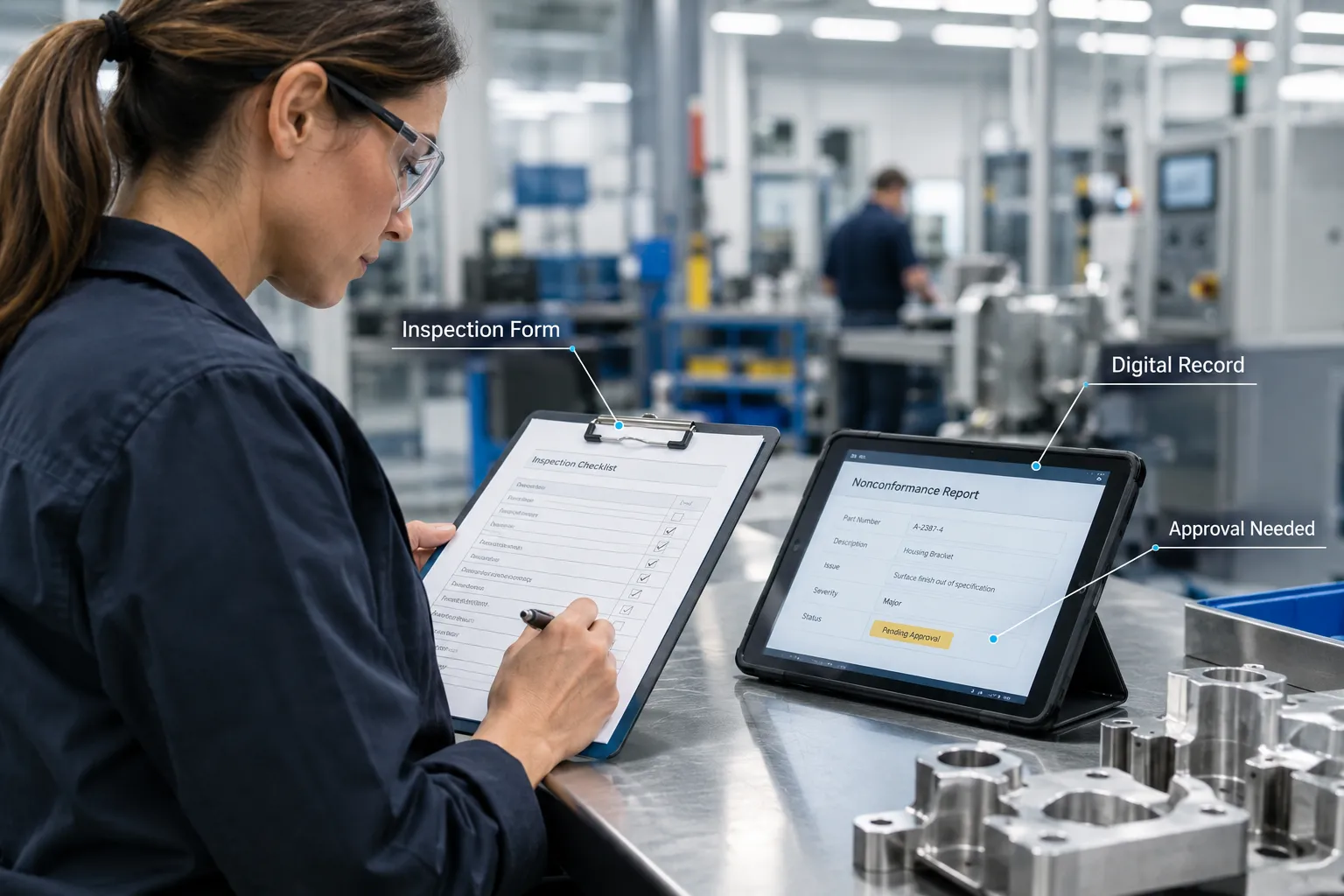
AI can extract information from inspection forms, classify records by type or severity, summarize what changed on a nonconformance report, and organize supporting documents so nothing gets lost in an email chain. This is manufacturing document automation applied to one of the highest-stakes parts of the business.
What doesn’t change: quality personnel remain fully responsible for judgment calls. Deciding whether a nonconformance is acceptable, whether a batch ships, or whether a corrective action plan is sufficient stays with the people accountable for quality outcomes. AI organizes the paperwork around those decisions. It doesn’t make them.
Workflow #6: Scheduling and Internal Notifications
A single production change can ripple through scheduling, purchasing, shipping, sales, management, and the customer, and today that ripple usually happens through a chain of phone calls and emails. One delay on the floor turns into five separate conversations, each slightly different depending on who’s telling the story.
Manufacturing operations automation can propagate an approved change to everyone and every system that needs it, at the same time, with the same information. Once a scheduler or manager approves a change, the system notifies purchasing that a material need has shifted, updates the shipping team’s expected ship date, and flags sales so they can manage the customer conversation, all without anyone having to remember who to call next.
Decision rule: if a single change on the floor regularly requires more than two or three manual notifications to other departments, that’s a strong candidate for automated internal notifications.
Human role: approving the change in the first place and handling any customer-facing conversation that requires context or negotiation. Automation handles the distribution. People handle the relationship.
Workflow #7: Shipping and Customer Communication
Shipping documentation and order status updates often require someone to gather the same information from multiple systems, over and over, for every order. One person checks the ERP for order status, another checks the CRM for the customer’s contact preferences, and a third prepares the shipping paperwork by hand.
AI workflow automation for manufacturing can prepare shipping documents from existing order data, trigger internal notifications when a shipment is ready, send the customer an update in the format they expect, and push the final status back into the CRM and ERP so every system reflects reality. The point isn’t to remove the customer relationship from the process. It’s to stop employees from repeatedly re-gathering information that already exists somewhere in your systems.
What stays human: any exception, like a damaged shipment, a late delivery that needs a real conversation, or a customer relationship issue that requires a judgment call rather than a status update.
What Makes a Manufacturing Workflow Ready for AI Automation?
A manufacturing workflow is ready for automation when it’s repetitive, predictable, and rules-based, and when it currently consumes time from people who could be doing higher-value work. The clearer and more consistent the pattern, the easier it is to automate reliably.
Use this checklist when evaluating any process in your operation. Look for workflows that are:
- Repetitive: the same steps happen over and over with minor variation
- High-volume: it happens often enough that small time savings add up fast
- Predictable: the inputs and outputs follow a recognizable pattern
- Rules-based: decisions follow logic that can be written down
- Error-prone: manual handling regularly introduces mistakes
- Dependent on copying information: someone retypes data that already exists elsewhere
- Spread across multiple systems: the process touches ERP, CRM, email, and spreadsheets in the same day
- Consuming skilled employee time: your best people are doing administrative work instead of engineering, quality, or sales work
Strong rule: if employees repeatedly move predictable information from one place to another, investigate whether the workflow can move it for them.
Where AI Fits and Where Traditional Workflow Automation Fits in Manufacturing
Traditional workflow automation and AI automation solve different problems, and manufacturers who understand the difference build stronger systems. Traditional automation handles structured, rules-based steps. AI handles unstructured, less predictable information like emails and documents.
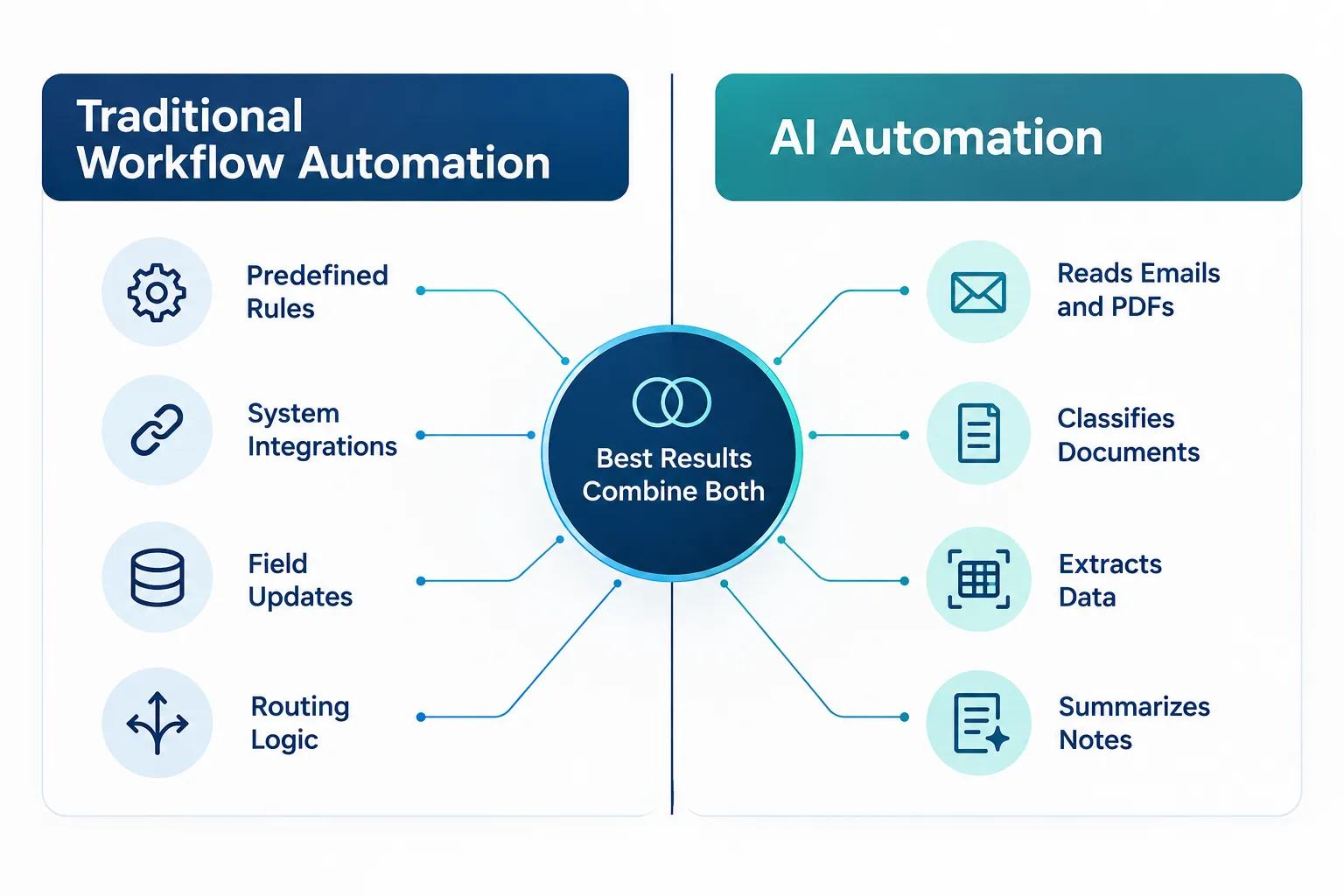
| Capability | Traditional workflow automation | AI automation |
|---|---|---|
| Best suited for | Predefined rules, integrations, routing | Emails, PDFs, notes, unstructured documents |
| Example task | Update a field in the ERP when a status changes | Extract part numbers and quantities from an RFQ email |
| Decision style | Follows fixed logic every time | Interprets variable, less structured inputs |
| Common use | Notifications, calculations, system-to-system updates | Classification, extraction, summarization |
Neither approach replaces the other. The strongest manufacturing AI solutions usually combine both: AI reads and interprets a document, and traditional automation takes what AI extracted and routes it, updates records, and triggers the next step. That combination is what makes ERP workflow automation projects succeed instead of stalling at the “we tried a chatbot” stage.
Connect Your Existing Manufacturing Systems Before You Replace Them
You almost certainly don’t need to rip out your ERP, CRM, or accounting software to get value from automation. Most manufacturers already own the systems they need. What’s missing is the connective tissue between them.
Picture the systems most small and mid-sized manufacturers already run: ERP, CRM, email, inventory, scheduling, accounting, paper forms, and shop floor production data. Each one does its job well individually. The problem shows up in the gaps between them, where a person becomes the integration layer, manually copying information from one system into the next.
Automation should often make your existing systems work better together before you consider replacing them.
This is where system integration work pays off fastest. Connecting your existing systems through workflow automation typically costs less, disrupts operations less, and delivers results faster than a system-wide software replacement. Save the bigger technology decisions for when your current tools genuinely can’t support your growth, not before.
How to Choose Your First Manufacturing Process Automation Project
Pick one workflow to automate first, not all seven at once. Score each candidate workflow on frequency, time consumed, number of employees involved, error risk, and business impact, then start with whichever one scores highest and is easiest to measure.
A simple scoring approach: multiply frequency by time per instance, by the number of employees touching the process, by error risk, by business impact. The workflow with the highest combined score is usually your best starting point, because it’s where the pain is most concrete and the return is easiest to prove.
Which manufacturing processes see the biggest ROI from AI automation
RFQ processing, production reporting, and inventory updates tend to deliver the fastest, most visible return because they’re high-frequency, high-error-risk, and directly tied to revenue or delay costs. A workflow that touches sales response time or production downtime usually shows measurable improvement within the first reporting cycle after launch.
How long does it take to implement AI automation in a factory?
A single, well-scoped workflow, like automating RFQ intake or production reporting, typically takes a few weeks from design to working automation, not months. Timelines stretch when a manufacturer tries to automate several workflows simultaneously or attempts a full system replacement alongside the automation project. Starting narrow keeps the timeline short and the risk low.
What skills do manufacturers need to deploy AI automation?
You don’t need in-house AI engineers to get started. You need someone who understands your current workflows well enough to document them clearly, and a partner who can translate that into working automation connected to your existing systems. Most small and mid-sized manufacturers rely on an outside automation partner for the technical build rather than hiring for it internally.
Can small manufacturers afford AI automation solutions?
Yes, when the project starts with a single high-impact workflow instead of a full operational overhaul. Automating one process, like quote intake or shipping documentation, costs a fraction of an ERP replacement and can be scoped to fit a modest, predictable budget. Manufacturers with 5 to 100 employees are often the best fit for this approach because they have enough repetitive volume to justify automation without the complexity of a large enterprise rollout.
Don’t Automate Away Human Judgment
Removing repetitive work is not the same as removing accountability, and manufacturers who blur that line create new risks instead of solving old ones. Keep people firmly in charge of decisions that carry safety, financial, or relationship consequences.
Employees should stay directly involved in:
- Quality decisions and nonconformance dispositions
- Final pricing and margin decisions on quotes
- Engineering judgment on specs and revisions
- Safety decisions on the floor
- Unusual or non-standard production situations
- Purchasing approvals above routine reorder levels
- Customer relationship conversations
- High-risk exceptions that don’t fit a standard pattern
What manufacturing workflows should not be automated with AI
Avoid fully automating final pricing decisions, safety-critical judgment calls, quality dispositions on borderline nonconformances, and any customer conversation involving a complaint or a relationship issue. These situations depend on context, experience, and accountability that a system shouldn’t carry alone.
How does AI automation handle exceptions and edge cases in production
A well-built system flags anything that doesn’t match its expected pattern and routes it to a person instead of guessing. For example, if an RFQ is missing a required specification, the system should notify the estimator rather than filling in an assumption. Good manufacturing AI solutions are built to escalate uncertainty, not hide it.
What happens when AI automation systems fail or make errors in production
When a workflow fails, the system should default to notifying a person rather than proceeding silently, and the underlying source data in your ERP, CRM, or accounting system should remain the reliable record of truth. This is why pairing AI with clear escalation rules matters more than chasing full autonomy. A properly designed automation reduces human error; it doesn’t eliminate the need for a human backstop.
Common Mistakes to Avoid When Implementing AI in Manufacturing
The most common mistake is trying to automate too many workflows at once instead of proving value with one. A close second is skipping documentation of the current manual process, which makes it nearly impossible to know if the automated version is actually working better.
Other frequent mistakes:
- Automating a broken process instead of fixing the process first
- Letting AI make decisions that require human accountability
- Choosing a platform before mapping the actual workflow
- Ignoring the people who currently do the work when designing the new one
- Underestimating how much value comes from simply connecting existing systems
How Do You Measure the Success of AI Automation in Manufacturing
Measure success in the same terms you used to justify the project: time saved, errors reduced, and delay eliminated between systems or departments. Compare a specific before-and-after metric, like hours spent per week on RFQ data entry or the number of duplicate inventory corrections per month, rather than relying on a general sense that “things feel faster.”
Best approach for ecommerce fulfillment versus automotive production
Ecommerce-style fulfillment environments benefit most from automation focused on order status, shipping documentation, and customer communication because volume and speed dominate. Automotive and discrete manufacturing environments benefit most from automation focused on quality documentation, work order routing, and production reporting because precision and traceability dominate. Match the workflow you automate first to the pressure point your specific operation actually feels.