
How Business Spreadsheets Gradually Turn Into Operational Systems
Spreadsheets rarely start as business systems. They start as someone’s personal way to keep track of something, and they grow into critical infrastructure one addition at a time. That slow growth is exactly why so many business owners don’t notice the problem until it’s already expensive.
Here’s how it usually happens. A manager builds a simple sheet to track employee shifts for one department. Six months later, three departments use it, someone added a tab for time-off requests, and payroll pulls numbers from it every two weeks. Nobody decided to build a scheduling system. It just became one.
The same pattern shows up with inventory counts, customer lead lists, approval sign-offs, and weekly reports. Each addition feels small at the time. The result, a few years later, is a spreadsheet holding together a process that touches revenue, staffing, or customer relationships, built on a tool that was never designed for shared, real-time, multi-person use.

This is the moment a spreadsheet to app conversation becomes worth having. The spreadsheet isn’t broken. It’s just outgrown its original job.
Seven Signs Your Spreadsheet Is Holding Your Business Back
A spreadsheet is holding your business back when it creates more manual work, more risk, or more confusion than it saves. Watch for these patterns in your own operation.
- Multiple versions circulating. Employees email files back and forth, and nobody is fully sure which version is current.
- Formulas breaking or getting overwritten. Someone pastes data into the wrong cell and a calculation that worked for a year quietly stops working.
- Manual copying between files. Your team retypes or copy-pastes the same information into two or three different sheets every week.
- No clear accountability. You can’t tell who changed a number, when they changed it, or why.
- Limited visibility into current information. Leaders ask “what’s our real inventory count right now” and nobody can answer without opening three files.
- Access control problems. Everyone has edit access to everything, including data they shouldn’t be able to touch.
- Growing pains. The sheet that worked fine for 15 employees falls apart at 40, with slow load times, crashed files, and version conflicts almost daily.
If you recognize three or more of these in a single spreadsheet, that file is costing you more in staff time and error risk than most business owners realize.
What Problems Can Spreadsheet-Based Systems Cause?
Spreadsheet-based systems cause three main categories of damage: wasted labor, data errors that affect decisions, and exposure to compliance or security risk. These costs are often invisible because they show up as “just part of the job” rather than a line item.
- Wasted labor: Staff spend hours each week on manual data entry, reconciling mismatched sheets, or hunting for the latest version.
- Error-driven decisions: A dropped decimal, a broken formula, or an outdated copy can lead a manager to make a staffing, ordering, or pricing decision based on wrong numbers.
- Security and compliance gaps: Spreadsheets emailed around or stored on personal drives are hard to secure and nearly impossible to audit, which is a real concern for accounting firms, healthcare practices, and any business handling sensitive client data.
A specific example: a dental practice tracking patient intake and insurance verification in a shared spreadsheet found that two front-desk staff were editing the same file at different times, overwriting each other’s updates. Patients were showing up with unverified insurance because the “latest” information wasn’t actually the latest. That’s not a training problem. That’s a tool problem.
What’s the Difference Between Using Excel and a Real System?
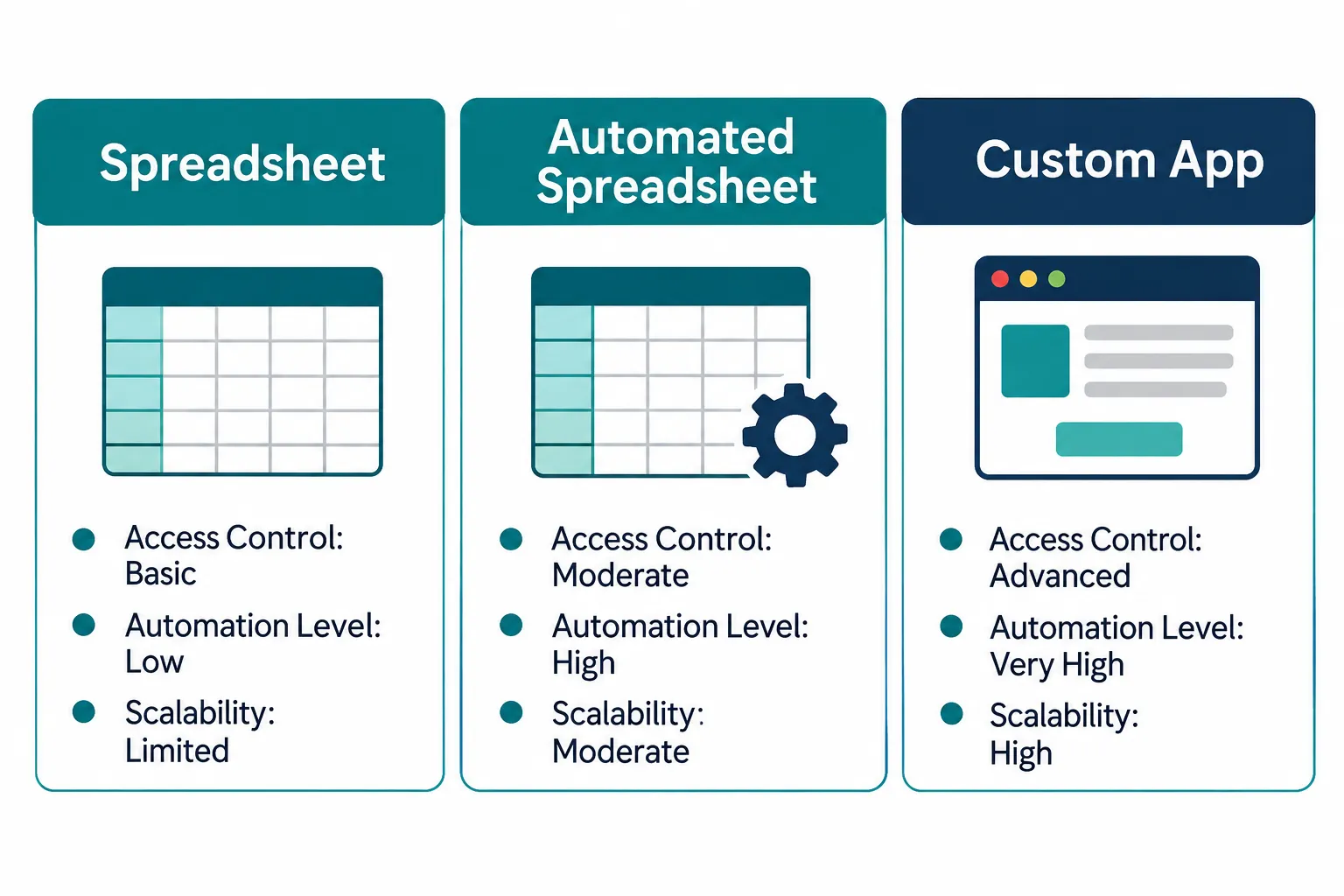
Excel and a real business system differ mainly in how they handle multiple users, enforce rules, and keep a record of activity. Excel is a flexible grid with no built-in guardrails. A real system, whether that’s an automated workflow or a custom application, enforces structure, tracks who did what, and reduces the chance of someone breaking it by accident.
| Capability | Spreadsheet | Automated Spreadsheet | Custom App |
|---|---|---|---|
| Usability for non-technical staff | Easy to start, hard to maintain | Easy, with guardrails | Built for the specific task |
| Access control | Weak or none | Limited | Role-based, precise |
| Scalability | Breaks down past a certain size | Moderate | Built to grow with you |
| Automation | Manual unless scripted | Partial, rule-based | Full workflow automation |
| Change tracking | Rare, hard to audit | Some version history | Full audit trail |
| Maintenance | Grows messier over time | Needs occasional upkeep | Requires planned updates |
Choose a plain spreadsheet if: one or two people use it, the data isn’t sensitive, and it hasn’t broken anything in the last year.
Choose spreadsheet automation if: the structure works fine, but people waste time on repetitive steps like copying data between tabs or sending manual reminders.
Choose a custom app if: multiple departments rely on the same data, access needs to be restricted by role, or the process is tied to revenue, compliance, or customer experience.
Real Business Examples of Spreadsheet-to-App Transformation
Most spreadsheet-to-app conversions follow a recognizable pattern: a tracking sheet becomes a purpose-built tool with access controls, notifications, and a single source of truth. Here are five common transformations we see across industries.
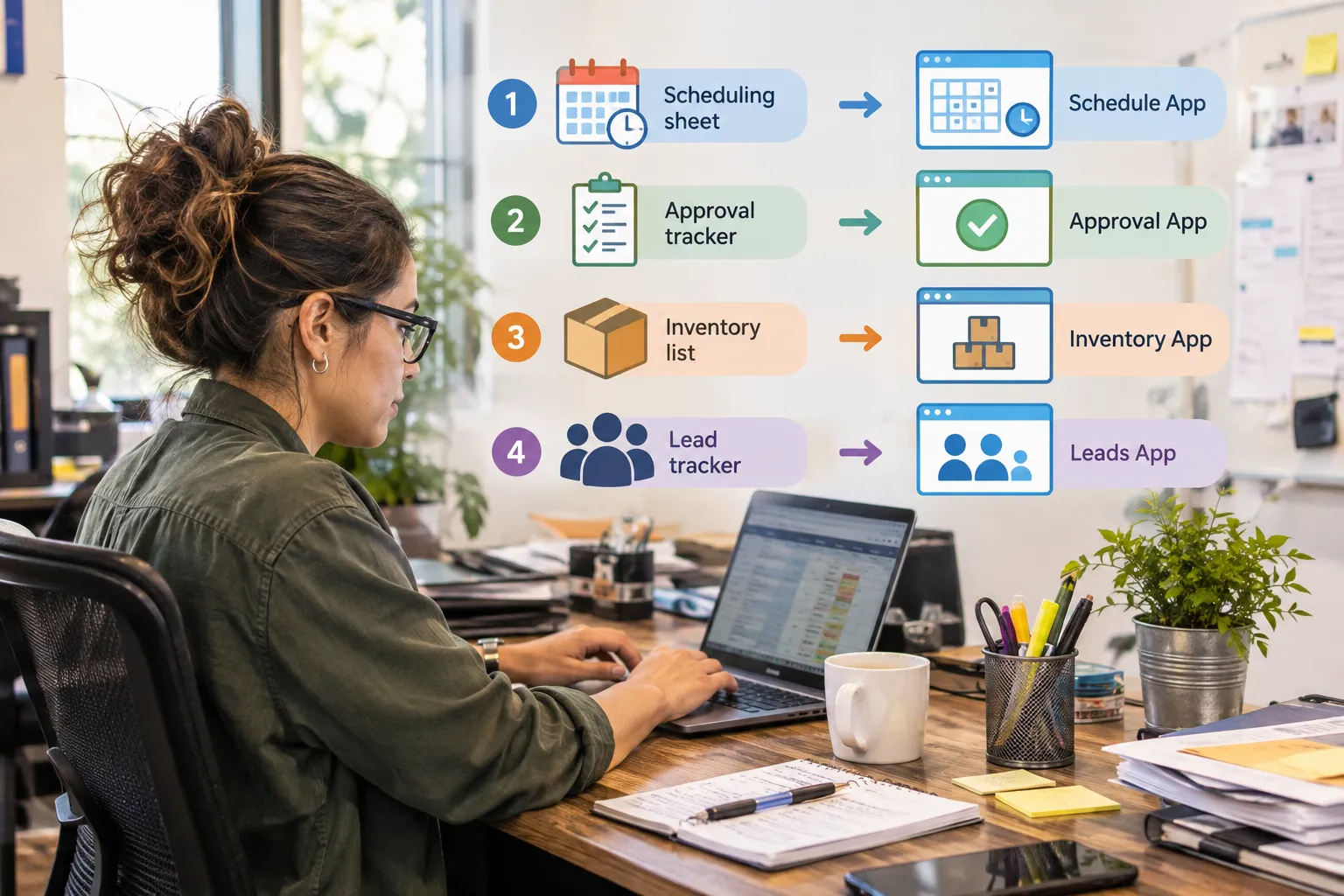
- Employee scheduling spreadsheet to scheduling application: Instead of a grid employees screenshot and text each other, a scheduling app shows live shifts, lets employees request swaps with manager approval, and sends automatic reminders.
- Approval tracker to approval workflow system: A spreadsheet full of “pending,” “approved,” and “???” statuses becomes a workflow where requests route automatically to the right approver and nothing sits unseen for a week.
- Inventory spreadsheet to inventory management interface: A manually updated count, often wrong by the time anyone checks it, becomes a live interface tied to actual stock movement, with low-stock alerts built in.
- Reporting spreadsheet to automated dashboard: The Friday afternoon ritual of copying numbers into a report becomes a dashboard that pulls live data and updates itself.
- Customer tracking sheet to centralized lead management system: A sales rep’s personal lead list becomes a shared system where every rep sees the same pipeline, with no leads lost to a laptop that crashed.
A manufacturing client we worked with had an inventory spreadsheet that took one employee roughly six hours a week to reconcile against the warehouse floor. After moving to a connected inventory interface, that reconciliation dropped to under an hour, because the system pulled real counts automatically instead of relying on manual recordkeeping.
When Should You Actually Make the Switch From Spreadsheets to an App?
You should move from a spreadsheet to an app when the spreadsheet is causing repeated errors, consuming significant staff hours, or putting sensitive data at risk, not simply because the file looks messy. Timing matters more than perfection.
Decision rule: if fixing the spreadsheet (cleaning it up, adding protections, reorganizing tabs) would take real time and the problem would reappear in six months anyway, it’s time for a different tool. If a thirty-minute cleanup solves it, you don’t need an app yet.
Common triggers for making the switch:
- You’ve hired enough people that two or more departments now touch the same sheet.
- A mistake in the spreadsheet has already cost money, a missed deadline, or a compliance issue.
- You’re spending real budget on staff hours just maintaining the sheet itself.
- Leadership can’t get a straight answer on current numbers without someone manually pulling a report.
Can You Automatically Convert a Spreadsheet to an App? What No-Code Tools Help?
Yes, in many cases a spreadsheet can be converted into a working app using no-code or low-code platforms that read spreadsheet structure and generate a basic interface automatically. These tools work well for straightforward data entry, tracking, and simple approval flows, but they struggle with complex formulas, custom integrations, or unusual business logic.
No-code and low-code approaches generally fall into a few categories:
- Database-app builders that import spreadsheet data and generate forms, views, and basic automation.
- Workflow automation platforms that connect your existing spreadsheet to other tools, like sending a notification when a row changes.
- Custom-built applications developed specifically around your process, which cost more upfront but handle complexity that no-code tools can’t.
Edge case: if your spreadsheet relies on dozens of interlinked formulas, macros, or pivot tables feeding other reports, a direct no-code conversion usually breaks something. That’s a sign the project needs a developer’s eye rather than a drag-and-drop tool.
How Much Does It Cost and How Long Does It Take to Build an App From a Spreadsheet?
Cost and timeline depend heavily on complexity, but most small business spreadsheet-to-app projects fall into a few general tiers. A simple automated workflow connecting existing tools might take two to four weeks. A custom application built around a specific process, like scheduling or inventory, typically takes two to four months from design to rollout.
- Light automation: connecting a spreadsheet to email, a calendar, or another tool. Fastest and least expensive option.
- Mid-size custom app: a dedicated interface for one process, like approvals or inventory, with role-based access. Moderate time and cost investment.
- Full operational system: multiple connected modules (scheduling, reporting, customer data) built to scale with the business. Largest investment, biggest long-term payoff.
Common mistake: rushing the discovery phase to save time upfront. Skipping the step where you map out exactly how the current process works almost always leads to a more expensive rebuild later.
Is a Spreadsheet or a Custom App More Cost-Effective Long Term?
A spreadsheet is cheaper up front but gets more expensive over time as staff hours, errors, and workarounds accumulate. A custom app costs more initially but tends to cost less over several years once you account for reduced manual work and fewer costly mistakes.
Think of it in terms of hidden cost versus visible cost. A spreadsheet has no software bill, but it has a real cost in staff hours spent maintaining it, fixing it, and working around its limits. A custom app has a visible development cost, but that cost is often recovered within a year or two through reduced manual work and fewer errors, especially for processes tied to revenue or compliance.
What Mistakes Do People Make Switching From Spreadsheets to Apps, and How Do You Migrate Your Data?
The most common mistake is rebuilding the spreadsheet’s existing mess inside new software instead of fixing the underlying process first. The second most common mistake is underestimating how much cleanup the existing data needs before it can move anywhere.
Steps for a clean migration:
- Audit the spreadsheet to identify duplicate entries, outdated tabs, and broken formulas before moving anything.
- Define the real process you want the new system to support, not just the columns you currently use.
- Clean and standardize the data so dates, names, and categories are consistent.
- Map fields from the spreadsheet to the new app’s structure.
- Run both systems in parallel for a short period to confirm the new system matches reality.
- Set access roles before full rollout so the right people see the right information from day one.
What you lose moving from Excel to an app: some flexibility. You can’t just add a random column on the fly the way you could in a spreadsheet. In exchange, you gain structure, access control, and a system that holds up as more people use it.
Handling multiple people on the same system: a real app assigns roles and permissions, so two people editing the same record at the same time doesn’t cause a silent overwrite the way it can in a shared spreadsheet. Changes get logged, not lost.

At What Company Size Should You Stop Relying on Spreadsheets?
There’s no exact headcount cutoff, but most businesses start feeling real pain once a single spreadsheet is used by 10 or more people, or once it supports a process touching revenue, payroll, or compliance. Smaller teams can often run spreadsheets safely for years if the process stays simple and access stays limited.
Quick example: a five-person nonprofit tracking donor contact info in a shared sheet is probably fine. A 35-employee accounting firm tracking client deadlines in the same kind of sheet is sitting on a serious risk, because missed deadlines have real financial consequences.
The Practical Path From Spreadsheet to App
The practical path starts with diagnosing the actual business problem, not jumping straight to “build an app.” Some spreadsheets just need better structure or a connection to another tool. Others genuinely need to be replaced.
- Identify the pain point. Is it wasted time, errors, lack of visibility, or risk?
- Decide the right fix. Light automation, a connected spreadsheet, or a full custom app.
- Map the current process honestly, including the workarounds people use today.
- Build and test with the actual people who use the system daily, not just leadership.
- Migrate data carefully, cleaning it before it moves.
- Roll out in stages, running old and new side by side briefly to catch gaps.
This is where a reliable partner earns their keep. A provider who understands both your industry and your existing systems can tell you honestly whether you need a two-week automation fix or a built-from-scratch application, instead of pushing the most expensive option by default.
Conclusion: Build a System Around the Way Your Business Works
Your spreadsheet isn’t the enemy. It became what it is because your business grew faster than the tool meant to support it. The goal isn’t to throw out every spreadsheet in the company. It’s to find the specific ones quietly costing you hours, accuracy, or peace of mind, and fix those first.
If you’re staring at a spreadsheet right now thinking “this is exactly our problem,” that’s worth a real conversation. At AlphaCIS, we help businesses connect existing systems, automate repetitive tasks, and build custom applications around how operations actually work, not a generic template. We also keep the underlying infrastructure secure, monitored, and running smoothly through our managed IT services, so the new systems you build stay protected and reliable.
Reach out to AlphaCIS for a straightforward conversation about which of your spreadsheets have quietly become business-critical systems, and what it would take to give them the structure they deserve.