A Lead Comes In. What Actually Happens Next?
A prospect fills out your website form at 10:17 AM asking about pricing for a specific service. What happens in your business over the next hour determines whether that lead becomes a customer or goes quiet. In many companies, the honest answer is: nobody knows for sure.
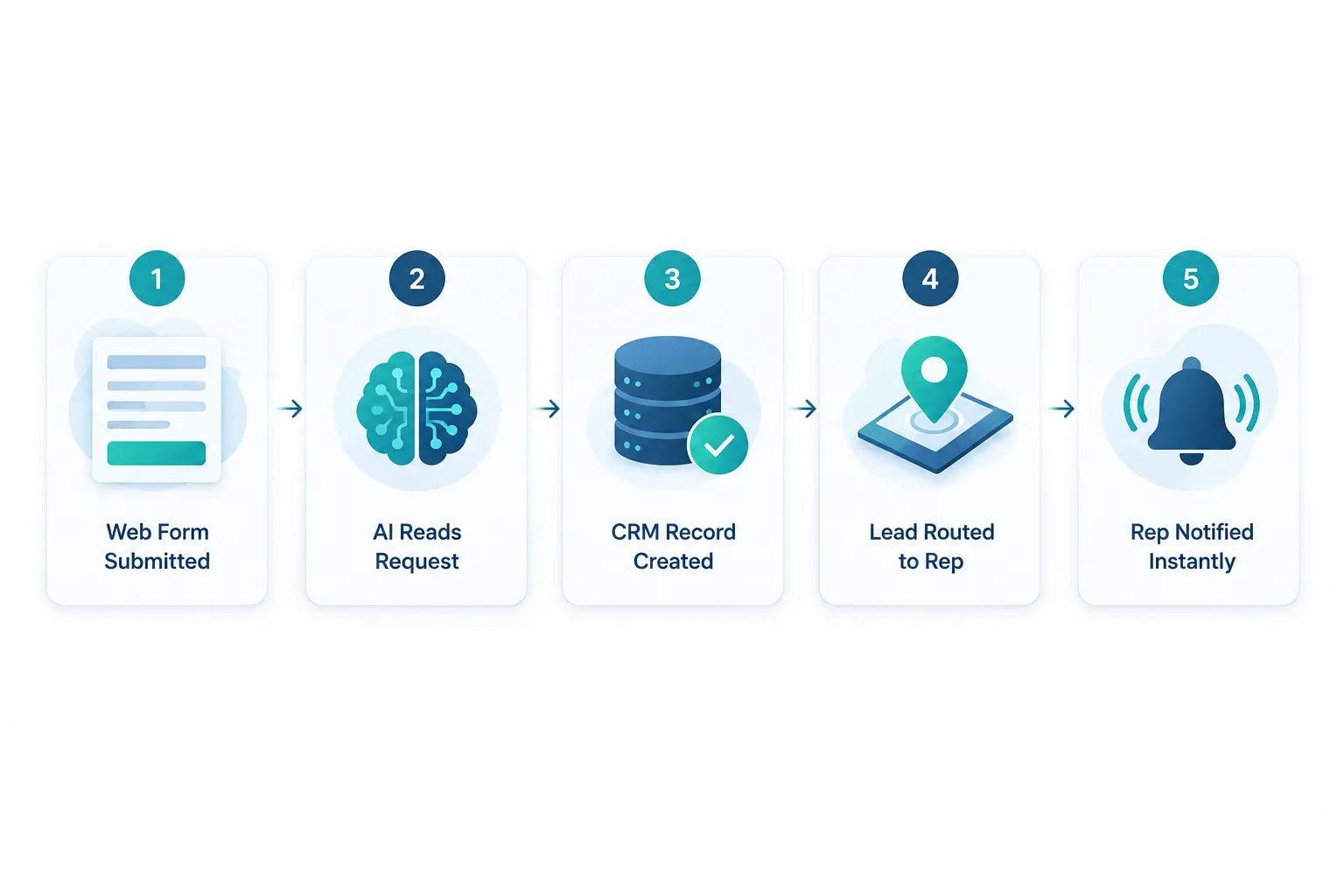
Here is what usually happens without automation. An email notification lands in a shared inbox. Someone reads it when they get a chance, maybe an hour later, maybe the next morning. They manually create a contact in the CRM, decide who should handle it based on gut feel, and forward the email to that salesperson with a note to “follow up.” The salesperson sees it between calls, means to respond, and gets pulled into something else.
None of this is anyone’s fault. It is what happens when a business runs sales through a mix of inboxes, spreadsheets, and memory. The problem your business has is usually not generating leads. It is everything that happens to that lead in the hours and days after it arrives, which is exactly where AI sales process automation and connected sales workflow automation earn their keep.
What Is AI Sales Process Automation and How Does It Work?
AI sales process automation is a system of connected tools and rules that automatically captures, organizes, qualifies, routes, and tracks a lead from the moment it enters your business until a salesperson closes the deal. It combines automation, which follows consistent rules every time, with AI, which reads and interprets unstructured information like a form message or an email. Together, they remove manual steps without removing the person who actually sells.
Think of it as four connected jobs happening automatically in the background while your team focuses on the conversation.
Step 1: Automatically Capture the Lead
A lead can enter your business through several channels, and automation should catch every one of them the same way. Common sources include:
- Website forms
- Inbound email
- Landing pages tied to ad campaigns
- Website chat
- Referral forms from partners
- Marketing campaign responses
- Manual CRM imports from trade shows or lists
Instead of someone copying names, emails, and messages into the CRM by hand, automation creates or updates the CRM record the moment the lead arrives. This alone eliminates one of the biggest sources of manual data entry and reduces the human error that comes from retyping information across systems.
Step 2: AI Reads and Organizes the Request
Once the record exists, AI can read the actual message and pull out the details that matter, even when a lead writes in plain, unstructured language instead of filling out clean form fields. AI is especially useful here because most inbound requests do not arrive as neat data. A lead might write “Hi, we need someone to look at our HVAC system at our Marietta location before it gets hot again, pretty urgent” instead of filling out five separate boxes.
From a message like that, AI can identify:
- Company and contact information
- The service being requested
- Location
- Urgency level
- The general intent of the message
- Any other details worth flagging for the salesperson
Step 3: Qualify and Route the Lead Using AI Lead Qualification
Can AI really qualify leads better than humans? AI does not replace human judgment on qualification. It applies consistent, predefined business rules faster and more reliably than a person juggling twenty other tasks, which is a real advantage in speed and consistency, not in judgment.
A rules-based AI lead qualification setup routes leads based on factors you define, such as:
- Service or product requested
- Geography or service territory
- Company size or account type
- Which salesperson owns that territory or account
- Urgency indicated in the message
The AI applies your rules the same way every single time. A tired employee at 4:45 PM on a Friday might route a lead differently than they would at 9 AM on a Tuesday. Automation does not have that inconsistency, but it also should not be making final judgment calls on ambiguous or high-value opportunities. Those still belong to a person.
Step 4: Trigger the Right Response
Once a lead is captured and routed, the system can trigger several things at once without anyone lifting a finger:
- An automatic acknowledgement email to the prospect
- A notification to the correct salesperson
- A task created in the CRM with a due date
- A request for missing information if the message was incomplete
- A scheduling link sent directly to the prospect
- An internal alert if the lead is high priority or time sensitive
A widely cited lead response study from researcher James Oldroyd, conducted with Kellogg School of Management and InsideSales.com, found that businesses contacting a web lead within one hour were nearly seven times more likely to qualify that lead than those who waited even a little longer (Oldroyd, 2007). Speed matters, and automation is what makes fast, consistent response possible without asking your team to watch an inbox all day.
Automated Lead Follow-Up: Scheduling, CRM Updates, and Staying on the Radar
Automated lead follow-up means the system, not a person’s memory, is responsible for making sure a scheduled task, meeting, or reminder actually happens on time. This removes the two most common failure points in a sales process: the forgotten follow-up and the double-booked calendar.
Automate Scheduling and Meeting Prep
Once a prospect shows interest, the workflow can move the lead from interest to a booked meeting without back-and-forth emails. A typical sequence looks like this: lead expresses interest, a scheduling link goes out automatically, the prospect books a time, the calendar updates, the CRM logs the appointment, and the salesperson gets notified. AI can also generate a summary of the lead’s original request so the salesperson walks into the meeting already knowing what the prospect needs, instead of starting from a blank page.
Keep the CRM Updated Automatically
CRM automation logs the routine activity around a deal so your salespeople do not have to. That includes:
- Call and email activity
- Meeting notes and appointment records
- Pipeline stage changes
- Follow-up tasks and due dates
- Updated customer information
Salespeople should not be spending an hour a day keeping three systems in sync by hand. When the CRM updates itself as work happens, your pipeline stays accurate, which means your sales manager gets real visibility into lead status instead of guessing based on what people remember to log.
How to Set Up Automated Lead Follow-Up Sequences
Setting up automated lead follow-up starts with mapping the natural rhythm of your sales cycle, not with picking software first. A workable sequence for most small businesses looks like this:
- Define trigger points: no response after 2 days, proposal sent but not opened after 3 days, meeting scheduled but not held.
- Assign an action to each trigger: a reminder email, a task for the salesperson, or an internal alert to a manager.
- Set a human checkpoint so a salesperson reviews and personalizes any outbound message before it feels automated.
- Track responses so the sequence stops the moment a prospect replies.
Common mistake: treating a follow-up sequence like a marketing drip campaign. Sales follow-up should read like it came from a person who remembers the conversation, not a template blasted to everyone on a list.
Proposal and Quote Workflow: From CRM Data to Signed Deal
Proposal and quote automation pulls approved information already sitting in your CRM into a document instead of making someone rebuild it from scratch every time. Customer details, service descriptions, and standard terms populate automatically, which saves the repetitive part of writing proposals that look nearly identical deal after deal.
Pricing decisions and final sign-off still belong with the appropriate employee, whether that is the salesperson, a sales manager, or an owner on larger deals. Automation removes the busywork of formatting and re-entering data. It does not remove the judgment call on what to charge or what to include.
Example: A CPA firm sends a similar engagement letter template to nearly every new client, but a staff member manually rebuilds each one, copying client details and adjusting service scope by hand. With CRM-connected proposal automation, that same document populates automatically from the CRM record, and the accountant only reviews pricing and scope before sending.
Lead Becomes Customer: Onboarding Starts the Moment the Deal Closes
Sales pipeline automation should not stop at the signature. The moment a deal is marked won, that single action can trigger a chain of internal steps automatically, connecting your sales process directly to operations.
A typical closed-deal sequence looks like this:
- Deal marked won in the CRM
- Customer record created or updated automatically
- Internal teams notified, such as billing, service, or project management
- Onboarding tasks assigned to the right people
- Required documents requested from the new customer
- A welcome communication sent automatically
This is where automation shows its real value beyond the sales team. A closed deal that just sits in the CRM without triggering next steps creates delays that make a brand-new customer wonder if they made the right choice.
What the Entire Automated Sales Workflow Looks Like
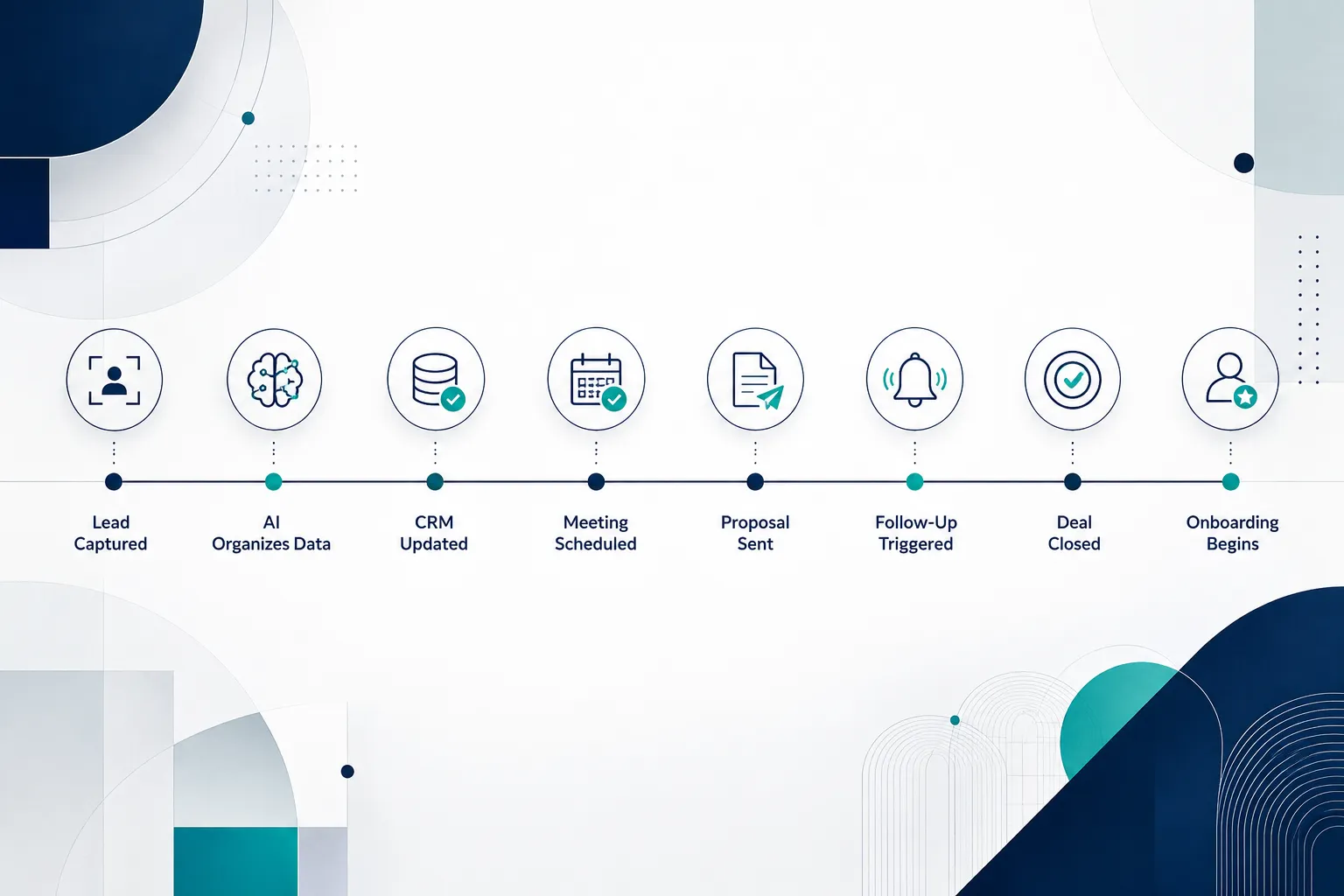
Here is the same process laid out as a single connected sequence, from first contact to onboarding:
Lead Captured
   ↓
AI Organizes Information
   ↓
CRM Updated
   ↓
Lead Routed to the Right Salesperson
   ↓
Salesperson Notified
   ↓
Meeting Scheduled
   ↓
Proposal Workflow
   ↓
Follow-Up Triggered
   ↓
Deal Closed
   ↓
Customer Onboarding Begins
Every arrow in that sequence used to be a manual handoff, and every manual handoff is a place where a lead can stall. Business workflow automation replaces each of those handoffs with a rule the system follows automatically, so the lead keeps moving even when nobody is actively watching it.
What Should Stay Human in an AI-Automated Sales Process?
People, not software, should still own the relationship, the judgment calls, and anything that requires reading between the lines. AI automation for business works best when it handles repetitive administrative tasks and leaves the parts of selling that actually require a human being to a human being.

Keep these responsibilities with your team:
- Relationship building and rapport
- Discovery conversations that uncover real needs
- Negotiation
- Complex or judgment-heavy qualification decisions
- Final pricing decisions
- Handling objections
- Strategic recommendations specific to the customer’s situation
- Sensitive or difficult customer communication
The core idea worth remembering: automate the administration around selling, not the human relationship that makes the sale happen. A prospect can tell the difference between a system doing its job well in the background and a system trying to replace the person they actually want to talk to.
AI Sales Automation vs Traditional CRM: Which One Do You Actually Need?
A traditional CRM is a system of record that stores customer and deal information. AI sales automation is the layer on top of it that reads incoming information, applies rules, and triggers actions without someone manually pushing the buttons. Most businesses need both working together, not one instead of the other.
| Capability | Traditional CRM Alone | AI Sales Automation Layer |
|---|---|---|
| Stores contact and deal data | Yes | Yes, same underlying data |
| Creates records from new leads | Manual entry required | Created automatically |
| Reads unstructured lead messages | No | Yes |
| Applies routing rules consistently | Depends on staff discipline | Applied every time |
| Sends follow-up reminders | Only if manually set | Triggered automatically |
| Connects to calendar and email | Sometimes, with setup | Built into the workflow |
| Updates pipeline stage on its own | No | Yes, based on defined triggers |
Decision rule: choose a CRM upgrade alone if your main problem is disorganized data. Choose an AI automation layer on top of your CRM if your main problem is manual work, slow response times, or inconsistent follow-up, since a better database does not fix a broken handoff process by itself.
Cost, Company Size, and ROI: Is AI Sales Automation Worth It for a Small Business?
How Much Does AI Sales Automation Software Cost?
Cost depends heavily on how many systems you are connecting and how customized the workflow needs to be, so there is no single number that applies to every business. A simple automation connecting a web form to a CRM and triggering a notification costs far less than a full workflow that spans forms, CRM, calendar, proposals, and onboarding. Most small and mid-sized businesses see the biggest return by starting with one workflow instead of trying to automate everything at once, which keeps the initial investment focused and measurable.
What Size Business Should Use AI Sales Automation?
Any business with more than a handful of inbound leads per week and more than one person touching the sales process is a reasonable candidate. Companies with 5 to 100 employees, the range where a lot of accounting firms, healthcare practices, dealerships, and professional services sit, tend to benefit the most because they have enough lead volume to make manual handling error-prone but not enough staff to dedicate someone full-time to chasing follow-ups.
Can small businesses afford AI sales automation? Yes, in most cases, because the cost of building one focused workflow is usually far less than the cost of the leads a business already loses to slow response and forgotten follow-up. The math tends to work in favor of automation once you count the value of even a few recovered deals per quarter.
How Long Does It Take to See ROI from Sales Automation?
Most businesses that automate a single clear bottleneck, such as lead capture and routing, see a measurable difference in response time and lead handling within the first few weeks of going live. Full return on investment, measured in recovered deals and hours saved, typically becomes clear within one to two sales cycles, since that is enough time to compare pipeline performance before and after the change.
Best AI Tools for Automating Sales Workflows
The right tools depend on what you already use, since the goal is to connect your existing systems rather than replace them. Most effective sales automation setups combine three layers: a CRM as the system of record, an automation platform that moves data between tools and applies rules, and AI that reads and interprets unstructured text like emails and form messages.
How to Integrate AI Automation with Your Existing Sales Team
Integration works best when automation is introduced as support, not a replacement for how your team already sells. A practical rollout looks like this:
- Start with the CRM your team already knows, and connect other tools to it rather than switching platforms.
- Automate one workflow first, such as lead capture and routing, before adding proposal or onboarding automation.
- Get input from the salespeople who will actually use the notifications and tasks the system generates.
- Review the first month of automated routing and follow-up together as a team and adjust the rules.
What Data Do You Need to Train AI for Lead Qualification?
AI lead qualification does not require a massive dataset to get started, but it does need clear examples of what a good lead and a poor lead look like in your business. Useful inputs include past won and lost deals, the criteria your best salesperson already uses mentally to prioritize leads, and clean examples of the language typical prospects use when they describe urgent versus low-priority requests. The clearer your existing qualification rules are on paper, the faster AI can apply them consistently.
Common Mistakes When Implementing Sales Process Automation
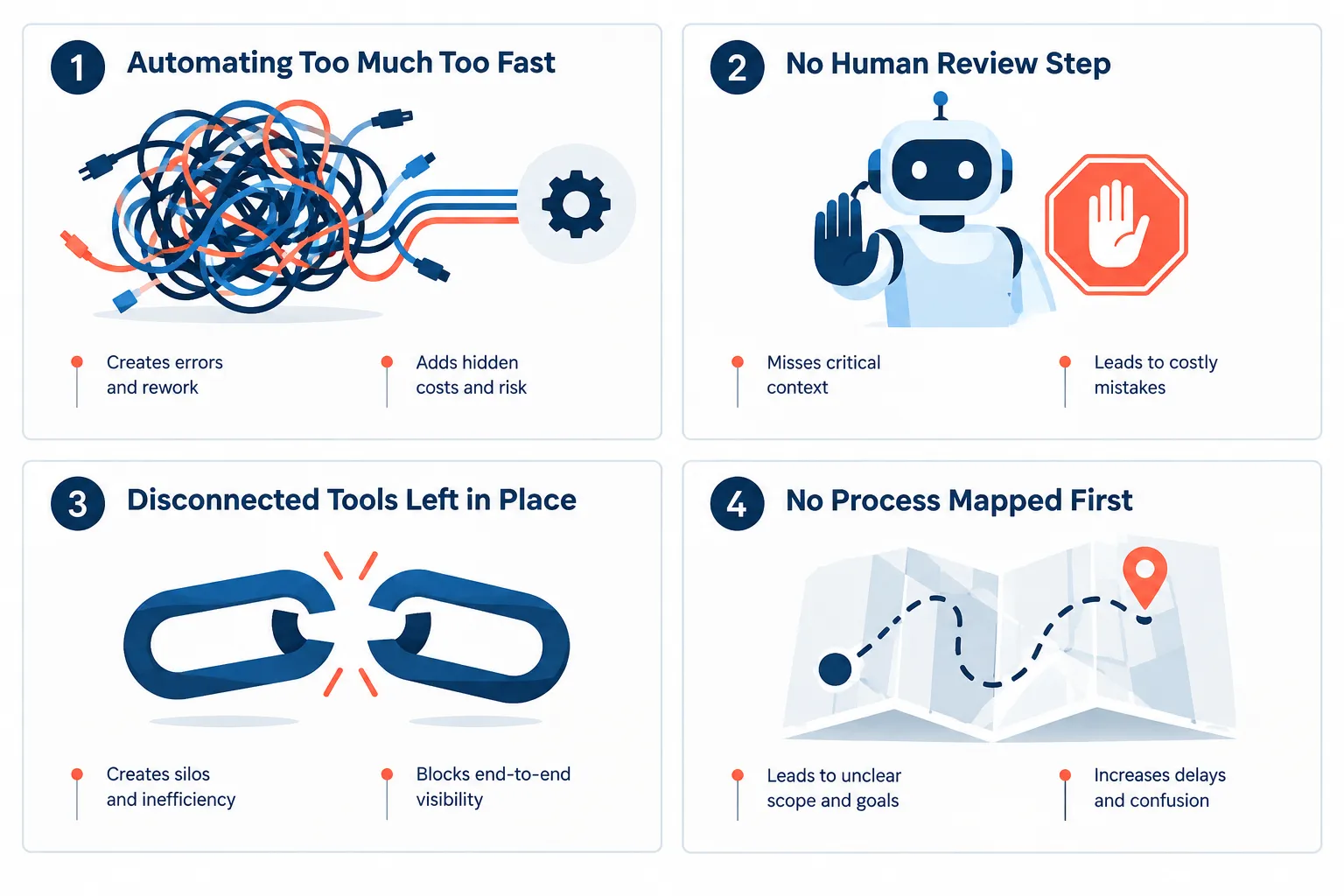
Most automation failures come from trying to automate too much at once or skipping the mapping step, not from the technology itself. Here are the mistakes that show up most often.
- Automating before mapping the process. Businesses connect tools without first understanding where leads actually get stuck.
- Removing the human checkpoint entirely. Automated messages that go out with zero review start to feel robotic and generic.
- Leaving old tools half-connected. A form that still emails one person while the CRM updates separately creates duplicate, conflicting records.
- Letting AI make the final call on complex leads. Automation should flag and route, not silently decide, on high-value or ambiguous opportunities.
- Skipping team buy-in. Salespeople ignore notifications and tasks from a system they were not part of designing.
What Happens When AI Misqualifies a Lead?
An occasional misqualified lead is a normal part of any rules-based system, and the fix is a human review step, not abandoning automation altogether. Build in a simple safety net: any lead the AI cannot confidently categorize gets routed to a general queue for manual review instead of being dropped or auto-closed. This keeps the system fast for the 80 to 90 percent of clear-cut leads while protecting you from silently losing the harder ones.
Does AI Sales Automation Work for B2B Companies?
Yes, and B2B companies with longer sales cycles and multiple decision-makers often benefit the most, since there are more handoffs and more time for a lead to go cold without consistent follow-up. B2B deals typically involve more touchpoints between first contact and close, more internal approvals, and more proposal customization, all of which are exactly the repetitive administrative steps that automation is built to handle.
How to Start: Map Your Process Before You Automate Anything
The most reliable way to start is mapping your current process on paper before choosing any software, because automation applied to a broken process just makes the broken process move faster. Walk through your own sales cycle and answer four questions honestly:
- Lead enters: where does it land first, and who sees it?
- Who touches it: how many people handle the lead before a salesperson actually talks to the prospect?
- Where is data copied: how many times does the same information get retyped into a different system?
- Where does someone wait, and what gets forgotten: which step regularly slips because it depends on someone remembering to do it?
Start by automating the single most repetitive bottleneck you find, whether that is lead capture, routing, or follow-up reminders. A focused first project builds confidence and proves the value before you expand into proposals and onboarding.
Quick self-check before you automate:
- Can you name, right now, who touches a new lead in the first hour?
- Do you know how many leads are re-entered by hand into your CRM each week?
- If a salesperson goes on vacation, does anyone else know which follow-ups are pending?
- Can your sales manager see lead status without asking someone directly?
If you answered no to more than one, the bottleneck is already visible. That is where to start.