The Factory Floor Has Changed. The Office Often Hasn’t.
Your CNC machine isn’t copying numbers from an email into a spreadsheet. Your employees shouldn’t have to either, yet in most manufacturing operations, they do it every day. Manufacturers have spent decades and serious capital automating the machines that make products, while the paperwork and information flow around those machines stayed stuck in 2005.
Walk the floor of almost any manufacturer and you’ll see robotics, PLCs, and MES systems tracking every cycle in real time. Walk into the office next door and you’ll often find someone re-typing a purchase order into an ERP system by hand, or a production supervisor building the same weekly report in Excel because nobody connected the machine data to the spreadsheet. The equipment runs itself. The information about that equipment does not.
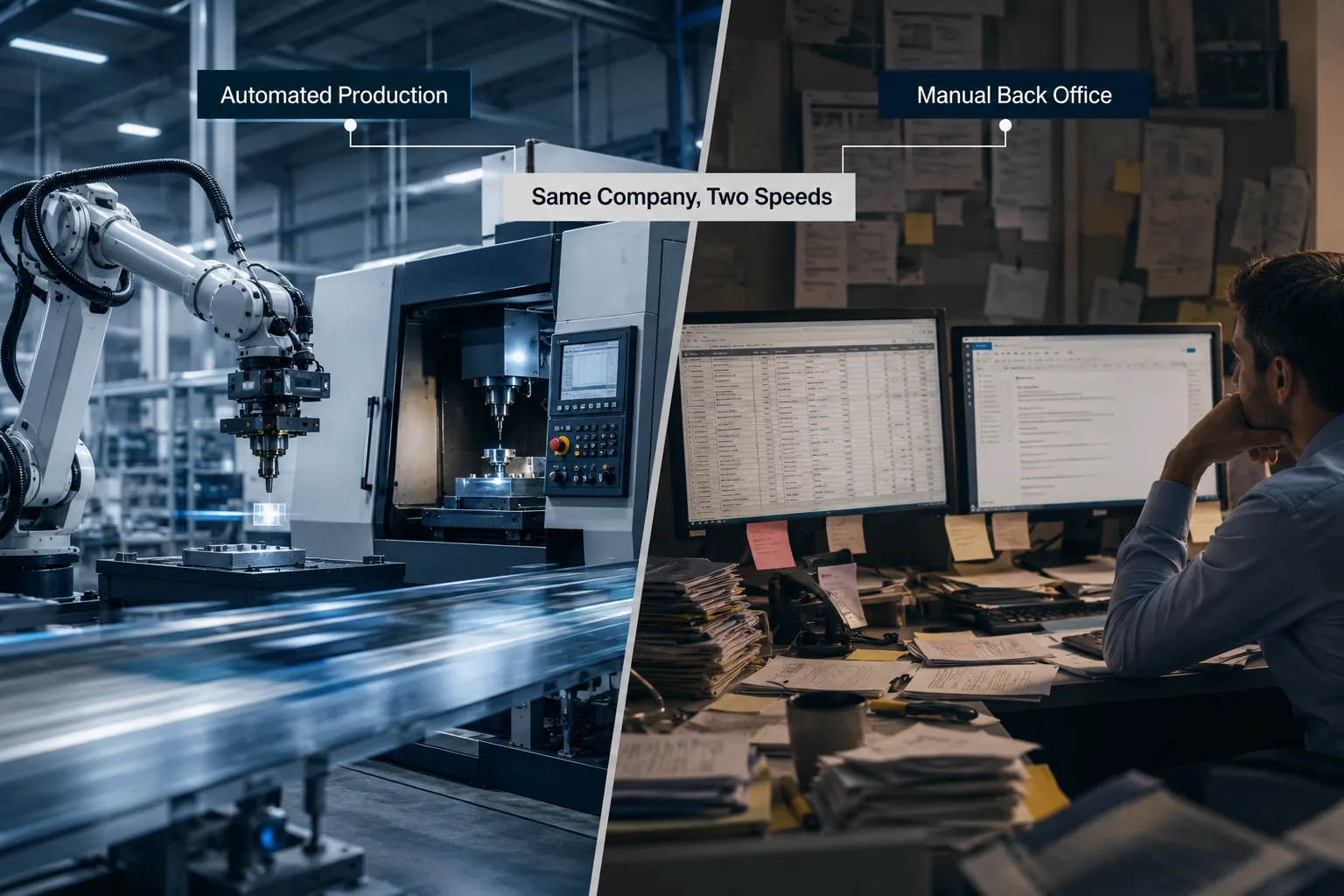
This is not a knock on your team. It’s a gap in where automation investment has gone. Most manufacturers automated production because the ROI was obvious and the tools were mature. The back office got left behind because the tools to fix it, particularly AI automation, only became practical for mid-sized manufacturers in the last few years.
What Is Manufacturing Back Office Automation and How Does It Work
Manufacturing back office automation is the use of software, integration, and AI to handle administrative and information-based work that currently depends on employees manually moving data between systems. It works by connecting the systems you already use (ERP, email, spreadsheets, CRM, scheduling tools) and applying rules or AI to move, format, and route information without a person retyping it.
At a basic level, it works in three layers:
- Capture: Information comes in through email, a web form, a PDF, or a scanned document.
- Process: Rules-based automation or AI reads, extracts, or organizes that information.
- Route: The processed information flows into the right system (ERP, CRM, accounting) and triggers the next step, like a notification or an approval request.
This differs from production automation in one key way. Machine automation controls physical movement and repeatable manufacturing process automation on the line. Back office automation controls information movement, which is just as repetitive but far less visible until you start counting the hours it consumes.
Automation Shouldn’t Stop at the Machine
Manufacturing automation has a much bigger scope than robotics and CNC equipment. It also covers the information workflows that support production, including quoting, scheduling, reporting, and communication between departments. Treating automation as a shop-floor-only initiative leaves a large share of your operating cost unaddressed.
Think about what actually happens between a customer’s request and a shipped order. A quote gets built. A purchase order gets entered. Production gets scheduled. Materials get checked against inventory. Quality documentation gets filled out. An invoice gets generated. Every one of those steps is a workflow, and most of them still rely on a person copying information from one place to another.
Extending automation into these workflows is not about replacing your ERP or your production system. It’s about building a layer of manufacturing workflow automation and AI automation for manufacturing on top of what you already run, so information moves the way parts move on an assembly line: automatically, in order, with a checkpoint where a human needs to make a judgment call.
What Tasks Can Be Automated in the Manufacturing Back Office
Nearly every repetitive, rules-based information task in a manufacturing back office is a candidate for automation. The best candidates are tasks performed often, across multiple systems, with predictable steps.
Common examples include:
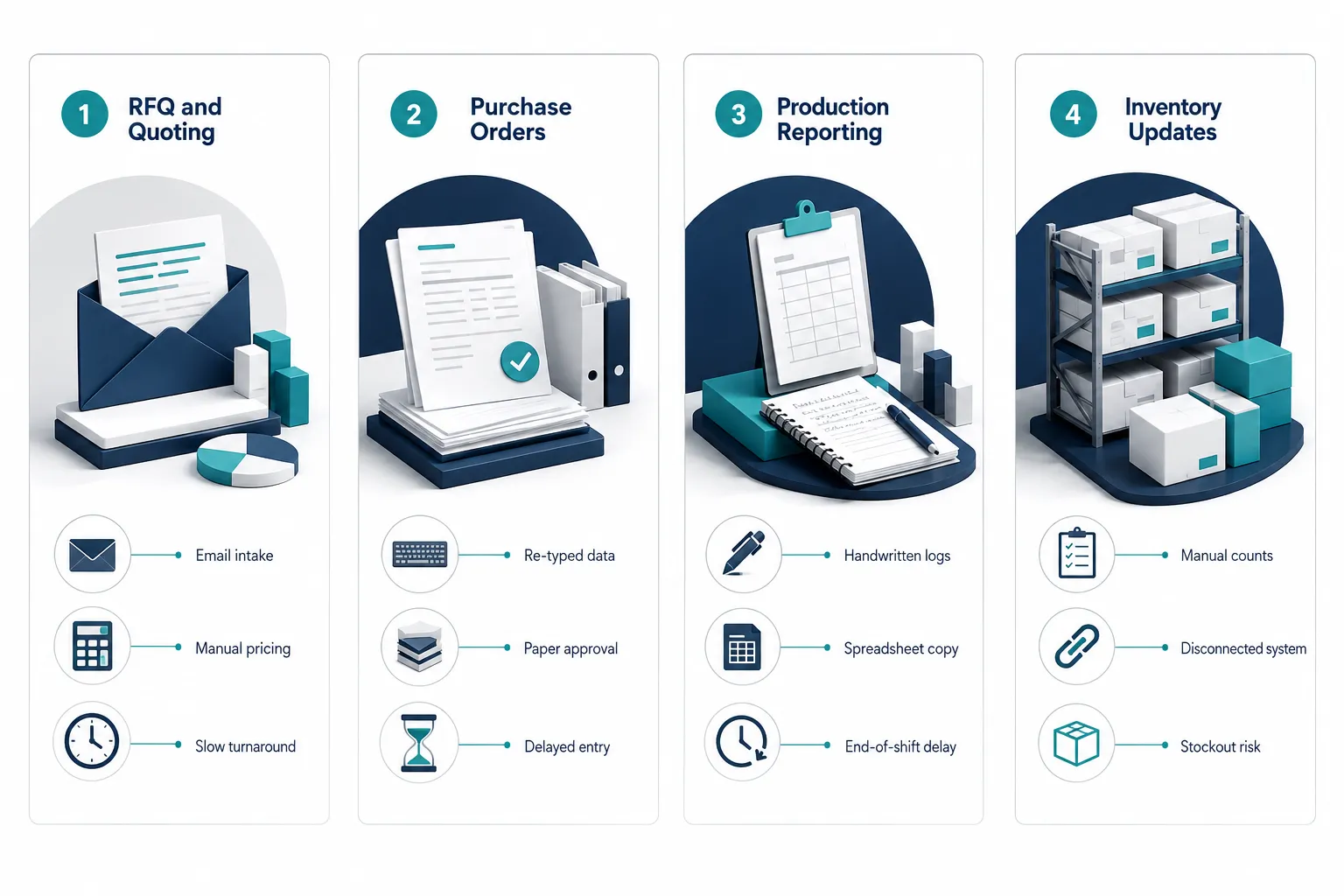
- RFQ and quoting: Turning incoming requests into structured quotes without manual data entry.
- Purchase orders: Capturing PO details and pushing them into the ERP automatically.
- Production reporting: Pulling shift or machine data into a report without manual compilation.
- Work order processing: Routing new work orders to the right department or scheduler.
- Inventory updates: Syncing stock counts between production systems and the ERP.
- Quality documentation: Organizing inspection records and routing exceptions for review.
- Scheduling updates: Notifying affected teams automatically when a schedule changes.
- Shipping documentation: Generating packing slips and shipping notices from order data.
- Customer and vendor communications: Sending status updates without someone drafting an email.
- Invoice processing: Matching invoices to purchase orders and flagging mismatches.
- Management reporting: Building recurring dashboards instead of rebuilding spreadsheets weekly.
Decision rule: if a task is done the same way more than a few times a week, involves copying data between two or more systems, and rarely requires creative judgment, it belongs on your automation shortlist.
The Copy-and-Paste Problem in Manufacturing Data Automation
The copy-and-paste problem is what happens when the same piece of information gets manually re-entered at every handoff: email to spreadsheet, spreadsheet to ERP, ERP to report, report to another department. Each handoff adds time, risk of error, and delay, and none of it adds value to the product.
Here’s a realistic example. A customer emails a purchase order. An employee reads the email, types the order details into a spreadsheet to track it, then re-enters the same details into the ERP for production scheduling. Later, someone pulls that ERP data into a report for management. That’s four manual touches of the exact same information, and if any one step has a typo, it carries forward into scheduling, invoicing, or shipping.
Manufacturing data automation removes the retyping, not the information. Integration lets data entered once, at the source, flow automatically to every system that needs it. The order still gets reviewed by a person. It just doesn’t get retyped four times by four different people.
What AI Adds to Traditional Manufacturing Process Automation
Traditional automation works well when data is structured and rules are clear, like moving a field from one system to another. AI adds value when the incoming information is unstructured, such as an email, a PDF, a handwritten note, or a customer request written in plain language.
Rules-based automation can move a number from field A to field B reliably, but it struggles when the “number” is buried in the third paragraph of a customer email, or when a purchase order arrives as a scanned PDF with a different layout than last time. That’s where AI automation for manufacturing earns its place:
- Extract: Pull relevant details (part numbers, quantities, dates) out of emails, PDFs, and forms.
- Classify: Sort incoming requests by type, urgency, or department.
- Summarize: Condense long customer threads or reports into the key points someone needs to act on.
- Organize: Structure messy information into a clean format the rest of the workflow can use.
Once AI has cleaned up and structured the information, traditional rules-based automation takes over to route it, log it, and notify the right person. The two work together. AI handles the messy front end; structured automation handles the reliable back end.
Manufacturing Back Office Automation Examples: RFQ and Production Reporting Workflows
Two workflows show this combination clearly: quoting and production reporting. Both involve information that starts messy and needs to end up structured, and both are common bottlenecks in manufacturing operations.
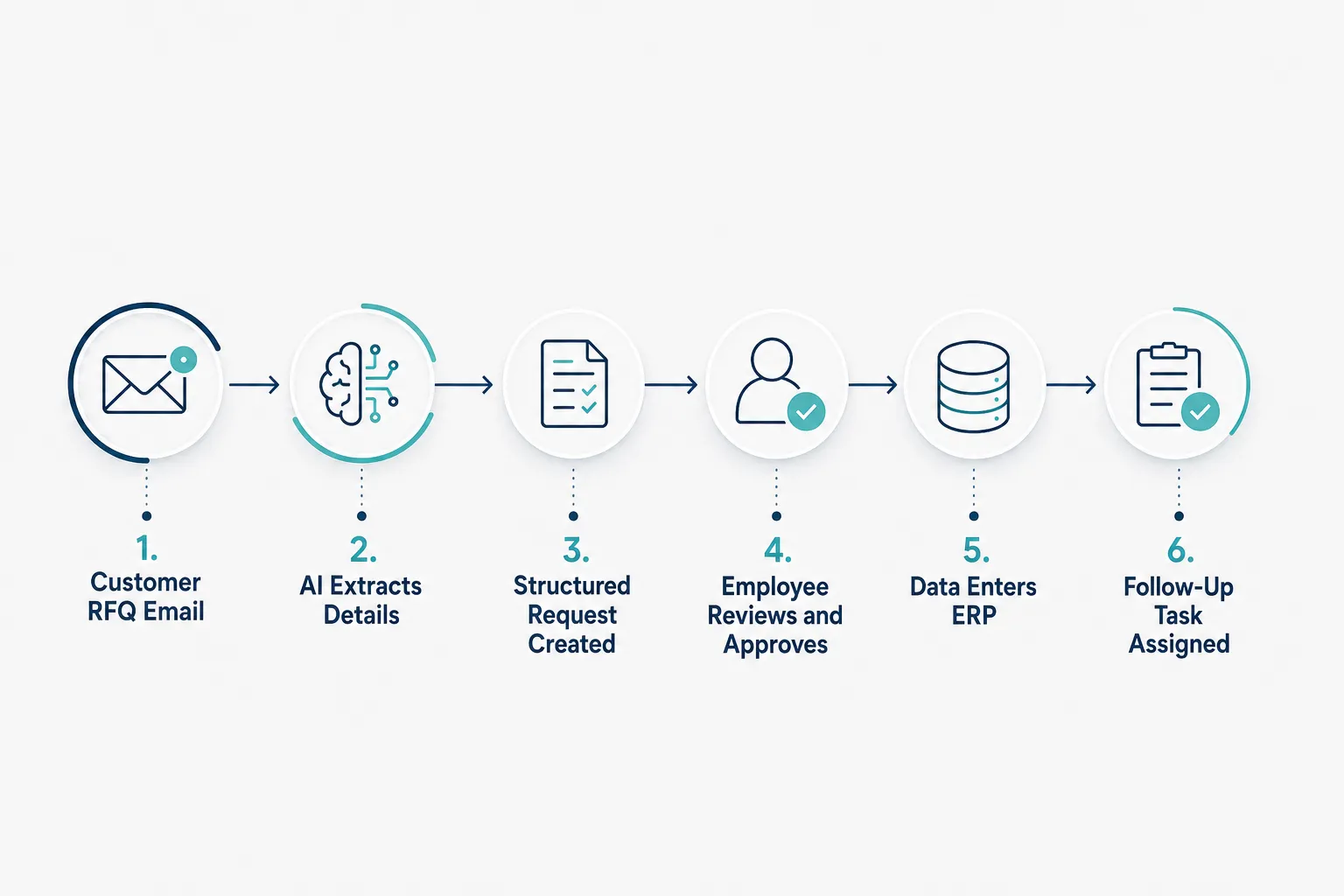
RFQ workflow example:
- A customer RFQ arrives by email, often with attachments and inconsistent formatting.
- AI reads the message and attachments, extracting part numbers, quantities, specs, and deadlines.
- The workflow organizes that information into a standard quote request format.
- The responsible estimator receives a structured, ready-to-work request instead of a raw email.
- Once approved, the quote data flows into the CRM or ERP automatically.
- A follow-up task gets created to check in with the customer if no response arrives in a set window.
Production reporting workflow example:
- Production data is collected automatically from machines, terminals, or shift entries.
- Automation compiles that data into a structured report format on a schedule.
- The report populates a management dashboard instead of a static spreadsheet.
- If a metric falls outside a set range, an exception notification goes out immediately, not at the next weekly meeting.
In both cases, a human still makes the final call. Approval and judgment stay with your team. What changes is that the person doing the reviewing gets clean, organized information instead of spending their morning assembling it.
Manufacturing Back Office Automation Integration With ERP Systems
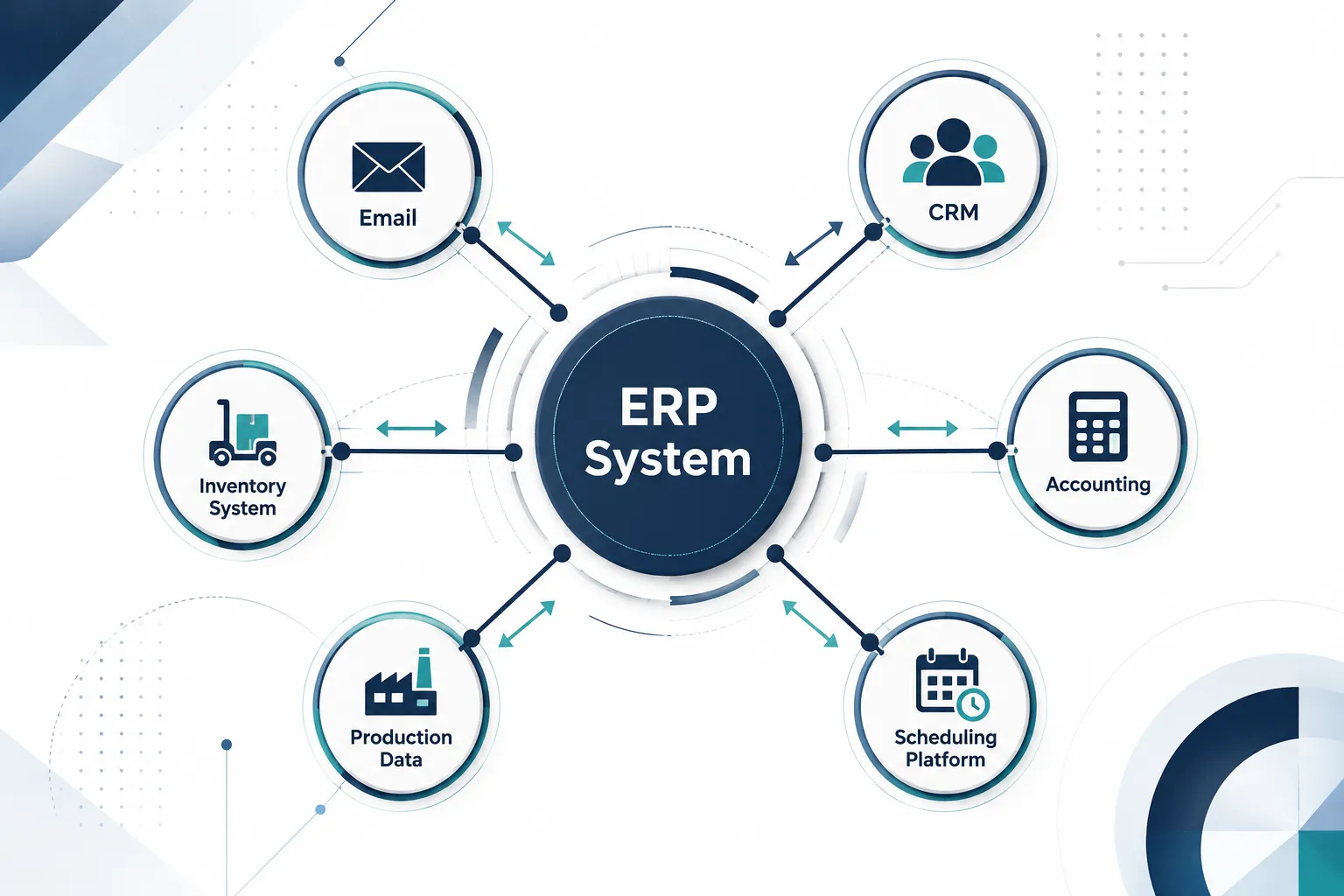
Manufacturing back office automation connects to your ERP through integration, not replacement. Most manufacturers can automate the majority of their back-office workflows using the ERP, CRM, and accounting software they already have, linked together so data moves between them automatically.
Typical integration points include:
- ERP: Order entry, inventory, production scheduling, and cost data.
- CRM: Customer communication history and quote tracking.
- Accounting software: Invoice matching and payment status.
- Inventory systems: Real-time stock levels shared with production planning.
- Scheduling platforms: Automatic updates when production timelines shift.
- Forms and databases: Structured intake for quality checks, safety reports, or customer requests.
The practical benefit is that your team stops treating each system as an island. Integration reduces human error by removing the manual step where someone has to remember to update the second system after updating the first. You keep the tools you’ve already trained your team on. You just stop asking people to be the connection between them.
Manufacturing Back Office Automation vs Manual Processes: Calculating the ROI
The return on manufacturing back office automation comes from time saved on repetitive tasks plus the reduction in costly errors and delays. A simple formula gives you a starting estimate before you commit to any project.
Estimate formula: minutes per process × process frequency × employees involved × labor cost per minute = monthly cost of a manual task.
For example, if entering a purchase order takes 12 minutes, happens 40 times a month, and involves one employee earning the equivalent of about $0.40 per minute loaded cost, that single task costs roughly $192 a month in labor, not counting errors. Multiply that across quoting, reporting, scheduling updates, and invoice matching, and the number adds up fast. This is an illustrative estimate meant to show the calculation, not a benchmark figure, so run your own numbers with your actual task times and pay rates.
Beyond direct labor cost, manual processes carry hidden costs that are harder to put a number on but just as real:
| Hidden cost | What it looks like |
|---|---|
| Errors and rework | A mistyped quantity triggers a wrong order or a production delay |
| Delayed decisions | Management waits days for a report that could be instant |
| Slow customer response | A quote sits in an inbox while a competitor responds faster |
| Bottlenecks | One person out sick stalls an entire approval chain |
Comparing manual processes to automated ones isn’t just about hours. It’s about how fast your business can respond and how many of those responses are error-free.
How Much Does Manufacturing Automation Software Cost
Costs for manufacturing back office automation vary widely based on scope, the number of workflows automated, and whether AI processing is involved, so there is no single industry-standard price. Simple integrations between two existing systems, like syncing inventory data between an ERP and a spreadsheet, cost far less than a multi-step AI-assisted RFQ workflow that touches email, ERP, and CRM together.
Rather than quoting a number that won’t match your situation, focus on the variables that actually drive cost:
- Number of systems involved: More systems to connect generally means more setup work.
- Data structure: Structured data (ERP fields) is cheaper to automate than unstructured data (emails, PDFs) that needs AI processing.
- Volume: Higher transaction volume can justify more upfront investment because the payback period shortens.
- Ongoing support: Straightforward pricing models with predictable monthly costs are easier to budget than one-off project fees with no maintenance plan.
Decision rule: if a workflow costs your team more than a few hundred dollars a month in labor (using the ROI formula above) and touches more than two systems, it’s usually worth pricing out an automation project.
Best Back Office Automation Tools for Manufacturers
The best tools for manufacturing back office automation are the ones that integrate cleanly with your existing ERP and communication systems, not necessarily the ones with the most features. A tool that requires you to replace your ERP or retrain your entire staff usually costs more in disruption than it saves in efficiency.
Look for these characteristics when evaluating options:
- Native or flexible ERP connections so you’re not stuck building custom code for basic data transfer.
- AI document processing for reading emails, PDFs, and scanned forms accurately.
- Workflow builders that your team can adjust without calling a developer every time a process changes.
- Approval and notification features so critical decisions still route to a person.
- Clear reporting on what’s automated, what’s pending, and where exceptions occur.
Avoid tools chosen purely because they’re popular in another industry. A tool built for retail order processing may not handle manufacturing-specific data like work orders, bills of materials, or shop floor exceptions well. If you’re not sure which category of tool fits your workflows, an outside automation assessment is usually faster and cheaper than trial-and-error software shopping.
How to Implement Back Office Automation in Manufacturing (and How Long It Takes)
Implementing back office automation in manufacturing works best as a phased process: map the workflow, automate one process at a time, and expand once the first automation proves out. Trying to automate everything at once is the fastest way to stall a project.
A practical implementation sequence:
- Map the current workflow. Document every manual step, every handoff, and every system touched.
- Pick one high-impact workflow. Choose something repetitive and well-defined, like PO entry or quote intake.
- Connect the systems involved. Set up the integration between email, ERP, CRM, or spreadsheets.
- Add AI where the data is unstructured. Only apply AI to the steps that need it, not the whole workflow.
- Keep a human checkpoint. Route anything above a certain dollar amount or complexity to a person for approval.
- Test with real data. Run the automation alongside the manual process for a short period before fully switching over.
- Expand to the next workflow. Use lessons from the first project to move faster on the second.
Timeline expectations vary by scope. A single, well-defined workflow (like automating one report or one intake process) can typically go from planning to live in a matter of weeks. A larger initiative touching multiple departments and several systems takes longer, often a few months, because it involves more testing and more people adjusting to a new process. Starting narrow is what keeps timelines short and budgets predictable.
Manufacturing Back Office Automation for Small vs Large Companies
Manufacturing back office automation benefits small manufacturers and large ones differently, but both see meaningful returns. Small manufacturers often have fewer systems to connect, which makes early automation projects faster and cheaper. Large manufacturers have more volume, which means the same automated workflow pays for itself faster.
Choose a narrow starting point if you’re a smaller manufacturer: with fewer than 50 employees, pick one workflow, like quoting or PO entry, and prove the value before expanding. You likely don’t have a dedicated IT team, so lean on a partner who can manage the integration for you.
Choose a phased, multi-department rollout if you’re a larger manufacturer: with complex ERP systems and multiple production sites, plan integration in stages by department, starting with the workflow causing the most bottlenecks. Coordinate with IT early since larger environments usually involve more security and compliance considerations.
In both cases, the goal is the same: reduce manual work without disrupting production. Scale without adding headcount, whether you’re a 20-person shop or a 200-person operation.
Common Mistakes and Challenges When Automating Manufacturing Workflows
The most common mistake in manufacturing workflow automation is trying to automate a broken process instead of fixing it first. If a workflow is inefficient because of unclear ownership or unnecessary approval steps, automating it just makes the same inefficiency happen faster.
Other frequent mistakes include:
- Automating everything at once. This overwhelms staff and makes it hard to isolate what’s working.
- Skipping the human checkpoint. Removing approval steps entirely on high-risk decisions creates new risk instead of removing it.
- Ignoring data quality. Automation moves bad data just as efficiently as good data, so clean up source data first.
- Choosing tools that don’t integrate well. A tool that can’t connect cleanly to your ERP creates a second manual step, not zero.
- Underestimating change management. Employees need training and a clear explanation of what changes for their day-to-day work.
Common edge case: highly custom, low-volume production runs (one-off jobs, prototypes) often don’t justify heavy automation investment, since the setup time can exceed the manual time saved. Focus automation on your repeatable, high-volume workflows first, and treat one-off jobs as a lower priority.
Do We Really Need Back Office Automation If Production Is Already Automated
Yes, back office automation is still necessary even with fully automated production, because automated machines still depend on accurate, timely information entering and leaving the system. A perfectly automated production line loses its advantage if orders, materials, and scheduling data still move through manual, error-prone steps around it.
Think of it this way: your CNC machine cuts a part in exact tolerances every time. But if the work order that told it what to cut was manually re-typed from an email and someone transposed a digit, the machine will execute the mistake with the same precision it executes everything else. Automated production amplifies the cost of bad information because it runs faster than a person can catch an error.
Administrative bottlenecks slow down otherwise efficient operations regardless of how advanced the shop floor is. A machine that finishes a job in ten minutes but waits three hours for a scheduling update isn’t running at capacity, it’s running at the speed of your slowest manual handoff.
The Goal Isn’t a People-Free Factory
The purpose of manufacturing back office automation is to remove unnecessary administrative work, not to remove people. AI automation and workflow automation exist to give your team back the hours they currently spend copying, checking, and re-entering information so they can spend that time on work only a person can do.
That means more time for solving production problems on the floor instead of chasing a status update by email. More time for serving customers with faster, more accurate quotes instead of building them by hand. More time for improving quality and catching issues before they become returns. More time for the judgment calls, vendor relationships, and process improvements that actually grow the business.
I’ve talked with plant managers who assumed automation meant fewer people on staff. In practice, the manufacturers who get the most value use freed-up time to take on more customers, more product lines, or more complex work without adding headcount just to keep up with paperwork. The machines got faster decades ago. This is the chance to let the people around them work at the same pace.