The Manufacturing Floor Still Runs on Paper in Many Places
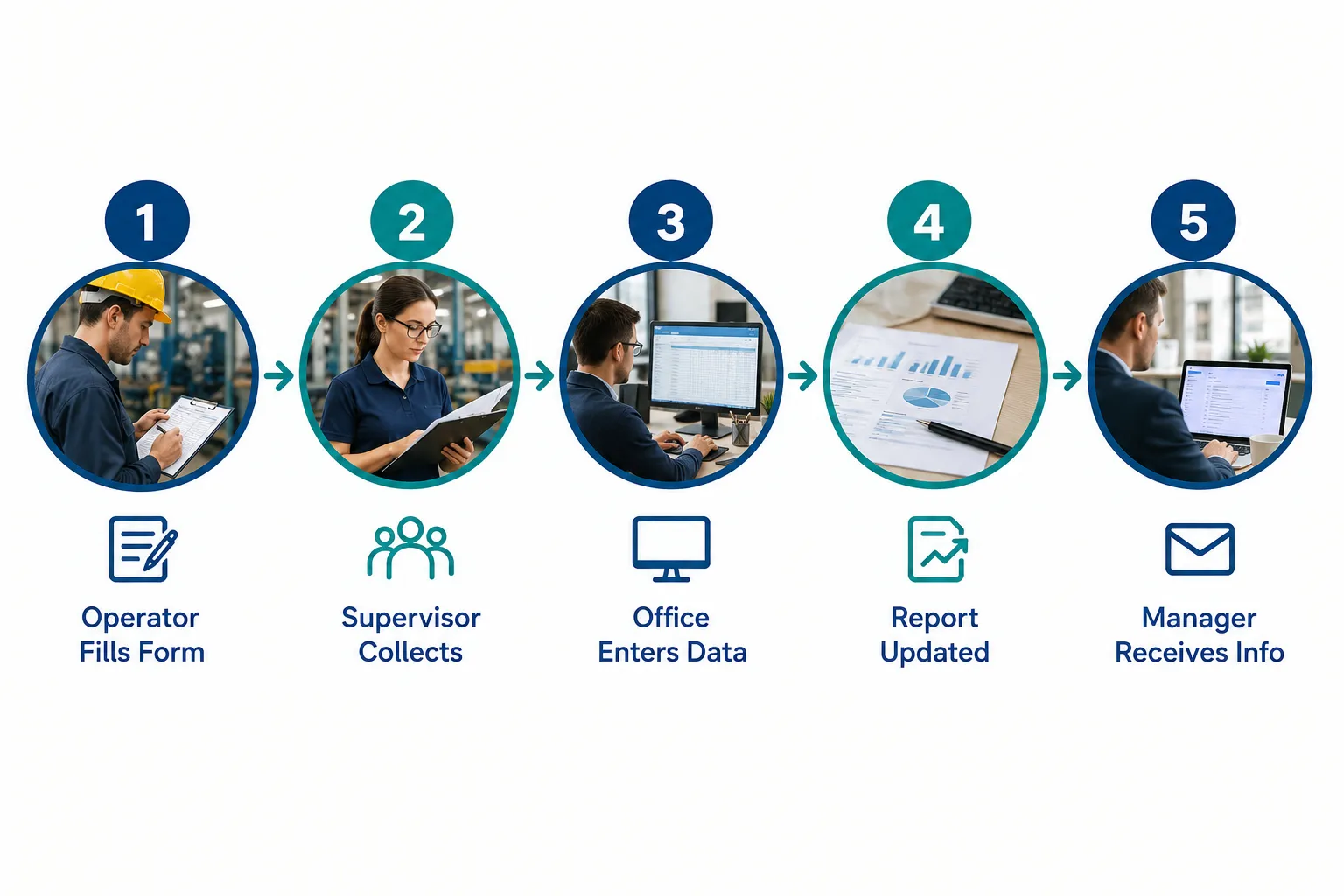
Walk onto most mid-sized manufacturing floors and you will still find a clipboard somewhere near the line. An operator finishes a production run, fills out a form by hand, and drops it in a tray near the supervisor’s office. Nobody looks at it again until someone has time to collect it, which might be an hour later or might be at the end of the shift.
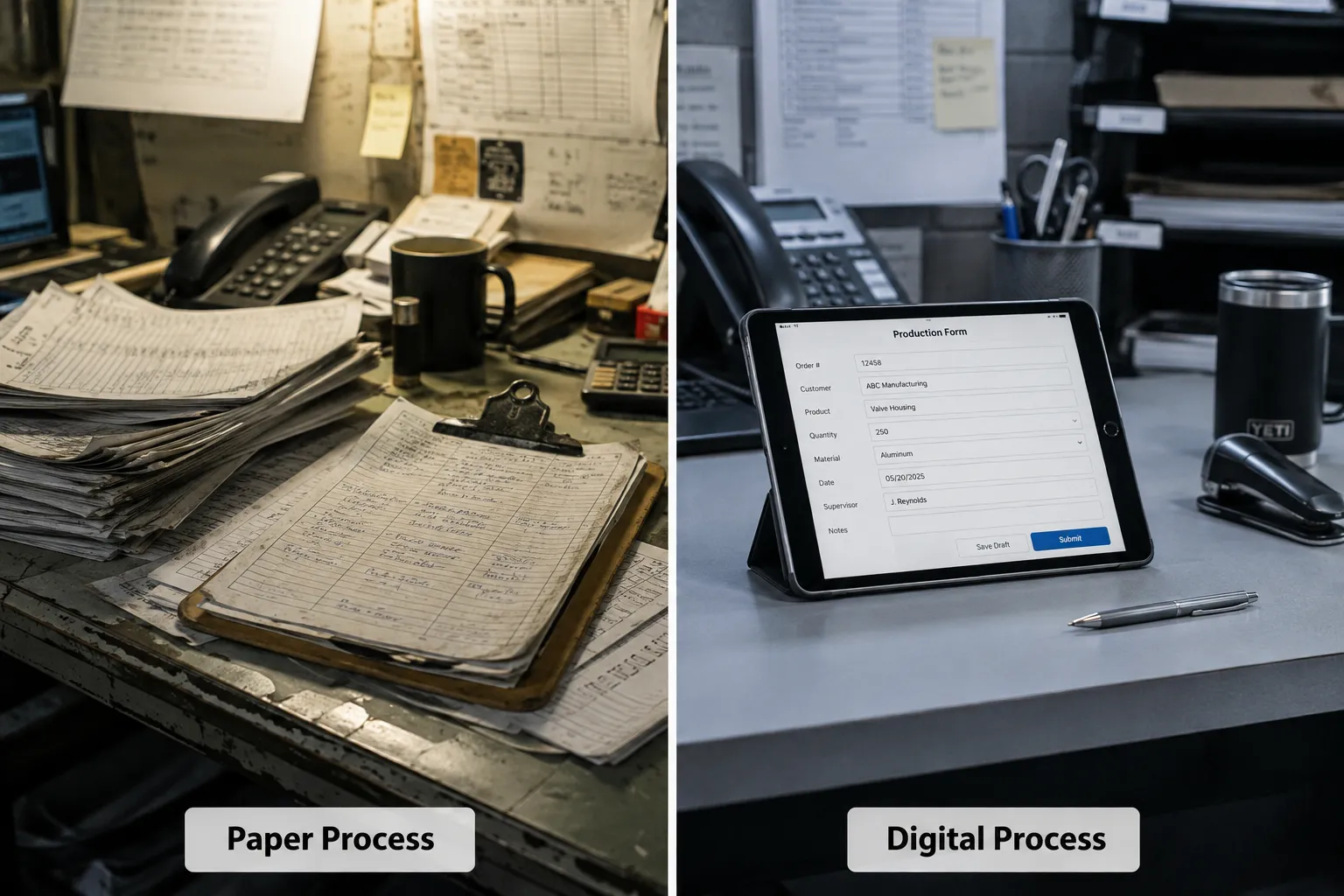
That delay is the real problem, not the paper. The form itself takes thirty seconds to complete. The bottleneck is everything that happens after: who picks it up, when they get around to entering it, and how many other people need a copy of that same information. Manufacturing workflow automation targets that gap between when information is created and when it actually becomes useful to someone.
Paper forms are a symptom of a bigger pattern: information that sits still until a person physically moves it. Fixing that pattern, not just swapping a clipboard for a tablet, is what actually changes operations.
What Is Manufacturing Workflow Automation and How Does It Work?
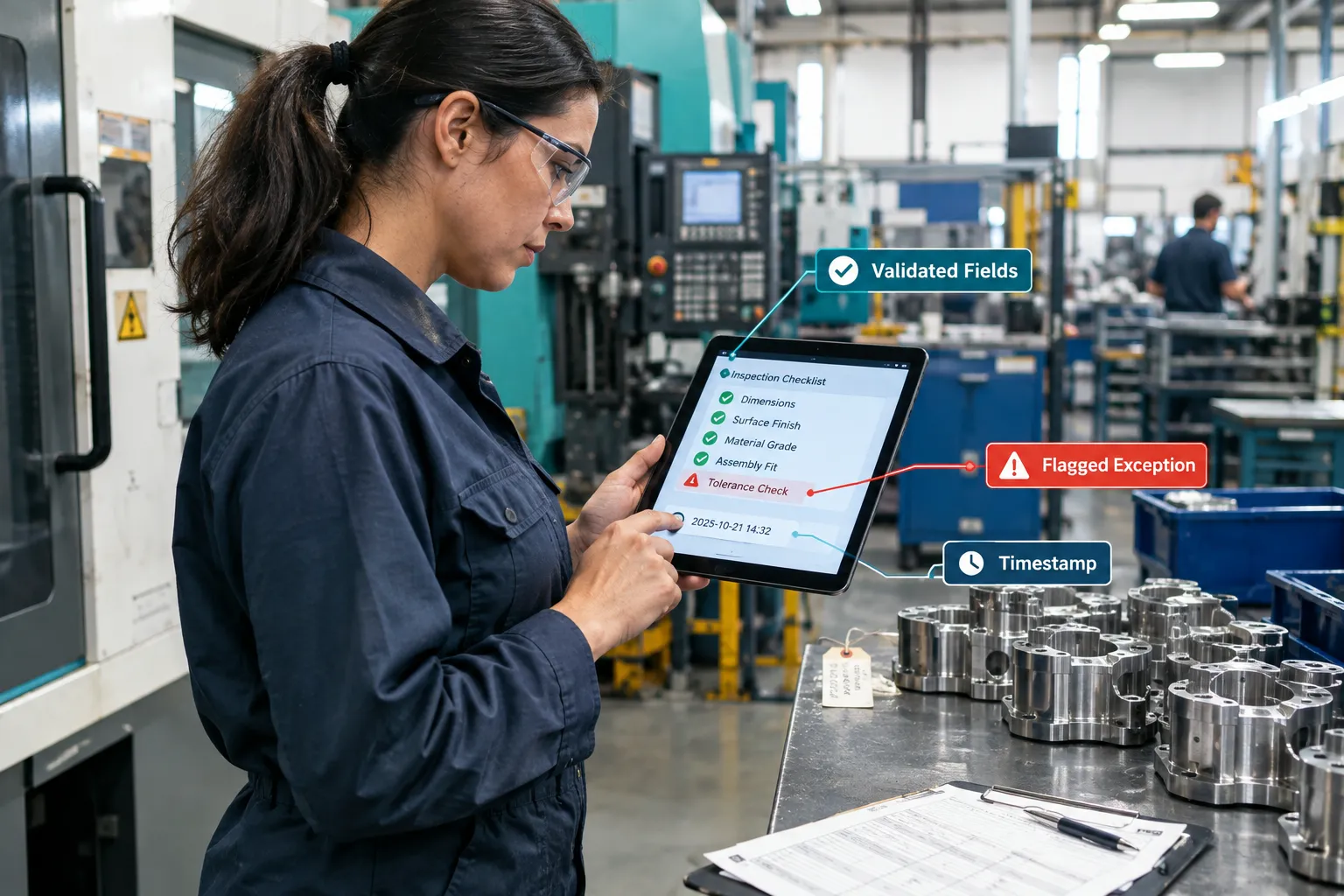
Manufacturing workflow automation is the use of digital tools and connected systems to capture production, quality, and maintenance information once, then automatically route, validate, and store it without manual re-entry. It works by replacing a paper form or verbal update with a digital form or sensor input, then applying rules that send that data to the right person, system, or report.
Here is a simple way to picture it:
- An operator or technician enters information once into a digital form on a tablet, scanner, or terminal.
- The system checks for required fields and flags anything missing or out of range.
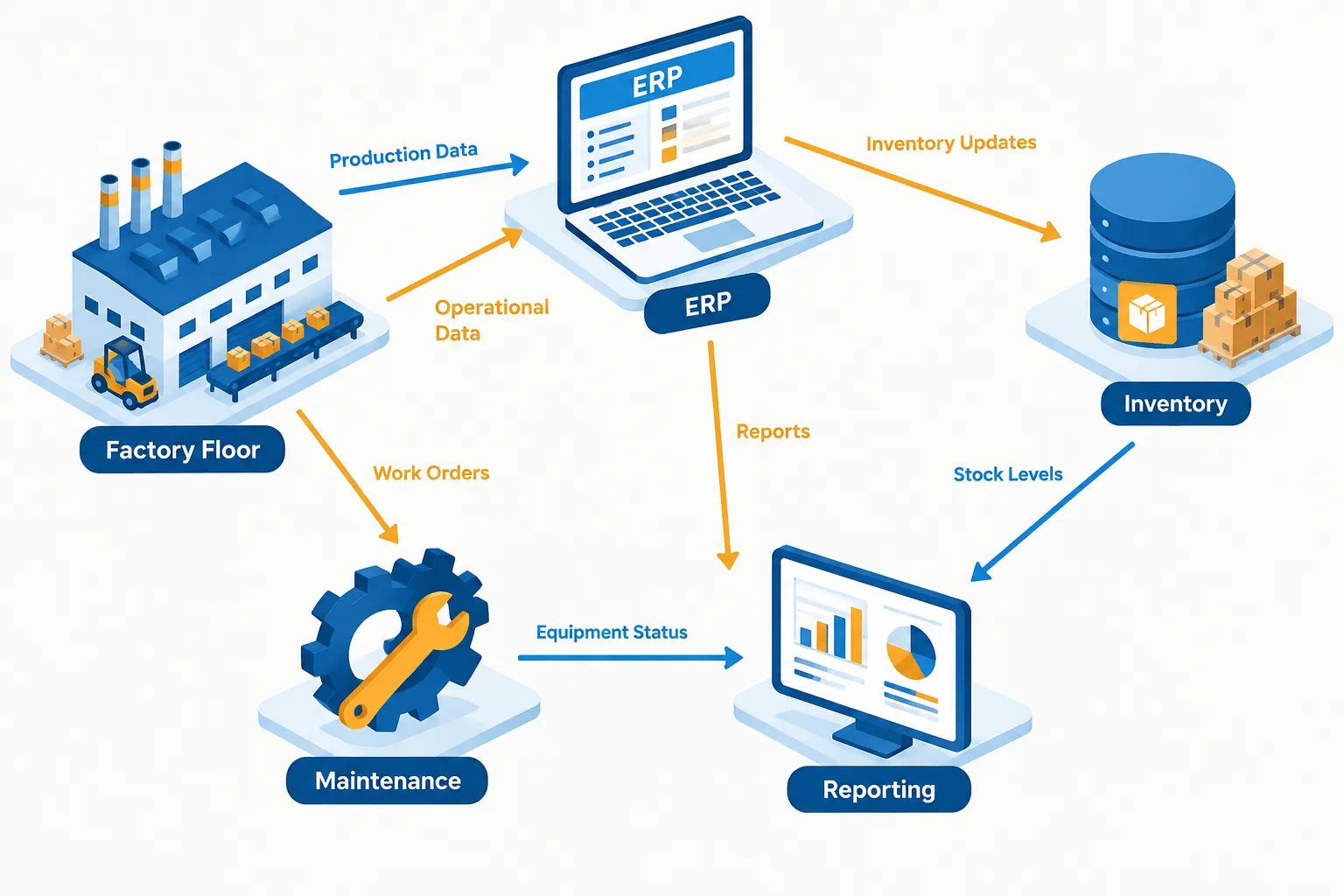
- The data routes automatically to the people or systems that need it: a supervisor, the ERP system, a quality log, a maintenance queue.
- Notifications go out automatically instead of someone having to remember to call or email.
- The information becomes searchable and reportable without anyone retyping it.
A common mistake is assuming the software does all the thinking. The workflow still needs clear rules about who approves what, what counts as an exception, and how data quality gets checked. Automation handles the moving and formatting. People still make judgment calls.
How Do You Transition from Paper-Based Processes to Digital Manufacturing?
You transition by mapping one workflow at a time, removing unnecessary steps first, then digitizing what remains and connecting it to the systems that need the data. Trying to digitize everything at once usually creates more confusion than the paper process it replaced.
A practical transition usually looks like this:
- Pick a workflow that generates frequent paper volume and visible delays, like shift production logs or quality checks.
- Map the current process exactly as it happens today, including the shortcuts people take.
- Cut steps that exist only because of the paper itself, such as a second transcription step.
- Build a digital form that captures the same information with validation built in.
- Set up automatic routing so the right person or system gets the data without anyone forwarding it.
- Connect the form to your ERP, quality log, or scheduling tool where it makes sense.
- Run it with real operators on the floor, not just office staff, and collect their feedback.
- Measure the results before moving to the next workflow.
Skipping the mapping step is the most common misstep. Digitizing a messy process just makes the mess move faster.
What Are the Main Benefits of Automating Manufacturing Workflows?
The main benefits are faster information flow between the floor and the office, fewer duplicate data entry errors, searchable records instead of paper folders, and more consistent documentation for quality and compliance. These benefits show up as saved administrative hours and fewer corrections, not instant production speed gains.
Specific improvements you can expect:
- Reduce manual work by eliminating the step where someone retypes a paper form into a spreadsheet or ERP system.
- Reduce human error through required fields and validation rules that catch missing data before it moves forward.
- Improve operational efficiency by giving supervisors and managers updated information without waiting for a physical handoff.
- Free your team for higher-value work so office staff spend less time consolidating reports and more time analyzing them.
- Scale without adding headcount as production volume grows, since the workflow handles more forms without more clerical staff.
These gains depend on data quality and employee adoption. A digital form filled out carelessly produces bad data just as easily as a paper one.
How Much Does Manufacturing Automation Software Cost?
Costs for manufacturing workflow automation vary widely based on how many workflows you digitize, how complex the forms are, and how much system integration is required. A single digitized form with basic routing costs far less than a project connecting ten workflows across ERP, quality, and maintenance systems.
Factors that drive cost up or down:
| Cost factor | Lower cost scenario | Higher cost scenario |
|---|---|---|
| Number of workflows | One form, like maintenance requests | Ten-plus forms across departments |
| System integration | Standalone digital form | Two-way sync with ERP and inventory |
| Devices | Staff use existing phones/tablets | New ruggedized tablets for the floor |
| Training | Simple form, short onboarding | Multiple departments, shift-based training |
| Ongoing maintenance | Vendor-hosted, minimal upkeep | Custom integrations needing regular support |
Before estimating a budget, measure what the current paper process actually costs you. Track how many hours staff spend re-entering data each week and how often errors require rework. That baseline makes the return on investment easier to calculate honestly.
Best Tools and Platforms for Manufacturing Workflow Automation
The right tool depends on whether you need simple digital forms, deeper ERP integration, or AI-assisted document processing. There is no single best platform for every manufacturer; the right choice depends on your existing systems and the complexity of your workflows.
Common categories to evaluate:
- Digital form and workflow platforms for capturing production logs, inspections, and maintenance requests with routing rules.
- ERP-native modules when your ERP already supports workflow extensions and you want tighter data consistency.
- Integration and automation platforms that connect your existing software so data does not need manual transfer between systems.
- AI-assisted document tools for extracting data from scanned paper records or older files during the transition period.
Choose a platform that fits your current systems rather than one that requires replacing software that already works well. A tool that integrates cleanly with your existing ERP is usually a better fit than a flashier standalone system that creates a new data silo.
Can Small Manufacturers Use Workflow Automation, or Is It Only for Big Companies?
Small manufacturers can use workflow automation effectively, often with faster results than larger companies because there are fewer departments and approvals involved. A five-person quality team can digitize an inspection form and see results within weeks, while a large plant may need months to coordinate across shifts and locations.
Decision rule: if your team spends more than a few hours a week re-entering the same data into multiple places, workflow automation is worth evaluating regardless of your company size. Start with the workflow causing the most frustration, not the most complex one.
Common Mistakes When Implementing Manufacturing Automation
The most common mistake is digitizing a form without first fixing the process around it, which just speeds up an inefficient workflow. Other frequent mistakes include skipping employee input, underestimating training time, and assuming integration will be simpler than it turns out to be.
Watch for these specific issues:
- Choosing software before mapping the actual process, leading to a poor fit.
- Rolling out to every department at once instead of testing with one team first.
- Ignoring floor employees’ feedback, which leads to workarounds and shadow paper processes.
- Connecting systems without checking data quality first, which moves bad data faster instead of fixing it.
- Expecting real-time visibility when the underlying systems update only once a day.
How Long Does It Take to Go Digital with Manufacturing Processes?
A single workflow, like a maintenance request form, can typically go live in a few weeks once the process is mapped. A full transition covering production reporting, quality, and maintenance across multiple shifts usually takes several months when system integration is involved.
Timeline depends on three things: how many systems you are connecting, how much training is needed across shifts, and how much the current process needs to be redesigned before digitizing it. Rushing this timeline to hit a deadline is a common cause of poor adoption.
What Training Do Employees Need for Workflow Automation?
Employees need hands-on training on the specific digital form or device they will use daily, plus a clear explanation of what changes and why. Training that only covers button clicks without explaining the reason for the change tends to produce low adoption.
Effective training usually includes:
- A short walkthrough comparing the old paper step to the new digital step.
- Practice time with real production scenarios, not just demo data.
- A clear point of contact for questions during the first few weeks.
- Shift-specific sessions so night and weekend crews are not left out.
How to Measure ROI on Manufacturing Workflow Automation
You measure ROI by comparing administrative hours and error rates before and after the change, not just by counting how many forms got digitized. Track the hours spent on manual data entry weekly before the project, then measure the same metric three months after rollout.
Useful metrics to track:
- Hours per week spent re-entering or consolidating paper data.
- Number of missing or incorrect entries caught per month.
- Time between an event happening on the floor and it appearing in a report.
- Number of workflows still relying on paper or informal communication.
What Manufacturing Processes Are Hardest to Automate?
Processes involving subjective judgment, like evaluating a borderline quality defect, or highly custom production runs with constant variation are the hardest to fully automate. These processes can still benefit from digital capture and routing, even if the final decision stays human.
Edge case: a custom fabrication shop building one-off parts cannot automate the design or inspection judgment itself, but it can still automate how specifications, approvals, and quality notes move between the shop floor and the office.
Workflow Automation vs. Hiring More Staff for Manufacturing
Workflow automation reduces the administrative burden that often drives hiring requests, like data entry and report consolidation, while hiring more staff adds capacity without fixing the underlying inefficiency. Choose automation first if your team’s bottleneck is repetitive paperwork rather than a genuine shortage of skilled labor.
If the bottleneck is actual production capacity, like not enough machinists, automation will not solve that. It will, however, free up the staff you already have from administrative work so they can focus on production.
Does Workflow Automation Work for Complex or Custom Manufacturing?
Yes, workflow automation works for complex or custom manufacturing, though it focuses on the surrounding information flow rather than the unique production steps themselves. A custom cabinet shop, for example, can still automate how specs, change orders, and approvals move between sales, the shop floor, and the office even though every project is different.
The key is separating what varies (the actual build) from what repeats (the paperwork and approvals around it). Automate the repeatable part first.
How to Choose Between Different Manufacturing Automation Solutions
Choose a solution based on how well it fits your existing systems, not based on which platform has the most features. A tool that connects cleanly to your current ERP and is easy for floor staff to use beats a feature-heavy platform that requires replacing systems that already work.
Checklist for evaluating options:
- Does it integrate with your existing ERP, inventory, or quality systems?
- Can floor employees use it without extensive technical training?
- Does the vendor support the specific devices available on your floor?
- Can you start with one workflow before committing to a full rollout?
- Is pricing predictable, without hidden costs for added users or integrations?
Where AI Can Improve Digital Workflows
AI adds the most value in manufacturing workflow automation when it handles unstructured information, like scanned paper records, handwritten notes, or inconsistent maintenance descriptions. Traditional automation handles the predictable parts: routing, validation, and notifications.
Where AI fits in:
- Extracting data from scanned historical paper forms during a transition.
- Summarizing lengthy maintenance notes into short, scannable updates.
- Classifying incoming requests so they route to the right department automatically.
- Organizing unstructured quality notes into consistent, searchable fields.
AI output in these areas still needs spot checks. Treat it as a way to speed up data preparation, not a replacement for a quality manager’s final review.
Connecting the Manufacturing Floor to Office Systems
Connecting systems means letting information move automatically between production, ERP, inventory, quality, maintenance, and reporting tools instead of being manually re-entered in each one. Whether this is feasible depends on what interfaces your current systems support and how clean your existing data is.
Before committing to integration work, confirm:
- Which systems have an interface or API available for connection.
- Who has permission to access and modify data in each system.
- Whether your current data is consistent enough to connect reliably.
- Which connections actually save time versus which ones just look impressive on paper.
What Does a More Connected Manufacturing Operation Look Like?
A more connected operation captures information once, validates it automatically, and routes it to the right people and systems without manual re-entry. It does not mean every number updates instantly across every screen. It means less waiting, less retyping, and more trustworthy records when someone needs to pull them.
“The goal is not a paperless floor. The goal is information that moves on its own instead of waiting for someone to carry it.”
That shift changes how supervisors plan shifts, how quality managers respond to issues, and how office staff spend their mornings. Fewer handoffs mean fewer places for information to get lost or delayed.