Why Automating Every Process Can Backfire
More automation doesn’t automatically make a business more efficient. A poorly chosen automation project can add cost, create new maintenance work, and frustrate the same employees it was supposed to help.
I’ve seen companies spend thousands of dollars automating a task that took an employee ten minutes a week, while a two-hour daily bottleneck sat untouched because nobody measured it. The technology worked exactly as designed. The business still lost money because the project solved the wrong problem.
This happens for a predictable reason: automation is easy to justify in theory and hard to evaluate in practice. A vendor demo looks impressive. A spreadsheet showing nine minutes saved per task does not. Without a consistent way to compare opportunities, businesses chase the flashiest option instead of the most valuable one.
The goal of business process automation isn’t to automate as much as possible. It’s to automate the work that’s actually costing you money, time, or accuracy.
What Is Business Process Automation and How Does It Work?
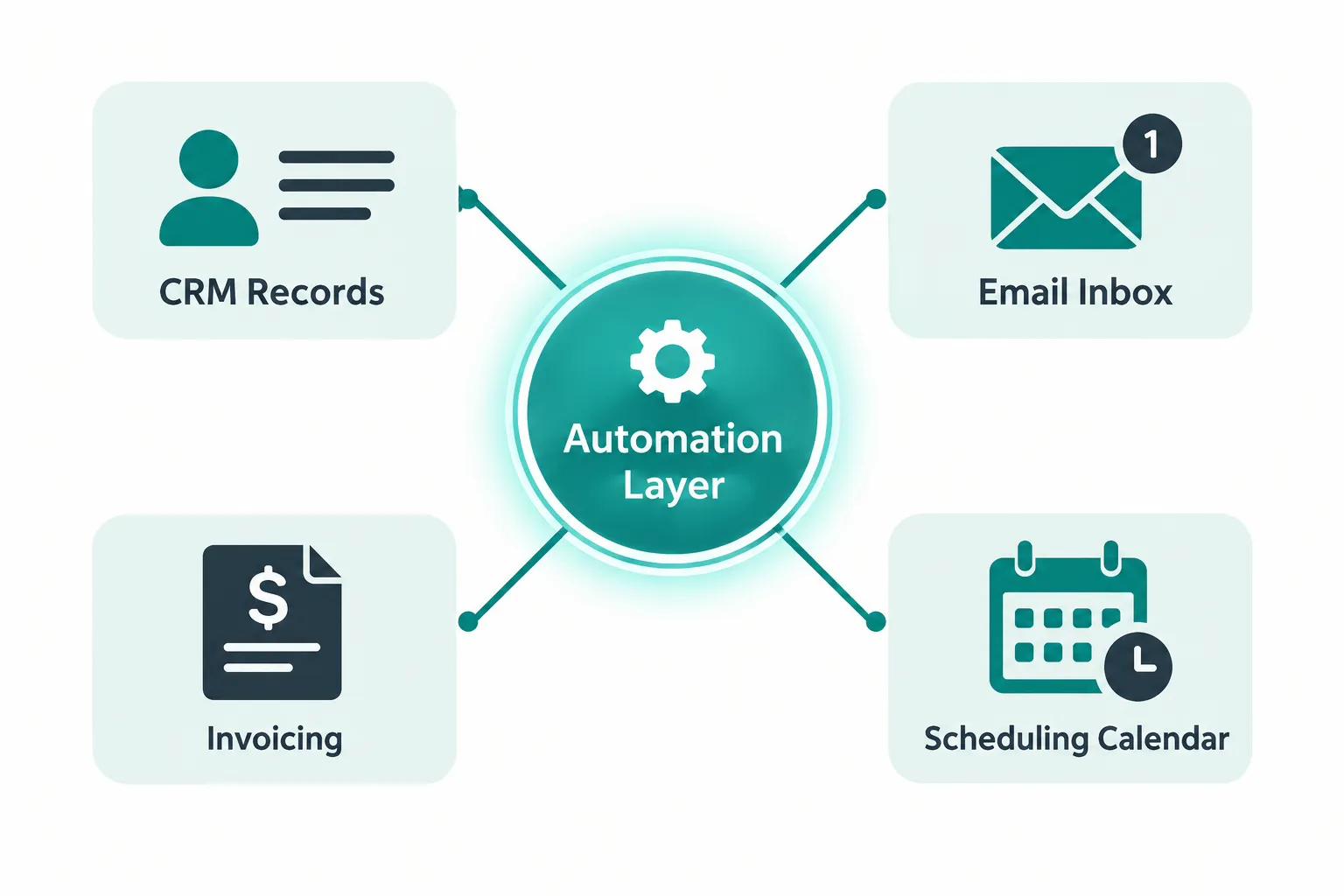
Business process automation is the use of software to handle repetitive, rule-based tasks that employees would otherwise do by hand, such as moving data between systems, sending notifications, or routing approvals. It works by connecting your existing software, applying defined rules or triggers, and letting the system execute the steps without a person clicking through each one.
A basic example: a new customer fills out a web form, and instead of an employee copying that information into a CRM, scheduling software, and a welcome email platform, an automated workflow does all three the moment the form is submitted.
Automation typically relies on one or more of these components:
- Triggers: an event that starts the process, like a form submission or a new invoice.
- Rules: the logic that decides what happens next.
- Integrations: connections between your existing systems so data moves without manual re-entry.
- Actions: the actual output, such as updating a record, sending an alert, or generating a document.
The technology matters less than the outcome. A workflow is successful when it reduces manual work, improves consistency, and frees your team for higher-value work, not when it uses the most advanced tool available.
What Should Business Process Automation Actually Improve?
Business process automation should reduce unnecessary labor, shorten turnaround times, prevent avoidable errors, and connect systems that don’t talk to each other. If a proposed project doesn’t measurably move one of those needles, it’s probably not worth building yet.
Judge every automation idea against outcomes, not features:
- Reduce manual work: fewer hours spent on copying, re-entering, or formatting data.
- Shorten turnaround times: faster quote-to-approval, invoice-to-payment, or application-to-response cycles.
- Prevent avoidable errors: fewer typos, missed steps, or inconsistent records.
- Improve consistency: every customer or employee gets the same process every time.
- Reduce bottlenecks: work doesn’t pile up waiting on one person or one manual step.
- Connect disconnected systems: information moves between your CRM, accounting software, and scheduling tools without someone acting as the human bridge.
A workflow automation project that checks two or three of these boxes is worth serious consideration. One that checks none of them is a solution looking for a problem.
How to Identify Which Processes to Automate First
Start by measuring the work that happens most often and takes the most collective time, because frequency and time consumed are the two fastest ways to find real savings. A task that happens 200 times a month and takes five minutes each time usually matters more than a task that happens twice a year and takes an hour.

Walk through your operation and look closely at:
- Data entry between systems (quotes, orders, invoices)
- CRM updates after calls, emails, or meetings
- Recurring reports pulled from multiple sources
- Scheduling and appointment confirmations
- Document processing, like contracts or intake forms
- Approval chains that pass through multiple people
- Customer or patient onboarding steps
For each one, ask: how many times does this happen in a month, and how many minutes does it take per occurrence? Multiply that by the number of employees doing it. You’ll usually find two or three tasks that dwarf everything else on the list. Those are your starting candidates.
Common mistake: teams often focus on the task that’s most annoying to the loudest employee instead of the one that actually consumes the most total hours across the company. Annoyance and cost aren’t the same thing.
Is the Process Stable Enough to Automate?
A process that changes constantly or has never been clearly defined isn’t ready for automation, and building a solution on top of a broken workflow usually makes the problem worse, not better. Automating chaos just produces chaos faster.
Before you build anything, document the process as it actually runs today, not how it’s supposed to run on paper. Walk it step by step with the people who do the work and note every exception, workaround, and “well, usually we…” moment. Those exceptions are often where the real cost is hiding.
Then simplify. Remove steps that exist out of habit rather than necessity, and get everyone who touches the process to agree on the correct version before anyone writes a line of workflow logic. A process with three competing “correct” versions will produce an automation project with three times the complexity and a fraction of the reliability.
Decision rule: if your team can’t agree on how the process should work today, fix the process first. Automate it once it’s stable.
How Much Does Business Process Automation Cost?
Business process automation costs vary widely, from a few hundred dollars a month for simple workflow tools to several thousand dollars for a custom-built solution integrating multiple systems, and the right number depends entirely on which process you’re automating and how complex the systems involved are. The more useful question isn’t “what does automation cost,” it’s “what does the current manual process cost us every month, and does automation beat that number?”

Here’s a practical baseline calculation you can run on a napkin before any vendor conversation:
Step 1: Minutes per task x monthly frequency x employees involved ÷ 60 = monthly labor hours
Step 2: Monthly labor hours x loaded hourly labor cost = estimated monthly labor cost
Example: A 10-minute task done 300 times a month by 3 employees equals 50 monthly labor hours (10 x 300 x 3 ÷ 60). At a loaded hourly cost of $28, that’s roughly $1,400 a month in labor tied up in one task.
That $1,400 isn’t automatically your savings. Actual savings depend on how much of that work automation actually eliminates, what the solution costs to build and maintain, and whether your team uses the freed-up time productively or just works slower. Treat the labor cost as your ceiling, not your guaranteed return.
Which Business Processes Should You Automate First?
The strongest automation candidates are frequent, repetitive, predictable, time-consuming, error-prone, and span multiple systems, because those traits stack the deck in favor of a quick, measurable payoff. A process missing most of these traits is a weaker bet, no matter how modern the proposed tool is.
| Trait | Why it matters |
|---|---|
| High frequency | More occurrences mean more total time saved |
| Repetitive steps | Rule-based logic can replicate them reliably |
| Predictable outcome | Fewer exceptions mean a simpler, cheaper build |
| Time-consuming | Removes real hours, not minutes |
| Error-prone | Fixing mistakes manually is expensive |
| Crosses multiple systems | Manual re-entry between tools is a classic time sink |
| Measurable before and after | You can prove the ROI, not just assume it |
If a process checks five or more of these boxes, it belongs near the top of your list. If it checks one or two, keep it on the radar but don’t prioritize it over stronger candidates.
What Processes Should You Not Automate?
Some workflows are better left manual, including tasks performed rarely, processes that change constantly, work requiring heavy human judgment, and anything that’s already fast and cheap to do by hand. Automating these usually costs more in build time and upkeep than it ever saves.
Think twice before automating:
- Rare tasks: something done five times a year doesn’t justify a build, no matter how annoying it is in the moment.
- Constantly changing workflows: if the process will likely look different in three months, you’ll be rebuilding the automation as often as using it.
- Judgment-heavy decisions: negotiating a contract exception or handling a sensitive customer complaint needs a person, not a rule engine.
- Already-efficient tasks: if something takes 90 seconds and never goes wrong, automation adds complexity without meaningful upside.
- High maintenance, low benefit work: if keeping the automation running will cost more staff time than it saves, skip it.
Edge case: a task might be rare but extremely high-stakes, like an annual compliance filing. In that situation, a checklist or template often delivers more value than a full automation build, because the risk is about accuracy, not volume.
Traditional Automation, AI, or a Custom Application: What’s the Difference?
Traditional automation handles predictable, rule-based work; AI automation interprets messy or unstructured information like emails and documents; and a custom application gives your team a dedicated tool when existing software can’t support a recurring process. Choosing between them comes down to how structured the information is and whether your current software can handle it at all.
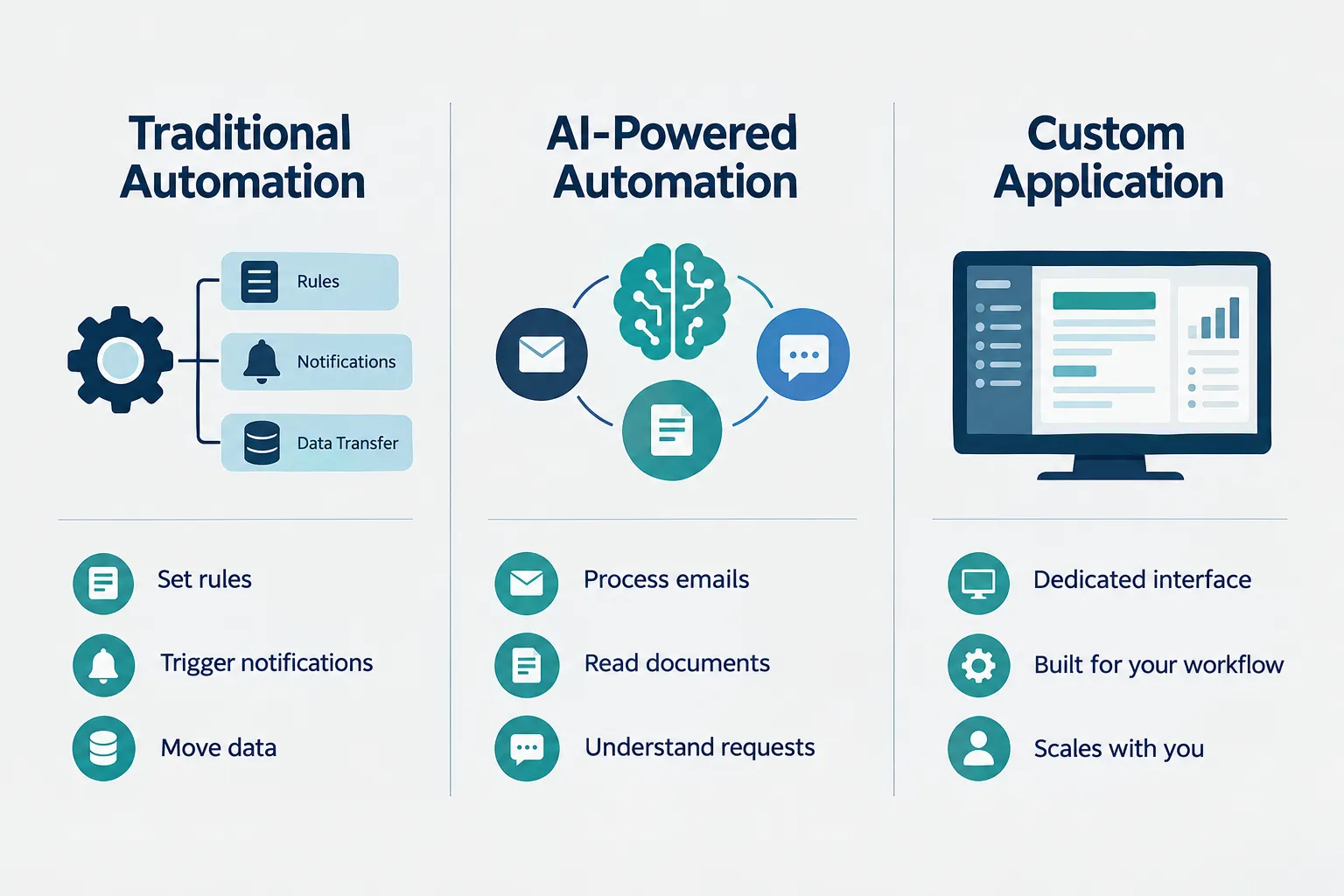
Traditional automation fits clear, rule-based work: moving data between systems, sending notifications, updating records on a schedule. It’s the cheapest and most reliable option when the rules don’t change often.
AI-powered automation fits situations involving judgment-adjacent interpretation: reading an email to figure out what a customer needs, pulling data out of an inconsistent PDF, or summarizing a long document. It costs more to build and tune, so reserve it for work that genuinely requires interpretation.
Custom applications make sense when no existing software fits the process, such as a dedicated intake portal or an internal scheduling tool built around how your business actually operates.
Do you need coding skills? Not necessarily. Many workflow automation platforms use visual, no-code builders for rule-based tasks. More complex AI workflows or custom applications usually require a developer or an experienced automation partner, especially when multiple systems and edge cases are involved.
RPA (robotic process automation) vs. business process automation: RPA is a specific technique where software mimics human clicks and keystrokes inside existing applications, often used when systems have no direct integration option. Business process automation is the broader category, covering RPA, workflow tools, and AI-driven processes alike.
Common Mistakes When Implementing Business Process Automation
The most common automation mistakes are automating a broken process, tackling too many workflows at once, and skipping the ROI calculation before building anything. Each one turns a potentially good investment into a costly one.
Watch for these patterns:
- Automating before fixing: a messy process just becomes a faster, messier process.
- Trying to do everything at once: spreading a budget across ten small projects usually delivers less value than nailing one big one.
- Skipping the math: without a baseline labor cost, there’s no way to know if the project paid off.
- Ignoring the people doing the work: employees who aren’t consulted often build manual workarounds around the new system, which defeats the purpose.
- Choosing complexity by default: reaching for AI or a custom build when a simple rule-based workflow would have worked just as well.
Avoiding these mistakes is less about technical skill and more about discipline: measure first, fix the process, build the simplest solution, and expand only after proving it works.
How Long Does Business Process Automation Take, and Is It Worth It for Small Businesses?
A focused automation project, like connecting a web form to your CRM and scheduling tool, typically takes a few days to a few weeks, while a multi-system integration or custom application can take one to three months depending on complexity. Timelines depend far more on how many systems are involved and how clean the data is than on the size of the business.
For small and mid-sized businesses, business process automation is usually worth it when it targets genuinely high-volume or error-prone work, because it lets you scale without adding headcount and reduces the manual work that keeps managers stuck doing tasks instead of running the business. It’s less worth it when the target process is small, rare, or already efficient. The size of your company matters less than the size of the problem you’re solving.
A 15-person accounting firm automating client document intake can see a payback in weeks, because the volume and error risk are both high. That same firm automating a quarterly report nobody complains about would likely never recoup the build cost.
Business Process Automation Examples by Industry
Strong automation opportunities tend to cluster around the same patterns across industries: high-volume data entry, scheduling, approvals, and document handling. Here’s how that typically shows up:
- Accounting and CPA firms: automated client document intake, recurring report generation, and deadline reminder workflows.
- Healthcare and dental practices: appointment reminders, insurance verification steps, and patient intake form routing.
- Automotive dealerships: lead routing from multiple sources into one CRM, service appointment scheduling, and inventory updates.
- Manufacturing: purchase order processing, inventory threshold alerts, and quality control documentation.
- Nonprofits: donor data entry, recurring donation receipts, and grant reporting deadlines.
- Professional services: proposal generation, client onboarding checklists, and time-tracking-to-invoice workflows.
The common thread isn’t the industry. It’s the pattern: repetitive, high-volume, multi-system work that eats hours every week.
Business Process Automation Tools Comparison
No single tool fits every automation need, and picking a category comes down to how structured the task is and how many systems need to connect. Here’s a simplified comparison:
| Tool type | Best for | Typical cost range | Setup effort |
|---|---|---|---|
| No-code workflow platforms | Rule-based tasks, notifications, data transfer | Low monthly subscription | Low to moderate |
| RPA tools | Mimicking manual clicks in legacy software | Moderate licensing cost | Moderate |
| AI-powered automation | Interpreting emails, documents, unstructured text | Moderate to higher, usage-based | Moderate to high |
| Custom applications | Recurring processes with no good off-the-shelf fit | Project-based, higher upfront | High |
Decision rule: choose the simplest tool category that solves the actual problem. A no-code workflow tool that handles 80 percent of a process well usually beats a custom application that handles 100 percent but takes three times as long to build and maintain.
Start With One High-Value Workflow, Then Build a Roadmap
The smartest way to approach business process automation is to pick one high-value workflow, measure its current performance, build a focused solution, and prove the results before expanding to anything else. A successful pilot gives you real numbers and real credibility for the next project.
Document the process as it runs today, including time spent, error rate, and bottlenecks. Build the automation around that specific workflow, keeping the scope tight. Then measure the same metrics after launch: hours saved, errors reduced, turnaround time improved.
Use that pilot to build your roadmap. If the labor-hour math held up and the team actually used the freed-up capacity for higher-value work, you’ve found a repeatable pattern. Apply the same frequency, time, error, and stability criteria to your next candidate, and keep building one proven win at a time instead of automating everything on day one.
Find the Processes Actually Worth Automating
Not every workflow needs AI, and not every repetitive task deserves a custom solution. AlphaCIS can help identify your biggest operational bottlenecks and determine where workflow automation, AI, or custom tools could deliver measurable value.