What Is AI Automation and How Does It Work for Businesses
AI automation uses software to handle repetitive, rules-based tasks that normally require human intervention. Unlike simple macros or scripts, AI automation can adapt to variations in data formats, learn from patterns, and make basic decisions within defined parameters.
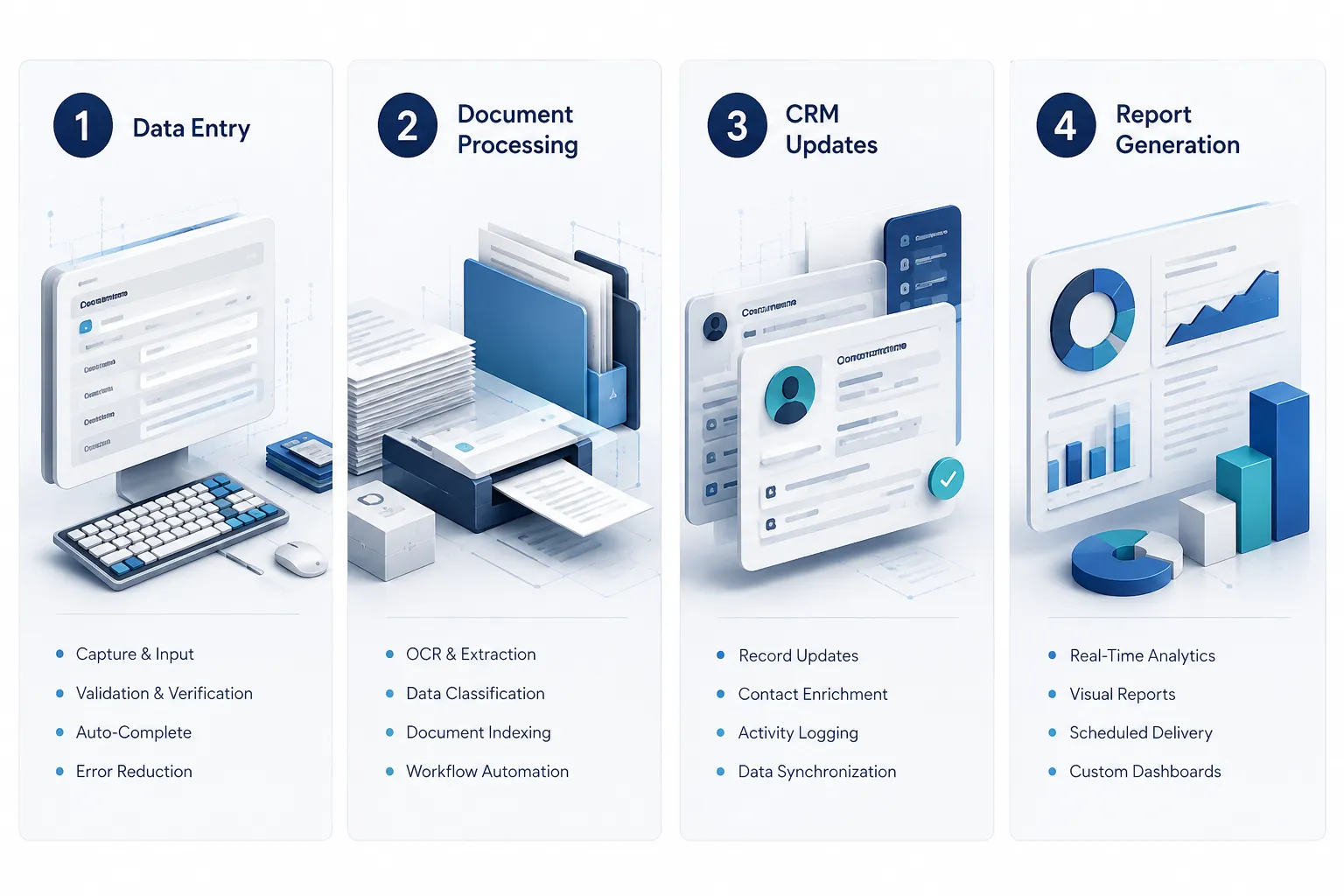
For businesses, this translates into systems that can read incoming emails and route them to the right departments, extract data from invoices and update accounting systems, or pull information from multiple databases to generate weekly reports. The key difference from traditional automation is flexibility – AI systems can handle variations in document formats, interpret different ways of expressing the same information, and work with unstructured data like emails or PDFs.
Common business applications include:
- Processing customer inquiries and routing them based on content
- Extracting data from forms, invoices, and contracts
- Updating CRM records when new information arrives
- Generating routine reports by pulling data from multiple systems
- Managing appointment scheduling and calendar coordination
- Monitoring inventory levels and triggering reorder processes
The technology works by training algorithms on examples of how tasks should be completed, then applying those learned patterns to new situations. This means the system improves over time and can handle edge cases that would break simpler automation tools.
How Much Does It Cost to Implement AI Automation vs. Hiring Employees
The real cost of hiring extends far beyond base salary. When you add recruiting, benefits, payroll taxes, equipment, software licenses, training time, and workspace, total employment costs typically run 1.5 to 2 times the employee’s annual salary.

Complete hiring costs include:
- Recruiting and onboarding: Job posting fees, interview time, background checks, initial training
- Direct compensation: Salary, overtime, bonuses, commission structures
- Benefits and taxes: Health insurance, retirement contributions, unemployment insurance, Social Security, workers’ compensation
- Equipment and software: Computer, phone, desk, software licenses, security tools
- Ongoing management: Supervision time, performance reviews, continued training, HR administration
- Workspace: Office space, utilities, parking, office supplies
For a $50,000 annual salary position, total costs often reach $75,000 to $100,000 when everything is included.
AI automation costs break down differently:
- Initial development: Process analysis, system design, integration work, testing
- Software and licensing: Monthly or annual fees for automation platforms, API costs
- Integration expenses: Connecting existing systems, data migration, security setup
- Training and change management: Teaching staff new workflows, updating procedures
- Ongoing maintenance: System updates, process refinements, technical support
A typical business process automation project might cost $15,000 to $50,000 upfront, plus $200 to $800 monthly in software fees, depending on complexity and volume.
What’s the ROI Timeline for Business Process Automation
Most businesses see positive ROI from automation within 6 to 12 months, but the timeline depends heavily on the process being automated and current labor costs. High-frequency, time-intensive tasks deliver faster returns than occasional administrative work.
Factors that accelerate ROI:
- High task frequency: Processes performed daily or multiple times per day
- Significant time investment: Tasks currently requiring several hours per week
- Multiple people involved: Processes that consume time across different departments
- Error-prone manual work: Tasks where mistakes create expensive rework
- Scaling bottlenecks: Processes that prevent taking on more customers or transactions
Calculate your potential timeline:
Start with annual labor cost for the process (hours per week × 52 weeks × hourly employee cost). If automation can handle 70% of that work and costs $30,000 to implement plus $5,000 annually to maintain, you’ll break even when labor savings exceed $35,000.
For example, if three employees each spend 8 hours weekly on data entry at $25 per hour, that’s $31,200 annually in labor costs. Automating 70% of this work saves $21,840 per year. With implementation and first-year costs of $35,000, you’d see positive ROI in month 20.
Industries typically see faster returns:
- Accounting firms: Invoice processing, data entry, report generation
- Healthcare practices: Appointment scheduling, insurance verification, patient communications
- Manufacturing: Inventory tracking, order processing, quality reporting
- Professional services: Proposal generation, client onboarding, time tracking
When Is It Better to Automate Than Hire Someone
Choose automation over hiring when the additional workload consists primarily of repetitive, rules-based tasks that follow predictable patterns. If you find yourself considering a hire whose main job would be data entry, document processing, or moving information between systems, automation likely makes more financial sense.
Strong automation candidates:
- High-volume repetitive work: Tasks performed dozens or hundreds of times monthly
- Structured data processing: Working with forms, spreadsheets, databases, or standardized documents
- Cross-system information transfer: Moving data between different software platforms
- Routine calculations and reporting: Generating regular reports from existing data
- Basic customer communications: Sending confirmations, reminders, or status updates
- Scheduling and coordination: Managing calendars, booking appointments, sending notifications
Clear hiring situations:
- Relationship-driven work: Building client relationships, complex customer service, sales conversations
- Strategic decision-making: Planning, problem-solving, creative work, leadership tasks
- Physical or location-specific work: On-site activities, hands-on services, travel requirements
- Highly variable situations: Work requiring significant judgment, interpretation, or adaptation
- Regulatory or compliance oversight: Tasks requiring professional certification or legal responsibility
The decision becomes clearer when you map out exactly what the new hire would do daily. If 60% or more of their time would involve predictable, repetitive tasks, automation deserves serious consideration.
What Tasks Should I Automate First in My Business
Start with high-frequency administrative tasks that currently create bottlenecks or consume significant time across multiple people. The best first automation projects deliver quick wins while teaching your team how automated processes work.
Ideal starter processes:
- Lead routing and qualification: Automatically directing inquiries based on content, location, or criteria
- Data entry from standard forms: Processing applications, orders, or registrations
- Invoice and document processing: Extracting information from PDFs and updating accounting systems
- Customer onboarding workflows: Sending welcome sequences, creating accounts, scheduling follow-ups
- Inventory and order management: Tracking stock levels, processing routine orders, updating suppliers
- Report generation: Pulling data from multiple sources to create regular business reports
Evaluation criteria for your first project:
- Frequency: Choose processes performed at least weekly, preferably daily
- Time investment: Focus on tasks consuming 5+ hours weekly across your team
- Standardization: Pick processes with consistent steps and predictable inputs
- Clear rules: Select tasks where decision-making follows specific criteria
- Measurable impact: Choose processes where time savings are easy to track
Avoid these for first projects:
- Processes requiring frequent exceptions or special handling
- Tasks involving complex judgment calls or relationship management
- Work that changes frequently or lacks standardized procedures
- Processes touching sensitive data without clear security requirements
Success with your first automation builds confidence and teaches lessons that make subsequent projects smoother and more ambitious.
How Do I Calculate the Cost of Manual Processes
Use this straightforward framework to quantify what manual processes actually cost your business: Time per task × Frequency × Number of people involved × Hourly employee cost (including benefits and overhead).
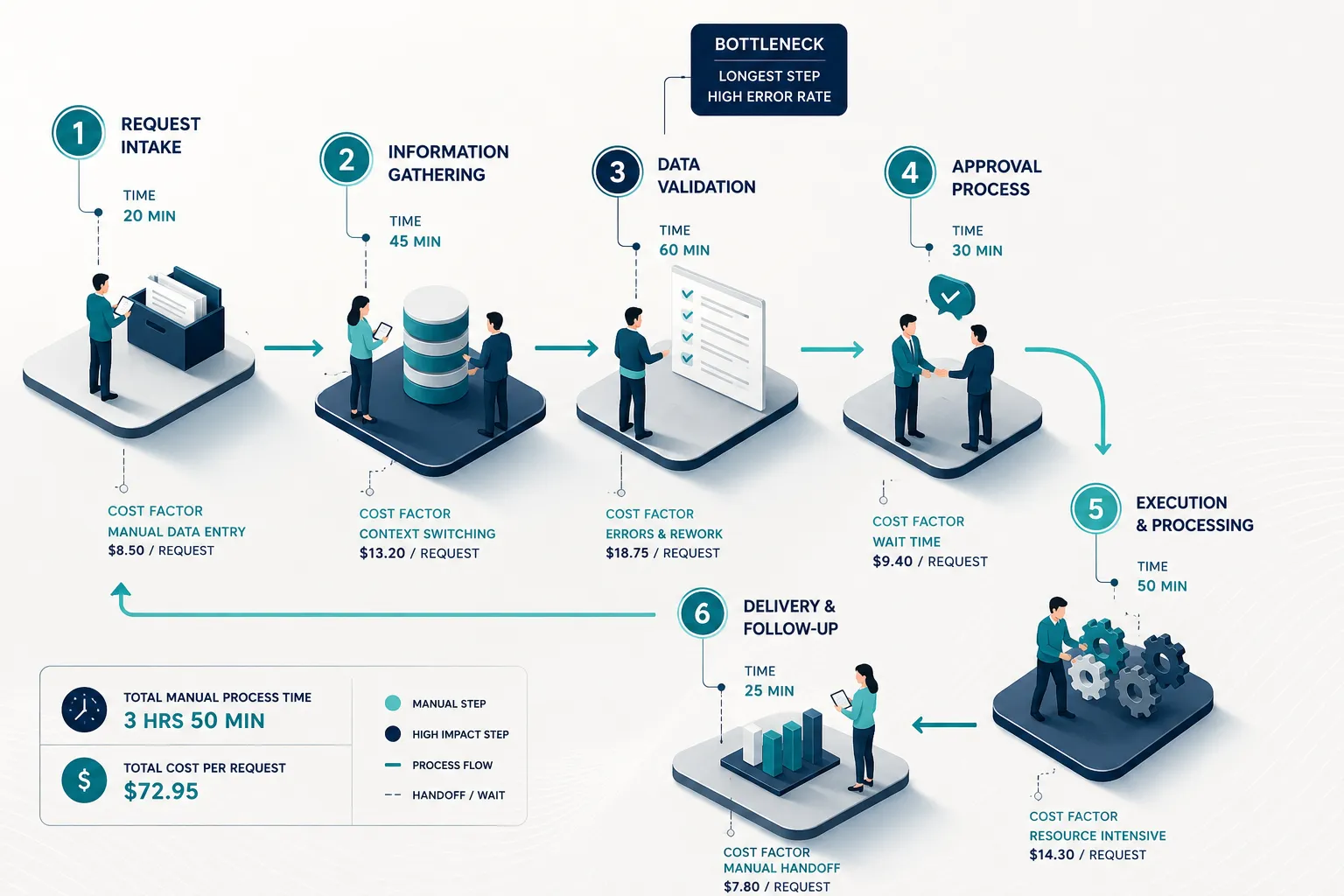
Step-by-step calculation:
- Track actual time: Have employees log time spent on the target process for 2-3 weeks
- Count frequency: Determine how often the process occurs (daily, weekly, per transaction)
- Include all participants: Account for everyone who touches the process, including review and approval steps
- Calculate true hourly cost: Use total employment cost (salary + benefits + overhead) divided by annual working hours
- Annualize the result: Multiply by 52 weeks or annual transaction volume
Example calculation:
Processing customer orders manually:
- Time per order: 25 minutes average
- Orders per week: 80
- People involved: 2 (order entry person + supervisor review)
- True hourly cost: $28 (including benefits and overhead)
Weekly cost: (25 minutes ÷ 60) × 80 orders × 2 people × $28 = $1,867
Annual cost: $1,867 × 52 weeks = $97,067
Hidden costs to include:
- Error correction: Time spent fixing mistakes, reprocessing orders, handling complaints
- Context switching: Lost productivity from employees jumping between different tasks
- Training time: Onboarding new people, refresher training, procedure updates
- Management oversight: Supervisor time spent reviewing work, handling exceptions
- Opportunity cost: What else could skilled employees accomplish with that time
This calculation gives you a baseline for evaluating automation ROI and helps prioritize which processes deliver the biggest potential savings.
Can Small Businesses Afford AI Automation
Small businesses can absolutely afford targeted AI automation, but success requires starting strategically rather than attempting comprehensive overhauls. Focus on one high-impact process rather than trying to automate everything at once.
Affordable automation approaches:
- Software-as-a-Service platforms: Monthly subscription tools like Zapier, Microsoft Power Automate, or industry-specific solutions
- Phased implementation: Automate one process completely before moving to the next
- Existing system enhancements: Add automation features to software you already use
- Template-based solutions: Leverage pre-built workflows for common business processes
Budget-conscious strategies:
Start with processes that deliver ROI within 6 months. A $500 monthly automation tool that saves 20 hours of administrative work pays for itself quickly when those hours cost $25-30 each. Many small businesses find their first automation project costs less than hiring a part-time employee for three months.
Realistic small business automation costs:
- Simple workflow automation: $50-300 monthly for tools like Zapier or Microsoft Power Automate
- Document processing: $200-800 monthly depending on volume
- CRM automation: Often included in existing CRM subscriptions
- Custom development: $5,000-25,000 for specialized processes
Industries with proven small business success:
- Professional services: Automating client onboarding, proposal generation, time tracking
- Retail: Inventory management, order processing, customer communications
- Healthcare: Appointment scheduling, insurance verification, patient reminders
- Real estate: Lead routing, document management, transaction tracking
The key is matching automation scope to your actual pain points rather than implementing technology for its own sake.
What Are Common Mistakes When Switching From Employees to Automation
The biggest mistake is treating automation as a direct employee replacement rather than a process redesign opportunity. Successful automation requires rethinking workflows, not just digitizing existing manual steps.
Critical mistakes to avoid:
Automating broken processes: Fix inefficient workflows before automating them. Automation makes bad processes fail faster and more consistently.
Ignoring change management: Employees need training on new workflows and clear communication about how automation affects their roles. Fear and resistance kill automation projects.
Over-automating initially: Start with 70-80% automation and keep humans in the loop for exceptions. Trying to automate every edge case creates complex, brittle systems.
Underestimating integration complexity: Connecting different software systems often takes longer and costs more than the automation logic itself.
Skipping process documentation: Automated processes need clear documentation for maintenance, troubleshooting, and training new team members.
Better approaches:
- Redesign first, automate second: Map out the ideal process flow before choosing automation tools
- Plan for exceptions: Design clear escalation paths when automation encounters unusual situations
- Involve affected employees: Get input from people who currently do the work – they understand nuances you might miss
- Start with pilot projects: Test automation on a subset of transactions before full implementation
- Measure and refine: Track performance metrics and continuously improve automated processes
Communication strategies:
Frame automation as eliminating tedious work so employees can focus on more interesting, valuable activities. Show how automation creates opportunities for skill development and career growth rather than threatening job security.
How Long Does It Take to See Savings From Automation
Savings timelines vary significantly based on process complexity, implementation approach, and current labor costs, but most businesses see measurable results within 3-6 months of going live with their automation.

Typical timeline phases:
Months 1-2: Planning and development
- Process analysis and workflow design
- System integration and testing
- Employee training and change management
- No savings yet, but foundation being built
Months 3-4: Initial implementation
- Pilot testing with subset of transactions
- Refinement based on real-world performance
- Gradual rollout to full volume
- First measurable time savings appear
Months 5-8: Optimization and scaling
- Process refinements and efficiency improvements
- Full volume automation running smoothly
- Significant labor hour reductions realized
- ROI becomes clearly positive
Months 9-12: Maturation and expansion
- Automated processes running independently
- Maximum efficiency gains achieved
- Planning for additional automation projects
- Compounding benefits from freed-up employee time
Factors that accelerate savings:
- High-frequency processes: Daily tasks show results faster than weekly ones
- Simple integrations: Fewer system connections mean quicker implementation
- Standardized inputs: Consistent data formats reduce development complexity
- Employee buy-in: Cooperative teams adopt new processes more quickly
Factors that delay savings:
- Complex business rules: Processes with many exceptions take longer to perfect
- Multiple system integrations: Each additional connection adds complexity
- Regulatory requirements: Compliance considerations slow development and testing
- Change resistance: Reluctant employees slow adoption and optimization
The key is setting realistic expectations and measuring progress in phases rather than expecting immediate dramatic changes.
What Processes Aren’t Worth Automating
Avoid automating processes that require significant human judgment, involve highly variable inputs, or occur infrequently. The cost and complexity of automation only make sense when applied to predictable, high-volume work.
Poor automation candidates:
Creative and strategic work: Marketing strategy, product development, business planning, and creative design require human insight and adaptation.
Relationship-intensive activities: Sales conversations, customer service for complex issues, team management, and client relationship building depend on human connection.
Exception-heavy processes: Work where every case is different or requires unique handling creates automation systems so complex they become unreliable.
Infrequent tasks: Processes performed monthly or less often rarely justify automation development costs.
Highly regulated decisions: Work requiring professional judgment, legal interpretation, or regulatory compliance often must remain human-controlled.
Physical or location-specific work: On-site services, hands-on manufacturing, travel-dependent activities, and physical inspections can’t be automated with software alone.
Evaluation questions:
- Does this process follow the same steps 80% of the time?
- Can the decision-making criteria be clearly defined?
- Is the work performed at least weekly?
- Would mistakes be easily caught and corrected?
- Are the inputs standardized and predictable?
If you answer “no” to most of these questions, focus your automation efforts elsewhere.
Better alternatives for unsuitable processes:
- Process improvement: Streamline workflows without full automation
- Partial automation: Automate data gathering while keeping human decision-making
- Better tools: Upgrade software to reduce manual work without full automation
- Training and templates: Standardize approaches through documentation and training
Do I Need to Replace All Employees With Automation
Absolutely not. The most successful automation strategies focus on eliminating repetitive tasks so employees can spend time on higher-value work that requires human skills like relationship building, problem-solving, and strategic thinking.
The augmentation approach:
Rather than replacing people, automation should augment human capabilities by handling the administrative burden that prevents employees from focusing on work that drives business growth. This creates more engaging jobs while improving business efficiency.
How roles evolve with automation:
- Administrative staff shift from data entry to analysis, customer service, and process improvement
- Sales teams spend less time on CRM updates and more time building relationships and closing deals
- Managers focus on strategy and team development instead of routine reporting and oversight
- Customer service handles complex issues and relationship management while automation manages routine inquiries
Benefits of the hybrid approach:
- Improved job satisfaction: Employees work on more interesting, challenging tasks
- Better customer experience: Human attention goes to situations that truly need personal service
- Increased scalability: Handle more volume without proportional staff increases
- Reduced turnover: More engaging work leads to better employee retention
- Competitive advantage: Freed-up human capacity enables better service and innovation
Planning workforce evolution:
When implementing automation, clearly communicate how roles will change and what new opportunities become available. Provide training for higher-value activities and involve employees in identifying automation opportunities.
Most businesses find that automation allows them to grow revenue significantly before needing additional staff, rather than reducing headcount. The goal is scaling operations more efficiently, not eliminating jobs.
How Do I Measure Automation ROI for My Business
Track both direct cost savings and indirect benefits to get a complete picture of automation ROI. Direct savings are easier to measure, but indirect benefits often provide the greatest long-term value.
Direct ROI measurements:
- Labor hours saved: Compare time spent before and after automation
- Error reduction: Calculate cost of mistakes prevented
- Processing speed: Measure throughput improvements
- Overtime elimination: Track reduced need for extra hours during busy periods
ROI calculation formula:
(Annual labor savings + error reduction savings – automation costs) ÷ automation costs × 100 = ROI percentage
Indirect benefits to track:
- Improved customer experience: Faster response times, more consistent service
- Employee satisfaction: Reduced frustration with repetitive work
- Scalability capacity: Ability to handle growth without proportional staff increases
- Data accuracy: Better reporting and decision-making from cleaner data
- Compliance improvement: Reduced risk of regulatory violations
Measurement timeline:
- Month 1-3: Baseline measurements of current process performance
- Month 4-6: Initial automation performance compared to baseline
- Month 7-12: Optimized performance and full ROI calculation
- Year 2+: Long-term benefits and compound improvements
Key metrics to track:
- Time per transaction: Before and after automation implementation
- Error rates: Mistakes requiring rework or customer service intervention
- Employee utilization: How freed-up time gets reallocated to valuable work
- Customer satisfaction: Service quality improvements from automation
- Revenue per employee: Overall productivity and efficiency gains
Realistic expectations:
Most businesses see 200-500% ROI from well-chosen automation projects within 18 months. However, the greatest value often comes from enabling growth and improving service quality rather than just cutting costs.
What Happens to Employees When You Automate Their Jobs
Smart automation eliminates tasks, not jobs. The most successful implementations redeploy employees to higher-value activities that drive business growth and improve customer experience.
Typical role transitions:
From data entry to analysis: Instead of inputting numbers, employees interpret trends, identify opportunities, and make recommendations based on automated data collection.
From routine processing to exception handling: Employees focus on complex cases that require judgment while automation handles straightforward transactions.
From administrative work to customer service: Time previously spent on paperwork gets redirected to building relationships and solving customer problems.
From manual reporting to strategic planning: Automated reports free employees to analyze results and develop improvement strategies.
Change management strategies:
- Early communication: Explain automation goals and how roles will evolve before implementation begins
- Skill development: Provide training for new responsibilities and higher-value activities
- Gradual transition: Phase in automation while employees learn new skills and responsibilities
- Clear career paths: Show how automation creates opportunities for advancement and more interesting work
Employee benefits from automation:
- Reduced repetitive work: Less boring, mind-numbing tasks
- Skill development opportunities: Training for analysis, customer service, and strategic work
- Improved work-life balance: Less overtime and rush work during busy periods
- Career advancement: Higher-value skills lead to better opportunities and compensation
- Job security: More efficient operations create competitive advantages that protect employment
Industries with successful transitions:
- Banking: Tellers became customer relationship specialists
- Manufacturing: Quality inspectors became process improvement analysts
- Healthcare: Administrative staff became patient experience coordinators
- Accounting: Bookkeepers became financial analysts and client advisors
The key is viewing automation as workforce development rather than workforce reduction.
Which AI Automation Tools Are Most Cost-Effective for Small Business
Start with established platforms that offer pre-built integrations and don’t require custom development. These tools provide the fastest path to ROI while teaching your team how automation works.
Top cost-effective platforms:
Zapier: Connects over 5,000 apps with simple trigger-action workflows. Plans start at $20 monthly and handle most common business process automation needs without programming.
Microsoft Power Automate: Included with many Office 365 subscriptions. Excellent for businesses already using Microsoft tools, with strong document processing and approval workflows.
Monday.com automations: Built into project management platform. Good for teams already using Monday for workflow management, with automation features included in standard plans.
HubSpot workflows: Free and paid automation features for marketing, sales, and customer service. Particularly strong for businesses focused on lead management and customer communications.
Industry-specific solutions:
- Accounting: QuickBooks and Xero offer built-in automation for invoicing, expense tracking, and financial reporting
- E-commerce: Shopify, WooCommerce automation apps for order processing and inventory management
- Healthcare: Practice management systems with automated appointment scheduling and patient communications
- Real estate: CRM platforms with automated lead routing and transaction management
Selection criteria:
- Integration capability: Works with your existing software stack
- Ease of use: Non-technical team members can create and modify workflows
- Scalable pricing: Costs grow reasonably with usage volume
- Reliable support: Good documentation and customer service
- Security standards: Meets your industry’s data protection requirements
Implementation approach:
Start with one platform and master it before adding others. Most small businesses get better results from fully utilizing one automation tool than partially implementing multiple solutions.
Focus on platforms that offer free trials or low-cost starter plans so you can test effectiveness before committing to annual contracts.
Conclusion
The decision between AI automation and hiring comes down to understanding what type of work is driving your growth. If increasing volume means more data entry, document processing, and administrative tasks, automation likely delivers better ROI than adding staff. If growth requires more relationship building, strategic thinking, and complex problem-solving, hiring remains the right choice.
The strongest approach combines both strategies: automate repetitive, rules-based work so your team can focus on activities that actually require human judgment and creativity. This creates more engaging jobs while building scalable operations that don’t require proportional increases in overhead.
Start by calculating the true cost of your current manual processes, then identify one high-frequency administrative bottleneck that consumes significant time across multiple people. That becomes your first automation project and your proof of concept for larger initiatives.
Before adding another employee to handle repetitive work, identify how much of that workload could be automated. Talk with AlphaCIS about an AI automation assessment to uncover processes where automation could save time, reduce manual work, and improve scalability.