What Is Microsoft 365 and How Does It Help Manufacturing Companies
Microsoft 365 for manufacturing is a cloud-based productivity platform that connects your entire operation from the executive suite to the factory floor. Unlike traditional office software, it creates a unified digital workplace where production teams, quality managers, maintenance staff, and corporate employees can collaborate seamlessly in real-time.
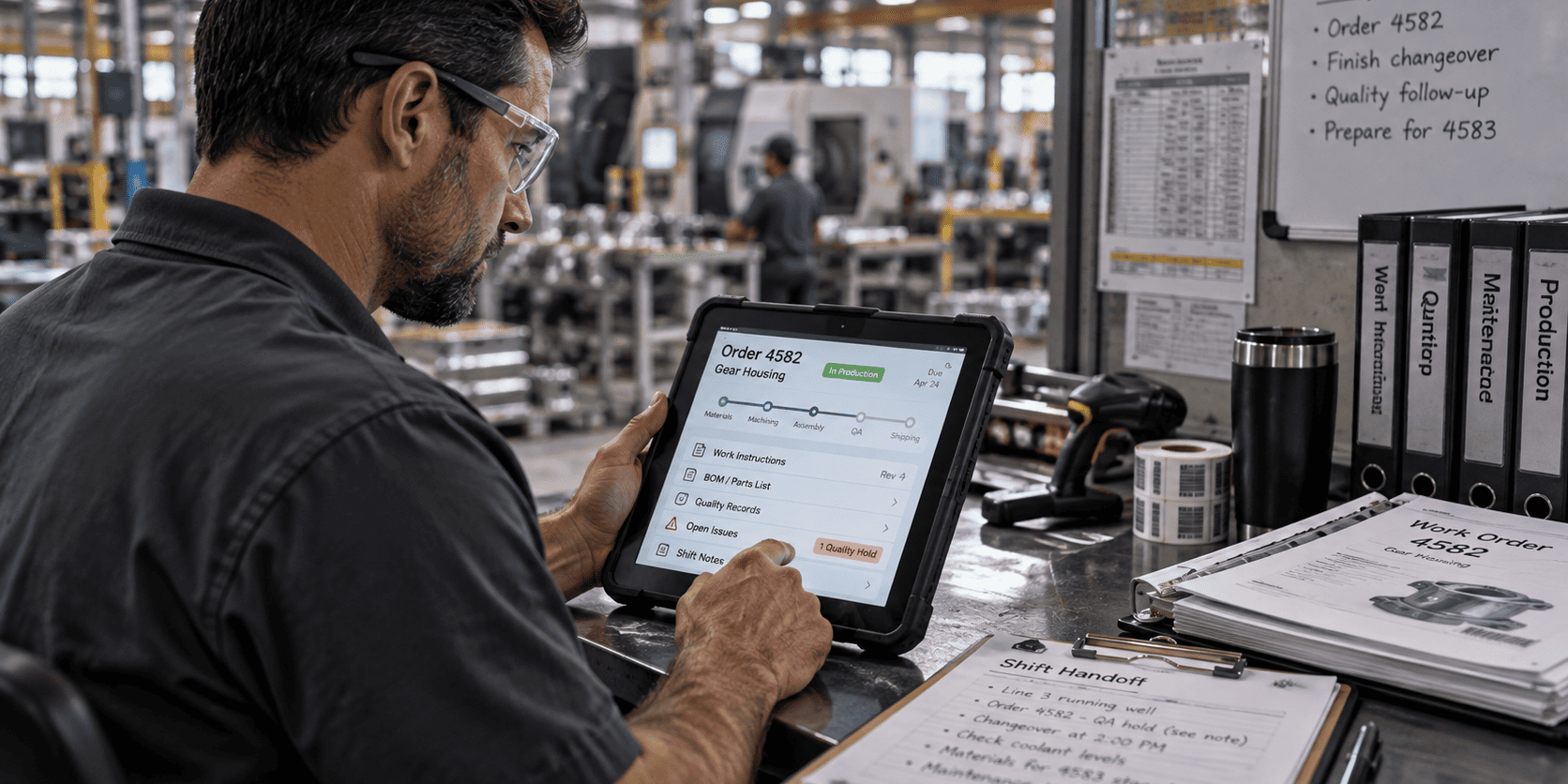
Manufacturing companies face unique challenges that generic business software can’t address. Your frontline workers need mobile access to safety procedures while wearing gloves. Your quality team needs instant access to the latest inspection checklists. Your maintenance crew needs to report equipment issues without leaving the production floor. Microsoft 365 collaboration solves these problems with purpose-built tools.
The platform includes several key applications that work together:
- Microsoft Teams connects workers across shifts and locations with chat, video calls, and file sharing
- SharePoint centralizes documents, procedures, and quality records with automatic version control
- Power BI turns your production data into visual dashboards and alerts
- Power Automate eliminates repetitive tasks like approval workflows and status updates
- OneDrive provides secure file storage accessible from any device
- Office apps (Word, Excel, PowerPoint) work seamlessly with manufacturing-specific templates
The real power comes from integration. When a quality issue occurs, Teams can instantly notify the right people, SharePoint provides access to corrective action procedures, Power BI tracks the impact on production metrics, and Power Automate routes the incident through your approval process automatically.
Choose Microsoft 365 for manufacturing if you have more than 10 employees, need better communication between office and production teams, or want to digitize paper-based processes. Avoid it if you’re a single-location shop with fewer than 5 employees where everyone works in the same room.
How Does Microsoft Teams Improve Communication on the Factory Floor
Microsoft Teams for manufacturing transforms how production teams communicate by replacing walkie-talkies, paper logs, and scattered phone calls with a unified communication platform. Frontline workers get mobile apps designed for industrial environments, while managers gain visibility into real-time operations without disrupting production flow.
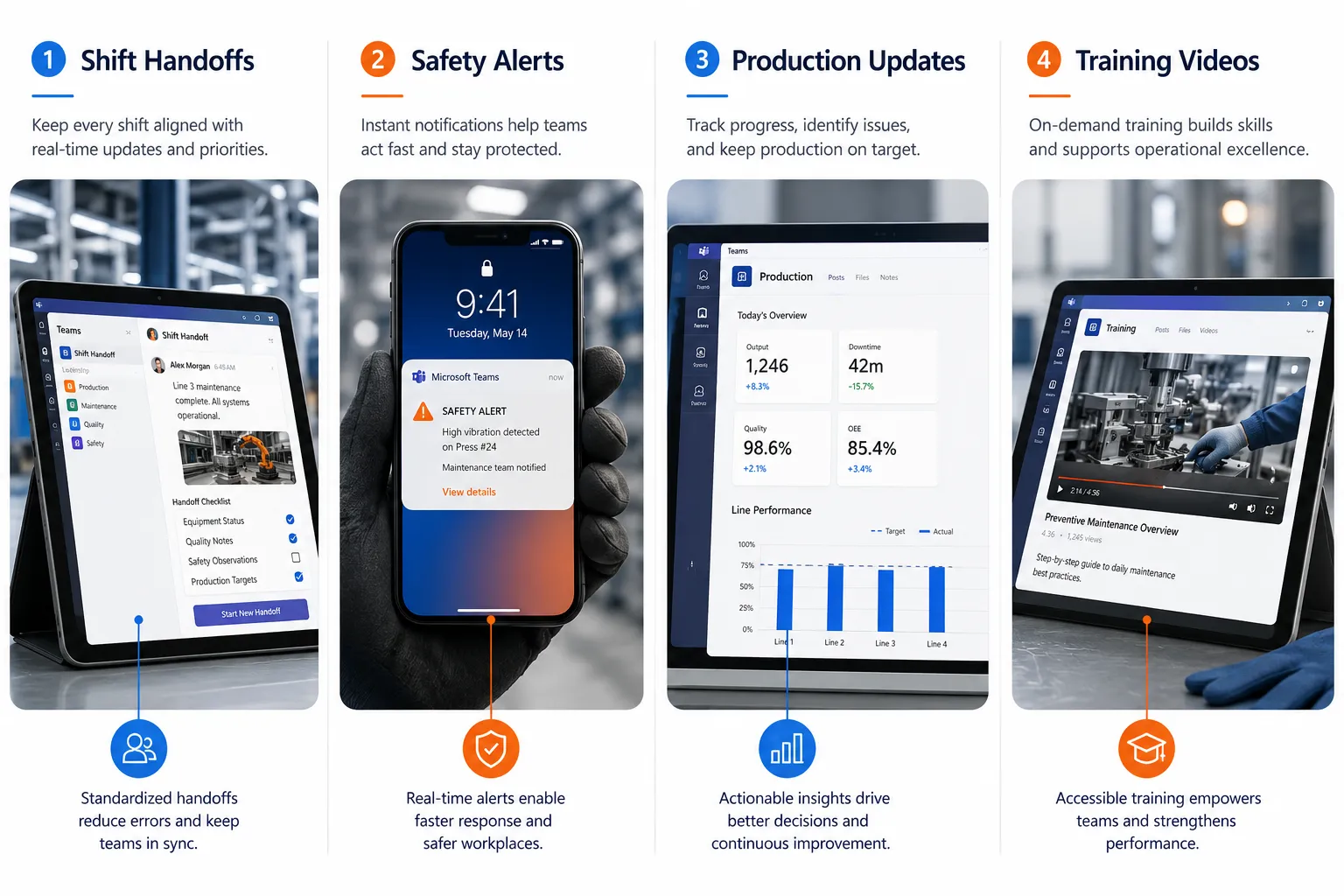
The platform addresses the most common manufacturing communication problems. Shift handoffs become seamless when the outgoing team posts updates, photos, and priority items directly in Teams channels. Instead of hoping the next shift reads handwritten notes, critical information gets delivered instantly with read receipts and acknowledgments.
Safety incidents get reported immediately through Teams mobile apps. Workers can take photos, record voice messages, and notify supervisors without leaving their workstation. The safety team receives instant alerts and can coordinate response efforts through group chats and video calls.
Production updates flow automatically through dedicated channels. When equipment goes down, the maintenance team gets notified immediately with photos and descriptions. Quality issues get escalated to engineers with real-time data and visual documentation. Management stays informed without micromanaging through dashboard views and automated summaries.
Teams handles the unique needs of manufacturing environments:
- Walkie-talkie feature works through smartphones and tablets for instant voice communication
- Offline message sync ensures critical information reaches workers even with spotty WiFi
- Shift scheduling integration shows who’s on duty and routes messages to the right people
- File sharing lets workers access updated procedures, drawings, and safety documents instantly
- Video calling connects remote experts with on-site teams for troubleshooting
Common mistake: Trying to replace all existing communication methods at once. Start with one use case like shift handoffs or safety reporting, then expand as teams get comfortable with the platform.
The key benefit is eliminating information silos. When production, quality, maintenance, and management all use the same communication platform, problems get solved faster, and nothing falls through the cracks.
What Are the Benefits of SharePoint for Managing Manufacturing Documents
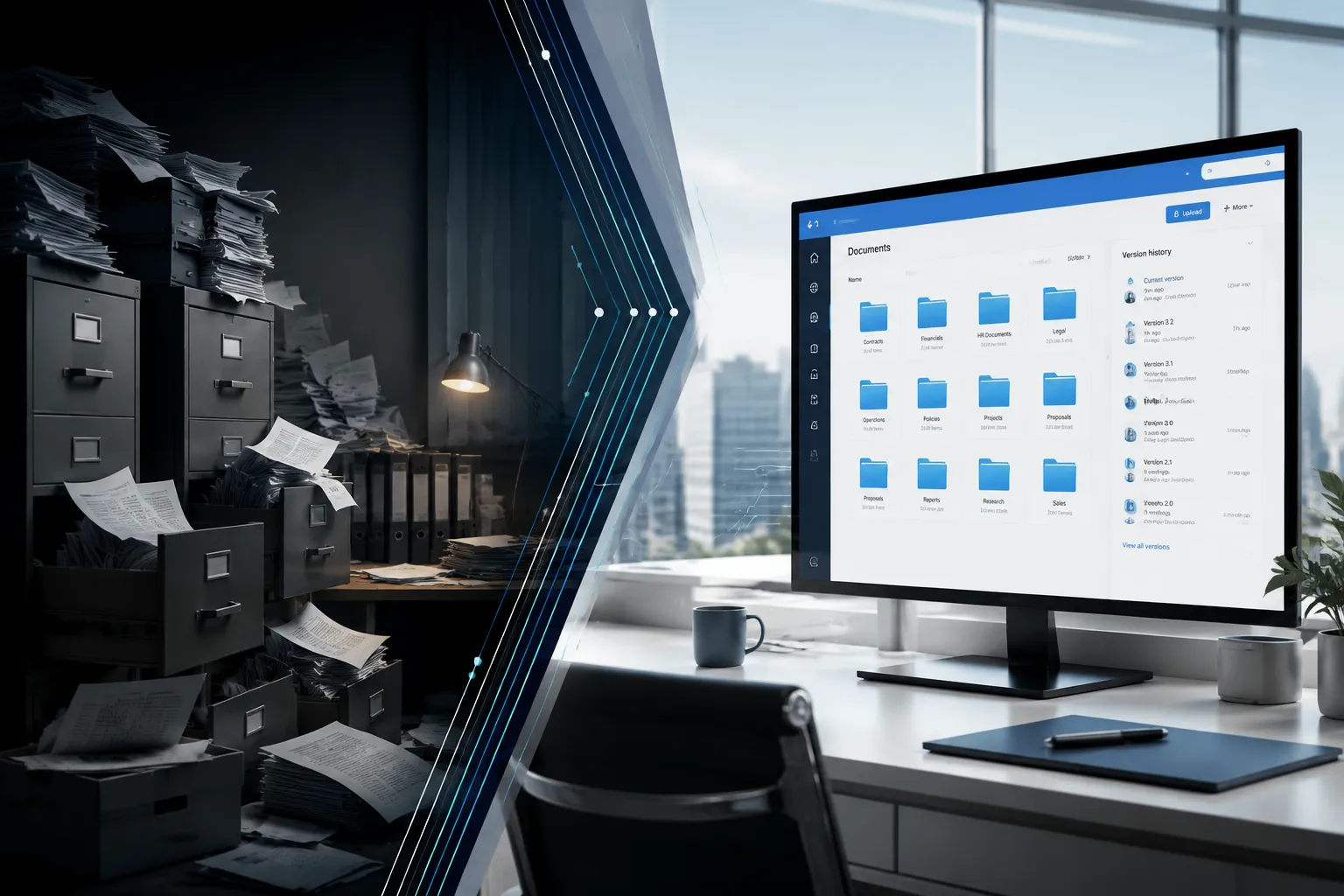
SharePoint for manufacturing eliminates the chaos of outdated procedures, lost documents, and version confusion that plague many production facilities. Manufacturing document management through SharePoint ensures everyone accesses current standard operating procedures, quality checklists, and safety protocols while maintaining complete audit trails for compliance requirements.
Traditional manufacturing document control creates serious problems. Workers might follow outdated procedures because someone printed an old version. Quality auditors can’t find the documents they need. Engineers waste time searching through network drives for the latest drawings. SharePoint solves these issues with centralized, controlled document libraries.
Version control happens automatically. When your quality manager updates an inspection checklist, SharePoint retires the old version and notifies relevant teams about changes. Workers always see the current procedure, and you maintain complete revision history for audits. No more wondering if someone is following an outdated process.
Document approval workflows ensure quality and compliance. New procedures route through the appropriate reviewers automatically. Changes require proper authorization before publication. Expired documents get flagged for review. Your quality system stays current without manual tracking.
SharePoint manufacturing features include:
- Document libraries organized by department, product line, or process area
- Metadata tagging for easy searching by part number, procedure type, or equipment
- Mobile access so frontline workers can view procedures on tablets and smartphones
- Integration with Teams for discussing documents and sharing updates
- Audit trails showing who accessed what documents and when
- Automated notifications when documents are updated or require review
Permission controls ensure sensitive information stays secure. Production workers see safety procedures and work instructions but not financial documents. Suppliers access only the specifications relevant to their parts. Auditors get read-only access to quality records.
The platform handles manufacturing-specific document types effectively. Engineering drawings sync with CAD systems. Quality procedures link to inspection data. Maintenance manuals integrate with work order systems. Training materials connect to certification tracking.
Choose SharePoint if you have compliance requirements, multiple locations, or struggle with document version control. Skip it if you’re a small shop with simple procedures that rarely change.
How Can Power BI Help Track Manufacturing Metrics and Production Data
Power BI manufacturing transforms raw production data into visual dashboards that help managers make informed decisions quickly. Instead of waiting for end-of-shift reports or manually calculating efficiency metrics, manufacturing teams get real-time insights into production performance, quality trends, and equipment effectiveness.
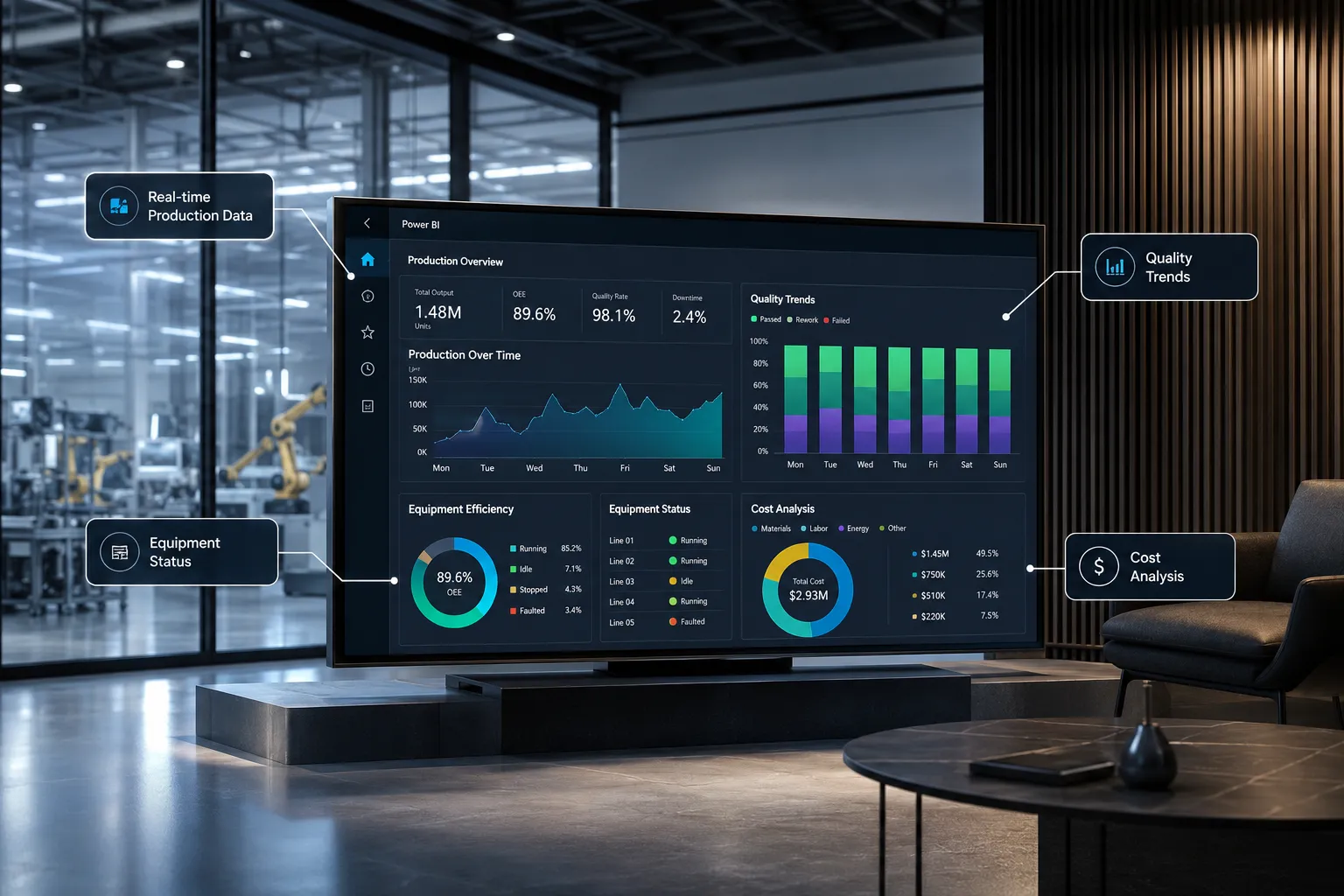
The platform connects to your existing manufacturing systems without disrupting operations. Whether you use MES software, SCADA systems, or simple Excel tracking, Power BI pulls data automatically and presents it in easy-to-understand charts and graphs. Production managers can spot problems before they become costly issues.
Real-time production monitoring shows current output rates, quality metrics, and equipment status on large displays throughout the facility. Workers see how their performance compares to targets. Supervisors identify bottlenecks immediately. Management tracks KPIs without interrupting production flow.
Key manufacturing metrics Power BI tracks effectively:
- Overall Equipment Effectiveness (OEE) with availability, performance, and quality components
- Production rates by line, shift, and product with trend analysis
- Quality metrics including defect rates, first-pass yield, and customer complaints
- Inventory levels with automatic reorder alerts and supplier performance tracking
- Energy consumption patterns to identify efficiency opportunities
- Maintenance costs and equipment reliability trends
Predictive analytics help prevent problems before they occur. Power BI analyzes historical patterns to predict when equipment might fail, when quality issues are likely to emerge, or when production bottlenecks will develop. This proactive approach reduces unplanned downtime and improves overall efficiency.
The platform makes complex data accessible to everyone. Plant managers get executive dashboards showing high-level KPIs. Production supervisors see detailed line performance. Maintenance teams focus on equipment health metrics. Quality managers track defect trends and customer satisfaction.
Mobile dashboards keep managers connected to operations even when they’re not on-site. Critical alerts push to smartphones when production falls behind schedule or quality issues emerge. Remote monitoring capabilities provide peace of mind during off-hours.
Common mistake: Trying to track everything at once. Start with 3-5 key metrics that directly impact your business goals, then expand the dashboard as users become comfortable with the platform.
Power BI integrates seamlessly with other Microsoft 365 manufacturing tools. Teams notifications can include dashboard snapshots. SharePoint documents link to relevant performance data. Power Automate triggers actions based on metric thresholds.
What Does Power Automate Do for Manufacturing Workflows
Power Automate for manufacturing eliminates repetitive manual processes that slow down operations and create opportunities for errors. Manufacturing workflows like purchase approvals, quality notifications, maintenance requests, and compliance reporting happen automatically, freeing your team to focus on value-added activities instead of paperwork.
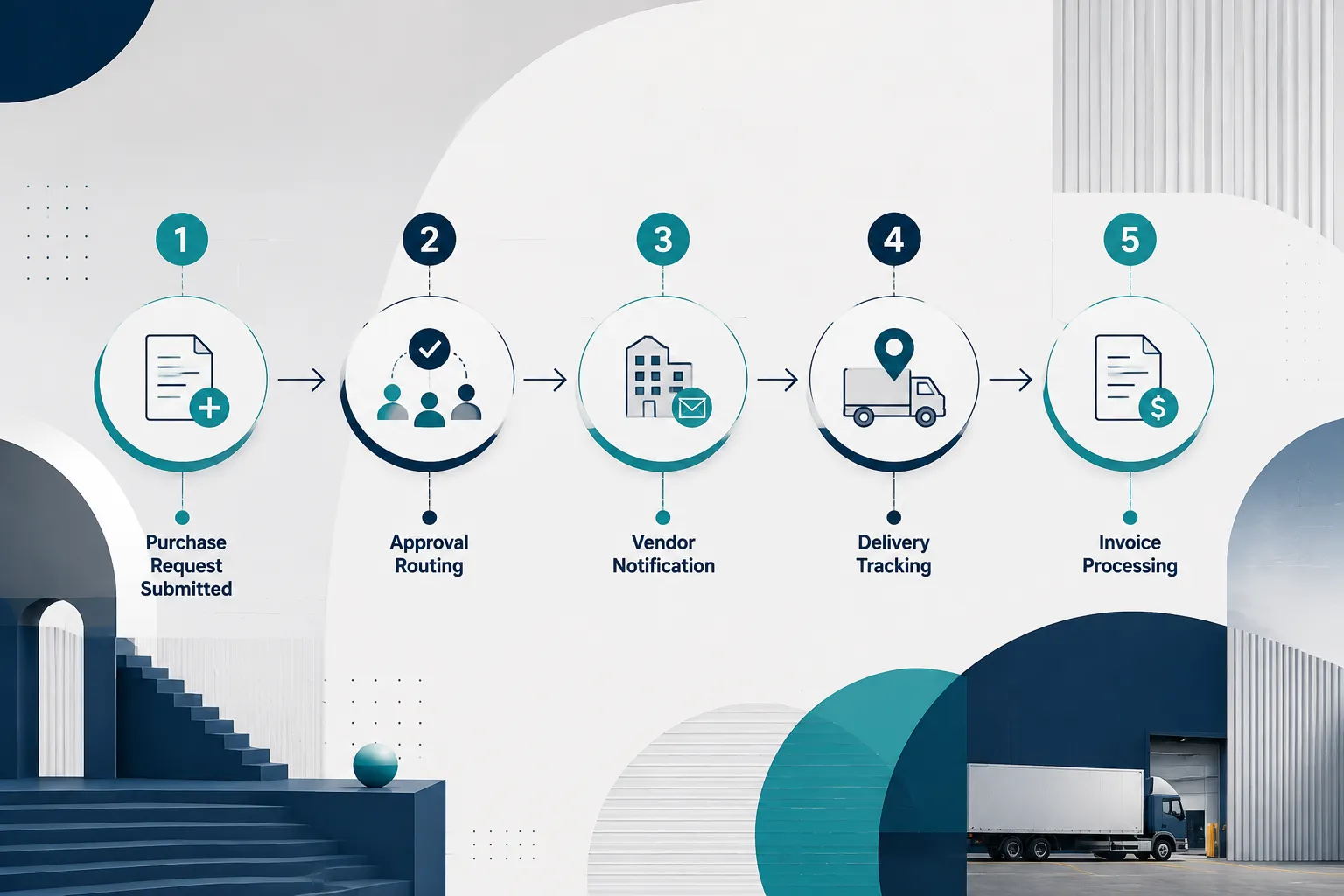
Manufacturing operations involve countless routine tasks that consume time without adding value. Someone needs to route purchase requests through multiple approvers. Quality issues require notifications to various stakeholders. Maintenance work orders need scheduling and tracking. Compliance reports demand regular compilation and distribution. Power Automate handles these processes automatically.
Purchase approval workflows speed up procurement while maintaining proper controls. When a supervisor submits a purchase request, Power Automate routes it to the appropriate approver based on amount, category, and budget availability. Approved requests automatically generate purchase orders and notify suppliers. The requesting department gets status updates without manual follow-up.
Quality incident management becomes seamless and traceable. When workers report quality issues through Teams, Power Automate creates incident records, notifies quality managers, assigns investigation tasks, and tracks corrective actions through completion. Root cause analysis reports are generated automatically with all relevant data compiled.
Common manufacturing workflows Power Automate handles:
- Maintenance requests from equipment issues to work order completion with automatic scheduling
- Inventory alerts when stock levels hit reorder points with supplier notifications
- Employee onboarding, including safety training assignments and access provisioning
- Document approvals for procedures, specifications, and quality records
- Compliance reporting with automatic data collection and regulatory submissions
- Customer notifications for order status, quality issues, and delivery updates
Integration capabilities connect Power Automate with your existing systems. ERP systems trigger workflows when inventory drops. MES data automatically updates production dashboards. Quality management systems generate corrective action tasks. The platform works with your current technology investment.
Conditional logic ensures workflows adapt to different situations. High-value purchases require additional approvals. Critical quality issues escalate faster than minor problems. Maintenance requests route differently for production equipment versus office systems. The automation handles complexity without human intervention.
Audit trails track every step for compliance and improvement purposes. You can see exactly when approvals occurred, who was notified, and what actions were taken. This visibility helps identify bottlenecks and optimize processes over time.
Start small with one simple workflow like maintenance requests or document approvals. Once your team sees the benefits, expand to more complex processes. The platform grows with your needs without requiring technical expertise.
How Much Does Microsoft 365 Cost for a Manufacturing Business
Microsoft 365 manufacturing costs range from $6 to $57 per user per month depending on the features your operation needs. Most manufacturing companies find the Business Premium plan at $22 per user monthly provides the best value, including all core applications plus advanced security features essential for protecting sensitive production data.
Frontline Worker licenses cost significantly less at $2.25-$8.25 per user monthly for production employees who primarily need mobile access to Teams, SharePoint documents, and basic Office apps. This pricing structure makes it affordable to include your entire workforce, not just office staff.
The total monthly cost depends on your user mix:
- Office workers (managers, engineers, sales): Business Premium at $22/month
- Frontline workers (production, maintenance, quality): F3 license at $8.25/month
- Executives requiring advanced features: E3 or E5 at $36-$57/month
For a typical 50-person manufacturing company with 35 frontline workers and 15 office staff, monthly costs would be approximately $619 ($288 for frontline + $330 for office workers). This includes all applications, cloud storage, and security features.
Additional costs to consider:
- Implementation services typically run $5,000-$15,000 for professional setup and training
- Third-party integrations with MES or ERP systems may require custom development
- Advanced security features like device management add $2-$8 per user monthly
- Power Platform usage beyond included limits costs extra for complex automation
ROI typically appears within 6-12 months through reduced downtime, improved efficiency, and eliminated manual processes. One mid-sized manufacturer reported saving $2,400 monthly by automating their quality incident workflow alone.
Small manufacturers (5-20 employees) often start with Business Standard at $12.50 per user monthly, then upgrade as they grow. Large manufacturers (500+ employees) usually need Enterprise licenses for advanced compliance and security features.
Common mistake: Buying too many licenses initially. Start with core users who will drive adoption, then expand as the platform proves its value. Microsoft allows easy scaling up or down monthly.
Nonprofit manufacturers qualify for significant discounts, sometimes up to 75% off standard pricing. Multi-year commitments provide additional savings but reduce flexibility for growing companies.
Can Microsoft 365 Work with Legacy Manufacturing Systems
Microsoft 365 integrates effectively with most legacy manufacturing systems through built-in connectors, APIs, and third-party integration platforms. Your existing ERP, MES, SCADA, and quality management systems can share data with Microsoft 365 without requiring expensive replacements or major system overhauls.
Pre-built connectors handle common manufacturing systems like SAP, Oracle, Rockwell Automation, and Wonderware. Power Platform includes hundreds of connectors that link directly to popular industrial software. Data flows automatically between systems without custom programming in most cases.
API integration works with virtually any system that can export data. Even older systems without modern APIs can connect through database queries, file exports, or web services. The integration typically requires some technical setup but doesn’t disrupt existing operations.
Integration approaches that work well:
- Data synchronization between ERP inventory and SharePoint documents
- Production data from MES systems feeding Power BI dashboards
- Quality records from inspection systems creating Teams notifications
- Maintenance schedules from CMMS triggering Power Automate workflows
- Customer orders from ERP generating collaborative project spaces in Teams
Real-time integration happens through modern APIs and web services. Batch integration works for older systems through scheduled file transfers or database queries. Both approaches provide value depending on your specific needs and system capabilities.
Common integration challenges include data format differences, security requirements, and network connectivity. Most issues resolve through proper planning and experienced implementation partners. The key is starting with simple integrations and expanding complexity gradually.
Legacy system benefits actually increase with Microsoft 365 integration. Your existing MES might lack mobile access, but Teams provides smartphone connectivity. Your ERP might have poor reporting, but Power BI creates better dashboards. Your quality system might lack collaboration features, but SharePoint adds document sharing.
Security considerations require careful planning when connecting cloud and on-premises systems. Microsoft provides extensive security tools and compliance certifications, but your IT team needs to configure connections properly.
Start with read-only integrations that pull data from legacy systems into Microsoft 365 dashboards and reports. Once you’re comfortable with the setup, add write-back capabilities for updating records and triggering actions in your existing systems.
What’s the Difference Between Microsoft 365 and Just Using Email for Manufacturing Teams
Microsoft 365 manufacturing provides structured collaboration, real-time communication, and integrated workflows that email simply cannot match. While email works for simple messages, manufacturing operations need instant communication, document sharing, mobile access, and automated processes that traditional email systems don’t support effectively.
Email limitations become obvious in manufacturing environments. Important messages get buried in crowded inboxes. File attachments create version confusion when multiple people edit documents. Group conversations become unwieldy threads that are hard to follow. Mobile access is limited and clunky for frontline workers.
Microsoft Teams replaces email chaos with organized channels for different topics. The maintenance team has their own space for equipment discussions. Quality issues get their own channel with relevant stakeholders. Shift handoffs happen in dedicated areas where information stays organized and searchable.
Key differences that matter for manufacturing:
- Real-time communication through chat and voice instead of delayed email exchanges
- File collaboration with live editing and automatic version control versus email attachments
- Mobile-first design for frontline workers instead of desktop-focused email clients
- Integration capabilities connecting production data and workflows versus isolated email messages
- Search functionality across all conversations and files instead of individual email searches
- Persistent conversations that new team members can review versus private email threads
Document management through SharePoint eliminates email attachment problems. Instead of sending procedure updates through email, workers access current versions directly from mobile devices. Changes get tracked automatically with approval workflows and notification systems.
Automated workflows through Power Automate replace email-based approval processes. Purchase requests route through proper channels automatically. Quality incidents trigger appropriate responses without manual email coordination. Status updates happen automatically instead of requiring reminder emails.
Security and compliance features exceed typical email capabilities. You can control who accesses sensitive manufacturing data, track document usage for audits, and ensure communications meet regulatory requirements. Email lacks these sophisticated controls.
Training requirements are minimal since most people already understand chat and file-sharing concepts. The learning curve is much gentler than implementing complex manufacturing software systems.
Cost comparison often favors Microsoft 365 when you consider the full value. While email might seem cheaper, the productivity gains, reduced errors, and improved efficiency typically justify the investment within months.
How Do Frontline Workers Access Microsoft 365 on the Production Floor
Frontline communication in manufacturing through Microsoft 365 uses mobile apps, tablets, and kiosks designed specifically for industrial environments. Production workers access Teams, SharePoint documents, and workflows through touch-friendly interfaces that work with gloves, resist moisture, and function reliably in challenging manufacturing conditions.
Mobile apps provide the primary access method for frontline workers. The Teams mobile app includes walkie-talkie functionality, camera integration for incident reporting, and offline message sync for areas with poor connectivity. Workers can communicate instantly without leaving their workstations or removing safety equipment.
Rugged tablets mounted near workstations give teams easy access to procedures, quality checklists, and communication tools. These industrial-grade devices withstand dust, vibration, and temperature extremes common in manufacturing environments. Touch screens work with work gloves, and bright displays remain visible in various lighting conditions.
Shared kiosks work well for areas where individual devices aren’t practical. Multiple workers can access the same terminal for shift handoffs, safety briefings, and procedure updates. Single sign-on capabilities make login quick and secure without compromising access controls.
Access methods that work in manufacturing:
- Smartphones with protective cases for individual workers who move around frequently
- Mounted tablets at workstations for accessing procedures and reporting issues
- Large displays showing real-time dashboards and team communications
- Voice commands through headsets for hands-free communication in noisy environments
- QR codes linking to specific procedures or work instructions
- Offline sync ensuring access to critical information during connectivity issues
Security controls ensure only authorized workers access sensitive information. Biometric login, badge readers, and PIN codes provide secure authentication without creating barriers to quick access. Device management policies protect company data while allowing necessary functionality.
Simplified interfaces focus on essential functions rather than overwhelming frontline workers with complex features. Custom apps built on Power Platform can create task-specific interfaces that integrate seamlessly with Microsoft 365 while presenting only relevant options.
Training approaches work best when they’re hands-on and job-specific. Instead of generic computer training, focus on how workers will use the tools for their specific tasks, like reporting safety issues or accessing work instructions.
Network requirements need careful planning for reliable access throughout the facility. WiFi coverage, cellular boosters, and offline capabilities ensure workers stay connected even in challenging RF environments like metal buildings or areas with heavy machinery.
Is Microsoft 365 Secure Enough for Sensitive Manufacturing Data
Secure collaboration in manufacturing through Microsoft 365 meets or exceeds the security requirements of most manufacturing operations, including those with strict compliance needs. The platform provides enterprise-grade security controls, data encryption, and compliance certifications that protect sensitive manufacturing data, intellectual property, and customer information effectively.
Data encryption protects information both in transit and at rest using industry-standard AES-256 encryption. Your manufacturing documents, production data, and communications remain secure whether stored in the cloud or transmitted between devices. Even if someone intercepts the data, they cannot read it without proper decryption keys.
Access controls ensure only authorized personnel see sensitive information. You can restrict engineering drawings to design teams, limit financial data to management, and control supplier access to relevant specifications only. Multi-factor authentication adds an extra security layer beyond passwords.
Manufacturing-specific security features include:
- Data Loss Prevention automatically detecting and blocking sharing of sensitive information
- Advanced Threat Protection scanning files and links for malware and phishing attempts
- Compliance Manager helping meet industry regulations like ITAR, FDA, and ISO requirements
- Audit logs tracking who accessed what information and when for security investigations
- Device management controlling which devices can access company data and enforcing security policies
- Geographic data residency keeping your data in specific regions to meet regulatory requirements
Compliance certifications cover major manufacturing standards including SOC 2, ISO 27001, HIPAA, and FedRAMP. If your company serves regulated industries like aerospace, medical devices, or food processing, Microsoft 365 likely meets your compliance requirements out of the box.
Intellectual property protection prevents accidental or malicious data exposure through sophisticated monitoring and controls. The platform can detect when someone tries to share proprietary designs, customer lists, or manufacturing processes inappropriately and block the action automatically.
Incident response capabilities help you react quickly if security issues occur. Automated alerts notify administrators of suspicious activities. Investigation tools help track the scope of potential breaches. Recovery features restore access and data integrity quickly.
Common security mistakes include using weak passwords, sharing accounts between workers, and not training employees on phishing recognition. The technology provides strong security, but human factors remain the weakest link in most manufacturing environments.
Third-party security assessments consistently rate Microsoft 365 among the most secure cloud platforms available. Independent auditors regularly verify security controls and compliance with international standards.
On-premises comparison often shows cloud security advantages over traditional local servers. Microsoft invests billions in security infrastructure that most manufacturers cannot match with internal IT resources.
What Are Common Mistakes Manufacturers Make When Implementing Microsoft 365
The biggest mistake manufacturers make is treating Microsoft 365 like traditional office software instead of recognizing its potential for digital transformation in manufacturing. Companies often focus only on email and document storage while ignoring powerful collaboration, automation, and analytics capabilities that could solve their most pressing operational challenges.
Rushing the rollout without proper planning creates user resistance and poor adoption. Successful implementations start with pilot groups, gather feedback, and expand gradually. Trying to migrate everyone at once overwhelms both users and IT support resources.
Ignoring frontline workers during planning leads to solutions that work well for office staff but fail on the production floor. The most valuable Microsoft 365 benefits often come from connecting frontline teams with better communication and access to information.
Common implementation mistakes include:
- Insufficient training that covers features without explaining how they solve real manufacturing problems
- Poor change management that doesn’t address worker concerns about new technology
- Inadequate network infrastructure causing slow performance and user frustration
- Generic configuration instead of customizing for manufacturing-specific workflows and requirements
- Lack of integration planning with existing MES, ERP, and quality management systems
- Weak governance leading to disorganized file structures and inconsistent usage patterns
Security oversights happen when manufacturers don’t configure access controls properly for their specific needs. Production workers might get access to financial data, or external suppliers might see more information than necessary. Proper role-based permissions prevent these issues.
Unrealistic expectations about immediate results create disappointment and reduced support from leadership. While Microsoft 365 can deliver significant benefits, digital transformation takes time and requires process changes beyond just technology deployment.
Vendor selection problems occur when manufacturers choose implementation partners without manufacturing experience. Generic IT consultants often miss industry-specific requirements and opportunities that specialized partners would identify immediately.
Measurement failures make it difficult to prove ROI and maintain executive support. Successful implementations establish baseline metrics before deployment and track improvements in communication efficiency, document access times, and process automation benefits.
Change resistance from workers who prefer existing methods requires careful management. The key is demonstrating clear benefits for individual workers, not just company-wide efficiency gains. When workers see how Microsoft 365 makes their jobs easier, adoption accelerates naturally.
Integration shortcuts that skip connecting Microsoft 365 with existing manufacturing systems limit the platform’s value significantly. The real power comes from unified workflows that span multiple systems seamlessly.
Can Small Manufacturers Benefit from Microsoft 365 or Is It Only for Large Factories
Small manufacturers often benefit more from Microsoft 365 than large factories because they lack the extensive IT infrastructure and specialized software that bigger companies already have in place. Microsoft 365 provides enterprise-level capabilities at small business prices, helping manufacturers with 5-100 employees compete more effectively without major technology investments.
Scalable pricing makes Microsoft 365 accessible for small manufacturers starting at $6 per user monthly. You can begin with basic features and add capabilities as your business grows. There’s no need to invest in expensive servers, software licenses, or dedicated IT staff to get started.
Quick implementation typically takes weeks rather than months for small manufacturers. Without complex legacy systems and extensive customization requirements, small companies can deploy Microsoft 365 faster and start seeing benefits immediately.
Small manufacturer advantages include:
- Simpler decision-making with fewer stakeholders and approval layers
- Greater flexibility to change processes and adopt new workflows quickly
- Direct communication between ownership and frontline workers for faster feedback
- Lower complexity in system integration and customization requirements
- Immediate impact from basic features like Teams communication and SharePoint document management
- Cost-effective growth as the platform scales with hiring and expansion
Competitive advantages emerge when small manufacturers use Microsoft 365 effectively. Better customer communication through Teams, professional document sharing via SharePoint, and data-driven decisions using Power BI help small companies compete against larger competitors with bigger IT budgets.
Common small manufacturer use cases include:
- Customer collaboration through shared Teams channels for project updates and file sharing
- Remote work support for sales, engineering, and administrative staff
- Quality documentation using SharePoint for ISO certification and customer audits
- Production tracking with simple Power BI dashboards and automated reporting
- Supplier communication through secure document sharing and video conferencing
Resource constraints that challenge small manufacturers actually favor cloud solutions like Microsoft 365. Instead of hiring IT staff, purchasing servers, and managing software updates, everything happens automatically in the cloud with predictable monthly costs.
Growth planning becomes easier when your technology platform scales automatically. Adding new employees means buying additional licenses rather than upgrading servers or software. New locations connect instantly without additional infrastructure investments.
Industry expertise from Microsoft partners helps small manufacturers avoid common mistakes and implement best practices from day one. Many consultants specialize in small manufacturing implementations and understand budget constraints.
Success factors for small manufacturers include starting simple, focusing on immediate pain points, and expanding capabilities gradually as the team becomes comfortable with the platform.
How Do You Set Up Microsoft 365 for a Manufacturing Plant with Remote and On-Site Workers
Setting up Microsoft 365 for mixed manufacturing teams requires careful planning to ensure seamless collaboration between office workers, production staff, remote employees, and mobile field service teams. The key is creating unified communication channels and document access while respecting the different technology needs and security requirements of each worker type.
User licensing strategy should reflect how different workers will use the platform. Office workers and remote employees typically need Business Premium licenses for full functionality. Frontline workers in production areas can use less expensive F3 licenses focused on mobile communication and document access. Field service teams need mobile-optimized features with offline capabilities.
Network infrastructure planning ensures reliable access for all locations and device types. Production areas need robust WiFi coverage that works around metal equipment and electrical interference. Remote workers need VPN access or direct cloud connectivity. Mobile workers require cellular data optimization and offline sync capabilities.
Setup considerations for mixed teams:
- Team structure with channels for different functions (production, quality, maintenance, sales) plus location-specific spaces
- SharePoint organization by department and access level with appropriate permissions for each worker type
- Security policies that balance access needs with data protection requirements
- Device management covering everything from rugged tablets to home computers
- Integration planning connecting on-site manufacturing systems with cloud-based collaboration tools
- Training programs customized for different user types and technical comfort levels
Communication workflows need to account for different schedules and availability patterns. Production workers operate on shifts, office staff work standard hours, and remote employees may be in different time zones. Automated notifications and asynchronous communication become essential for keeping everyone informed.
Document access controls ensure the right information reaches the right people regardless of location. Production workers need current procedures and safety documents. Remote sales staff need customer information and product specifications. Field service teams need maintenance manuals and troubleshooting guides.
Mobile device management becomes critical when workers use personal devices or company-provided equipment in various environments. Policies need to protect company data while allowing necessary functionality for different job roles.
Backup communication methods ensure critical operations continue during network outages or system maintenance. Production teams might need offline access to safety procedures, while remote workers need alternative ways to access customer information.
Pilot testing with representative users from each worker type helps identify issues before full deployment. Start with volunteers who are comfortable with technology and can provide constructive feedback about what works and what needs adjustment.
Ongoing support requires understanding the different ways each worker type will need help. Production workers might need quick, hands-on assistance during shifts. Remote workers might prefer self-service resources and video tutorials.
What Happens If Your Internet Goes Down on the Factory Floor with Microsoft 365
Microsoft 365 includes robust offline capabilities and mobile sync features that keep essential manufacturing operations running even during internet outages. While some features require connectivity, workers can still access critical documents, continue communications, and maintain productivity until service is restored.
Offline document access through OneDrive and SharePoint mobile apps ensures workers can view essential procedures, safety documents, and work instructions even without internet connectivity. Files sync automatically when devices connect to WiFi, so current versions are available during outages.
Teams mobile apps cache recent conversations and allow message composition offline. When connectivity returns, messages send automatically and conversation history syncs across devices. The walkie-talkie feature can work through local WiFi networks even when internet access is down.
Backup strategies that work well for manufacturing include:
- Local file servers with copies of critical documents for emergency access
- Printed backup procedures for safety-critical operations that cannot stop
- Cellular data connections as backup internet access for essential communications
- Local WiFi networks that keep internal communications working during ISP outages
- Offline-capable tablets with cached documents and procedures for production areas
- Alternative communication methods like two-way radios for immediate safety needs
Power Platform apps can include offline functionality for data collection and basic workflows. Workers can continue entering production data, quality inspections, and maintenance records that sync automatically when connectivity returns.
Critical system identification helps prioritize what needs backup connectivity versus what can wait. Safety communications and emergency procedures require immediate access, while administrative tasks and reporting can typically wait for service restoration.
Recovery procedures should be tested regularly to ensure they work when needed. Practice scenarios help identify gaps in offline capabilities and improve response times during actual outages.
Internet redundancy through multiple ISPs, cellular backup, and satellite connections provides better reliability for manufacturers who cannot afford extended downtime. The cost of redundant connectivity often pays for itself by avoiding production delays.
Local caching strategies can extend offline capabilities by storing frequently accessed information on local servers or devices. This approach works particularly well for large facilities with their own IT infrastructure.
Communication planning during outages should include methods for notifying workers about service status and expected restoration times. Clear procedures help maintain productivity and prevent confusion during connectivity issues.
Business continuity considerations extend beyond just Microsoft 365 to include all technology dependencies. Manufacturing operations often rely on multiple connected systems, and outage response should address the complete technology ecosystem.