What’s the Difference Between Cloud and On-Premise Servers?
Cloud servers run in remote data centers managed by providers like Microsoft, Amazon, or Google, while on-premise servers sit in your office and require your team to manage them. The fundamental difference lies in who owns, maintains, and controls the physical hardware.
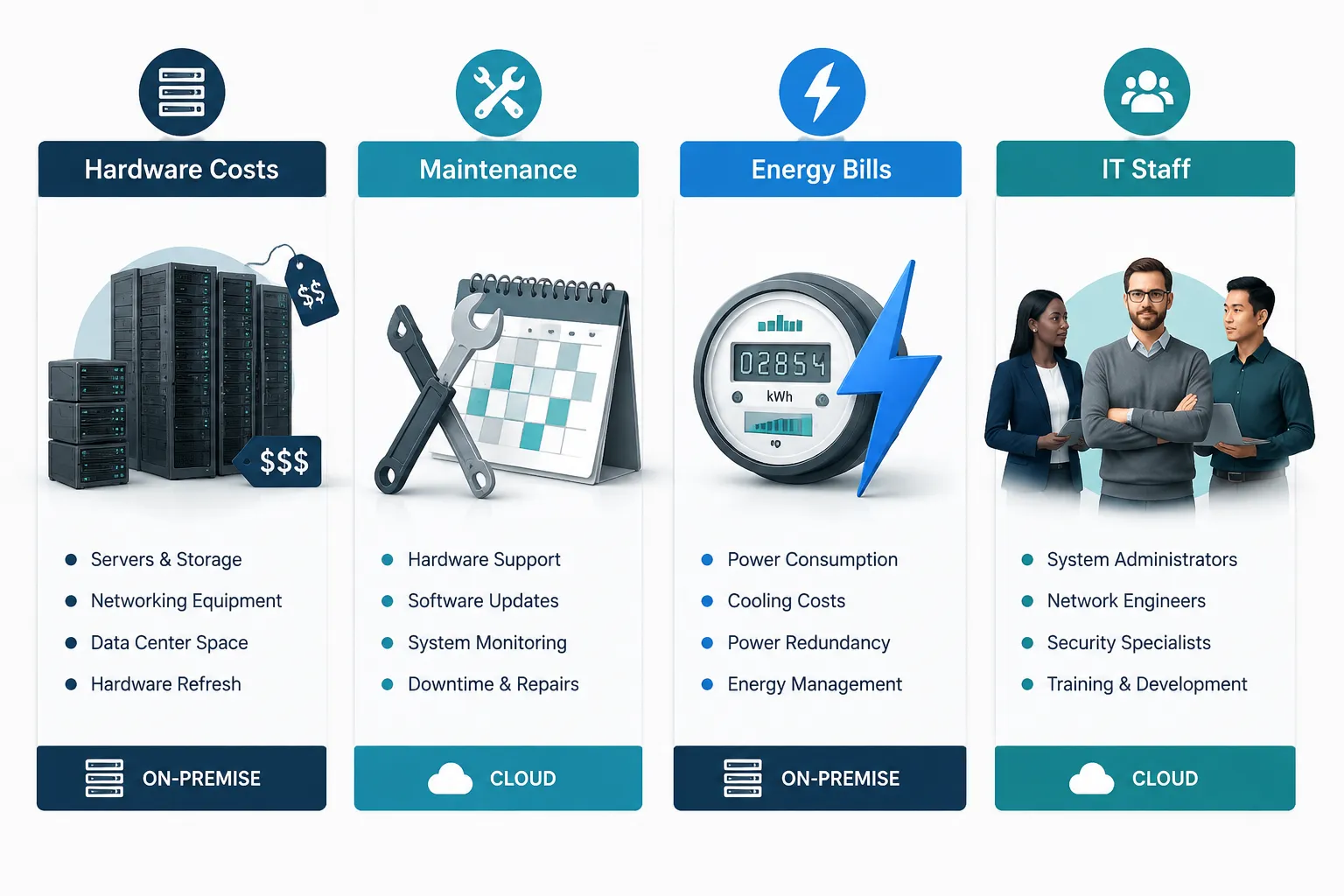
With cloud infrastructure, you’re essentially renting computing power and storage space. Your data lives on someone else’s servers, but you access it through the internet just like it’s sitting right next to your desk. You pay monthly fees based on what you use, and the cloud provider handles all the technical maintenance, security updates, and hardware replacements.
On-premises servers mean you own the physical machines. They sit in your office, server room, or data closet. Your IT team (or a local partner like us) handles everything from initial setup to daily maintenance, security patches, and eventual hardware upgrades. You control every aspect of the environment, but you’re also responsible for keeping it running smoothly.
The choice isn’t always black and white. Many of our clients in the Atlanta area use hybrid cloud infrastructure – keeping their most critical applications on local servers while using cloud services for email, file sharing, or backup storage. This approach gives you the control and performance of on-premises systems with the flexibility and disaster recovery benefits of the cloud.
Common mistake: Assuming cloud automatically means better security or lower costs. Both platforms can be equally secure and cost-effective when properly implemented for your specific business needs.
How Much Does It Cost to Run Servers On-Premise vs Cloud?
On-premise servers typically require $15,000-50,000 upfront for hardware, plus $2,000-8,000 annually for maintenance, while cloud services cost $50-500 per user monthly with no upfront investment. The total cost comparison depends on your business size, growth rate, and how long you plan to use the same infrastructure.
Breaking Down Server Infrastructure Costs
On-Premise Infrastructure Costs:
- Hardware: $15,000-50,000 for a small business server setup (3-5 year lifespan)
- Software licensing: $3,000-15,000 annually for Windows Server, SQL, and other applications
- Energy and cooling: $1,200-4,800 annually depending on equipment and local utility rates
- IT management: $2,000-8,000 annually for maintenance, updates, and monitoring
- Facility costs: Server room space, UPS systems, network equipment
Cloud Computing Costs:
- Monthly subscriptions: $50-500 per user for platforms like Microsoft Azure for business
- Storage: $0.02-0.10 per GB monthly
- Bandwidth: $0.05-0.20 per GB for data transfer
- Backup and disaster recovery: Often included in base pricing
- No hardware refresh costs: Provider handles all equipment updates
The Hidden Costs Many Businesses Miss
The real cost comparison goes beyond the obvious monthly fees or hardware prices. With on-premises servers, you’ll face unexpected expenses like emergency repairs, power outages requiring UPS systems, and the need to replace entire server setups every 3-5 years.
Cloud services include hidden costs too. Data transfer fees can add up quickly if you’re moving large files frequently. Some applications perform slower over internet connections, potentially impacting productivity. And if you ever want to move away from a cloud provider, extracting your data can be expensive and time-consuming.
Decision rule: Choose on-premises if you plan to use the same infrastructure for 4+ years and have stable user counts. Choose cloud if you’re growing rapidly, need remote access, or want predictable monthly expenses.
Is Cloud or On-Premise More Secure for Business Data?
Both cloud and on-premises infrastructure can achieve enterprise-level security when properly configured, but cloud providers typically offer more advanced security tools and monitoring that small businesses couldn’t afford to implement independently. The security advantage depends more on your IT expertise and budget than the platform choice itself.
Cloud Security Advantages
Major cloud providers like Microsoft Azure invest billions annually in security infrastructure that individual businesses could never match. They employ dedicated security teams, maintain 24/7 monitoring, and automatically apply security patches across their entire network.
Cloud security benefits:
- Automatic updates: Security patches deploy immediately without requiring your IT team’s attention
- Advanced threat detection: AI-powered monitoring identifies suspicious activity in real-time
- Compliance certifications: Providers maintain SOC 2, HIPAA, and other compliance standards
- Redundant backups: Your data exists in multiple geographic locations automatically
- Professional management: Security experts monitor your infrastructure around the clock
On-Premise Security Control
With on-premise servers, you control every security setting and access point. This means you can implement exactly the security measures your business requires, but it also means you’re responsible for getting everything right.
On-premise security benefits:
- Complete control: You decide who has access to what data and when
- Air-gapped systems: Critical data can be completely isolated from internet threats
- Custom security policies: Implement industry-specific security requirements
- No third-party access: Your data never leaves your physical control
- Immediate response: Your team can address security issues without waiting for a provider
Common mistake: Assuming on-premises is automatically more secure because you control it. Many small businesses lack the expertise to properly secure their servers, making cloud infrastructure actually safer for their specific situation.
The most secure approach for many businesses is hybrid cloud infrastructure – keeping highly sensitive data on local servers while using cloud services for less critical applications that benefit from professional security management.
Can I Switch from On-Premise to Cloud Without Losing Data?
Yes, you can migrate from on-premises to cloud infrastructure without data loss when following a proper cloud migration strategy, but the process requires careful planning and typically takes 2-8 weeks depending on your data volume and application complexity. Professional migration services ensure zero downtime and complete data integrity throughout the transition.
The Cloud Migration Process
A successful cloud migration strategy follows five key phases: assessment, planning, testing, migration, and optimization. Each phase builds on the previous one to ensure your business operations continue smoothly while your infrastructure transforms.

Phase 1: Assessment (1-2 weeks)
- Catalog all current applications, databases, and file systems
- Identify dependencies between different systems
- Evaluate which applications are cloud-ready versus those needing modification
- Calculate current resource usage and performance requirements
Phase 2: Planning (1-2 weeks)
- Choose the right cloud platform (Azure, AWS, Google Cloud) based on your needs
- Design the new cloud architecture
- Create a detailed migration timeline and rollback procedures
- Set up security policies and access controls in the cloud environment
Phase 3: Testing (1-2 weeks)
- Migrate a small subset of non-critical data first
- Test application performance and user access
- Verify backup and recovery procedures work correctly
- Train your team on the new cloud systems
What Happens to Your On-Premise Servers?
During migration, your on-premises servers continue running your business while we gradually move applications and data to the cloud. This parallel approach means you always have a working system – there’s no “big switch” moment where everything suddenly changes.
Migration timeline for a typical small business:
- Week 1-2: Assessment and cloud environment setup
- Week 3-4: Migrate file storage and email systems
- Week 5-6: Move business applications and databases
- Week 7-8: Final testing and decommission old servers
Once migration completes successfully, your old servers can be repurposed for local backup storage, sold to recover some investment, or securely disposed of with professional data destruction.
Edge case: Some legacy applications may not work properly in cloud environments. In these situations, a hybrid approach often works better – keeping problematic applications on local servers while moving everything else to the cloud.
What Size Business Should Use Cloud vs On-Premise Servers?
Businesses with 5-25 employees typically benefit most from cloud computing for small businesses due to lower upfront costs and simplified IT management, while companies with 50+ employees and stable infrastructure needs often find on-premises servers more cost-effective long-term. The decision depends more on your growth trajectory and IT requirements than employee count alone.
Small Business (5-25 employees)
Cloud makes sense when you:
- Need remote work capabilities for your team
- Want predictable monthly IT expenses
- Lack dedicated IT staff or expertise
- Plan to grow rapidly over the next 2-3 years
- Use standard business applications (Office 365, CRM, accounting software)
Small businesses often struggle with the upfront costs and complexity of on-premises infrastructure. Cloud services let you start with exactly what you need today and scale up as you grow, without massive initial investments or technical expertise requirements.
Medium Business (25-100 employees)
This size range benefits most from hybrid cloud infrastructure. You have enough users to justify some on-premises infrastructure for performance and cost savings, but you also need the flexibility that cloud services provide.
A hybrid approach works well for:
- File servers and databases on-premises for fast local access
- Email and collaboration tools in the cloud for remote access
- Backup and disaster recovery through cloud services
- New applications deployed in the cloud while keeping legacy systems local
Larger Business (100+ employees)
Companies this size often find on-premise server benefits outweigh cloud costs for core infrastructure, especially when they have dedicated IT staff to manage local systems properly.
On-premise advantages at scale:
- Lower per-user costs when amortized across many employees
- Better performance for applications that handle large amounts of local data
- Complete control over security and compliance requirements
- Ability to customize infrastructure for specific business needs
Decision rule: Choose cloud if more than 30% of your team works remotely regularly. Choose on-premise if you have stable user counts and dedicated IT expertise. Choose hybrid if you need both local performance and cloud flexibility.
How Do I Know If My Company Needs On-Premise Servers?
Your company likely needs on-premise servers if you handle large local files daily, have strict compliance requirements that mandate data location control, or use specialized applications that perform poorly over internet connections. The key indicators are data sensitivity, application performance needs, and regulatory requirements rather than company size.
Clear Indicators for On-Premise Infrastructure
You should strongly consider on-premise servers when:
- Compliance mandates local data storage: Healthcare (HIPAA), finance (SOX), or government contracts often require data to stay within specific geographic boundaries or under direct organizational control
- Large file processing: CAD firms, video production companies, or manufacturing businesses working with multi-gigabyte files need local server performance
- Legacy applications: Custom software built 10+ years ago often doesn’t work properly in cloud environments
- Internet reliability issues: Rural locations or areas with frequent connectivity problems need local infrastructure for business continuity
- Cost optimization: Companies with 50+ users and stable growth often save money long-term with owned hardware
When Cloud Makes More Sense
Skip on-premises infrastructure if you:
- Have mostly remote or mobile workers
- Use web-based applications (CRM, accounting, project management)
- Need to scale up or down frequently based on business cycles
- Lack dedicated IT staff or local technical expertise
- Want to avoid managing hardware refresh cycles every 3-5 years

The Hybrid Middle Ground
Many businesses discover they don’t need to choose exclusively between cloud and on-premises. Scalable IT infrastructure often combines both approaches strategically.
Common hybrid configurations:
- File servers on-premises for fast access to shared documents and project files
- Email and collaboration in the cloud for remote access and automatic backup
- Database servers locally for application performance with cloud-based disaster recovery
- Backup systems hybrid with local copies for quick recovery and cloud copies for major disasters
Quick assessment: If you answered “yes” to any compliance, performance, or legacy application concerns above, start with a hybrid approach. You can always move more systems to the cloud later as your needs evolve.
What Are the Hidden Costs of Cloud Infrastructure?
Hidden cloud costs include data transfer fees ($0.05-0.20 per GB), storage overages, premium support charges, and productivity losses from internet-dependent workflows that can add 20-40% to your expected monthly bills. Many businesses also underestimate the cost of cloud-optimized software licensing and staff training on new systems.
Unexpected Cloud Expenses
Data transfer and bandwidth costs catch most businesses off guard. While storing data in the cloud is relatively inexpensive, moving it in and out can be costly. If your team frequently downloads large files, syncs data between locations, or backs up significant amounts of information, these fees accumulate quickly.
Software licensing changes when moving to cloud infrastructure. Many applications charge differently for cloud deployments, and some require entirely new licenses. Your existing Windows Server licenses might not transfer to cloud environments, forcing you to purchase new subscriptions.
Performance optimization expenses emerge when applications run slower in the cloud than they did locally. You might need to upgrade to higher-tier cloud services, implement content delivery networks, or purchase additional bandwidth to maintain acceptable performance levels.
Calculating True Cloud Costs
Include these factors in your cloud budget:
- Base subscription fees (the advertised price)
- Data transfer charges for regular business operations
- Premium support if you need faster response times
- Additional security services beyond basic cloud security
- Staff training on new cloud-based workflows
- Potential productivity losses during transition periods
Cost comparison example: A 20-person business might see advertised cloud costs of $100 per user monthly ($2,000 total), but actual costs often reach $2,800-3,200 monthly when including data transfer, premium storage, and enhanced security features.
Managing Cloud Cost Creep
Strategies to control cloud expenses:
- Set up billing alerts to notify you when costs exceed expected ranges
- Regular usage audits to identify and eliminate unused services or storage
- Right-size your services – many businesses over-provision cloud resources initially
- Negotiate annual contracts for better pricing on services you’ll definitely use long-term
Edge case: Some businesses find cloud costs become prohibitive as they grow, making a migration back to on-premises infrastructure financially attractive after 2-3 years of cloud operations.
Is Hybrid Cloud a Good Middle Ground Between Cloud and On-Premise?
Hybrid cloud infrastructure offers the best compromise for most small to medium businesses, allowing you to keep performance-critical applications and sensitive data on-premises while leveraging cloud services for backup, collaboration, and scalability. This approach typically costs 15-30% more than pure cloud or pure on-premise solutions but provides significantly more flexibility and risk mitigation.
How Hybrid Infrastructure Works in Practice
Hybrid cloud infrastructure connects your local servers with cloud services through secure internet connections, creating a seamless environment where applications and data can work together regardless of their physical location.
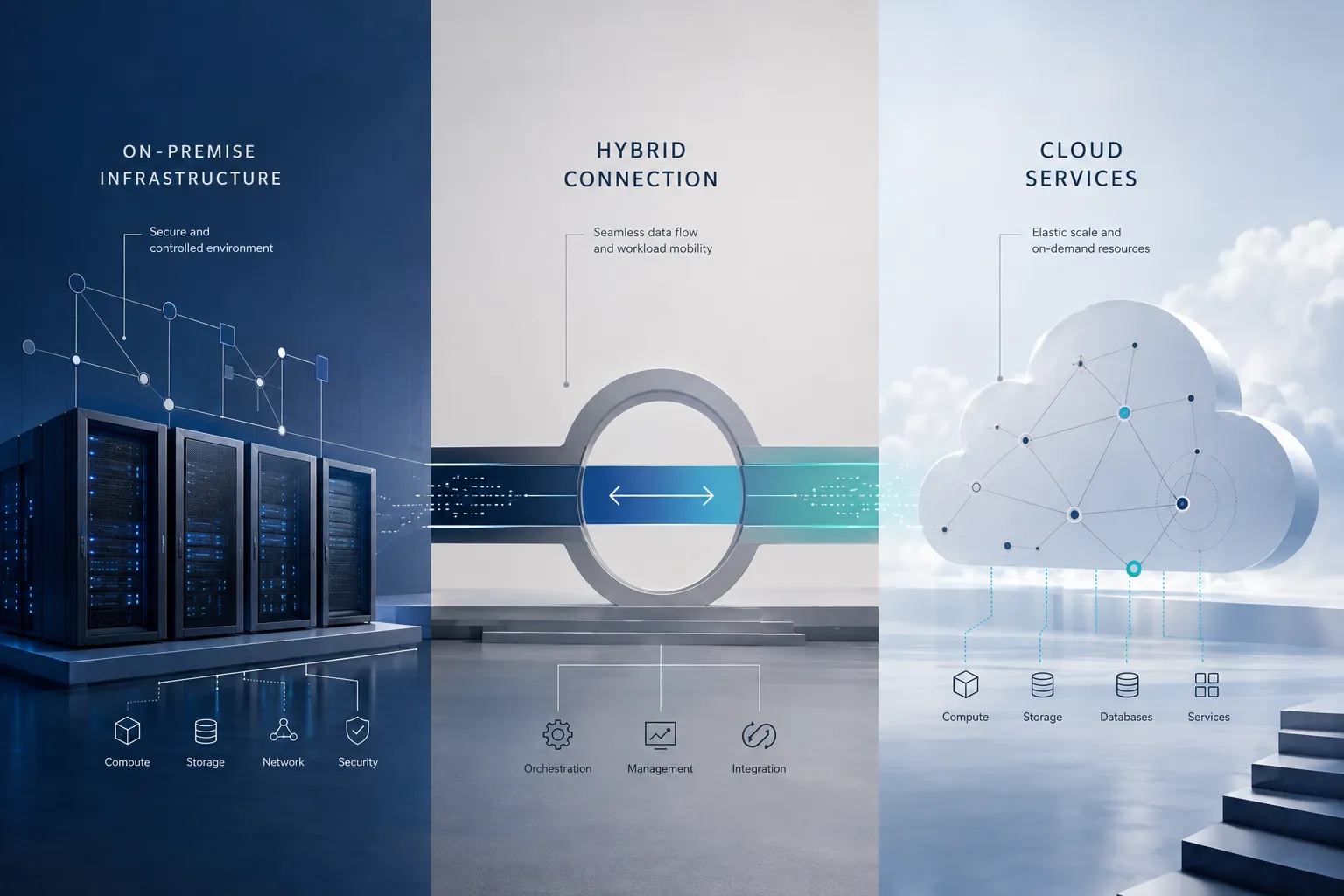
Typical hybrid configuration:
- Local file server for fast access to shared documents and project files
- Cloud-based email (Office 365 or Google Workspace) for remote access and automatic backup
- On-premises database server for your main business application with cloud backup
- Cloud storage for long-term archival and disaster recovery
- Local network infrastructure connected to cloud services through VPN or dedicated connections
This setup lets your team access files instantly from the office while still being able to work remotely through cloud services. Your most important data stays under your direct control, but you get the peace of mind that comes with professional cloud backup and disaster recovery.
Benefits of the Hybrid Approach
Performance where it matters: Keep applications that handle large files or require fast response times on local servers, while using cloud services for tasks that benefit from anywhere-access.
Cost optimization: Avoid the high monthly costs of moving everything to the cloud while still getting cloud benefits for appropriate workloads. Many businesses save 20-40% compared to pure cloud solutions.
Risk distribution: If your internet connection fails, critical applications keep running locally. If your local servers have problems, cloud services keep your team productive. You’re not putting all your eggs in one basket.
Gradual migration path: Start with a few cloud services and gradually move more systems as your team becomes comfortable with the technology and your business needs evolve.
When Hybrid Makes the Most Sense
Choose hybrid infrastructure if you:
- Need both local performance and remote access capabilities
- Have some compliance requirements but not complete data location mandates
- Want to test cloud services without abandoning your current infrastructure investment
- Have a mix of legacy applications and modern web-based tools
- Need disaster recovery but want to maintain local control of daily operations
Common mistake: Making hybrid infrastructure too complex by trying to integrate every possible service. Start simple with 2-3 cloud services alongside your existing local infrastructure, then expand gradually based on actual business benefits.
How Do I Evaluate the Right Infrastructure for Your Business in 2026?
Start by conducting a comprehensive infrastructure assessment that examines your current costs, performance requirements, compliance needs, and 3-year growth projections before making any cloud vs on-premise decision. The evaluation should prioritize business outcomes like uptime, security, and cost predictability rather than following technology trends.
Step-by-Step Infrastructure Evaluation
Step 1: Document Your Current State
- List all servers, applications, and IT services you currently use
- Calculate total annual IT costs, including hardware, software, support, and energy
- Identify performance bottlenecks and user complaints about current systems
- Review any compliance requirements specific to your industry
Step 2: Define Your Business Requirements
- Determine how many employees need remote access capabilities
- Identify which applications are mission-critical versus nice-to-have
- Set acceptable downtime limits (most businesses need 99%+ uptime)
- Establish data security and backup requirements
Step 3: Project Future Needs
- Estimate employee growth over the next 3-5 years
- Consider new applications or services you might need
- Evaluate potential changes in remote work requirements
- Factor in any planned business expansion or new locations
Key Decision Factors
Choose cloud infrastructure when:
- More than 25% of your team works remotely regularly
- You’re growing rapidly (20%+ annually) or have unpredictable growth
- You lack dedicated IT expertise or want to eliminate IT headaches
- Upfront costs are a significant constraint
- You use web-based business applications primarily
Choose on-premises servers when:
- You have strict compliance requirements mandating data location control
- Large file processing or database-heavy applications are core to your business
- You have 50+ employees with stable growth patterns
- Internet reliability in your area is questionable
- Long-term cost optimization is more important than flexibility
Choose hybrid cloud infrastructure when:
- You need both local performance and cloud flexibility
- Some applications work better locally while others benefit from cloud deployment
- You want to gradually transition to cloud without disrupting current operations
- Risk mitigation through diversified infrastructure is important
- You have both local and remote workforce needs
Getting Professional Help
The infrastructure decision impacts your business for years, so it’s worth getting expert guidance. A qualified IT partner can conduct a thorough assessment, provide accurate cost comparisons, and design a solution that actually fits your specific needs rather than following generic best practices.
What to expect from a professional infrastructure assessment:
- Detailed analysis of current costs and performance
- Customized recommendations based on your specific business requirements
- Realistic migration timeline and cost projections
- Ongoing support strategy for whatever solution you choose
The right infrastructure choice gives you peace of mind, eliminates IT headaches, and supports your business growth rather than constraining it.
Frequently Asked Questions
How long does it take to migrate from on-premises to cloud?
Most small business cloud migrations take 4-8 weeks when properly planned, including assessment, setup, data transfer, and testing phases. Complex environments with custom applications may require 3-4 months.
Can I keep some servers on-premises and move others to the cloud?
Yes, hybrid cloud infrastructure is often the best approach, allowing you to keep performance-critical or compliance-sensitive systems local while moving appropriate workloads to the cloud.
What happens if my internet goes down with cloud infrastructure?
Cloud-dependent systems become inaccessible during internet outages. Many businesses maintain local backup systems or use cellular internet backup to minimize this risk.
Are cloud services really more secure than on-premises servers?
Cloud providers typically offer more advanced security tools and monitoring than small businesses can implement independently, but both approaches can be equally secure when properly configured.
How much does it cost to maintain on-premise servers annually?
Annual maintenance costs typically range from $2,000 to $ 8,000 for small-business servers, including software updates, hardware support, energy costs, and IT management.
Can I switch back from cloud to on-premises if I’m not satisfied?
Yes, but cloud-to-on-premise migration can be expensive and time-consuming. It’s better to start with a hybrid approach or thorough evaluation to avoid costly reversals.
Do I need dedicated IT staff for on-premises servers?
Not necessarily. Many small businesses use local IT partners for server management, maintenance, and support rather than hiring full-time IT employees.
What size business benefits most from cloud computing?
Businesses with 5-50 employees often see the greatest cloud benefits due to lower upfront costs, simplified management, and built-in scalability for growth.
How do I calculate ROI for cloud vs on-premise infrastructure?
Compare total 3-5-year costs, including hardware, software, maintenance, energy, and IT management, for on-premises versus monthly cloud subscriptions, plus any migration costs.
What compliance issues should I consider with cloud infrastructure?
Industries like healthcare (HIPAA), finance (SOX), and government contracting may have specific data location and control requirements that influence cloud vs on-premise decisions.
Can cloud infrastructure handle my specialized business applications?
Most modern applications work well in cloud environments, but legacy or highly customized software may require on-premises servers or hybrid configurations.
What backup strategy works best for hybrid infrastructure?
A combination of local backup for quick recovery and cloud backup for disaster recovery typically provides the best protection and peace of mind.