The Small Task That Quietly Consumes Your Budget
A five-minute task does not feel expensive. Repeated 500 times a month across three employees, it becomes a part-time job nobody budgeted for.
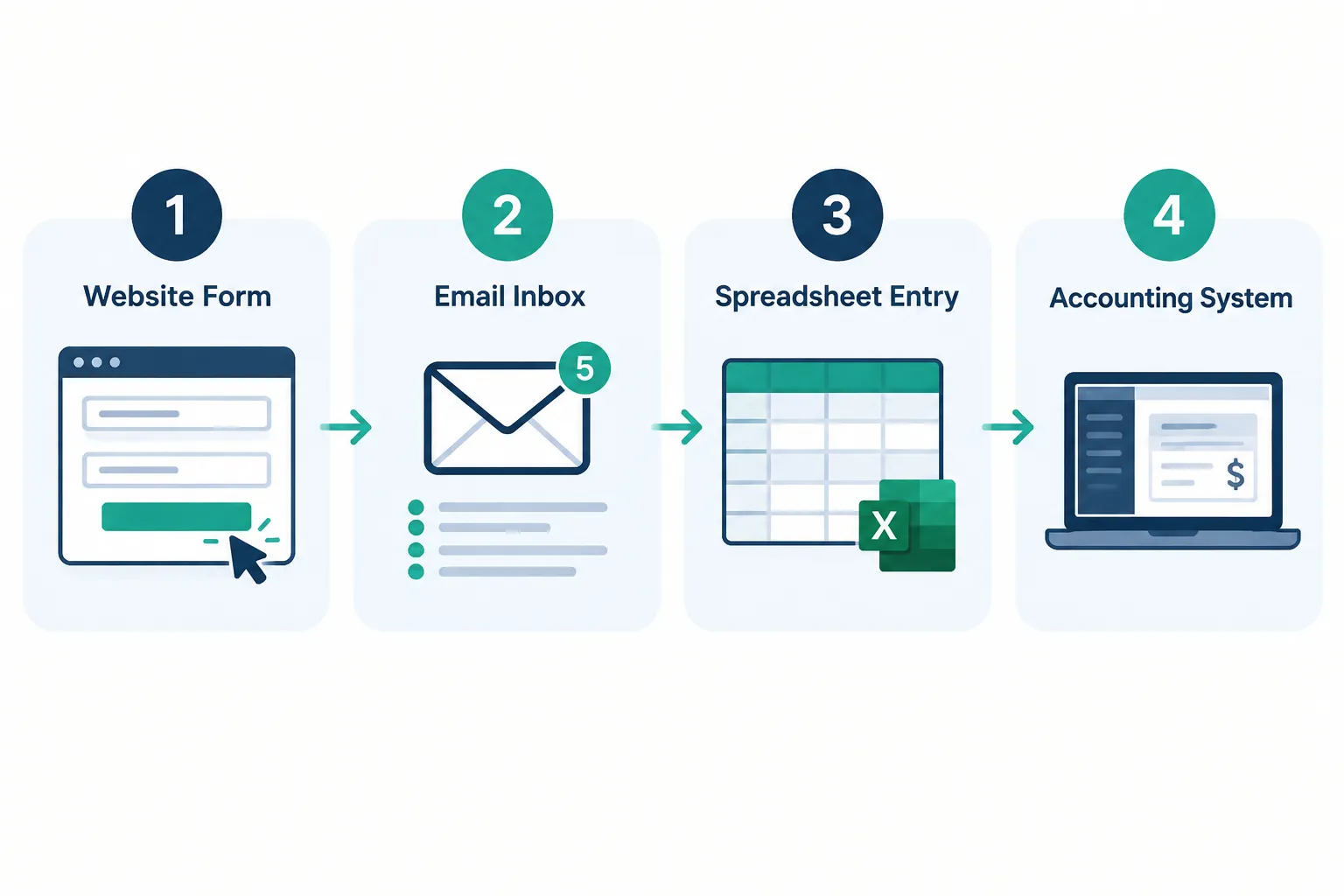
This is the trap with manual data entry costs. No single entry feels wasteful. An employee copies a customer’s name, phone number, and order details from an email into the CRM. It takes four minutes. They do it again an hour later for the next lead. By the end of the week, they have done it sixty times.
Multiply that across your sales team, your accounting staff, and your office administrator, and you have a recurring monthly expense buried inside everyone’s job description. Nobody put it on a budget line because it looks like “just part of the job,” not a cost center. But time is still time, and payroll is still payroll.
Where Manual Data Entry Costs Hide
Manual data entry costs typically hide inside routine handoffs between systems that do not talk to each other. These workflows feel normal because your team has always done them this way, which is exactly why they go unexamined.
Common places this shows up:
- Website forms to CRM: A lead fills out a contact form, and someone manually re-enters the details into your sales system.
- Email inquiries to customer records: Staff copy names, addresses, and order specifics from inbox messages into a database.
- Sales orders to ERP: Orders taken by phone or paper get keyed into your inventory or production system.
- Invoices to accounting systems: Vendor invoices are retyped into QuickBooks, Sage, or a similar platform instead of being imported.
- Inventory updates across applications: Stock counts get updated in one system, then manually copied into a second reporting tool.
- Employee reports to spreadsheets: Technicians, drivers, or field staff submit handwritten or app-based reports that someone retypes into a master spreadsheet.
- Customer details copied between departments: Sales hands a deal to onboarding, and onboarding re-enters everything sales already had.
Each of these looks small on its own. Together, they are usually where your biggest manual data entry costs live.
How Much Does Manual Data Entry Cost Per Hour?
The hourly cost of manual data entry equals your employee’s fully loaded hourly rate, not just their hourly wage. This matters because payroll taxes, benefits, and overhead push the real cost higher than the number on a pay stub.
For example, an employee earning $20 per hour in wages often costs the business closer to $26 to $28 per hour once you include payroll taxes and benefits, depending on your benefits structure. When you calculate manual data entry costs, use this fully loaded figure, not take-home pay. Otherwise you will understate the true expense of every task.
Calculate Your Manual Data Entry Costs
You can estimate your own manual data entry costs with one formula applied to one workflow at a time. Start with a single repetitive task rather than trying to estimate your whole operation at once.

The formula:
Minutes per task × tasks per month × employees involved ÷ 60 = monthly labor hours
Then:
Monthly labor hours × hourly labor cost = estimated monthly labor cost
Illustrative example (not a typical result or guaranteed outcome):
A team spends 10 minutes entering order details, performs this task 600 times per month, and has an average fully loaded labor cost of $25 per hour.
- Total time: 100 hours per month
- Estimated labor cost: $2,500 per month
- Annualized labor cost: $30,000
This is a hypothetical scenario meant to show the math, not a benchmark for your business. Run the same formula using your own numbers for an accurate picture.
What’s the Average Cost of Data Entry Errors to a Business?
There is no single verified industry figure for the average cost of a data entry error, and any number quoted without a named source should be treated with caution. What we can say with confidence is that errors create a second, separate cost beyond the original labor: rework, corrections, and the downstream problems they cause.
Common downstream effects include:
- Rework and manual corrections
- Duplicate customer records that confuse sales and support
- Incorrect invoices that delay payment or require credits
- Delayed orders waiting on missing or wrong information
- Missed follow-ups because a lead’s contact details were mistyped
- Inaccurate reports that lead managers to make decisions on bad data
- Customer service issues when a client’s history does not match what they were told
These costs are real but variable. Track your own correction volume over a month to understand your actual exposure rather than relying on an unverified industry average.
Why Repeated Data Entry Becomes More Expensive as You Grow
Manual data entry costs climb faster than revenue when a business grows without changing its processes. More customers, more orders, and more transactions all mean more manual keystrokes if nothing else changes.
A business processing 200 orders a month might absorb the manual workload with one administrator. Grow to 800 orders a month using the same manual process, and you likely need two or three more administrators just to keep pace, even though the actual decision-making work has not grown proportionally. This is why some businesses plan to “hire our way through it.” Hiring can solve a capacity problem temporarily, but it does not fix the underlying workflow, and the same inefficiency simply repeats itself at a larger scale with a bigger payroll attached.
Manual Data Entry Costs: What Should You Measure?
You should measure both the time spent on manual tasks and the downstream friction those tasks create, because labor hours alone undercount the real cost. Treat this as an ongoing scorecard, not a one-time audit.

Track these data points:
- Time per transaction for each manual workflow
- Number of transactions per month
- Employees involved in each task
- Frequency of duplicate entry across systems
- Error and correction rates
- Delays caused by missing or incorrect information
- Software and implementation costs for any tool already in place
Which Industries Spend the Most on Manual Data Entry?
Businesses with high transaction volume and multiple disconnected systems tend to carry the heaviest manual data entry costs. This usually means industries where paperwork, orders, or patient and client records move through several hands before reaching a final system.
Industries where this shows up frequently include:
- Accounting and CPA firms, where client documents and invoices move between intake and bookkeeping software
- Healthcare and dental practices, where patient intake forms are re-entered into practice management systems
- Automotive dealerships, where deal paperwork touches sales, finance, and service systems separately
- Manufacturing, where purchase orders and inventory counts move across multiple platforms
- Professional services firms managing client intake, contracts, and billing across separate tools
If your business fits one of these patterns, it is worth running the cost calculation above on at least one core workflow this quarter.
Which Data Entry Tasks Should You Automate First?
The best first candidates for automation are tasks that are frequent, repetitive, predictable, and time-consuming, because they offer the clearest return relative to setup effort. Tasks that vary wildly in format or require judgment calls are harder to automate well and should wait.
Good starting points include:
- Creating new contacts from web forms or email
- Updating routine records, like status changes or standard fields
- Processing structured forms with consistent layouts
- Moving data between two specific systems on a regular schedule
- Preparing recurring reports built from the same data sources each time
Decision rule: choose a task to automate first if it happens dozens of times a month, follows the same steps every time, and currently ties up a specific person’s schedule. Save judgment-heavy or rarely occurring tasks for later.
Traditional Automation vs. AI-Powered Data Entry: Which Costs Less?
Traditional automation costs less to build and maintain when your data is already structured and consistent. AI-assisted automation costs more up front but can handle messier inputs like scanned documents, free-form emails, and PDFs that traditional rules-based tools cannot read reliably.
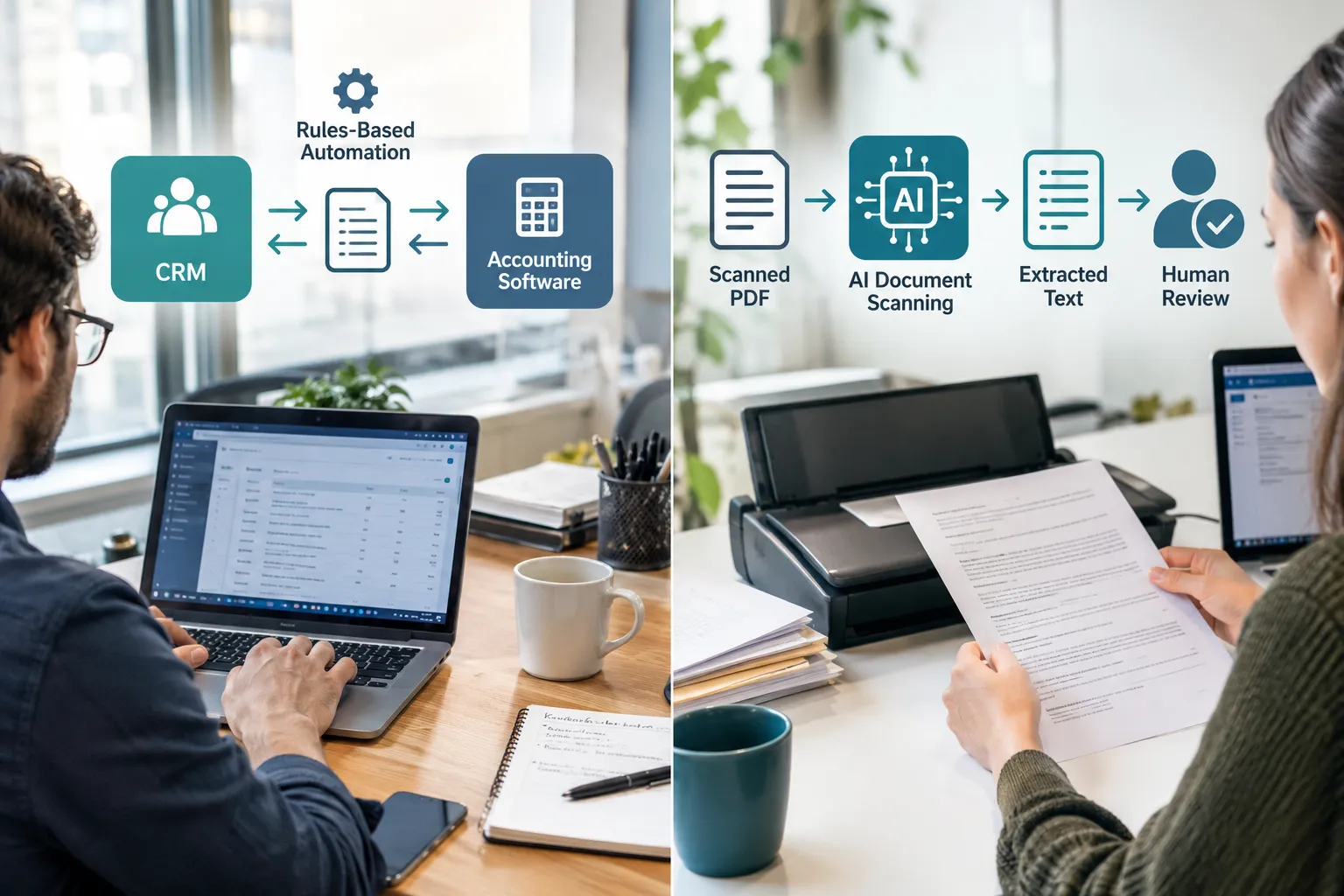
A simple way to think about the three layers:
- Traditional automation: Moves structured information between systems and applies predefined rules, such as syncing a new CRM contact into your accounting software.
- AI-assisted automation: Extracts or interprets information from emails, PDFs, scanned documents, and other less-structured inputs, such as pulling vendor and line-item details off a scanned invoice.
- Human review: Checks exceptions, sensitive data, and high-impact fields before anything is finalized.
AI tools can speed up messy document handling, but they do not extract every field with full accuracy every time. Plan for a human review step on anything that affects money, compliance, or a customer relationship, at least until the process has proven itself over time.
How Much Money Can You Save by Automating Data Entry?
The labor cost of manual work is not the same number as what you will actually save by automating it, because automation has its own costs and limits. A realistic savings estimate accounts for what portion of the task can genuinely be automated, not the full labor figure.
Before committing to a project, weigh:
- The share of the workflow that can actually run without a person, versus the share that still needs review
- Development and integration costs to connect your existing systems
- Software and API fees tied to the automation platform
- Ongoing maintenance as your forms, systems, or vendors change
- Testing and employee training time during rollout
- The remaining cost of human review on exceptions
Common mistake: assuming 100% of the labor hours calculated earlier will disappear. In practice, some oversight almost always remains, especially early on.
Is Outsourcing Data Entry Cheaper Than Hiring In-House Staff?
Outsourcing can lower the hourly rate paid for data entry, but it does not eliminate error risk, training needs, or management time, so it is not automatically cheaper overall. Businesses that outsource still need someone in-house to review quality and handle exceptions.
Does outsourcing overseas actually save money? It can reduce per-hour labor cost on paper, but time zone gaps, communication overhead, quality variance, and data security concerns often offset part of that savings. If your data includes sensitive customer or financial information, weigh the compliance implications carefully before sending it offshore. For many small and mid-sized businesses, connecting existing systems through automation addresses the root workload instead of just moving the same manual task to a cheaper location.
How to Reduce Manual Data Entry Without Replacing Everything
You can reduce manual data entry costs without ripping out your current software, because most forms, CRMs, and accounting platforms can be connected through integrations and workflow automation instead of replaced. This approach is usually faster and less disruptive than a full system overhaul.
A practical starting approach:
- Pick one workflow that showed the highest cost in your calculation.
- Map every manual step currently involved, including who touches it and how often.
- Identify where structured data can move automatically and where human judgment is still required.
- Connect the systems involved through integration or workflow automation.
- Measure the time saved and error rate over 60 to 90 days before expanding to the next workflow.
This step-by-step approach keeps risk low and gives you real numbers to justify the next phase, rather than guessing at results across your whole operation at once.
Turn Repetitive Data Entry Into a More Efficient Workflow
Manual data entry costs add up in small increments that are easy to miss and expensive to ignore once you add them together. Running the math on even one workflow usually reveals more than you expected, and that number is the starting point for a real conversation about where automation makes sense.
The goal is not to remove people from the process entirely. It is to free your team from repetitive keystrokes so they can spend their time on customers, judgment calls, and the work that actually grows the business.
Find Out What Manual Work Is Costing Your Business
Repetitive data entry can consume valuable employee time and introduce avoidable errors. AlphaCIS helps businesses identify inefficient workflows and evaluate where AI, automation, and system integration can reduce manual work.
Explore AI Automation