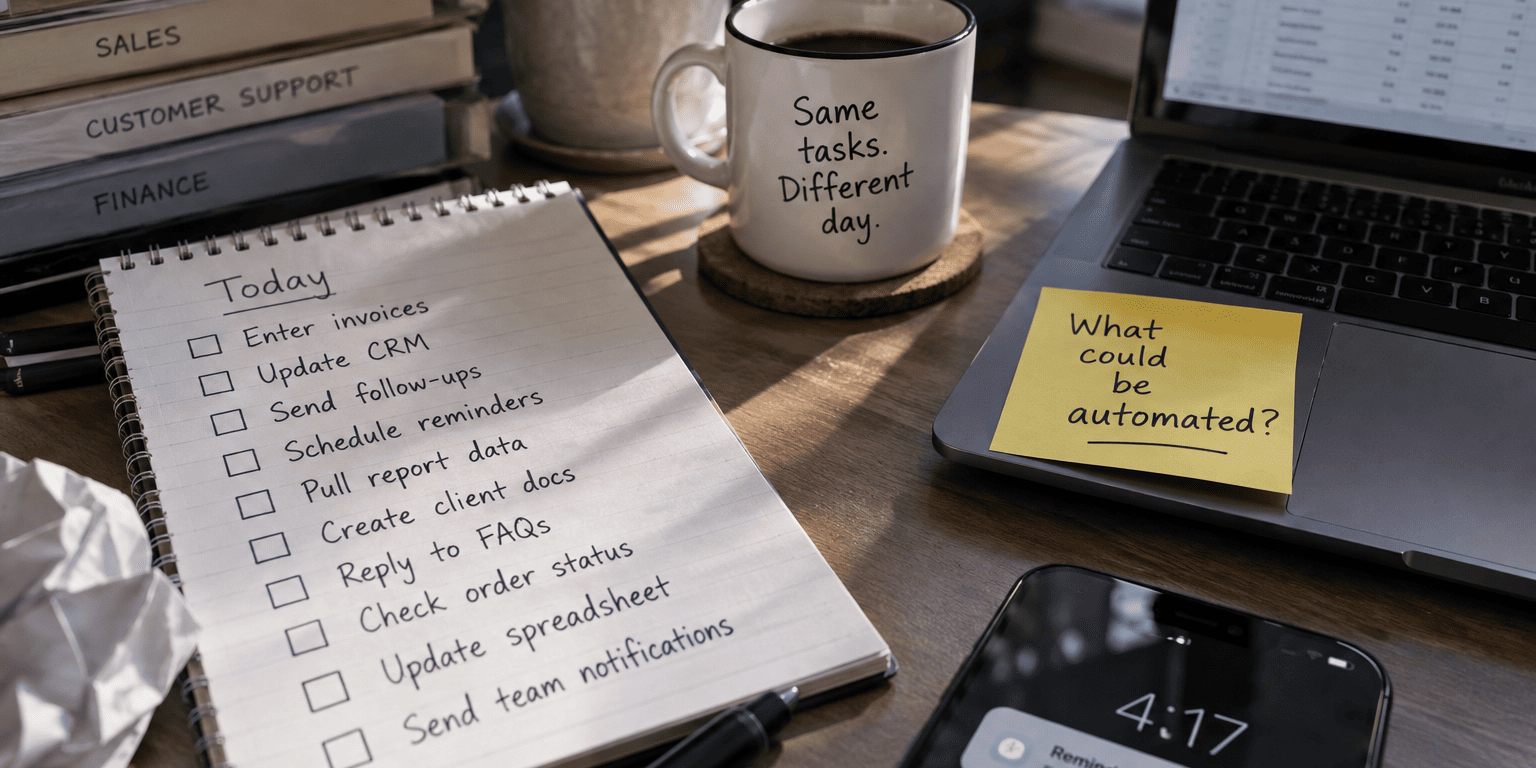
Not Every Workflow Needs an AI Agent
Every software vendor selling AI agents for business wants you to believe your company is behind if you don’t deploy autonomous systems this quarter. That pressure is misleading many good operators into buying more technology than the problem calls for.

Here’s a simple test. If your requirement sounds like this: “When a customer submits this form, create a CRM record and notify sales,” you do not need an autonomous agent making decisions. You need a rule. The trigger is clear, the action is clear, and nothing about the process requires judgment.
The principle that should guide every automation decision in your business is this: use rules when rules are enough, and add intelligence only when the workflow actually requires interpretation or decision-making. Skipping that question is how businesses end up with expensive, hard-to-maintain systems solving problems a simple workflow tool could have handled for a fraction of the cost.
This article walks through AI agents vs traditional automation in plain business terms: what each one is, where each one breaks down, what a hybrid setup looks like, and how to decide which one fits your actual workflow, not the one a sales deck is pushing.
What’s the Difference Between AI Agents and Traditional Automation?
Traditional automation follows a fixed path every time: a trigger happens, a rule checks conditions, and an action fires. An AI agent, by contrast, is given an objective and a set of approved tools, and it decides which steps to take to reach that objective, within limits you define.
Think of it as the difference between a vending machine and an employee. The vending machine (traditional automation) does exactly one thing when you press a button: it never improvises. An employee with a task and some discretion (an AI agent) can look at a situation, decide what to do next from a list of approved options, and adjust if something unexpected comes up.
Neither is inherently better. A vending machine is the right choice when the outcome should never vary. An employee with judgment is the right choice when the situation changes every time and rigid steps would fail. The mistake most businesses make is picking the employee model for a job the vending machine already handles perfectly well.
What Is Traditional Workflow Automation?
Traditional workflow automation, also called rules-based automation, connects a trigger to a predefined action through a set of conditions. Nothing is left to interpretation. The system does the same thing every time the same trigger fires.
The pattern is always: Trigger → Rule → Action. A few examples you’ve probably seen in your own business:
- A form submitted on your website creates a CRM record and notifies the assigned salesperson.
- An invoice gets approved, the accounting system updates automatically, and a confirmation email goes out.
- A customer books an appointment online, a calendar event is created, and a reminder text is scheduled.
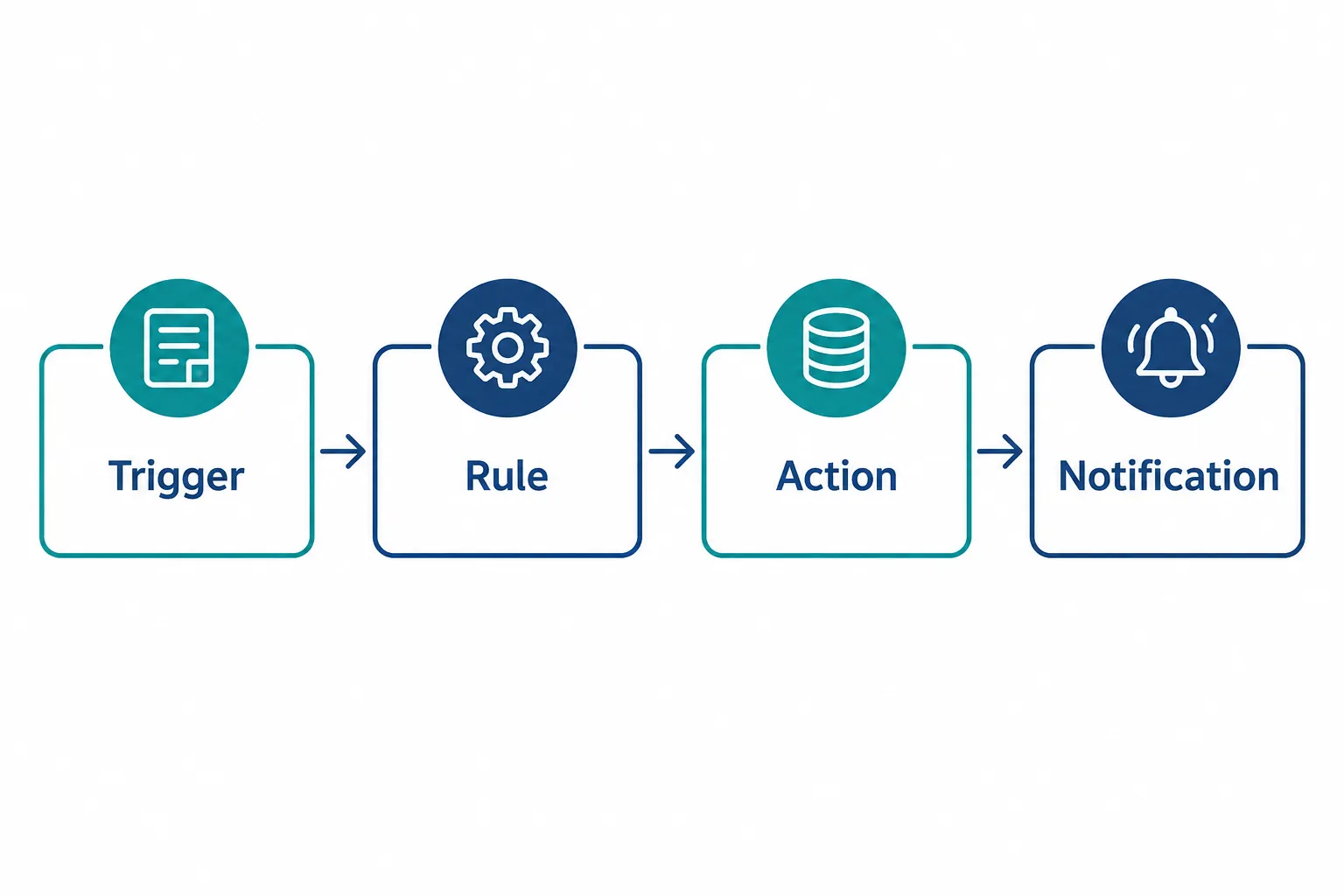
These workflows are the backbone of good business process automation, and they earn their place because of what they offer:
- Predictable. The same input always produces the same output.
- Easier to test. You can run through every scenario in advance and know exactly what will happen.
- Easier to audit. If something goes wrong, you can trace exactly which rule fired and why.
- Consistent. No variation between the first run and the thousandth.
- Efficient for structured processes. Once built, these workflows run for years with almost no maintenance.
What Are the Main Limitations of Traditional Workflow Automation?
Traditional automation struggles the moment a workflow includes information that doesn’t arrive in a clean, predictable format. Rules can only act on conditions someone anticipated in advance, so anything outside that pattern gets missed, misrouted, or dropped.
Common trouble spots include:
- Unstructured emails. A customer writes in with a question that doesn’t match any keyword rule you set up.
- PDFs and scanned documents. An invoice arrives as an image, and there is no fixed field to pull the total from.
- Ambiguous requests. “Can you move my appointment to sometime next week?” doesn’t fit a dropdown menu.
- Natural language. Free-text fields and chat messages vary too much for simple keyword matching.
- Document classification. Sorting incoming files by type (contract, invoice, application) when formatting varies by sender.
- Variable inputs. Every customer phrases the same request differently, so a rigid rule catches some cases and misses others.
This is exactly where AI starts to add real value, not because it’s trendy, but because rules genuinely cannot handle the variability.
What Is AI-Assisted Automation?
AI-assisted automation is a hybrid setup where AI handles one specific job, usually reading, extracting, or classifying, and then hands a clean, structured result off to a traditional rules-based workflow. This is often the sweet spot for businesses that have messy inputs but predictable next steps.
Here’s what that looks like in practice:
- A customer email arrives.
- AI reads the message and determines the customer’s intent (a billing question, a service request, a complaint).
- AI extracts the relevant details (account number, dates, amounts mentioned).
- The traditional workflow takes over and applies your business rules to that extracted information.
- The CRM updates automatically.
- The correct employee gets notified with the right context already attached.
Notice that the AI’s job here is narrow and specific: understand and extract. It’s not choosing what happens next across multiple steps or making a judgment call about how to resolve the issue. That distinction matters, because a huge number of businesses can solve their real problem with AI-assisted automation and never need a fully autonomous agent at all.
Example: A dental office receives new patient intake forms as scanned PDFs from a referral network. AI reads the scan, pulls out the patient name, insurance provider, and reason for visit, and populates the practice management system. A rule then routes urgent cases to the front desk manager immediately. No autonomous decision-making required, just accurate extraction feeding a solid workflow.
What Is an AI Agent?
An AI agent is a system given an objective, a defined set of tools, approved data sources, and constraints, and it decides which permitted steps to take to reach that objective. It is not an unrestricted system making open-ended decisions about your business. It operates inside boundaries you set.
A properly built AI agent typically has:
- An objective: “Resolve this customer refund request” or “gather the information needed to process this claim.”
- Available tools: specific systems it’s allowed to query or update, like your order database or your CRM.
- Approved data: only the information it’s permitted to see, nothing broader.
- Constraints: dollar limits, categories it can’t touch, actions that always require a human.
- Permissions: explicit rules about what it can do without approval and what it must escalate.
Given those boundaries, the agent can look at a situation, decide which of its permitted tools to use, and adjust its next step based on what it finds. That’s the real difference from traditional automation: an agent can choose among several approved paths rather than following one fixed path every time. It’s still working inside a fence you built. It just has more room to move within it.
AI Agents vs Traditional Automation: A Side-by-Side Comparison
The clearest way to compare AI agents vs automation is to look at how each one behaves across the same factors that matter to a business owner: predictability, complexity, and the oversight each one demands.
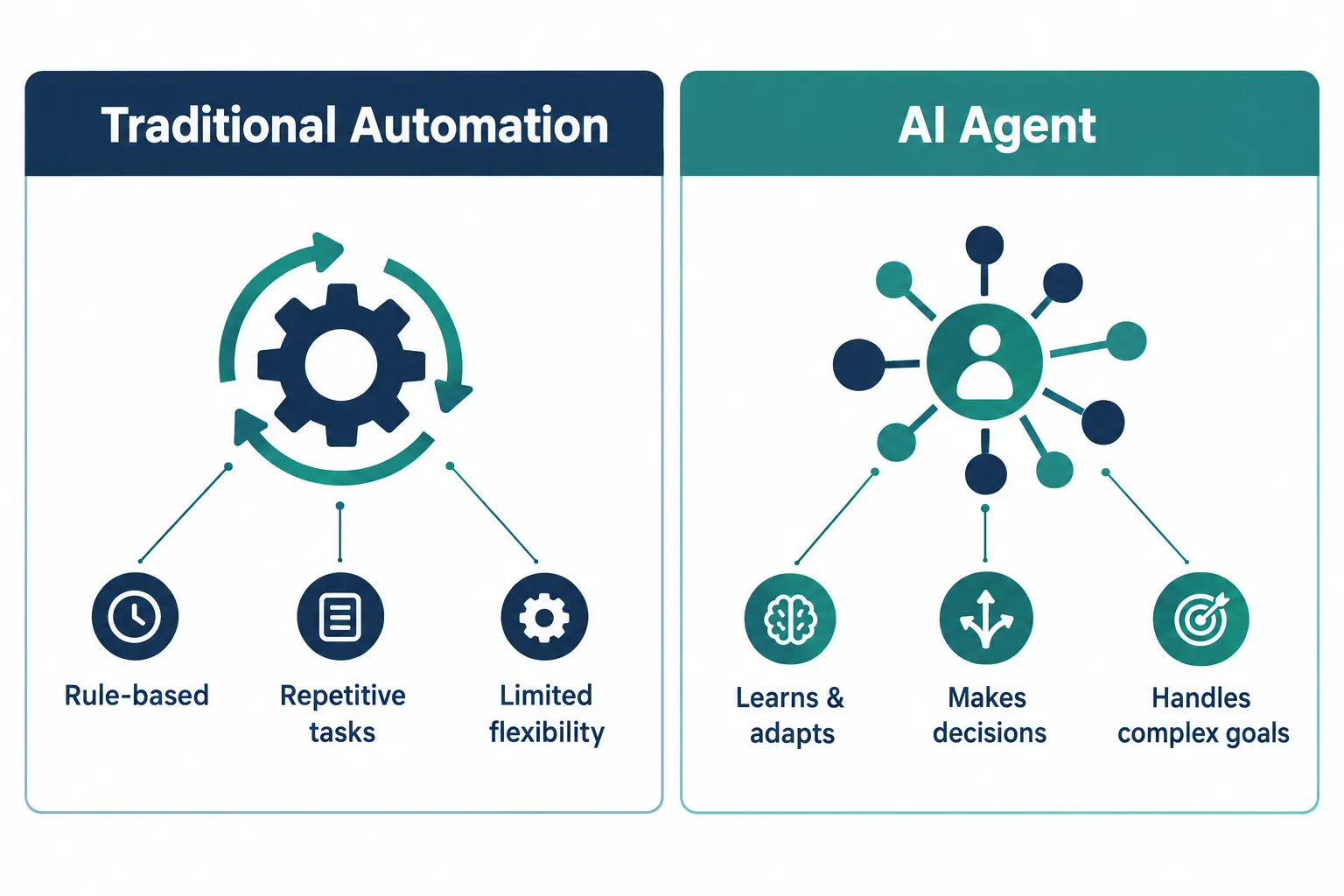
| Factor | Traditional Automation | AI Agent |
|---|---|---|
| Workflow | Predetermined, fixed path | More adaptive, chooses among approved steps |
| Input | Structured (forms, fields, defined formats) | Can handle variable or unstructured inputs |
| Decisions | Made by explicit rules | Made through AI-assisted reasoning within limits |
| Predictability | Higher, same result every run | More variable, depends on the situation |
| Complexity | Lower to build and maintain | Higher, more moving parts to manage |
| Oversight needed | Usually simpler | Often requires active monitoring and review |
| Best for | Repetitive, well-defined processes | Variable, multi-step work needing judgment |
Keep in mind that actual implementation details vary a lot between vendors and platforms. A “simple” AI agent from one provider might be more restricted than a “basic” automation tool from another. Judge each system on what it actually does in your workflow, not on the label attached to it.
When Should You Use AI Agents Instead of Rule-Based Automation?
Choose an AI agent when the workflow genuinely requires judgment across multiple steps, not just one point of interpretation. If a single rule or a single AI extraction step can resolve the task, an agent is overkill.
Reasonable signals that an agent might be worth the added complexity:
- The task requires interpreting changing information that doesn’t fit a fixed pattern.
- There are multiple approved actions and the right one depends on details discovered mid-process.
- The sequence of steps genuinely varies from case to case.
- Information needs to be gathered from several approved systems before a decision can be made.
- The next step depends on the outcome of the previous one, not on a fixed schedule.
Decision rule: if you can write the entire process as a flowchart with fixed boxes and arrows, you don’t need an agent. If the flowchart would need a box that says “figure out what to do based on what you just found,” that’s the point where an agent starts to make sense.
Can AI Agents Handle Complex Workflows That Automation Can’t?
Yes, within limits. AI agents can handle multi-step workflows where the right sequence of actions depends on information discovered partway through, something rigid rules genuinely cannot do well. But “complex” doesn’t automatically mean “needs an agent.” Plenty of complex-looking workflows are really just several simple rules chained together.
A realistic example: a manufacturing client submits a warranty claim with photos, an invoice, and a written description of the defect. An agent could review the claim, cross-reference the warranty database, check the purchase date against coverage terms, request an additional photo if the defect isn’t clear, and route the claim to the correct approver, all without a human manually chasing each of those steps. That’s a case where multiple approved tools and a changing sequence of steps genuinely justify agent-level reasoning.
Compare that to a workflow that just needs to check three fields and route to one of two departments. That’s not complex, even if it involves a document. It’s a rule with an AI extraction step in front of it.
Can Traditional Automation and AI Agents Work Together in One Workflow?
Yes, and for most businesses this combination is more practical than choosing one approach for an entire process. A single workflow can use traditional automation for the predictable parts, AI for interpretation, and an agent for the specific step that genuinely needs multi-step reasoning.
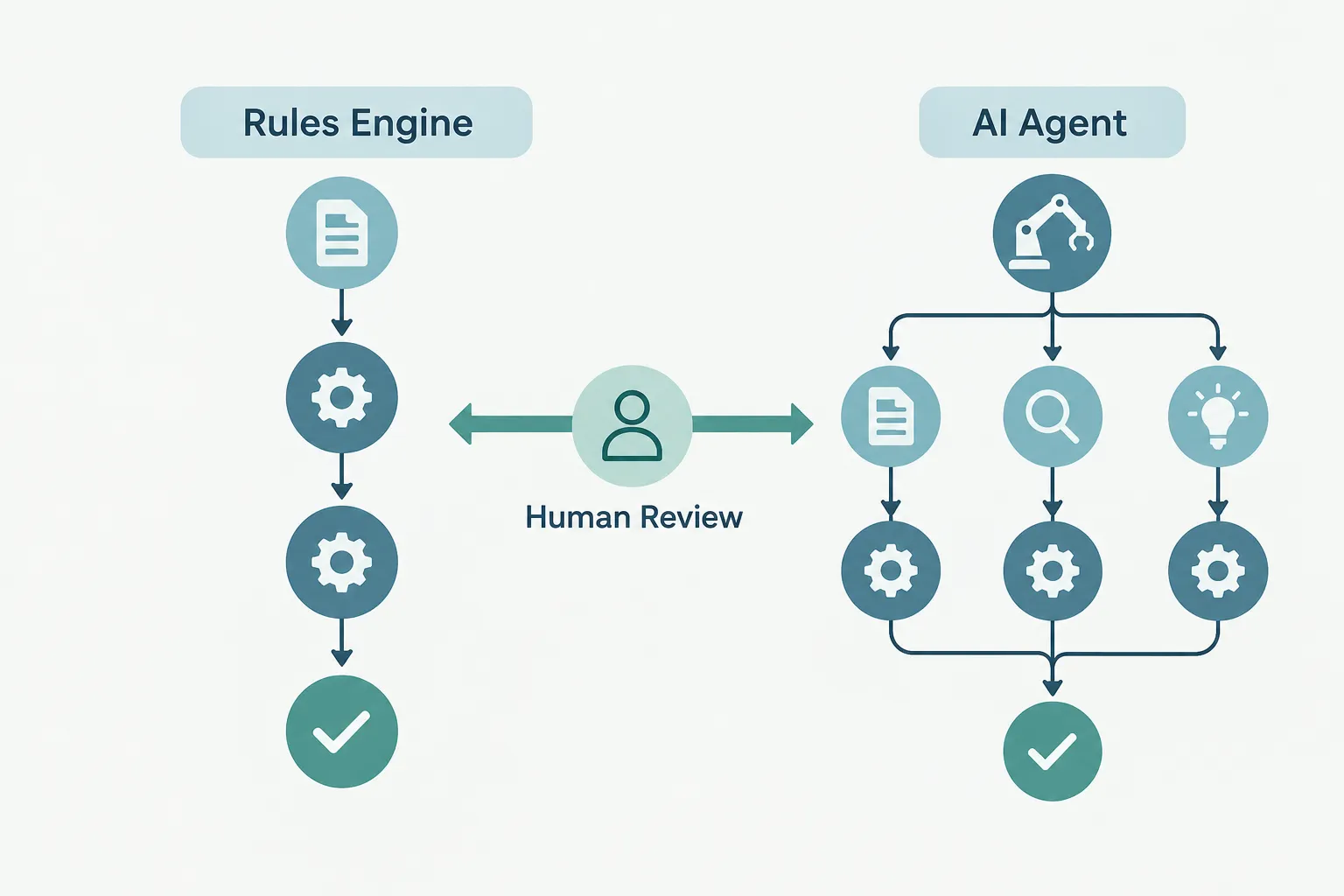
Here’s what a well-built hybrid workflow looks like end to end:
- An email arrives from a customer.
- AI reads the message and determines what the customer actually wants.
- Traditional rules validate the extracted information against your business logic.
- An agent handles an approved multi-step task, like checking inventory across two systems and drafting a resolution.
- A human reviews the final decision before anything customer-facing goes out.
This layered structure keeps cost and risk proportional to the actual complexity of each step. You’re not running every email through expensive agent reasoning, and you’re not forcing a rigid rule to handle a request it was never built to interpret. Each layer does the job it’s actually good at, and this is usually where the strongest AI workflow automation results come from.
How Much Does It Cost to Implement AI Agents vs Traditional Automation?
Traditional automation generally costs less to build and run because it has fewer moving parts: no model calls, less testing, and simpler monitoring. AI agents cost more across the board, not just in software fees, but in the extra oversight, testing, and error handling they require.
Costs to weigh honestly before committing to either approach:
- Model or API usage costs, which scale with how much text or data the AI processes.
- Additional testing, since AI-driven decisions need broader scenario coverage than fixed rules.
- Ongoing monitoring, because AI behavior can drift or misfire in ways a rule never would.
- Security considerations, especially around what data an agent can access.
- Permissions management, deciding and maintaining exactly what each agent is allowed to touch.
- Error handling, building a clear path for what happens when the AI gets something wrong.
- Human review time, for any decision that carries real business or financial risk.
Common mistake: comparing only the sticker price of an AI platform against a workflow tool’s subscription fee. The real cost of an agent includes the ongoing oversight it needs, and that number is often bigger than the software bill itself. Weigh that added cost against the actual business value the extra intelligence creates.
How Long Does It Take to Set Up AI Agents Compared to Automation Tools?
Traditional automation is generally faster to deploy because the logic is explicit and testing is straightforward. AI agents take longer because you have to define objectives, tools, permissions, and test how the system behaves across a wider range of scenarios before you trust it with real business decisions.
A simple rules-based workflow (form to CRM to notification) can often go live in days once the systems are connected. An AI-assisted workflow that adds document reading or intent classification typically adds testing time to make sure the AI is extracting the right information consistently. A true agent-based workflow takes the longest, because you need to test not just what it does right, but what it does when something goes wrong, and build in the review steps to catch that.
Edge case: if you’re integrating with legacy software that doesn’t have modern connection points, the timeline for any of these three approaches can stretch regardless of which one you choose. System integration difficulty, not the automation type, is often the real bottleneck.
Is AI Agent Automation Right for Small Businesses?
AI agent automation can work for small businesses, but it’s usually worth it only for a specific, high-volume, or high-friction process, not as a general upgrade across the whole operation. Most small and mid-sized businesses get more value starting with traditional automation and AI-assisted automation first.
Ask yourself honestly: does your business have a process that involves multiple decision points, changing information, and enough volume to justify the setup and oversight cost? If the answer is yes for one specific workflow, like claims intake or multi-step vendor onboarding, an agent can be worth building. If you’re looking for a general way to “use AI” without a specific bottleneck in mind, you’re better off automating the repetitive tasks eating your team’s time first.
Which Industries Benefit Most From AI Agents Over Automation?
Industries with document-heavy, multi-step, and judgment-dependent processes tend to see the clearest return from AI agents. That includes:
- Accounting and CPA firms, for multi-document reconciliation and exception handling during tax season.
- Healthcare and dental practices, for insurance verification workflows that require checking multiple systems.
- Manufacturing, for warranty and defect claims that involve photos, specs, and variable resolutions.
- Professional services, for client intake that pulls from several unstructured sources before a case can start.
Industries with mostly structured, repeatable transactions, like straightforward appointment scheduling or standard invoice processing, tend to do just fine with traditional automation and rarely need agent-level reasoning.
What Happens When AI Agents Make Mistakes in Business Processes?
AI agents can make mistakes, including choosing the wrong tool, misinterpreting information, or taking an action that technically fits its permissions but isn’t what you actually wanted. This is why oversight and constraints matter more with agents than with rules-based systems, where mistakes are rare and easy to trace.
To keep mistakes from becoming business problems:
- Limit permissions tightly. An agent should only be able to take actions you’ve explicitly approved.
- Require human approval on high-risk steps. Anything involving money, legal exposure, or customer-facing commitments should have a person sign off.
- Build in logging. You need a clear record of what the agent decided and why, so mistakes can be traced and fixed.
- Set spending or scope limits. Cap what an agent can approve or spend without escalation.
Edge case: an agent that’s allowed to email customers directly without review is a much bigger risk than one that drafts the email for a human to send. The same underlying AI capability carries very different risk depending on the permission you grant it.
Do I Need to Replace All My Automation With AI Agents?
No. Replacing working, reliable rules-based automation with an agent for the sake of using newer technology usually adds cost and risk without adding business value. If your current automation is doing its job accurately and consistently, leave it alone.
The better question isn’t “should we upgrade to agents,” it’s “where are we still doing manual work that a rule, a bit of AI, or an agent could take off someone’s plate.” Audit your actual bottlenecks first. You’ll often find that most of your existing automation is fine exactly as it is, and the real opportunity is in the manual steps nobody has automated at all yet.
What Skills Do Teams Need to Manage AI Agents?
Teams managing AI agents need someone who understands the business process well enough to define clear objectives, permissions, and escalation rules, plus someone who can monitor behavior and catch when something drifts. You don’t necessarily need an in-house AI engineer, but you do need clear ownership.
Practical skills and roles worth having in place:
- Someone who owns the workflow and can define what “correct” looks like.
- A process for regularly reviewing agent decisions, especially early on.
- A clear escalation path for exceptions the agent shouldn’t handle alone.
- Basic familiarity with the tools the agent connects to, so issues can be diagnosed quickly.
This is often where a managed technology partner adds the most value, handling the setup, monitoring, and troubleshooting so your internal team isn’t stretched thin trying to babysit a system nobody fully understands.
How Do AI Agents Learn and Improve Over Time?
Most business AI agents don’t “learn” in the sense of rewriting their own rules automatically. They improve through deliberate updates: refining the objective, adjusting permissions, adding new approved tools, or improving the underlying prompts and data based on what you observe in practice.
In practical terms, improvement usually looks like this:
- Reviewing logged decisions weekly or monthly to spot recurring errors.
- Narrowing or widening permissions based on what the agent handles well versus poorly.
- Feeding back corrected examples so future extraction or classification steps get more accurate.
- Adjusting escalation thresholds as you build confidence in specific parts of the process.
This is a maintenance commitment, not a one-time setup. Businesses that treat an agent as “set it and forget it” tend to be the ones surprised by a mistake six months later.
What Are Common Mistakes Companies Make When Switching to AI Agents?
The most common mistake is buying an AI agent before defining the actual business problem, then hunting for something for it to do. That backwards approach almost always produces an expensive tool solving a vague need instead of a clear one.
Other patterns worth watching for:
- Overengineering a simple workflow. Building agent-level reasoning for a task that only ever has two outcomes.
- Trusting vendor labels. A lot of software calls itself “an AI agent” when it’s really a chatbot or a basic rule with an AI-written response.
- Skipping oversight to move faster. Launching without human review on decisions that actually carry risk.
- Underestimating maintenance. Assuming the agent will run itself indefinitely without any review cycle.
- Ignoring existing automation. Ripping out reliable rules-based workflows that were never actually the problem.
Decision rule: if you can’t clearly state the business problem an agent will solve and what happens when it gets something wrong, you’re not ready to build it yet.
A Simple Decision Framework for Automation Solutions
Use these four questions in order, and stop as soon as you have a clear answer:
- Is the workflow predictable? If yes, start with traditional automation.
- Does it contain unstructured information, like emails, PDFs, or free text? If yes, add AI-assisted extraction or classification on top of your rules.
- Does it require adaptive, multi-step actions where the next step depends on what was just discovered? If yes, evaluate whether an agent adds meaningful value over a simpler setup.
- Does it involve high-risk decisions, financial, legal, or customer-facing? If yes, add appropriate human approval regardless of which technology you chose above.
This framework won’t hand you a perfect answer for every edge case, but it will keep you from jumping straight to the most complex option before checking whether a simpler one already solves your problem.
Start With the Business Problem, Not the Technology
The order that actually works is: problem, then workflow, then requirements, then technology. Too many automation projects start backwards, with a technology picked first and a problem assembled around it afterward.
If you’re evaluating intelligent automation for your business, describe the actual pain in plain terms before anyone touches a platform. What’s the manual task, who’s doing it, how often, and what does it cost in hours or errors? Once that’s clear, the right mix of rules, AI, and agents usually becomes obvious, and you avoid paying for reasoning capability your workflow never needed in the first place.
Quick self-check before you buy anything:
- Can I describe this process as a flowchart with fixed boxes? Rules will work.
- Does the input arrive as messy text or documents? Add AI extraction.
- Does the next step genuinely depend on what was just found? An agent might earn its cost.
- Is money, compliance, or a customer promise on the line? Add human review no matter what.
Try the Automation Fit Tool