Why Are Employees Still Copying Data Between Systems?
Here’s what a normal order looks like in a lot of manufacturing shops right now: sales takes the order, types it into the CRM, then someone retypes it into the ERP. A production spreadsheet gets updated by hand. Production changes the status, someone emails sales, sales updates the customer, and accounting enters its own version for billing.
That’s six or seven manual touches on one order before it ships. None of those touches add value. They exist only because the systems involved don’t talk to each other.
Ask yourself how many times the same order gets typed, copied, or emailed in your shop before it’s actually complete. If you can’t answer quickly, that’s a sign the number is higher than it should be.
Your employees shouldn’t be the API connecting your business systems.
What Is Manufacturing System Integration and Why Do You Need It?
Manufacturing system integration is the practice of connecting separate business applications, like your ERP, CRM, production tools, and accounting software, so they automatically share information instead of relying on people to move it between them. You need it because every manual handoff between systems is a place where time gets wasted and errors get introduced.
A manufacturer running an ERP, a CRM, a scheduling tool, and a spreadsheet is running four separate sources of truth unless those systems are connected. Manufacturing system integration turns them into one connected environment where a change in one place updates everywhere it matters.
This matters most for shops where:
- The same customer or order data lives in more than one system
- Production status changes but sales finds out by asking, not by seeing it
- Spreadsheets exist to move information between two applications that should already connect
The Problem Isn’t Necessarily Your ERP
A capable ERP does not fix a disconnected process by itself. The real gap is usually that the systems a manufacturer already owns simply don’t communicate with each other, not that any single system is inadequate.
I’ve walked into plants where the ERP was strong, the CRM was strong, and the production software was strong, and the business still ran on spreadsheets and email because nobody had ever connected them. Replacing any one of those systems would have solved nothing. The fix was integration, not replacement.
Before you replace another system, determine whether the systems you already own simply need to work together. That question alone can save a six-figure ERP replacement project.
Where Duplicate Data Entry Hides in a Typical Manufacturing Operation
Duplicate data entry hides in the handoffs between departments, specifically anywhere information has to move from one application to another without a direct connection. These handoffs are predictable, which makes them easy to find once you know where to look.
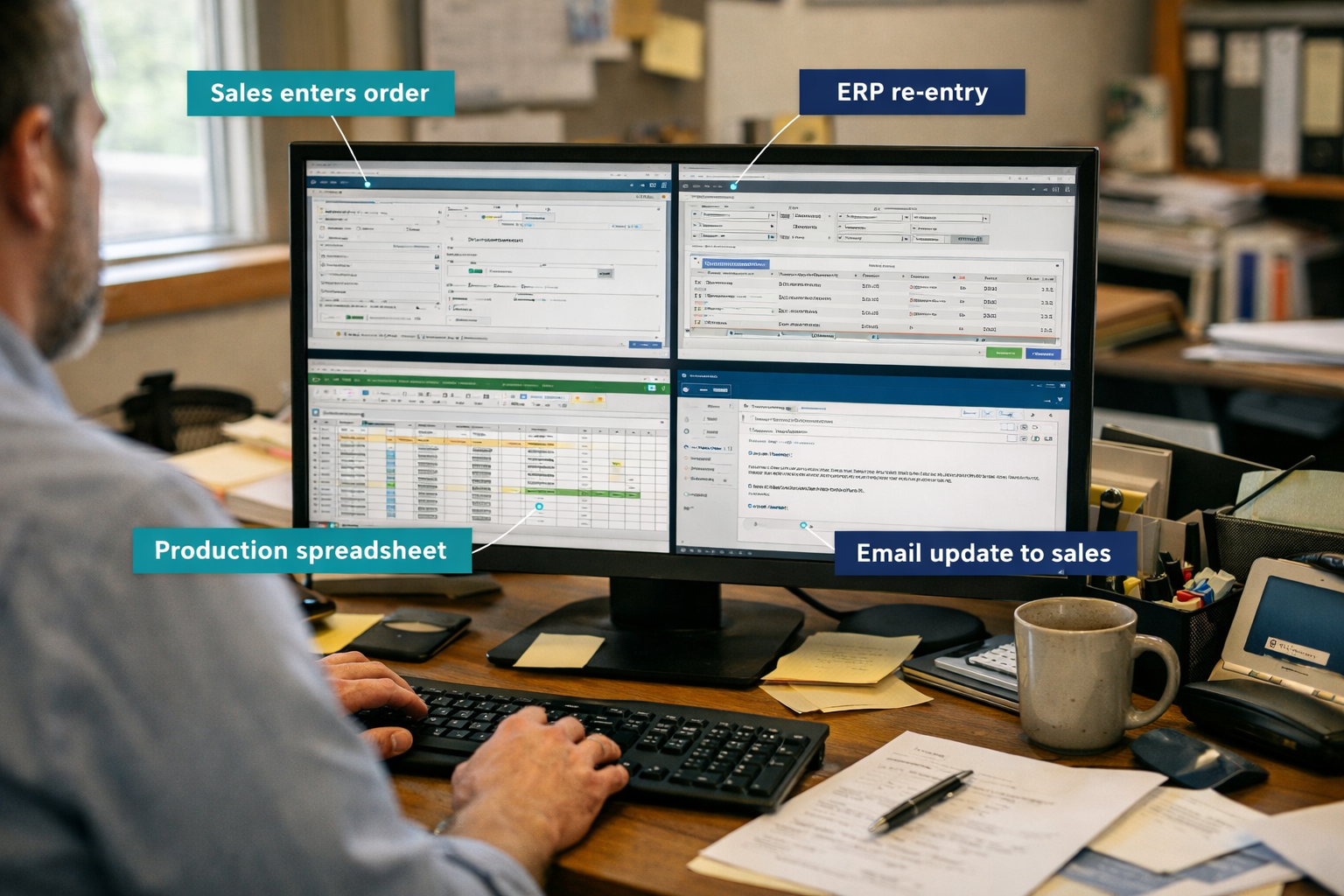
Common places where the same information gets typed more than once:
- Sales to ERP: Customer details, quotes, and order specs get entered in the CRM, then re-entered into the ERP.
- ERP to Production: Orders, schedules, and material requirements get copied into a separate production spreadsheet or scheduling tool.
- Production to Office: Status updates, completions, and exceptions get relayed through email instead of updating a shared system.
- Production to Sales: Order progress and delivery timing get chased down instead of automatically surfacing to sales.
- Shipping to Accounting: Shipment confirmations get manually turned into invoices instead of triggering billing automatically.
Every one of these is a routine, repeatable task, which also makes every one of them a strong candidate for automation.
How Does ERP Integration Reduce Manual Data Entry in Manufacturing?
ERP integration reduces manual data entry by automatically passing order, customer, and inventory information between the ERP and every other connected system the moment that information changes, so nobody has to type it a second time. Instead of an employee copying a quote from the CRM into the ERP, an integration does it the instant the quote is approved.
This works in both directions. When production updates a job status inside the ERP, integration can push that update to a CRM record or trigger a notification to sales, without anyone touching a keyboard.
Choose ERP integration first if: the same order or customer record currently gets typed into two or more systems, and that information doesn’t change in meaning between them. That’s the simplest and highest-payoff type of connection to build.
What Happens If Manufacturing Systems Aren’t Integrated?
When manufacturing systems aren’t integrated, the same information exists in multiple versions across your business, and nobody can be fully sure which version is current. That uncertainty shows up as delays, errors, and employees checking two or three places to answer one question.
Specific costs show up in familiar ways:
- Data-entry errors when a quantity, part number, or ship date gets mistyped during a manual copy
- Conflicting records when sales shows one delivery date and production is working from another
- Delayed updates when a production change doesn’t reach sales until someone remembers to send an email
- Rework when an order ships against outdated specs because the correction never made it into every system
- Slow customer responses when a rep has to check the ERP, the spreadsheet, and email before answering a simple “where’s my order” question
- Weak reporting when monthly numbers require manually pulling data from three systems and reconciling it by hand
The real problem isn’t the typing itself. It’s that your business ends up maintaining several versions of the truth at once, and every version drifts a little further apart over time.
What Manufacturing Workflow Automation Looks Like: Sales to Production
Manufacturing workflow automation is what happens after an integration passes data between systems. It’s the logic that decides what should happen next, like automatically creating a production job the moment an order is approved. Integration moves the data. Automation decides the next step.
A connected sales-to-production flow generally looks like this:
- A lead or quote is created in the CRM
- The customer approves the quote
- An order is automatically created in the ERP
- The order automatically enters the production scheduling workflow
- Status updates flow back without manual re-entry
Approvals still stay under human control at the points that matter, like pricing exceptions or credit holds. Automation moves the routine information. People make the judgment calls.
Closing the Loop: Getting Production Status Back to Sales
Getting production status back to sales automatically means the flow works in reverse too, so sales stops repeatedly asking “where is this order” and starts seeing the answer without asking. That single change removes one of the most common sources of internal email traffic in a manufacturing business.
When production updates a job’s status, an approved workflow can update the relevant CRM record or send an internal notification directly to the account owner. The sales rep doesn’t need to log into the production system or ask a supervisor.
Enter important information once. Let connected systems move it where it needs to go.
This matters most for customer-facing teams. A rep who can answer a delivery question in seconds, instead of a day, is protecting a relationship that a slow answer could easily damage.
Where AI Automation Fits in Manufacturing Process Automation
AI automation for manufacturing fits best where information arrives in a format systems can’t read directly, like a PDF, an email, or handwritten notes, not where data is already structured and ready to move through a standard integration. Forcing AI into a connection that a simple integration could already handle just adds cost and complexity.
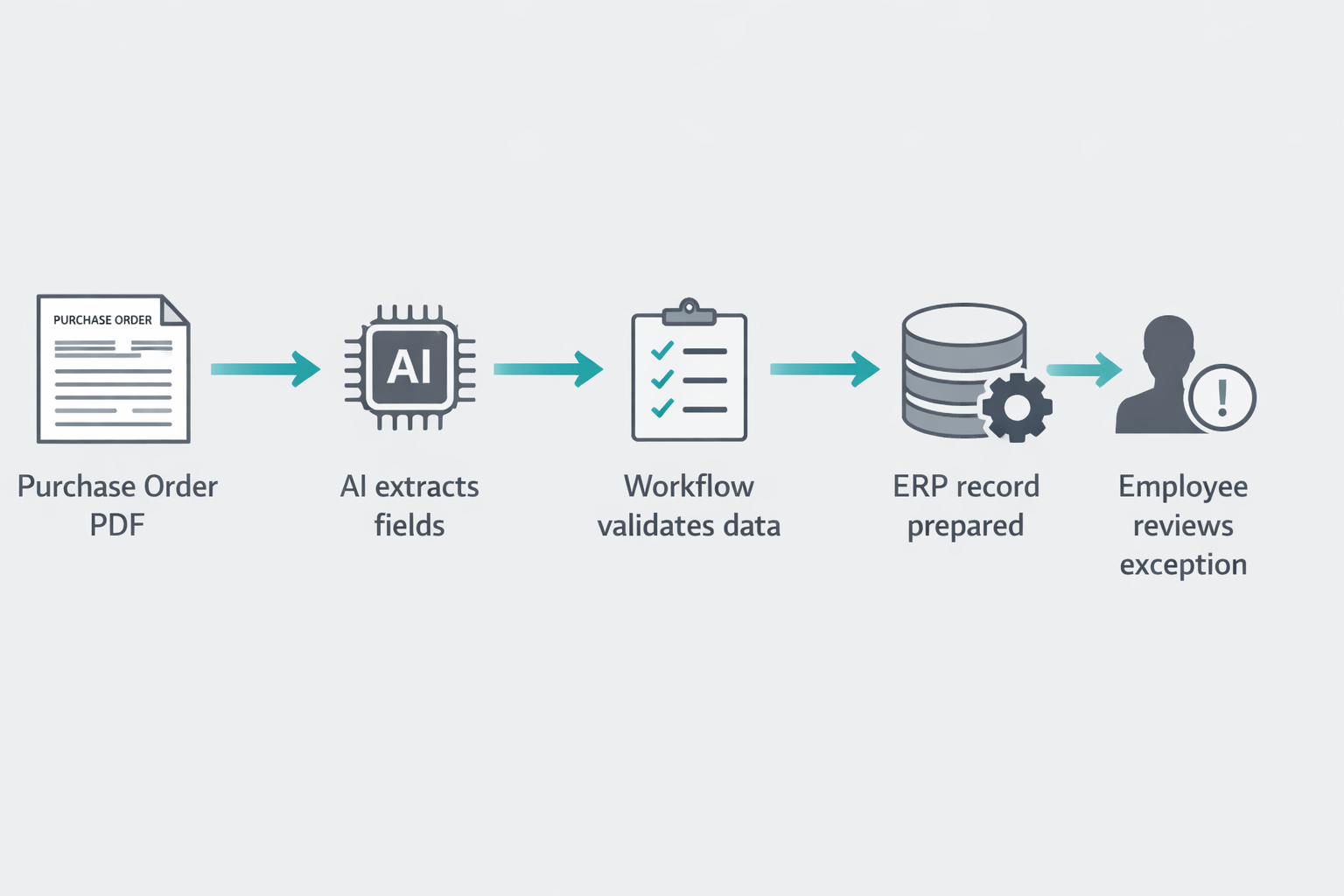
A common example: a customer sends a purchase order as a PDF attachment. AI extracts the part numbers, quantities, and pricing fields. A workflow validates that data against existing catalog and pricing records. An ERP order record gets prepared automatically, and an employee reviews only the exceptions, like a part number that doesn’t match anything in the system.
Is AI Automation Worth It for Small Manufacturing Businesses?
AI automation is worth it for small manufacturers when a meaningful volume of information regularly arrives as email, PDFs, or documents that someone currently reads and retypes by hand. If most of your orders already arrive as clean, structured data, standard integration will deliver more value for less cost than an AI layer.
Common mistake: buying an AI tool before mapping where unstructured information actually enters the business. Start by counting how many purchase orders, quotes, or requests arrive as documents each week. That number tells you whether AI automation pays for itself.
Manufacturing Workflow Automation vs. Process Automation vs. AI: What’s the Difference?
Integration, workflow automation, and AI solve three different problems, and confusing them is the most common reason integration projects underdeliver. Integration moves data between systems. Workflow automation decides what should happen after that data arrives. AI interprets information that isn’t already structured.
| Layer | What it does | Example |
|---|---|---|
| API / integration | Exchanges data between two systems | CRM order pushed into ERP |
| Workflow automation | Decides the next action after an event | Approved order auto-creates a production job |
| AI automation | Understands unstructured input | Extracts fields from a scanned PO |
The full chain, in order: data is created, integration moves it, workflow automation decides what happens next, AI steps in only where the input is unstructured, the business system receives the result, and a person handles whatever falls outside normal rules.
Can You Integrate ERP with CRM for Manufacturing Companies Without Replacing Everything?
Yes. In most cases you can integrate your ERP with your CRM, along with production, accounting, and inventory systems, without a full replacement project, as long as those systems offer usable APIs or database access. Feasibility depends on the age of the software, vendor restrictions, and how much data access the vendor is willing to expose.
A realistic connected environment often looks like: ERP linked to CRM, CRM linked to production status, production linked to accounting for billing, and inventory linked to both ERP and scheduling. None of that requires ripping anything out.
Edge case: some older, on-premise systems restrict outside connections entirely or charge extra for API access. In those cases, a lighter middleware layer or scheduled data sync can often bridge the gap without a rebuild.
How to Connect Legacy Manufacturing Systems to a Modern ERP
You connect legacy manufacturing systems to a modern ERP by identifying what access the legacy system actually allows, whether that’s an API, a database export, or a flat file, and building the integration around that access point instead of assuming a direct connection exists. Older systems rarely offer modern APIs, so the connection method has to match what’s really available.
Typical approaches, from simplest to most involved:
- Scheduled file or database exports that feed into a middleware tool
- A lightweight integration platform that maps fields between old and new systems
- A custom connector built specifically for one legacy application
Manufacturing Data Integration Tools Comparison
There’s no single best manufacturing ERP integration software for every shop. The right tool depends on which systems you’re connecting, how much unstructured data you handle, and your internal IT capacity.
| Approach | Best for | Tradeoff |
|---|---|---|
| iPaaS platforms | Connecting cloud ERP, CRM, and accounting tools | Ongoing subscription cost |
| Custom API integration | Unique or complex workflows | Higher upfront build cost |
| Middleware for legacy systems | Older, on-premise ERP or production software | Slower data sync intervals |
| AI-assisted document processing | Email, PDF, and PO-based orders | Needs validation rules to stay accurate |
Decision rule: choose an iPaaS-style platform if most of your systems are cloud-based with modern APIs. Choose custom integration or middleware if you’re bridging an older, on-premise system that wasn’t built to connect to anything.
How Much Does It Cost to Integrate Manufacturing Systems?
Integration costs vary widely because they depend on the number of systems, the age of your software, and how much custom logic the workflow requires, but the better question is what re-keying is already costing you every month. That number is calculable today, before you spend anything on integration.
A simple formula for the cost of manual re-entry:
Minutes spent re-entering data × transactions per month × number of employees involved × hourly labor cost
Example: if two employees spend 8 minutes per order re-entering data, and your shop processes 300 orders a month, at a $28 fully loaded hourly rate, that’s roughly 4,800 minutes a month, or 80 hours, costing around $2,240 a month in labor alone. That figure doesn’t include correction time, delayed decisions, or the customer response delays caused by conflicting records.
How Long Does Manufacturing System Integration Implementation Take?
Timelines depend on scope, but a single well-defined integration, like connecting CRM orders into an ERP, typically moves faster than a full multi-system rollout. Simple, single-connection integrations often take weeks. Multi-system projects involving legacy software, custom logic, or AI-assisted document processing take longer because of testing and validation.
Quick example: connecting a modern cloud CRM to a modern cloud ERP with existing APIs is a materially faster project than connecting a 15-year-old on-premise production system that has no API at all.
Common Mistakes When Integrating Manufacturing Workflows
The most common mistake is trying to integrate everything at once instead of starting with the single handoff causing the most pain. That approach burns budget and time on low-value connections before the highest-impact one is even fixed.
Other frequent mistakes:
- Skipping data validation, so a bad record in one system now corrupts a second system automatically
- Automating a broken process instead of fixing it first
- Ignoring who needs to approve exceptions, which removes necessary human judgment
- Choosing a tool before mapping which systems actually need to talk to each other
Common mistake, expanded: automating a flawed workflow just makes the flaw move faster. Fix the process logic first, then automate it.
What Should You Integrate First? How to Eliminate Duplicate Data Entry
Start with the data that is entered multiple times, high in volume, predictable in format, and frequently wrong, since that’s where automation delivers the fastest, most visible return. Don’t start with the most technically complicated integration just because it seems impressive.
Look for handoffs that share these traits:
- The same information is typed into more than one system
- The transaction happens often enough to matter, weekly or daily rather than occasionally
- The data format is consistent from one order to the next
- Errors in this handoff regularly cause downstream problems
- Multiple departments depend on this information being accurate
That combination points to your first project. Everything else can wait.
Manufacturing System Integration for Mid-Market vs. Enterprise Manufacturers
Mid-market manufacturers generally need a smaller number of high-impact integrations built around existing tools, while enterprise manufacturers often need a broader integration platform to manage many systems, locations, and stricter compliance requirements. The underlying goal is the same. The scale and governance needed to get there is not.
A mid-market shop with one plant, one ERP, and one CRM can often solve most of its re-keying problem with two or three targeted integrations. An enterprise manufacturer running multiple plants, multiple ERPs, and stricter audit requirements usually needs a centralized integration platform and formal data governance to keep everything consistent.
Choose a targeted integration approach if you’re running under a handful of core systems at one or two locations. Choose a platform-based approach if you’re coordinating data across multiple plants, multiple ERPs, or regulated reporting requirements.
What the Connected Manufacturer Looks Like
A connected manufacturer has systems that share information automatically, so employees spend their time on decisions and exceptions instead of retyping data that already exists somewhere else. That shift changes how a manufacturing business actually feels to run day to day.
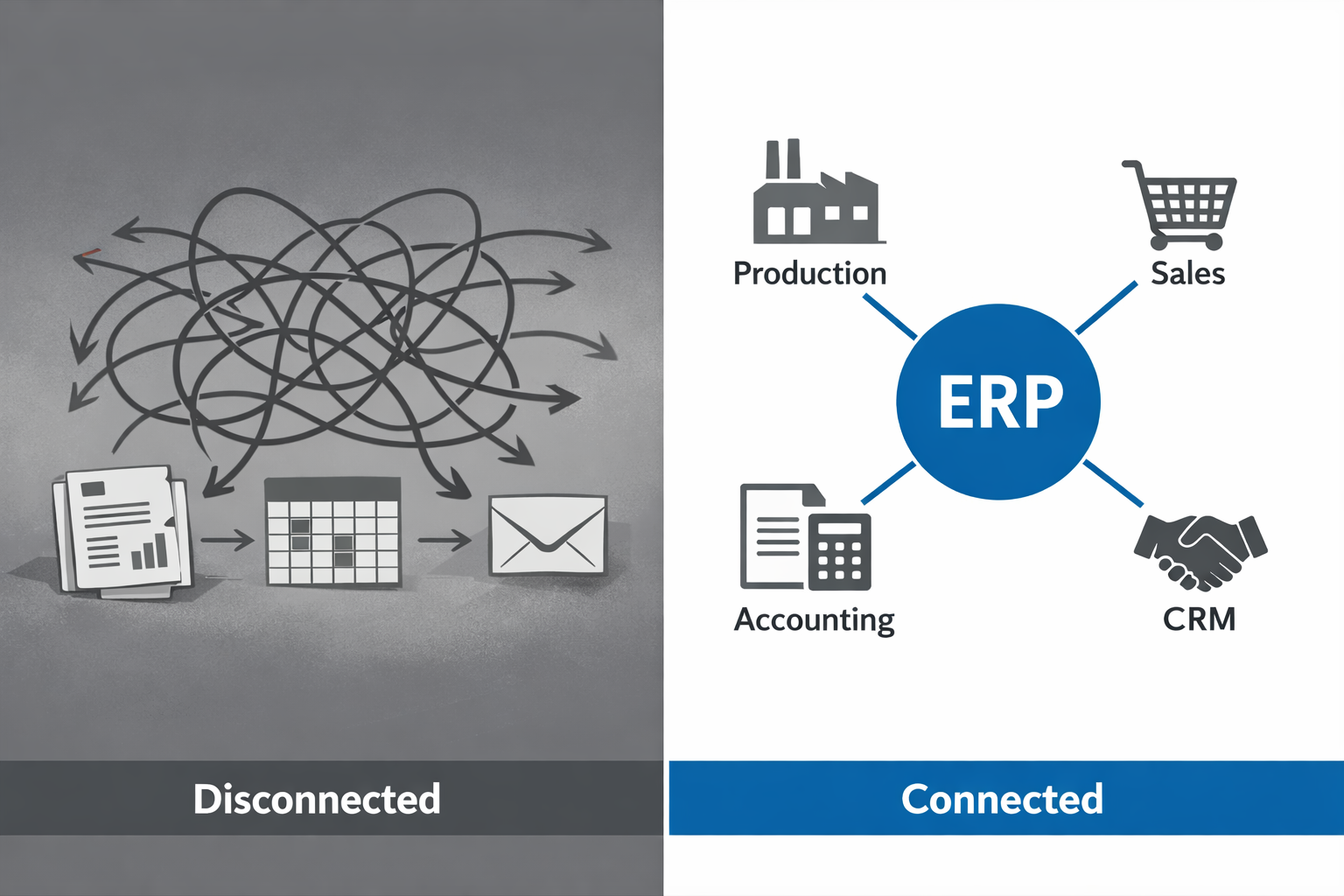
Before: Sales enters an order, an employee retypes it into the ERP, another employee builds a spreadsheet for production, production emails a status change, sales manually updates the customer, and accounting enters its own version for billing.
After: Sales, ERP, production, and office systems stay connected, with approved information moving automatically between them. Employees step in only when something needs a decision, an approval, or a judgment call a system can’t make on its own.