An AI Assistant for Manufacturing Is More Than a Chatbot
A production AI assistant is not a chat window where employees type questions into a search bar and hope for a good answer. It’s a system that sits on top of your ERP, production data, documents, and workflows, with permission to retrieve, organize, and act on approved information. That distinction changes what it can actually do for your team.
Most business leaders hear “AI assistant” and picture something like a general chatbot: type a question, get a generic answer pulled from the internet. That version has limited use on a production floor because it knows nothing about your orders, your equipment, or your work instructions. A manufacturing AI assistant worth building is different because it’s connected to the systems your team already relies on: your ERP, your MES if you have one, your document library, your email, and your scheduling tools.
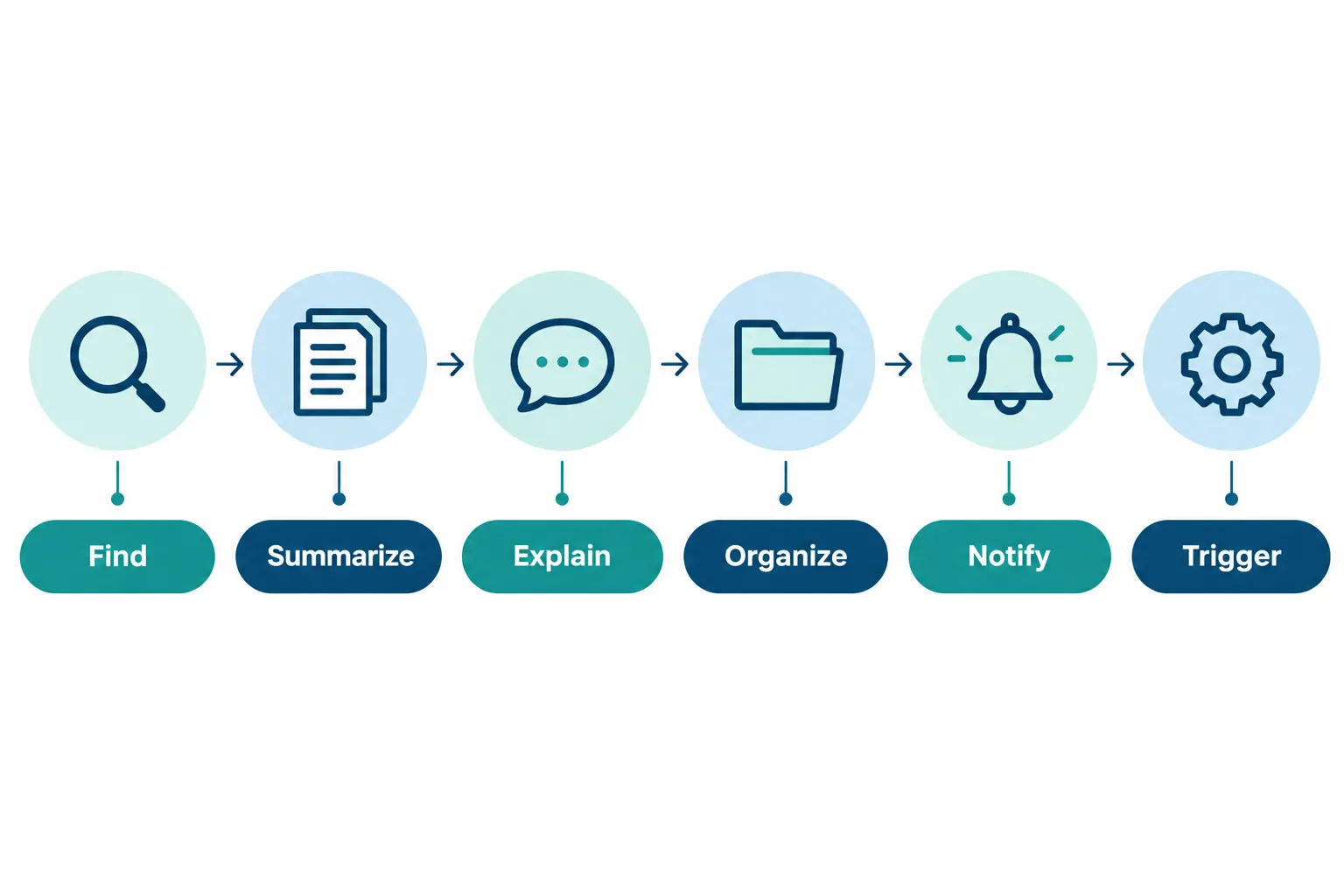
When it’s connected properly, a production AI assistant can potentially:
- Find the right order, document, or record without a manual search
- Summarize long reports, notes, or email threads into a few sentences
- Explain what a status, code, or exception actually means
- Organize scattered information into a usable format like a shift report
- Notify the right person when something needs attention
- Trigger the next step in a defined workflow, like creating a task or updating a record
The exact list of what your assistant can do depends on which systems it connects to, what permissions are set, how clean your data is, and which integrations are actually built. An assistant with no connection to your ERP can’t tell you an order’s real status. One with no document integration can’t hand you the correct SOP. This is why the setup matters more than the AI model behind it.
What Tasks Can an AI Assistant Handle on a Manufacturing Floor
An AI assistant on a manufacturing floor is best suited to information retrieval, documentation, and administrative work, not physical or safety-critical control. It works alongside operators and supervisors rather than replacing decisions that require human judgment or machine authority.
Realistic tasks include:
- Answering order status and schedule questions from ERP and MES data
- Pulling up the correct, current version of a work instruction or SOP
- Compiling shift summaries from production logs, notes, and events
- Flagging exceptions such as delayed orders or missing paperwork
- Preparing handoff notes between shifts or departments
- Drafting routine reports, internal updates, and structured records
- Extracting key details from PDFs, emails, and scanned documents
Choose this use case if: your team spends measurable time each week searching for information that already exists somewhere in your systems. This is not the right fit if: the core problem is a broken process itself, like an ERP with bad data or a scheduling method nobody trusts. Fix the underlying process first, then layer AI on top.
“What’s the Status of This Order?” A Real AI for Production Teams Example
An AI assistant should answer order status questions by retrieving live data from your connected ERP or MES, not by guessing or estimating. The value comes from speed and consolidation, not from the AI inventing an answer.
Here’s what that looks like in practice. An authorized supervisor types or speaks a simple question:
“What’s the status of Order 4582?”
Instead of opening the ERP, checking a spreadsheet, and calling the floor lead, the assistant pulls permitted information from connected systems and responds with something like:
- Current stage: Machining, second operation
- Scheduled completion: Thursday, end of shift
- Outstanding issues: Waiting on a quality hold from Tuesday’s inspection
- Relevant notes: Operator flagged a tooling wear concern
- Next required action: Quality sign-off needed before final packaging
This only works because the assistant is reading from your actual order records. It should never fabricate a completion date or invent a status that isn’t in the source system. If the ERP data is wrong or stale, the assistant will repeat that same wrong information faster, which is exactly why data quality and system connections come before deployment.
Finding Work Instructions and Documents Faster
An AI assistant can act as a conversational layer over your approved documentation, so employees ask for what they need instead of digging through folders. It retrieves the current, correct version and cites where the information came from.
Production employees lose real time hunting through shared drives, binders, PDFs, and old email attachments for the right SOP, quality checklist, or equipment manual. Version control makes it worse: an operator might grab an outdated instruction because it’s the file that happened to be easiest to find. That’s a quality and safety risk, not just a time cost.
Instead of a manual search, an employee could ask:
“What’s the current work instruction for changing over Line 3 to the 12-ounce mold?”
A properly connected assistant retrieves the approved document, shows the relevant section, and references the source file and version number so the employee (or an auditor) can verify it. This depends entirely on your document permissions and version control being set up correctly on the back end. An AI layer can’t fix a document library that has five conflicting versions of the same SOP floating around; it can only surface what’s marked as current and approved.
Turning Production Data Into Shift Summaries
An AI assistant can organize existing production data, operator notes, and logged events into a structured shift summary that a supervisor reviews and approves. It should prepare the information, not create data that was never recorded.
Manually compiling a shift summary usually means a supervisor pulling numbers from one system, notes from a whiteboard or paper log, and quality flags from another screen, then typing it all into a report near the end of a long shift. That’s tedious work, and it’s also where details get dropped when someone is tired or rushed.
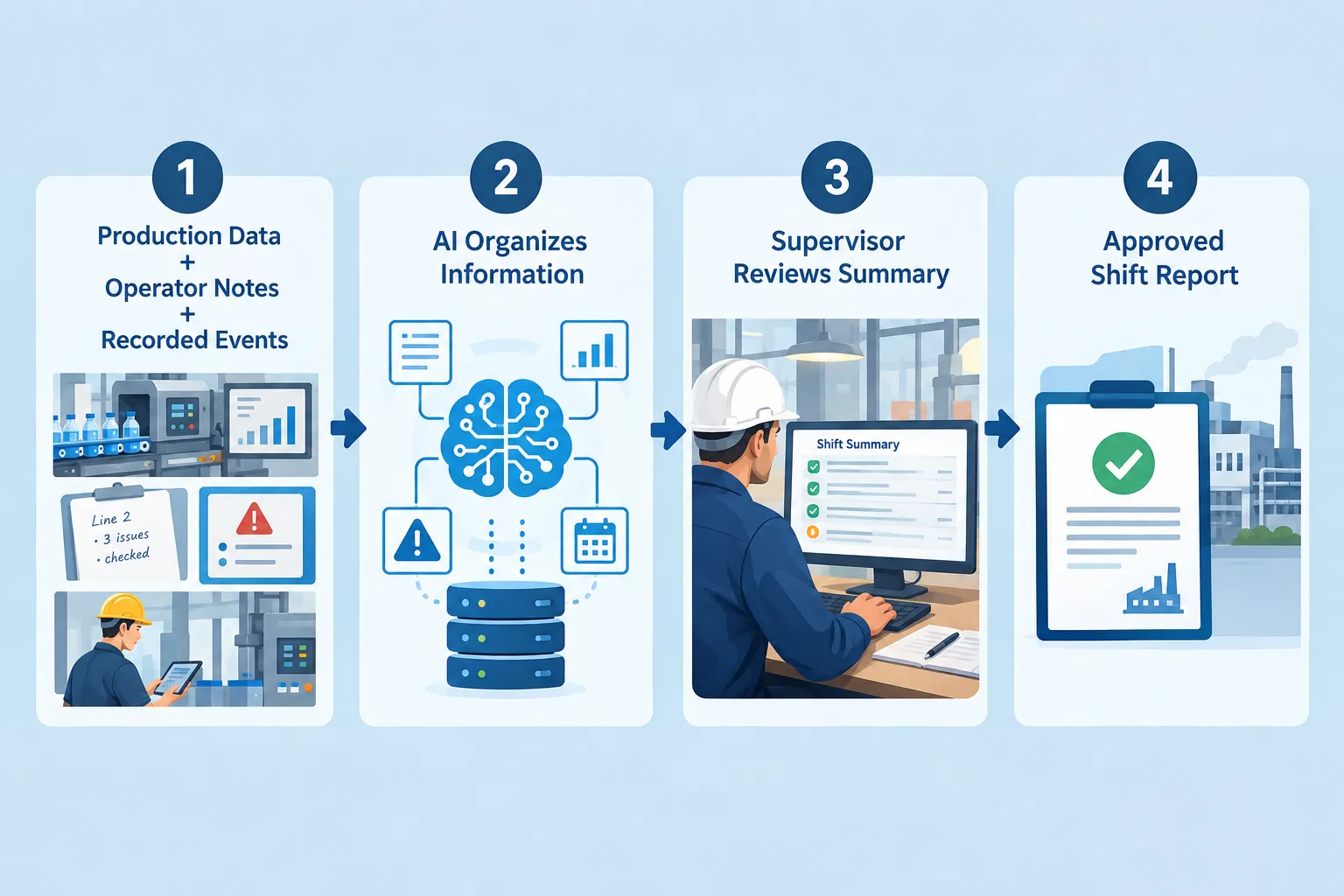
The flow looks like this:
- Production data, operator notes, and recorded events feed into the assistant
- The AI organizes that information into a draft summary
- The supervisor reviews the draft for accuracy
- The supervisor approves it as the official shift report
Common mistake: treating the AI-generated draft as final without review. The assistant organizes what exists; it doesn’t verify that a machine actually ran the cycle count someone logged. Keep a human check in the loop, every shift, until you’ve built enough trust and history with the accuracy of the output.
Surfacing Exceptions Instead of Making People Search for Them
A well-connected AI assistant should flag exceptions automatically instead of waiting for someone to ask about them. This shifts the daily habit from “go find the problem” to “show me what needs attention.”
Connected workflows can watch for conditions like:
- Orders running behind schedule
- Missing information on a job traveler or work order
- Material shortages flagged in inventory data
- Approvals sitting overdue past a set threshold
- Quality exceptions or failed inspection results
- Incomplete documentation before a job moves to the next stage
Your production team doesn’t need another place to search. They need faster access to the information already inside your business.
Edge case: if your underlying systems don’t track a condition at all (say, material shortages live only in someone’s head, not in inventory software), the assistant can’t surface it. Exception detection is only as good as the data feeding it, which is another reason system connections matter more than the AI itself.
How AI Assistants Help With Production Handoffs
An AI assistant can organize the information a supervisor needs to hand off a shift cleanly, reducing the gaps that happen when details get passed verbally or not at all. The supervisor still verifies and takes responsibility for what’s reported.
Shift changes are a known weak point. The outgoing supervisor is tired and in a hurry, the incoming supervisor is catching up cold, and important context gets lost in a thirty-second hallway conversation. An assistant can compile:
- Jobs currently running and their stage
- Open issues that haven’t been resolved
- Delayed work and the reason for the delay
- Pending approvals waiting on someone
- Important notes from operators during the shift
- Outstanding actions the next shift needs to pick up
This makes handoffs more consistent from shift to shift, since the format and level of detail don’t depend on how much energy the outgoing supervisor has left at 6:45 in the morning. The supervisor still reviews and confirms the handoff before it’s treated as accurate.
Answering Questions From Approved Manufacturing Data
An AI assistant is most useful when it answers specific, recurring questions using only the systems it’s connected to, and its usefulness scales directly with how many relevant systems are hooked up. A narrow connection means narrow answers.
Practical examples of the kinds of questions a connected assistant can handle:
- “Which orders are due this week?”
- “Which jobs are waiting for approval?”
- “Summarize today’s open production issues.”
- “Show the work instructions for this process.”
- “Which orders currently have missing information?”
Decision rule: if a question requires information that lives in a system you haven’t connected (a paper log, a personal spreadsheet, a side notebook), the assistant can’t answer it accurately, no matter how advanced the underlying AI model is. Map your key data sources before you set expectations for what employees can ask.
Reducing Routine Administrative Work
An AI assistant can take on the administrative work that surrounds production without touching the production process itself, freeing skilled employees for higher-value work. This is one of the fastest, lowest-risk places to start.
Tasks that fit well here include:
- Preparing routine reports on a set schedule
- Organizing scattered notes into a clean format
- Summarizing long documents or email threads
- Drafting internal updates for other departments
- Extracting key fields from PDFs (like packing slips or supplier certificates)
- Creating structured records from unstructured input
- Routing requests to the right person or department
- Preparing recurring documentation, like weekly compliance logs
None of this requires the AI to make a judgment call about production quality or safety. It reduces manual work and human error in the paperwork layer that surrounds the shop floor, which is exactly the kind of task manufacturing employees usually describe as the least valuable part of their day.
AI Assistant Plus Manufacturing Workflow Automation: Answering vs. Acting
An AI assistant that only answers questions is helpful, but a connected workflow automation that also acts on those answers is where the bigger operational gains show up. Answering tells you about a problem; automation moves it toward resolution.
A basic assistant might tell you:
“Order 4582 is waiting for approval.”
A connected automation goes further:
- Identify the issue (an approval sitting past its normal turnaround time)
- Notify the responsible person automatically
- Create a task tied to that specific order
- Update the workflow status so others can see it’s in progress
- Track the issue until it’s resolved
The real value appears when AI can not only understand information but also connect that information to a controlled business workflow.
This is where AI automation for manufacturing stops being a search tool and starts functioning as manufacturing workflow automation: reducing the lag between “someone notices a problem” and “someone with the authority to fix it actually knows about it.” AlphaCIS builds this layer by connecting the AI assistant to defined, controlled workflows rather than letting it act on its own outside those boundaries.
What Should an AI Assistant Not Control in Manufacturing Operations Automation
An AI assistant should not have unrestricted control over machinery, safety systems, quality acceptance, engineering decisions, maintenance shutdowns, or purchasing approvals. Those decisions require human authority and, in many cases, dedicated industrial controls with their own safeguards.
Keep the assistant in a supporting role for anything involving:
- Machinery operation or setpoints
- Safety systems and interlocks
- Production equipment control
- Final quality acceptance decisions
- Engineering changes or specifications
- Critical maintenance timing decisions
- Purchasing approvals above a set threshold
- Production shutdown decisions
Common mistake: assuming “AI-powered” means “AI-controlled.” A useful production assistant surfaces information and drafts recommendations. A qualified person still makes the call on anything that affects safety, product quality, or spending authority. This boundary is what keeps an AI rollout credible with your floor staff and your insurance carrier.
Why Permissions Matter in Manufacturing AI Solutions
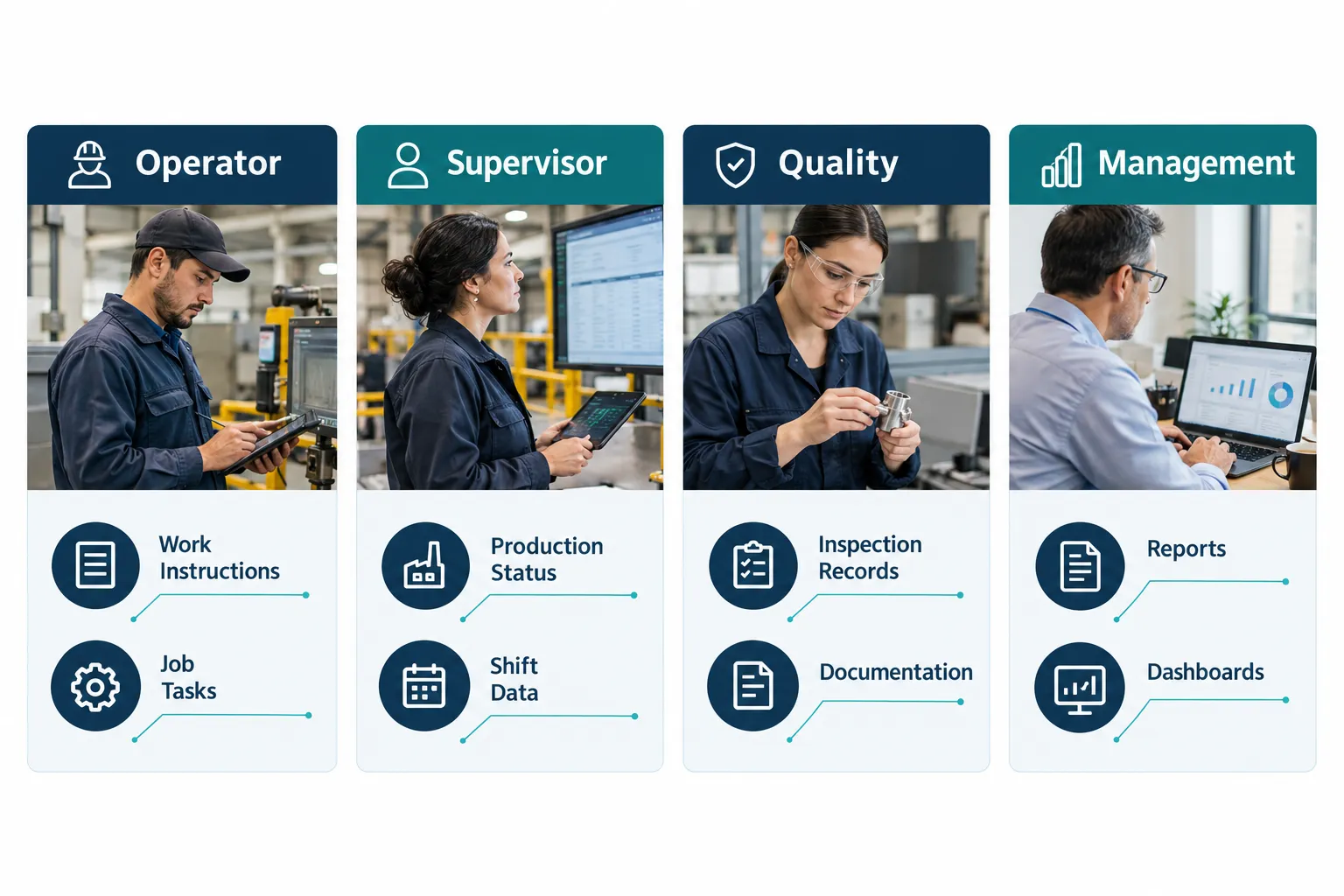
Permissions determine what each employee can see through the AI assistant, and they should mirror the access controls already built into your ERP and document systems. Not every employee needs, or should have, access to every piece of company data.
A reasonable structure looks like this:
| Role | Typical access through the AI assistant |
|---|---|
| Operator | Relevant work instructions and job information for their station |
| Supervisor | Production status, shift information, and exception alerts |
| Quality | Quality records, inspection documentation, and hold notices |
| Management | Summaries, reports, and cross-department operational visibility |
Decision rule: if your underlying ERP or document system already uses role-based permissions, the AI assistant should inherit those same rules rather than creating a separate access model. This keeps your data secure and compliant and avoids a situation where the assistant accidentally exposes information a role wasn’t cleared to see.
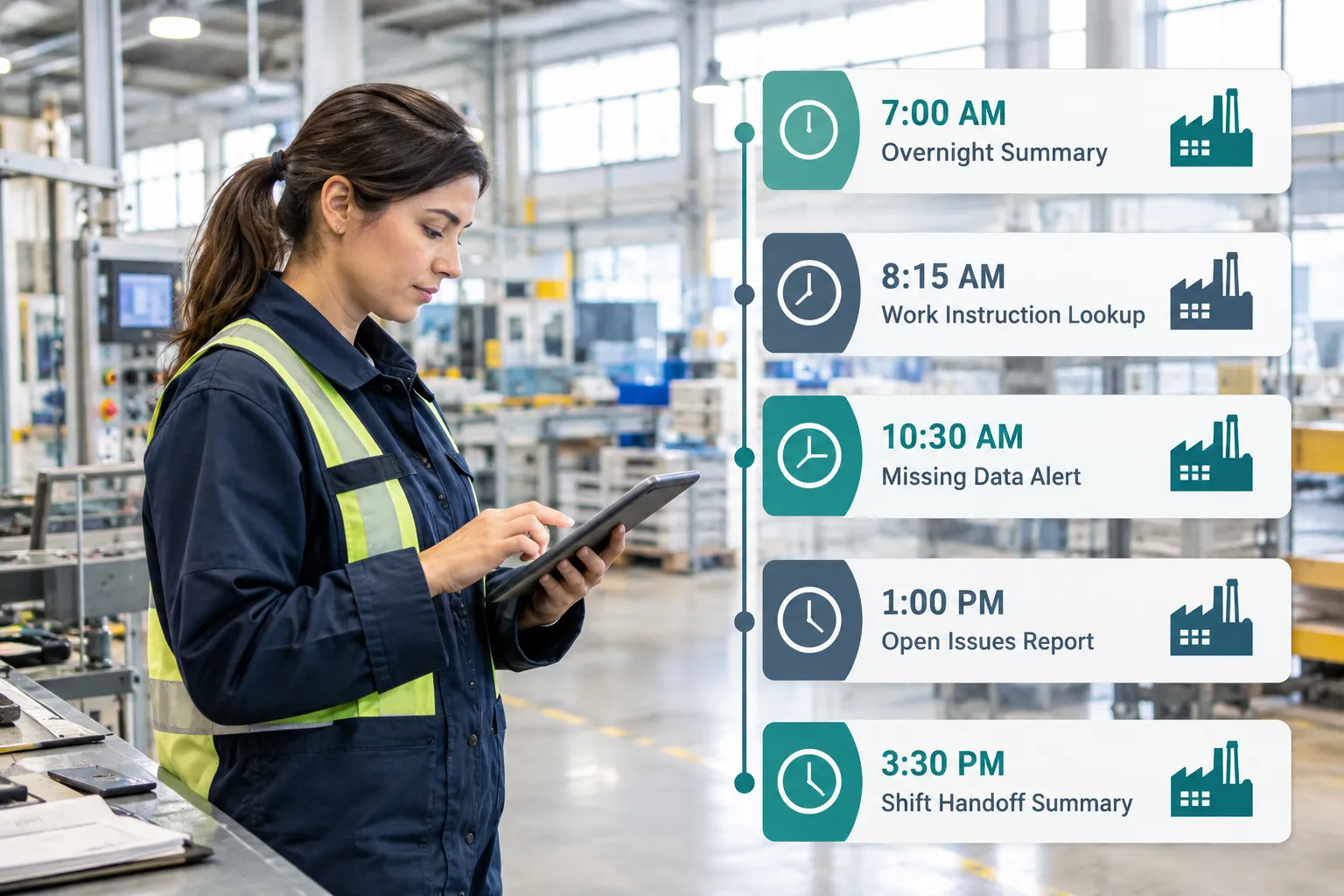
What a Real Shift Would Look Like With an AI Assistant for Plant Operations
A production AI assistant works quietly across a normal shift, showing up at specific moments rather than requiring constant interaction. Here’s a realistic example of how that plays out over one day.
- 7:00 AM: The incoming supervisor requests an overnight production summary before the morning huddle.
- 8:15 AM: An operator retrieves the latest approved work instruction for a changeover, without leaving the workstation to find a binder.
- 10:30 AM: A connected workflow notices an order is missing required documentation and alerts the employee responsible for fixing it.
- 1:00 PM: The production manager asks for a summary of open issues before a scheduling decision.
- 3:30 PM: The assistant prepares a draft shift handoff summary for the outgoing supervisor to review and approve.
None of these moments require someone to leave their station and hunt across four different applications. That’s the practical difference between a generic chatbot and an AI assistant for manufacturing built around your actual systems.
AI Assistant vs. Traditional Manufacturing Software: What’s the Difference
An AI assistant doesn’t replace your ERP, MES, or scheduling software. It sits on top of those systems as a conversational and organizational layer, retrieving and structuring information that already exists rather than storing new production records.
| Traditional manufacturing software | AI assistant for manufacturing | |
|---|---|---|
| Purpose | Records and manages production data | Retrieves, summarizes, and organizes that data |
| Interaction | Menus, forms, screens | Plain-language questions and requests |
| Where it lives | Standalone system of record | Connected layer across multiple systems |
| Typical use | Entering and tracking transactions | Answering questions, drafting summaries, flagging exceptions |
| Human role | Data entry and lookup | Review and approval of AI-prepared output |
Choose to add an AI assistant if: your team already has solid systems of record but spends too much time manually pulling information out of them. Fix your core systems first if: your ERP data is unreliable or your process isn’t documented, because the assistant will just surface bad information faster.
What Does It Cost, and Can It Integrate With Your Existing Manufacturing Systems
Cost for an AI manufacturing assistant depends mainly on how many systems it connects to, how much custom integration work is required, and the complexity of the workflows you want automated, not on the AI software itself. A narrow, single-use-case assistant costs far less to build than a broad multi-system rollout.
Integration is generally possible with most modern ERP platforms, MES systems, document repositories, and email, provided those systems have an API or another supported connection method. Older, highly customized, or fully paper-based systems may need a data bridge or a smaller-scope pilot first. AlphaCIS scopes this during discovery: reviewing your current systems, checking connection options, and identifying data quality issues before recommending an approach.
Common mistake: budgeting for “an AI assistant” as one flat cost. The real cost driver is the number and complexity of integrations, so a single-use-case pilot (like order status lookups) will always cost less than a plant-wide rollout touching five systems at once. Start narrow, price it accurately, and expand from a working foundation.
Is an AI Assistant Right for Small Manufacturers or Just Large Plants
An AI assistant can work for a manufacturer with a handful of production employees just as well as it works for a large facility, because the value comes from connecting to your actual systems and data, not from the size of your operation. Smaller shops often see faster payback because the same person is wearing multiple hats and feels administrative drag most directly.
- Choose a small, focused pilot if: you have 5 to 100 employees, a defined ERP or production system, and one specific pain point like order status calls or shift reporting.
- Wait or start smaller if: your production process still runs mostly on paper with no digital system of record. Digitize the core process first, then add an AI layer.
- Large plants typically need broader permission structures and more integrations, but the underlying logic (find, summarize, notify, trigger) is the same.
How Do You Implement an AI Assistant in a Manufacturing Plant, and What Data Does It Need
Implementation works best as a short, scoped project: pick one use case, connect the relevant systems, test with real users, then expand. The assistant needs clean, current, and permission-aware access to whichever systems answer the questions you want it to answer.
A practical implementation checklist:
- Pick one clearly defined use case (order status, document lookup, or shift summaries)
- Identify the systems that hold the needed data (ERP, MES, document library, email)
- Confirm data quality and correct any obvious gaps before connecting
- Set role-based permissions that mirror your existing access rules
- Build the integration and test it with a small group of real users
- Review output accuracy closely for the first several weeks
- Expand to additional use cases only after the first one is working well
Data requirements: the assistant needs structured, permission-tagged access to order records, current document versions, and any logs or notes you want summarized. Messy spreadsheets and undocumented processes will limit accuracy no matter how good the AI model is.
Common Mistakes Manufacturers Make When Adopting AI
The most common mistake is trying to build one large system that answers every possible question on day one instead of proving value with a single use case first. This usually leads to a stalled project, frustrated IT staff, and a skeptical floor team.
Other frequent mistakes:
- Connecting the assistant before cleaning up bad or duplicate data
- Skipping role-based permissions and giving everyone the same access
- Letting the assistant draft reports with no human review step
- Expecting the assistant to answer questions from systems it isn’t connected to
- Rolling it out to the whole plant before testing with a small group
- Treating it as a replacement for your ERP instead of a layer on top of it
Decision rule: if your team can’t agree on which one problem to solve first, that’s a sign you’re not ready to scope a build yet. Get specific about the single most annoying, time-consuming information gap, and start there.
How Does AI Help With Quality Control and Defect Detection, Predictive Maintenance, and Real-Time Scheduling
Quality control and defect detection
An AI assistant supports quality work by organizing inspection records, surfacing quality holds, and summarizing recurring defect patterns from existing data, rather than making the accept-or-reject call itself. Final quality acceptance stays with a qualified person, per the boundaries described earlier in this article.
Predicting equipment failures
An AI assistant can help surface patterns in maintenance logs and sensor data if those systems are connected, flagging equipment that shows early signs of trouble based on historical records. True predictive maintenance typically requires dedicated sensor and monitoring infrastructure feeding the AI layer; without that data source, the assistant can only summarize what’s already logged, not forecast a failure on its own.
Real-time scheduling and bottlenecks
An AI assistant can surface scheduling conflicts and flag bottlenecks that already exist in your scheduling or MES data, such as an order stacking up behind a resource constraint. It presents that information to a scheduler or planner, who decides how to reprioritize. It’s a decision-support layer, not an autonomous scheduling engine, unless paired with a dedicated scheduling optimization tool your team has explicitly approved for that purpose.
What’s the Learning Curve for Production Teams Using AI Assistants
The learning curve for most production employees is short, usually a few days of regular use, because the interaction is plain-language questions rather than new software menus to memorize. The bigger adjustment is often trust, not skill.
- Operators and supervisors generally adapt quickly since they’re just typing or speaking questions in normal language.
- The real ramp-up time goes into building trust: employees need to see a few weeks of accurate answers before they stop double-checking the assistant against the old manual process.
- IT and operations leaders need more upfront time, since they’re the ones scoping integrations, setting permissions, and reviewing accuracy during the pilot phase.
Edge case: employees who’ve been burned by a clunky software rollout before may be skeptical at first. Address that directly by starting with a narrow, reliable use case rather than promising it can do everything immediately.
Start With One Useful Job
Building a single, well-scoped AI assistant beats trying to create one massive system that covers every department at once. Pick one job, prove it works, measure the results, then expand.
Reasonable starting options:
- Option A: Production document assistant, for finding SOPs and work instructions
- Option B: Shift reporting assistant, for compiling and drafting shift summaries
- Option C: Order-status assistant, for answering “where’s my order” questions
- Option D: Production issue summarization, for daily exception reports
Track results honestly:
- Time saved on the target task
- Adoption rate among employees who were supposed to use it
- Accuracy of the information provided
- Response time compared to the old manual process
- Reduction in time spent searching across systems
- Change in administrative workload for supervisors
The goal isn’t to put AI in charge of production. It’s to give your production team faster access to information and less repetitive administrative work.
Quick Self-Check: Is This a Good First AI Assistant Use Case?
| Question | Good sign |
|---|---|
| Does the data already exist in a system? | Yes, in ERP/MES/documents |
| Is this question asked repeatedly? | Several times a day/week |
| Can you measure time currently spent? | Yes, roughly |
| Does it avoid safety/quality decisions? | Yes, information only |