What Are the Biggest Cybersecurity Risks for Old Industrial Machines
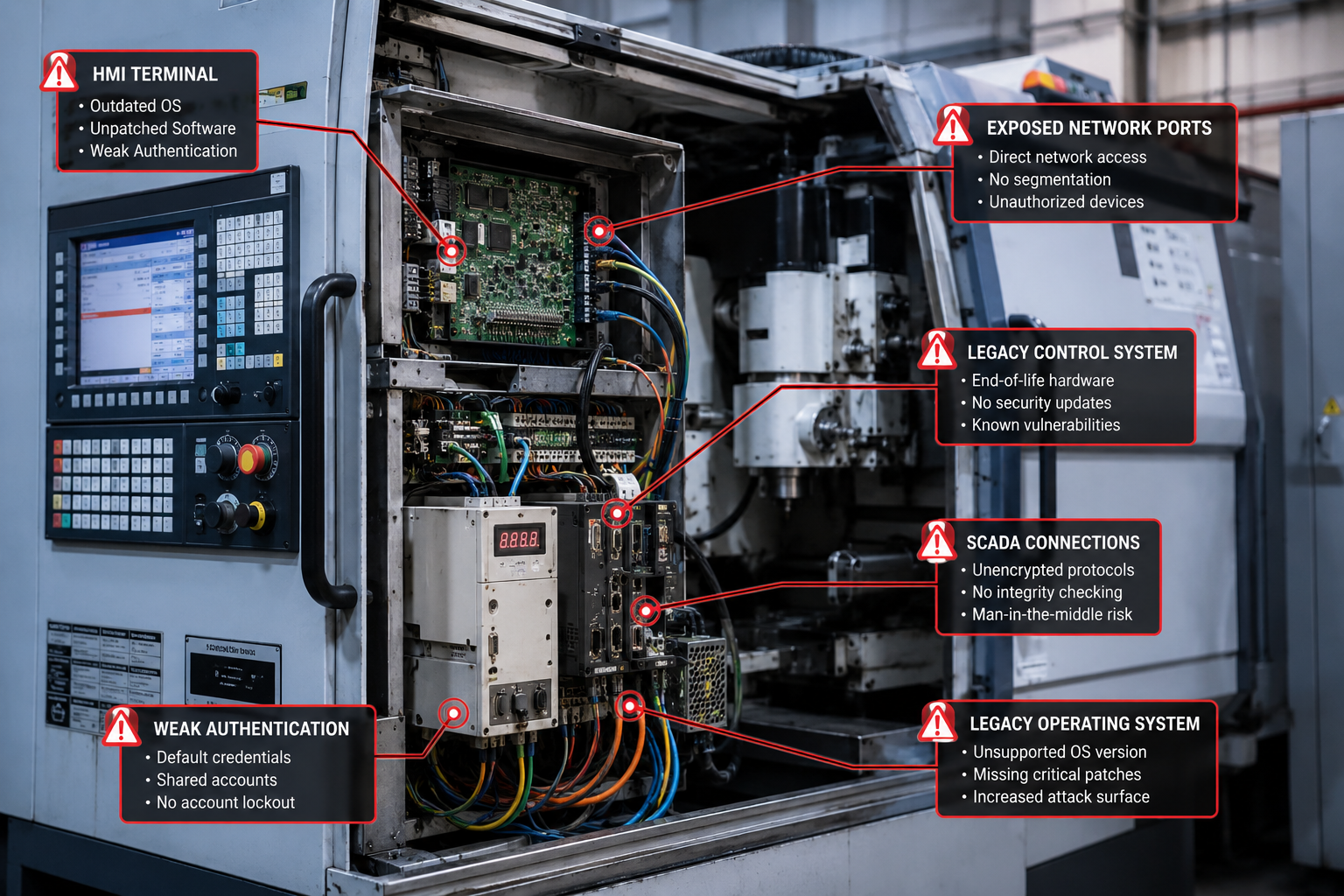
Legacy manufacturing equipment faces three critical security vulnerabilities: unpatched operating systems, weak authentication, and direct network exposure. These older systems often run Windows XP or proprietary software that hasn’t received security updates in years, making them easy targets for ransomware and industrial espionage.
The most dangerous risk is lateral movement. Once attackers breach one legacy system, they can spread throughout your network because older equipment typically lacks modern security controls. Many legacy machines use default passwords, shared accounts, or no authentication at all, giving attackers administrative access once they’re inside your network.
Physical access vulnerabilities also plague older equipment. USB ports, maintenance panels, and diagnostic connections often provide direct system access without logging or monitoring. A single infected USB drive or malicious technician can compromise your entire production line.
Network protocol weaknesses represent another major threat. Legacy systems frequently use unencrypted communication protocols that transmit passwords and commands in plain text. Attackers can intercept these communications to steal credentials or inject malicious commands.
Common attack vectors include:
- Ransomware targeting Windows-based HMI systems
- Man-in-the-middle attacks on unencrypted industrial protocols
- Credential harvesting from systems with default passwords
- USB-based malware introduced during maintenance
- Supply chain attacks through compromised software updates
Who Should Invest in Legacy Equipment Security Upgrades
Manufacturing companies with equipment over 10 years old that still has 5+ years of productive life remaining should prioritize security upgrades over replacement. This approach makes the most financial sense when your legacy systems are mechanically sound, parts are still available, and replacement costs exceed $100,000 per machine.
Small to mid-sized manufacturers benefit most from this strategy because they typically can’t afford to replace entire production lines simultaneously. Companies with 20-100 employees often have legacy equipment worth $500,000 to $5 million that would cost prohibitive amounts to replace all at once.
Industries with specialized equipment should almost always choose security upgrades first. Custom machinery, specialized tooling, and industry-specific systems often have no modern equivalent or would require extensive retraining and process changes to replace.
You’re a good candidate for legacy security if you have:
- Equipment that’s mechanically reliable but technologically outdated
- Systems that would cost more than 3x their current value to replace
- Specialized machinery with no modern equivalent
- Production lines where downtime costs exceed $10,000 per day
- Compliance requirements that don’t mandate specific equipment ages
Avoid security upgrades if your equipment requires frequent repairs, has obsolete parts, or lacks vendor support for critical components. In these cases, the ongoing maintenance costs often exceed the investment in modern, secure equipment.
How Much Does Network Segmentation Cost for Legacy Manufacturing Systems
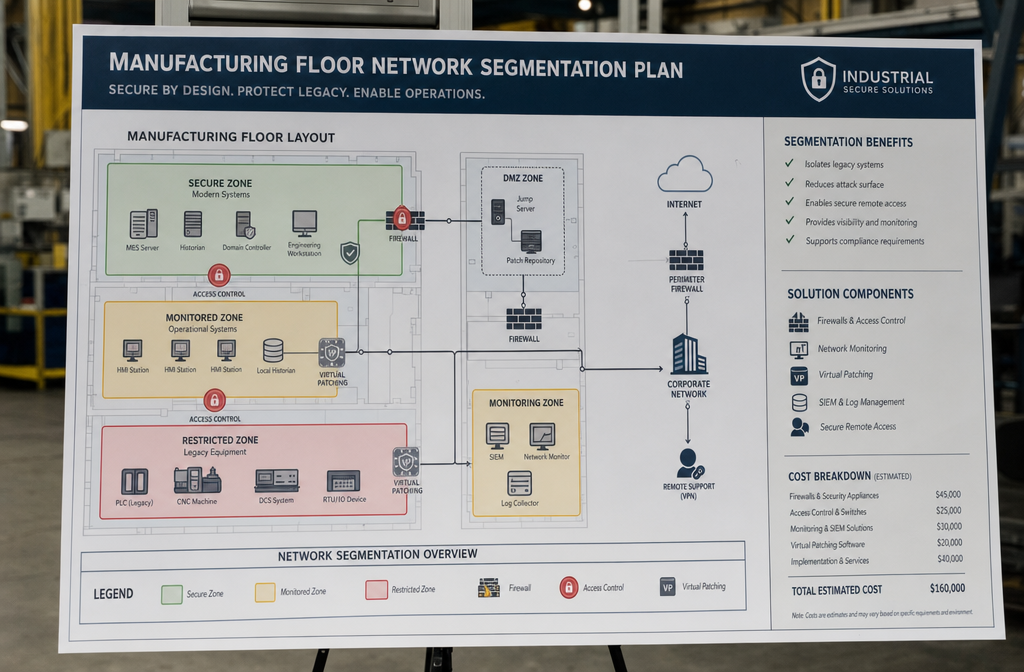
Network segmentation for legacy manufacturing systems typically costs $25,000 to $75,000 for a mid-sized facility, depending on the number of network zones and existing infrastructure. This investment creates isolated network segments that prevent attackers from moving between your legacy equipment and critical business systems.
Basic segmentation using managed switches and VLANs costs $10,000-25,000 and provides good protection for smaller facilities with 10-20 legacy devices. This approach creates separate network zones for production equipment, office systems, and external connections.
Advanced segmentation with industrial firewalls and micro-segmentation ranges from $50,000-100,000 but offers enterprise-grade protection. This includes deep packet inspection, protocol filtering, and granular access controls between individual machines.
Ongoing costs include monitoring software ($5,000-15,000 annually), security updates, and managed services if you outsource management. Many manufacturers find that partnering with a local IT provider offers better value than hiring dedicated cybersecurity staff.
Cost breakdown for a typical 50-machine facility:
- Industrial firewall: $15,000-25,000
- Managed switches: $8,000-12,000
- Configuration and setup: $10,000-15,000
- Monitoring software: $8,000-12,000 annually
- Staff training: $3,000-5,000
The investment pays for itself quickly when you consider that a single ransomware attack can cost $200,000-500,000 in downtime, recovery, and lost production.
Can I Add Security to My 20-Year-Old CNC Machines Without Buying New Equipment?
Yes, you can significantly improve the security of 20-year-old CNC machines using external security controls that don’t modify the original equipment. The key is creating protective layers around your legacy machines rather than trying to update their internal systems.
Network isolation provides the most effective protection for older CNC equipment. Place your machines behind industrial firewalls that only allow necessary communication protocols and block internet access. This prevents remote attacks while maintaining local network connectivity for production management.
Secure remote access solutions let technicians perform maintenance without exposing your CNC machines to the internet. Virtual private networks (VPNs) or zero-trust remote access tools create encrypted tunnels that authorized personnel can use for diagnostics and programming.
Physical security upgrades complement network protections. Install locks on USB ports, secure maintenance panels, and implement badge-based access controls around your CNC equipment. Many successful attacks on legacy systems start with physical access.
Practical security additions for 20-year-old CNCs:
- Industrial firewall between machines and main network ($3,000-8,000)
- Secure KVM switches for isolated operator access ($1,500-3,000)
- USB port locks and physical security ($500-1,000)
- Network monitoring to detect unusual activity ($2,000-5,000)
- Backup and recovery systems for machine programs ($1,000-3,000)
Avoid installing security software directly on legacy CNC controllers, as this can cause system instability or void warranties. External security controls protect without risking production downtime.
What Are Common Mistakes Manufacturers Make When Trying to Secure Older Tech
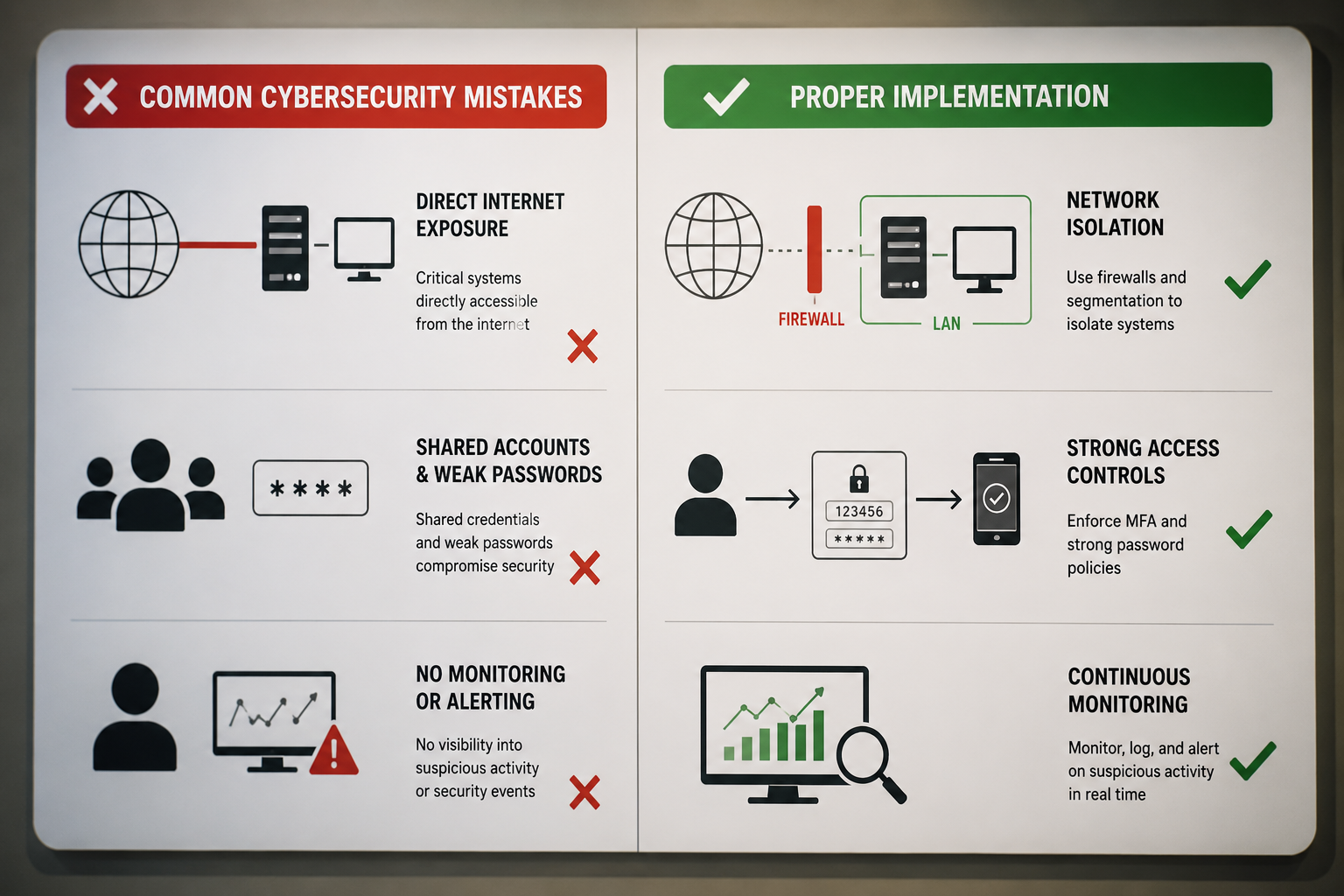
The biggest mistake manufacturers make is trying to install modern security software directly on legacy systems, which often causes crashes, performance issues, or complete system failures. Legacy equipment wasn’t designed to run additional software, and adding security programs can overwhelm limited processing power or conflict with industrial control software.
Blocking all network traffic is another common error that breaks legitimate functionality. Many manufacturers panic about network security and completely isolate legacy systems, preventing necessary communication with MES systems, backup servers, or remote monitoring tools that keep production running smoothly.
Using consumer-grade security tools in industrial environments creates more problems than it solves. Standard antivirus software, Windows updates, and commercial firewalls aren’t designed for the real-time requirements and specialized protocols used in manufacturing environments.
Ignoring physical security while focusing only on network protection leaves major vulnerabilities. Attackers often find it easier to plug a malicious device into an unsecured USB port than to breach network defenses remotely.
Mistakes that create more risk:
- Installing endpoint security on HMI computers running legacy software
- Enabling automatic Windows updates on production systems
- Using shared admin passwords across multiple legacy devices
- Connecting legacy systems directly to corporate networks
- Relying solely on perimeter security without internal monitoring
- Implementing changes during production without proper testing
The right approach involves external security controls, thorough testing in non-production environments, and gradual implementation during planned maintenance windows. Work with industrial cybersecurity specialists who understand the unique requirements of manufacturing environments.
Which Industries Are Most Vulnerable to Legacy System Cyber Attacks
Automotive manufacturing faces the highest risk from legacy system attacks because of the industry’s heavy reliance on specialized equipment with 15-20 year lifespans. These facilities often have hundreds of legacy machines connected to networks, creating numerous entry points for attackers seeking to steal intellectual property or disrupt production.
Food and beverage manufacturing ranks second due to strict regulatory requirements that make companies hesitant to modify legacy systems, even for security improvements. Many facilities continue operating decades-old equipment to maintain FDA compliance and avoid costly revalidation processes.
Chemical and pharmaceutical industries are prime targets because legacy system compromises can cause environmental disasters or contaminate products. Attackers know these industries will pay significant ransoms to avoid regulatory penalties and public safety incidents.
High-risk industry characteristics:
- Long equipment lifecycles (15+ years typical)
- Specialized legacy systems with no modern replacements
- Regulatory compliance requirements that discourage changes
- High attack payoffs through IP theft or ransom demands
- Complex integration makes security upgrades challenging
Aerospace and defense manufacturing also faces elevated risks, though these industries typically have better cybersecurity resources. The high value of intellectual property and national security implications make these attractive targets for state-sponsored attackers.
Lower-risk industries include those with shorter equipment cycles or less valuable data, such as basic metal fabrication or simple assembly operations. However, even these sectors face growing threats as attackers become more sophisticated.
What’s the Difference Between Air Gapping and Network Isolation
Air gapping completely disconnects systems from all networks, while network isolation uses firewalls and access controls to limit communication while maintaining necessary connections. Air gapping provides maximum security but eliminates remote monitoring, automated backups, and centralized management capabilities that modern manufacturing requires.
True air gapping means no network cables, wireless connections, or internet access – only manual data transfer via removable media. This approach works for standalone legacy machines that don’t need real-time data exchange, but it’s impractical for integrated production lines.
Network isolation creates secure network segments with controlled communication paths. Legacy equipment can still receive production schedules, send status updates, and connect to backup systems, but unauthorized traffic gets blocked by industrial firewalls and monitoring systems.
Hybrid approaches combine both strategies by air-gapping the most critical systems while using network isolation for equipment that needs connectivity. For example, you might air-gap legacy CNC controllers but allow isolated network access to their HMI terminals.
Key differences:
- Air gapping: Zero network connectivity, maximum security, manual data transfer
- Network isolation: Controlled connectivity, balanced security, automated operations
- Maintenance access: Air-gapped systems require physical presence, isolated systems allow secure remote access
- Monitoring capability: Air-gapped systems can’t be monitored remotely, isolated systems support security monitoring
- Cost: Air gapping costs less initially but increases operational overhead
Most manufacturers find that network isolation provides better security ROI because it maintains operational efficiency while significantly reducing attack risks.
Are There Affordable Security Solutions for Small Manufacturing Shops
Small manufacturing shops can implement effective legacy equipment security for a $10,000-25,000 initial investment, focusing on high-impact, low-cost solutions that provide maximum protection per dollar spent. The key is prioritizing network-based protections that secure multiple legacy devices simultaneously.
Managed firewall services offer the best value for small shops because you get enterprise-grade protection without hiring cybersecurity staff. Local IT providers typically charge $500-1,500 monthly for managed security services that include 24/7 monitoring, threat detection, and incident response.
Network segmentation using VLANs costs $3,000-8,000 to implement and immediately isolates legacy equipment from office networks and internet connections. This single investment eliminates the majority of attack vectors targeting legacy systems.
Budget-friendly security priorities:
- VLAN segmentation: $3,000-8,000 (protects all legacy equipment)
- Managed firewall: $6,000-12,000 setup + $500-1,500/month
- Backup systems: $2,000-5,000 (enables rapid recovery)
- Physical security: $1,000-3,000 (locks, access controls)
- Staff training: $1,000-2,000 (prevents social engineering)
Avoid expensive mistakes like trying to secure each legacy device individually or purchasing enterprise software that requires dedicated IT staff to manage. Focus on perimeter security and network controls that protect your entire facility.
Financing options include cybersecurity insurance discounts that offset security investments, equipment leasing for security hardware, and phased implementation that spreads costs over 12-24 months. Many small manufacturers find the monthly cost comparable to their current IT expenses but with significantly better protection.
How Do I Know If My Legacy Equipment Has Already Been Compromised
Unusual network activity is the most reliable indicator of compromised legacy equipment – look for unexpected data transfers, connections to unknown IP addresses, or communication during non-production hours. Most legacy systems have predictable network patterns, so deviations often signal unauthorized access.
Performance anomalies frequently indicate malware infections on legacy systems. Slower response times, unexpected reboots, or programs that won’t start normally suggest something is consuming system resources or interfering with normal operations.
File system changes provide clear evidence of compromise. Check for new files in system directories, modified timestamps on critical programs, or missing files that should be present. Legacy systems rarely change, so any unexplained modifications warrant investigation.
Warning signs to monitor:
- Network traffic to unfamiliar destinations or during off-hours
- System performance degradation without obvious causes
- Unexpected files or programs appearing on legacy systems
- Authentication failures or locked-out accounts
- HMI screens displaying unusual messages or behaviors
- Production data inconsistencies or unexplained changes
Forensic analysis requires specialized tools that can examine legacy systems without disrupting production. Many manufacturers work with cybersecurity firms that offer industrial incident response services designed for manufacturing environments.
Prevention beats detection – implementing network monitoring before an incident makes compromise detection much easier. Baseline your normal network traffic patterns so you can quickly identify anomalies that indicate potential breaches.
If you suspect compromise, isolate affected systems immediately and contact cybersecurity professionals experienced with industrial environments. Don’t attempt to clean infected legacy systems yourself, as improper remediation can cause more damage than the original attack.
What Certifications Matter When Adding Security to Older Industrial Systems
IEC 62443 certification is the gold standard for industrial cybersecurity and should guide any security additions to legacy manufacturing equipment. This international standard provides specific requirements for securing industrial control systems and helps ensure your security investments actually improve protection rather than just checking compliance boxes.
NIST Cybersecurity Framework compliance demonstrates that your security approach follows established best practices for risk management and incident response. While not industry-specific, NIST provides a solid foundation that cybersecurity insurance providers and auditors recognize.
ISA/IEC 62443 certification for security products ensures compatibility with industrial environments and legacy systems. Look for firewalls, monitoring tools, and access control systems that carry this certification to avoid compatibility issues with older equipment.
Important certifications and standards:
- IEC 62443: Industrial cybersecurity requirements and best practices
- NIST Cybersecurity Framework: Risk management and incident response
- ISO 27001: Information security management systems
- NERC CIP: Critical infrastructure protection (energy sector)
- FDA 21 CFR Part 11: Electronic records (pharmaceutical/medical devices)
Product certifications matter more than consultant certifications when securing legacy equipment. Focus on security tools that have been tested in industrial environments rather than general IT security products adapted for manufacturing use.
Avoid over-certification – you don’t need every possible standard, just the ones relevant to your industry and risk profile. A practical security implementation that follows IEC 62443 guidance provides better protection than a perfectly certified system that doesn’t fit your operational requirements.
Work with security providers who understand industrial standards and can help you achieve compliance without disrupting production or compromising the reliability of legacy systems.
What Are the Top Software Tools for Protecting Legacy Manufacturing Equipment
Industrial firewalls from vendors like Fortinet, Palo Alto Networks, and Cisco provide the most effective protection for legacy manufacturing equipment because they’re designed specifically for industrial protocols and real-time communication requirements. These tools create secure network boundaries without interfering with production operations.
Network monitoring solutions like Dragos, Claroty, and Nozomi Networks specialize in detecting threats on legacy industrial systems. These platforms understand industrial protocols and can identify malicious activity without the false alarms that plague general IT security tools in manufacturing environments.
Secure remote access tools such as TeamViewer Industrial, Ewon, and Secomea enable safe maintenance of legacy equipment without exposing systems to internet-based attacks. These solutions create encrypted tunnels that authorized technicians can use for diagnostics and programming.
Top categories of protection tools:
- Industrial firewalls: Fortinet FortiGate, Palo Alto PA-220, Cisco ISA 3000
- Network monitoring: Dragos Platform, Claroty CTD, Nozomi Networks Guardian
- Remote access: TeamViewer Industrial, Ewon Cosy, Secomea GateManager
- Backup solutions: Acronis Cyber Backup, Veeam, and industrial-specific backup appliances
- Asset discovery: Armis, Lansweeper, RedSeal for mapping legacy device inventory
Avoid consumer-grade tools like standard antivirus software, Windows Defender, or home-office VPN solutions. These tools aren’t designed for the reliability requirements and specialized protocols used in manufacturing environments.
Integration capabilities matter more than individual tool features. Choose solutions that work together and can be managed from centralized dashboards rather than requiring separate interfaces for each security function.
The best approach combines 2-3 specialized tools rather than trying to find one solution that does everything. Focus on network-level protection that secures multiple legacy devices simultaneously rather than endpoint solutions that require individual device management.
When Is It Actually Better to Replace Legacy Equipment Instead of Securing It
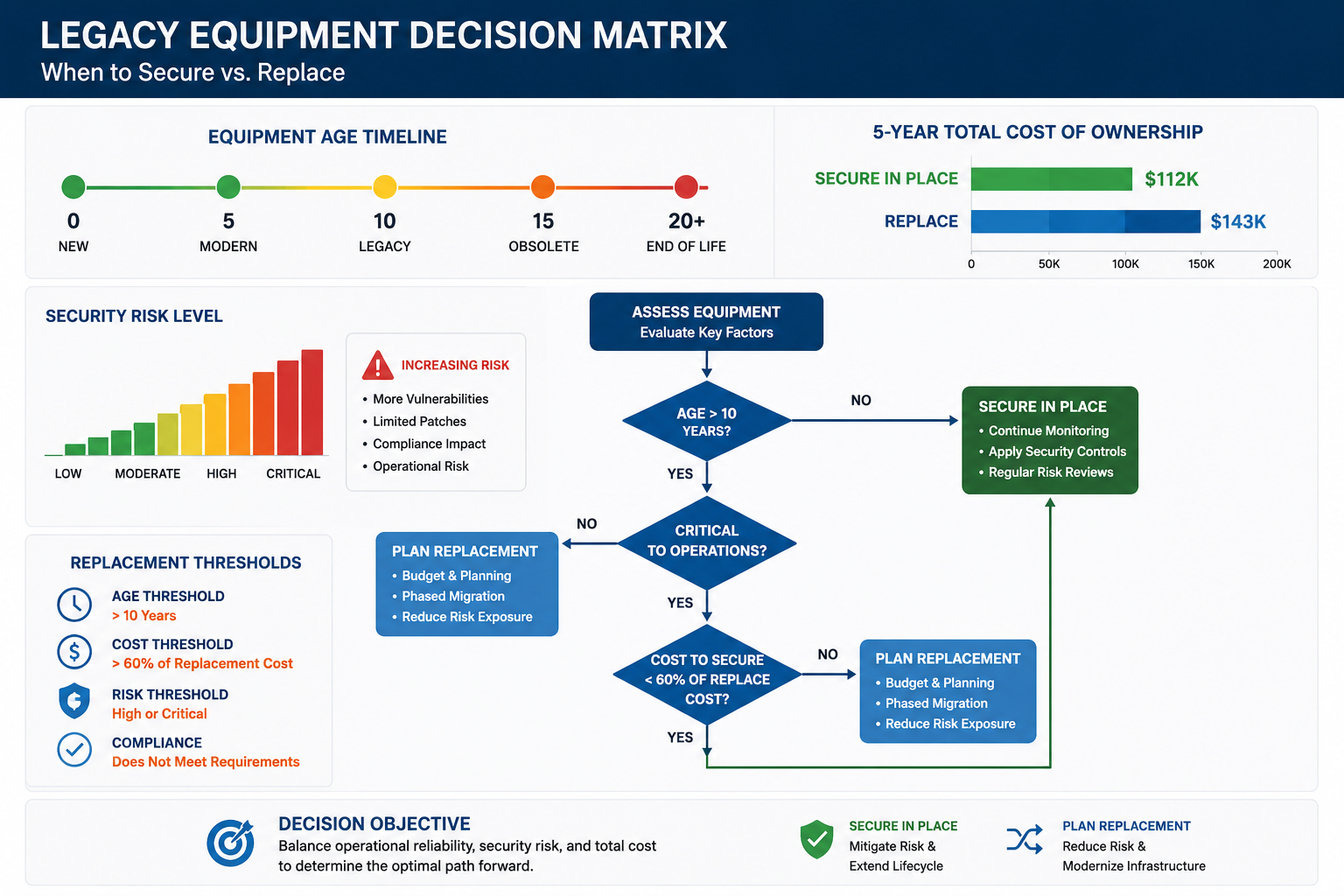
Replace legacy equipment when annual maintenance costs exceed 15% of replacement value, or when security risks cannot be adequately mitigated through external controls. Equipment over 20 years old with frequent breakdowns, obsolete parts, or unsupported operating systems often costs more to secure and maintain than to replace with modern alternatives.
Critical safety systems should be replaced rather than secured if they control hazardous processes and cannot be properly isolated from network threats. The liability and regulatory risks of a compromised safety system typically outweigh the costs of modernization.
High-value targets with irreplaceable intellectual property or customer data may require replacement if they cannot be adequately secured through network controls. Equipment that processes sensitive information or controls proprietary processes needs stronger protection than external security measures can provide.
Replace when you encounter:
- Annual maintenance costs exceeding 15% of replacement value
- Obsolete parts with lead times over 6 months
- Unsupported operating systems with known vulnerabilities
- Safety-critical functions that cannot be properly isolated
- Regulatory requirements mandating specific security capabilities
- Integration needs that require modern communication protocols
Phased replacement often provides the best balance between security and cost management. Replace the most vulnerable or critical systems first while securing the remainder until budget allows for complete modernization.
Calculate the total cost of ownership, including security investments, ongoing maintenance, downtime risks, and compliance costs. Sometimes the math clearly favors replacement, especially when you factor in productivity improvements and reduced maintenance overhead of modern equipment.
Don’t replace everything at once unless you have an unlimited budget and can handle the operational disruption. Most manufacturers find success with 3-5 year modernization plans that prioritize replacements based on risk, condition, and strategic importance.
Building a Phased Modernization Roadmap
A successful modernization roadmap balances security improvements with operational continuity by prioritizing high-risk, high-impact systems for immediate attention while creating a 5-10 year plan for complete infrastructure updates. Start with a comprehensive asset inventory and risk assessment to identify which legacy systems pose the greatest threats to your operations.
Phase 1 (0-12 months) should focus on quick wins that provide immediate security improvements: network segmentation, basic monitoring, and physical security upgrades. These investments protect your entire facility while you plan more complex modernization projects.
Phase 2 (1-3 years) typically involves replacing or upgrading the most vulnerable systems – those with known security flaws, frequent maintenance issues, or critical business functions. This phase also includes implementing advanced monitoring and incident response capabilities.
Phase 3 (3-5+ years) completes the modernization with systematic replacement of remaining legacy equipment based on operational priorities and budget availability. By this point, you have mature security processes and can make informed decisions about timing and technology choices.
Roadmap development steps:
- Asset inventory: Document all legacy equipment, software versions, and network connections
- Risk assessment: Evaluate vulnerability levels, business impact, and attack likelihood
- Cost analysis: Compare security investment versus replacement costs for each system
- Priority matrix: Rank systems by risk level, replacement urgency, and budget constraints
- Timeline planning: Spread investments over multiple budget cycles to maintain cash flow
- Success metrics: Define measurable goals for security improvements and operational continuity
Budget 20-30% annually of your equipment maintenance budget for security and modernization investments. This sustainable approach allows steady progress without overwhelming your capital resources or operational capacity.
Review and adjust your roadmap annually as threat landscapes evolve, new technologies emerge, and business priorities change. A flexible plan that adapts to changing conditions provides better long-term value than rigid replacement schedules.
Frequently Asked Questions
How long does it take to implement security for legacy manufacturing equipment?
Basic network segmentation and monitoring can be implemented in 2-4 weeks for most facilities, while comprehensive security upgrades typically take 3-6 months, depending on system complexity and operational requirements.
Can I secure legacy equipment without any production downtime?
Yes, most security implementations can be done during planned maintenance windows or by using redundant network paths. Proper planning allows security upgrades with minimal or zero production impact.
What’s the minimum budget needed for effective legacy equipment security?
Small manufacturers can achieve meaningful security improvements for a $10,000-25,000 initial investment, focusing on network segmentation, basic monitoring, and physical security controls.
Do cybersecurity insurance companies offer discounts for legacy equipment protection?
Many insurers provide 10-25% premium discounts for manufacturers who implement recognized security frameworks like IEC 62443 or NIST, even on legacy systems.
How often should I update security measures on legacy equipment?
Security configurations should be reviewed quarterly, with annual assessments of threat landscapes and technology updates. The underlying legacy equipment doesn’t need frequent changes once properly secured.
Can I use cloud-based security tools with air-gapped legacy systems?
No, truly air-gapped systems cannot use cloud services. However, network-isolated systems can benefit from cloud-based monitoring and threat intelligence while maintaining security boundaries.
What happens if my legacy equipment gets infected with malware?
Immediate isolation prevents spread, followed by forensic analysis and clean restoration from known-good backups. This is why backup and recovery planning is essential for legacy system security.
Should I hire internal cybersecurity staff or outsource legacy equipment protection?
Most small to mid-sized manufacturers get better value from managed security services that provide 24/7 monitoring and expert response without the overhead of full-time security staff.
How do I train operators on new security procedures for legacy equipment?
Focus on practical, job-specific training that explains why security matters and how new procedures protect their work. Hands-on training during normal operations works better than classroom sessions.
Can legacy equipment security improvements void manufacturer warranties?
External security controls (firewalls, network monitoring) typically don’t affect warranties, but installing software on legacy systems might. Always check warranty terms before making changes.
What’s the biggest mistake manufacturers make with legacy equipment security?
Trying to install modern security software directly on legacy systems instead of using external network-based protections that don’t interfere with original equipment operation.
How do I know if my security investments are actually working?
Implement baseline monitoring before security changes, then track metrics like blocked attack attempts, reduced vulnerability scans, and faster incident detection times to measure improvement.
Conclusion
Securing legacy equipment manufacturing systems doesn’t require replacing everything at once – smart manufacturers use layered security strategies that protect their investments while maintaining operational efficiency. Network segmentation, monitoring, and access controls provide robust protection for older equipment at a fraction of replacement costs.
The key to success lies in understanding that external security controls often work better than trying to modernize legacy systems directly. Industrial firewalls, secure remote access, and specialized monitoring tools create protective barriers without risking the stability of production equipment that still delivers value to your operations.
Start with a thorough risk assessment to identify your most vulnerable systems, then implement quick wins like network segmentation and physical security improvements. Build a phased modernization roadmap that balances immediate security needs with long-term replacement planning, spreading costs over multiple budget cycles.
Remember that peace of mind comes from having a reliable partner who understands both manufacturing operations and cybersecurity requirements. Whether you choose to work with local IT providers or specialized industrial cybersecurity firms, the right expertise makes the difference between security theater and genuine protection.
Ready to secure your legacy manufacturing equipment? Contact our team for a comprehensive assessment of your current systems and a customized security roadmap that fits your budget and operational requirements. We provide straightforward pricing and same-day support to help eliminate IT headaches so you can focus on what matters most – running your business successfully.