Article Summary

  • Who this is for: Small business owners, CEOs, operations managers, and decision-makers at growing companies that rely on technology but lack a structured IT strategy. It’s especially relevant for businesses planning to scale, improve cybersecurity, or reduce unexpected IT costs.
  • The challenge: Reactive IT leads to surprise expenses, costly downtime, aging infrastructure, security vulnerabilities, and technology decisions that fail to support business growth. Without a roadmap, budgeting and long-term planning become unpredictable.
  • Key insights covered: Learn what an IT roadmap is, how to assess your current technology, prioritize upgrades, budget future investments, strengthen cybersecurity, avoid common planning mistakes, and keep your roadmap aligned with business growth through regular updates.
  • Your outcome: Walk away with a practical framework to build a proactive IT strategy that reduces risk, controls technology spending, minimizes downtime, and ensures your IT infrastructure supports long-term business growth instead of holding it back.

Quick Answer

An IT roadmap for a small business is a strategic planning document that outlines your technology investments, upgrades, and initiatives over the next 12-24 months. Every growing business needs one because it transforms unpredictable IT expenses into planned investments, reduces costly downtime, and ensures your technology supports rather than limits your growth. Without this roadmap, you’re essentially flying blind with your most critical business infrastructure.

Key Takeaways

  • An IT roadmap eliminates surprise technology expenses by planning hardware and software needs 12-24 months ahead
  • Businesses with IT roadmaps experience 40% less unplanned downtime compared to reactive approaches
  • Strategic planning helps small businesses budget accurately for technology investments and avoid cash flow surprises
  • Roadmaps identify cybersecurity gaps before they become expensive breaches or compliance violations
  • Regular updates ensure your technology scales smoothly with business growth rather than becoming a bottleneck
  • Managed IT providers can develop and maintain roadmaps more cost-effectively than hiring internal staff
  • A well-designed roadmap typically pays for itself within six months through reduced emergency repairs and improved efficiency
  • Remote and hybrid work environments require different roadmap considerations than traditional office setups

Ready to Take IT Off Your Plate?

Stop worrying about downtime, security risks, or endless IT frustrations. AlphaCIS is the trusted IT partner for small and mid-sized businesses in Metro Atlanta, keeping systems secure, connected, and running the way they should every day.

Whether it’s preventing costly outages, protecting your data, or giving your team unlimited support, we make sure technology helps your business grow instead of holding it back.

πŸ“… Book Your Free Consultation

Key Takeaways

What Is an IT Roadmap and Why Do Small Businesses Need One

An IT roadmap for a small business is your strategic blueprint for technology decisions over the next one to two years. Think of it as a GPS for your technology journey: it shows you where you’re going, the best route to get there, and helps you avoid costly detours along the way.

Unlike reactive IT management, where you fix problems as they arise, a roadmap takes a proactive approach. It maps out when you’ll upgrade that aging server, migrate to cloud-based software, or implement new cybersecurity measures. This planning approach gives you control over your technology timeline and budget.

Small businesses need IT roadmaps because technology has become the backbone of virtually every operation. From customer relationship management to financial reporting, your daily operations depend on systems that require regular maintenance, updates, and eventual replacement. Without a roadmap, these needs catch you off guard, forcing expensive emergency purchases and creating unnecessary stress.

The difference between having a roadmap and not having one is like the difference between planned home renovations and emergency repairs.Β Planned renovations happen on your schedule and budget. Emergency repairs happen at the worst possible time and cost significantly more.

Consider this scenario: Your main server is five years old and showing signs of wear. With a roadmap, you plan its replacement for the next quarter, research the best options, and budget appropriately. Without a roadmap, you wait until it crashes during your busiest season, forcing you to pay premium prices for rushed installation while losing productivity.

How Creating an IT Roadmap Transforms Your Business Operations

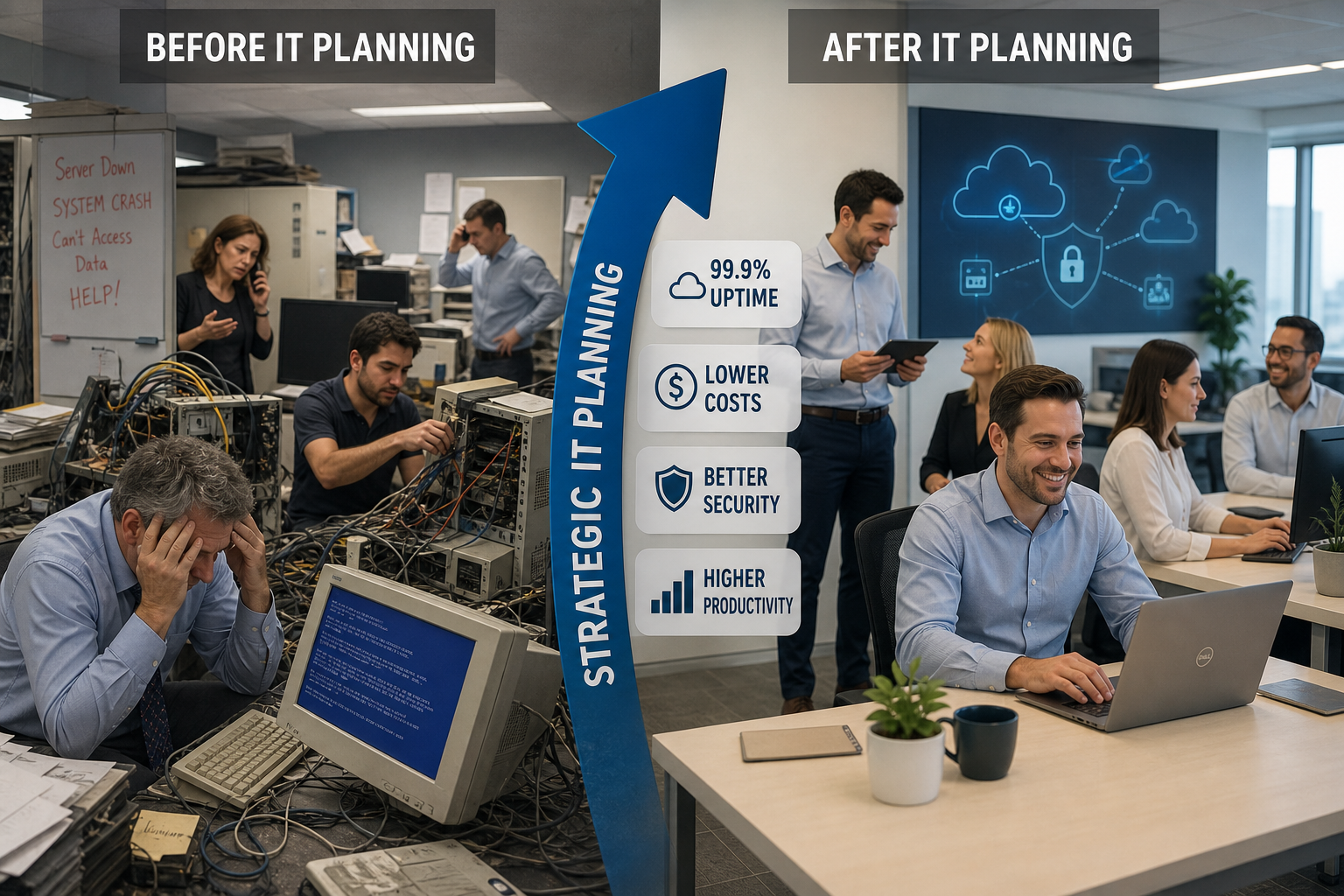
Creating an IT roadmap for a small business fundamentally changes how you approach technology from reactive firefighting to strategic planning. The process starts with a comprehensive assessment of your current technology infrastructure, identifying what’s working, what’s failing, and what’s missing.

Step 1: Current State Assessment
Begin by documenting every piece of technology in your business. This includes computers, servers, software licenses, network equipment, and security tools. Note the age, condition, and performance of each item. Many business owners are surprised to discover they have equipment that’s well past its recommended replacement date.

Step 2: Future Needs Analysis
Consider your business growth plans for the next 18-24 months. Are you hiring new employees? Opening additional locations? Expanding service offerings? Each growth initiative has technology implications that should be planned rather than addressed reactively.

Step 3: Priority and Timeline Development
Not everything needs to happen at once. Rank your technology needs by urgency and impact on business operations. Critical security updates might take priority over nice-to-have productivity software. Create a realistic timeline that spreads investments across multiple quarters to manage cash flow.

Step 4: Budget Planning
Transform unpredictable IT expenses into planned capital expenditures. Instead of wondering if this will be the month your server crashes, you know exactly when you’ll replace it and how much it will cost. This predictability helps with cash flow management and business planning.

The transformation happens gradually but noticeably. Emergency IT calls decrease. Employee productivity increases as they work with reliable, modern equipment. You gain peace of mind knowing your technology infrastructure supports your business goals rather than limiting them.
How Creating an IT Roadmap Transforms Your Business Operations

IT Roadmap vs Strategic Plan: Understanding the Difference

An IT roadmap for a small business differs from a general strategic business plan in scope, timeline, and specificity. While your strategic plan outlines broad business objectives over three to five years, your IT roadmap focuses specifically on technology initiatives over 12-24 months with detailed implementation steps.

Strategic Business Plan Characteristics:

  • Covers all business functions and departments
  • Typically spans 3-5 years
  • Focuses on high-level goals and market positioning
  • Addresses revenue targets, market expansion, and competitive strategy

IT Roadmap Characteristics:

  • Concentrates exclusively on technology infrastructure and tools
  • Usually covers 12-24 months with quarterly milestones
  • Includes specific hardware models, software versions, and implementation dates
  • Details exact costs, timelines, and technical requirements

The IT roadmap should align with and support your strategic business plan. For example, if your strategic plan calls for expanding into e-commerce, your IT roadmap would include specific steps for implementing online payment systems, inventory management software, and enhanced cybersecurity measures.

Integration is key. Your IT roadmap isn’t a standalone document; it’s a detailed implementation plan for the technology components of your broader business strategy. When these two planning documents work together, technology becomes an enabler of growth rather than a constraint.

Many small businesses make the mistake of creating one without the other. A strategic plan without an IT roadmap leaves technology decisions to chance. An IT roadmap without strategic alignment leads to technology investments that don’t support business objectives.

What Should Be Included in a Small Business IT Roadmap

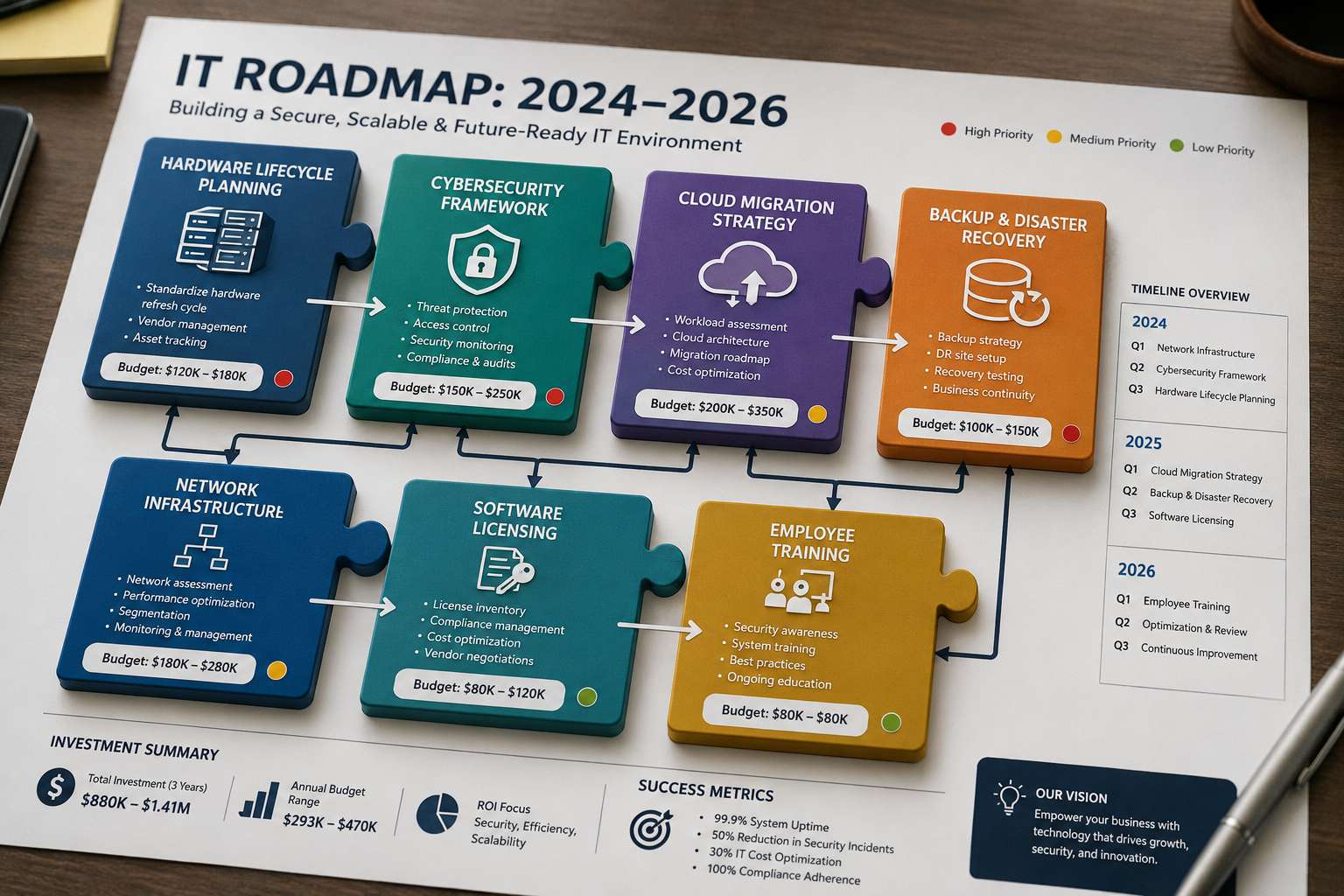
A comprehensive IT roadmap for a small business should cover seven essential areas that collectively ensure your technology infrastructure supports current operations and future growth. Each area requires specific planning considerations and coordination of timelines.

Hardware Lifecycle Planning
Document the age and condition of all computers, servers, printers, and network equipment. Plan replacements before equipment failures disrupt operations. Most business computers should be replaced every 4-5 years, while servers typically last 5-7 years depending on usage and maintenance.

Software Licensing and Updates
Track all software licenses, renewal dates, and upgrade requirements. Plan for major software transitions that might require employee training or data migration. Consider consolidating vendors to reduce complexity and potentially lower costs through volume discounts.

Cybersecurity Improvements
Identify current security gaps and plan systematic improvements. This might include implementing multi-factor authentication, upgrading firewalls, or enhancing employee security training. Cybersecurity improvements should be prioritized based on risk assessment and compliance requirements.

Cloud Migration Strategy
Evaluate which systems would benefit from cloud migration and plan the transition timeline. Consider factors like internet bandwidth requirements, data security concerns, and integration with existing systems. Cloud migrations often require careful coordination to avoid service disruptions.

Backup and Disaster Recovery
Plan comprehensive backup solutions and test disaster recovery procedures. This includes both technical implementation and staff training on recovery procedures. Regular testing ensures your backup systems work when you need them most.

Network Infrastructure Upgrades
Assess current network capacity and plan upgrades to support growing bandwidth needs. This becomes especially important as you add employees, implement cloud services, or support remote work arrangements.

Employee Technology Needs
Plan for new-hire technology requirements and existing-employee upgrade needs. Consider standardizing equipment to simplify support and reduce training requirements. Factor in remote work technology needs if applicable to your business model.
What Should Be Included in a Small Business IT Roadmap

How Much Does It Cost to Develop an IT Roadmap

The cost to develop an IT roadmap for a small business varies significantly based on your company size, technology complexity, and whether you handle it internally or work with external experts. Understanding these cost factors helps you budget appropriately and choose the best approach for your situation.

Internal Development Costs
If you have internal IT staff, developing a roadmap might cost $2,000-$5,000 in staff time and assessment tools. This assumes 20-40 hours of work to assess current systems, research solutions, and create documentation. However, many small businesses lack the internal expertise to identify all potential issues or opportunities.

External Consultant Costs
Hiring an IT consultant typically costs $3,000-$8,000 for a comprehensive roadmap development process. This includes current state assessment, future needs analysis, vendor research, and detailed implementation planning. The investment often pays for itself quickly through better purchasing decisions and avoided emergency expenses.

Managed Service Provider Approach
Many managed IT providers include roadmap development as part of their service offerings. This approach typically costs $1,500-$4,000 as a standalone service, or may be included in ongoing managed services contracts. The advantage is ongoing roadmap maintenance and updates as your business evolves.

Hidden Costs to Consider
The real cost of not having a roadmap often exceeds the development cost. Emergency hardware purchases typically cost 20-30% more than planned purchases. Unplanned downtime can cost small businesses $1,000-$5,000 per hour, depending on the industry. System incompatibilities from reactive purchasing decisions can require expensive integration work.

Return on Investment Timeline
Most small businesses recover their roadmap development costs within 6-12 months through improved purchasing decisions, reduced emergency repairs, and better budget planning. The ongoing benefits of proactive planning continue to provide value throughout the roadmap’s lifecycle.

Consider the roadmap development cost as insurance against much larger unexpected expenses. The peace of mind and improved business operations make it one of the most cost-effective investments you can make in your business infrastructure.

How Often Should We Update Our IT Roadmap

Your IT roadmap for a small business should be reviewed quarterly and updated annually, with additional updates triggered by significant business changes. This regular maintenance ensures your technology planning stays aligned with business needs and takes advantage of new opportunities or addresses emerging challenges.

Quarterly Reviews
Schedule brief quarterly reviews to assess progress on planned initiatives and identify any urgent issues that might require roadmap adjustments. These reviews typically take 1-2 hours and focus on timeline adherence, budget tracking, and identifying any new priorities that have emerged.

Annual Updates
Conduct comprehensive annual updates that reassess your entire technology landscape. This includes evaluating new technologies that might benefit your business, adjusting timelines based on actual implementation experience, and incorporating feedback from employees who use the systems daily.

Trigger Events for Updates
Certain business changes require immediate roadmap updates regardless of the regular schedule. These include significant staff growth, new location openings, major software vendor changes, cybersecurity incidents, or shifts in business model (such as adding e-commerce capabilities).

Seasonal Considerations
Many businesses benefit from aligning roadmap updates with their fiscal year planning process. This coordination ensures technology investments are properly budgeted and approved through normal business planning cycles. It also helps coordinate technology changes with other business initiatives.

Technology Evolution Factors
The rapid pace of technology change means some roadmap elements may become outdated between formal updates. Stay informed about major changes in your key software platforms, cybersecurity threats relevant to your industry, and new technologies that could provide competitive advantages.

Maintaining Flexibility
While roadmaps provide structure and planning, they shouldn’t be rigid documents that prevent you from taking advantage of unexpected opportunities. Build some flexibility into your timeline and budget to accommodate beneficial changes that weren’t anticipated during the original planning process.

Regular updates ensure your roadmap remains a valuable business tool rather than becoming an outdated document that sits unused in a drawer.

IT Roadmap Tools and Templates for Small Businesses

Several practical tools and templates can help small businesses create and maintain effective IT roadmaps without requiring extensive technical expertise. The key is choosing tools that match your team’s capabilities and business complexity while providing the structure needed for effective planning.

Spreadsheet-Based Templates
Microsoft Excel or Google Sheets templates offer the most accessible starting point for most small businesses. These templates can track hardware inventories, software licenses, planned upgrades, and budget allocations. The advantage is familiarity; most business owners already know how to use spreadsheets effectively.

Project Management Platforms
Tools like Microsoft Project, Asana, or Monday.com provide more sophisticated timeline management and task tracking capabilities. These platforms excel at coordinating complex implementations with multiple dependencies and team members. They’re particularly valuable if your roadmap includes major initiatives like office relocations or system migrations.

Specialized IT Planning Software
Dedicated IT planning tools like Device42, Lansweeper, or ManageEngine AssetExplorer offer advanced features for larger inventories and more complex environments. These tools automatically discover network devices, track warranties, and predict replacement needs. However, they may be overkill for businesses with fewer than 25 employees.

Cloud-Based Collaboration Tools
Platforms like SharePoint, Google Workspace, or Notion allow multiple team members to collaborate on roadmap development and updates. This collaboration capability becomes important when your roadmap needs input from different departments or external consultants.

Template Customization Tips
Regardless of which tool you choose, customize templates to match your specific business needs. Include fields for vendor contacts, warranty information, employee impact assessments, and approval workflows. The goal is to create a document that your team will actually use and update regularly.

Integration Considerations
Choose tools that integrate well with your existing business systems. If you already use Microsoft 365, staying within that ecosystem often provides better integration and user adoption. Similarly, Google Workspace users might prefer Google Sheets-based solutions.

The best tool is the one your team will consistently use and update. Start simple and add complexity only as your needs and capabilities grow.

Common Mistakes Small Businesses Make with IT Roadmaps

Small businesses frequently make predictable mistakes when developing their first IT roadmap for small businesses, often stemming from inexperience with technology planning or attempting to handle complex assessments without sufficient expertise. Understanding these common pitfalls helps you avoid costly errors and create a more effective roadmap.

Underestimating Implementation Timelines
The most common mistake is assuming technology implementations will happen faster than reality allows. Software migrations, hardware installations, and employee training all take longer than expected, especially when coordinated around normal business operations. Build buffer time into your timeline; most implementations take 25-50% longer than initial estimates.

Focusing Only on Hardware Replacement
Many businesses create roadmaps that only address obvious needs like replacing old computers while ignoring less visible but equally important elements like network security, software licensing, or backup systems. A comprehensive roadmap addresses all technology components, not just the most obvious ones.

Ignoring Employee Input
Technology roadmaps developed in isolation often miss practical usability issues that employees face daily. Include input from actual system users when assessing current technology performance and planning improvements. The people using the systems every day often have valuable insights that management overlooks.

Inadequate Budget Planning
Underestimating costs or failing to account for hidden expenses like data migration, employee training, or temporary productivity losses during transitions. Always include a 15-20% contingency budget for unexpected costs that arise during implementation.

Lack of Regular Updates
Creating a roadmap and then forgetting about it defeats the entire purpose. Technology needs change as businesses grow and evolve. Set specific dates for roadmap reviews and stick to them, even when business gets busy.

Trying to Do Everything at Once
Attempting to address every technology need simultaneously overwhelms resources and increases the risk of implementation failures. Prioritize initiatives based on business impact and available resources, spreading major changes across multiple quarters.

Ignoring Cybersecurity Integration
Treating cybersecurity as a separate initiative rather than integrating security considerations into every roadmap element. Every new system, software implementation, or hardware upgrade has security implications that should be addressed during planning rather than afterward.

Learning from these common mistakes helps you create a more realistic and effective roadmap that actually improves your business operations rather than creating additional stress and expense.

How Managed IT Providers Help Build and Maintain IT Roadmaps

Partnering with a managed IT provider transforms IT roadmap development from a challenging internal project into a systematic process backed by industry expertise and proven methodologies. This collaboration often produces more comprehensive and realistic roadmaps while freeing your internal team to focus on core business activities.

Comprehensive Assessment Capabilities
Managed IT providers bring specialized tools and expertise to assess your current technology infrastructure thoroughly. They can identify potential problems that internal teams might miss, such as network security vulnerabilities, software licensing compliance issues, or hardware that’s approaching end-of-life. This comprehensive assessment forms the foundation for effective roadmap planning.

Industry Expertise and Best Practices
Experienced providers have worked with hundreds of similar businesses and understand common technology challenges and solutions for your industry. They bring knowledge of what works, what doesn’t, and how to avoid common implementation pitfalls. This expertise helps create more realistic timelines and budgets.

Vendor Relationships and Purchasing Power
Established managed service providers often have relationships with technology vendors that can result in better pricing, faster implementation, and improved support. Their purchasing power and industry connections can reduce your technology costs while ensuring you get quality solutions.

Ongoing Roadmap Maintenance
Perhaps most importantly, managed IT providers offer ongoing roadmap maintenance and updates. As your business evolves and technology changes, you continuously adjust your roadmap to keep it current and relevant. This ongoing attention ensures your roadmap remains a valuable business tool rather than becoming an outdated document.

Implementation Support
Beyond planning, managed IT providers can handle the actual implementation of roadmap initiatives. This end-to-end support ensures that planned improvements actually happen on schedule and within budget. They coordinate vendor relationships, manage installations, and handle employee training.

24/7 Monitoring and Proactive Solutions
The best managed IT providers don’t just create roadmaps; they actively monitor your systems to identify issues before they become problems. This proactive approach, combined with same-day support when issues do arise, gives you the peace of mind that comes from having a reliable partner managing your technology infrastructure.

Personalized Service Approach
Quality managed IT providers take time to understand your specific business needs, industry requirements, and growth plans. This personalized service ensures your roadmap aligns with your business objectives rather than following a generic template.

Working with the right managed IT provider eliminates IT headaches while ensuring your technology infrastructure supports your business growth effectively and efficiently.


How Managed IT Providers Help Build and Maintain IT Roadmaps

IT Roadmap Cost Calculator

IT Roadmap Cost Calculator

Estimate your planning investment, annual IT budget, savings, and first-year ROI.

Company Size Small
Risk Level Medium
ROI Score Good
Roadmap Development: $0
Estimated Annual IT Budget: $0
Potential Savings, Year 1: $0
Estimated Downtime Reduction: 0%
Net ROI, Year 1: $0
ROI Strength 0%

This estimate is for planning purposes only. Actual costs can vary based on infrastructure, compliance needs, cybersecurity requirements, cloud systems, and support model.

Ready to Take IT Off Your Plate?

Stop worrying about downtime, security risks, or endless IT frustrations. AlphaCIS is the trusted IT partner for small and mid-sized businesses in Metro Atlanta, keeping systems secure, connected, and running the way they should every day.

Whether it’s preventing costly outages, protecting your data, or giving your team unlimited support, we make sure technology helps your business grow instead of holding it back.

πŸ“… Book Your Free Consultation

How Long Does It Take to Build an IT Roadmap

Building a comprehensive IT roadmap for a small business typically takes 2-4 weeks from initial assessment to final documentation, depending on your business complexity and the thoroughness of the planning process. Understanding this timeline helps you plan appropriately and set realistic expectations for when you’ll have a usable roadmap.

Week 1: Current State Assessment
The first week focuses on documenting your existing technology infrastructure. This includes creating an inventory of all hardware, software licenses, network equipment, and security systems. For businesses with 10-20 employees, this assessment typically takes 8-12 hours of focused work spread across several days.

Week 2: Future Needs Analysis
The second week involves analyzing your business growth plans and identifying technology requirements to support those plans. This phase includes researching solution options, gathering employee feedback on current system performance, and identifying priority areas for improvement.

Weeks 3-4: Planning and Documentation
The final phase involves creating the actual roadmap document with specific timelines, budget estimates, and implementation steps. This includes coordinating with vendors for pricing information and creating detailed project plans for major initiatives.

Factors That Extend the Timeline
Several factors can extend the roadmap development timeline. Complex network environments, multiple office locations, or highly regulated industries may require additional assessment time. Businesses with limited internal IT knowledge may need more time to research and understand their options.

Accelerated Timeline Options
Working with an experienced managed IT provider can compress the timeline to 1-2 weeks since they bring established assessment processes and industry expertise. They can quickly identify common issues and solutions without extensive research phases.

Ongoing Refinement
Remember that your initial roadmap doesn’t need to be perfect. It’s better to have a good roadmap in place quickly and refine it based on experience than to spend months trying to create the perfect plan. Most businesses find their roadmaps become more accurate and useful after the first quarterly review cycle.

The key is starting the process rather than waiting for the perfect time or trying to address every possible scenario before beginning.

Do We Really Need an IT Roadmap or Can We Skip It

Many small business owners question whether they really need a formal IT roadmap for their small business, especially if their current technology seems to be working adequately. The short answer is that while you can operate without a roadmap, doing so significantly increases your risk of expensive surprises and limits your ability to scale efficiently.

The Cost of Operating Without a Roadmap
Businesses without IT roadmaps typically spend 25-40% more on technology over time due to emergency purchases, incompatible systems, and reactive decision-making. They also experience more frequent downtime, which can cost $1,000-$5,000 per hour depending on your industry and business model.

When You Might Skip a Formal Roadmap
Very small businesses with fewer than 5 employees and minimal technology needs might reasonably operate without a formal roadmap, especially if they’re not planning significant growth. However, even these businesses benefit from basic planning around hardware replacement cycles and data backup strategies.

Warning Signs You Need a Roadmap
Certain situations make IT roadmaps essential rather than optional. If you’re planning to hire employees, open new locations, or expand service offerings, you need a roadmap. Similarly, if you’re experiencing frequent IT problems, struggling with slow systems, or worried about cybersecurity, a roadmap becomes a necessity rather than a luxury.

The “Good Enough” Trap
Many businesses fall into the “good enough” trap, where current systems work adequately, so they avoid planning for improvements or replacements. This approach works until it doesn’t, and when systems fail, they typically fail at the worst possible time with maximum business impact.

Competitive Considerations
In today’s business environment, technology often provides competitive advantages. Businesses with well-planned technology infrastructure can serve customers more efficiently, operate with lower overhead costs, and adapt more quickly to market changes. Operating without a roadmap means missing these competitive opportunities.

Risk Management Perspective
From a risk management standpoint, an IT roadmap is similar to business insurance; you hope you never need it, but when problems arise, you’re grateful to have planned. The peace of mind that comes from knowing your technology infrastructure is planned and maintained often justifies the investment by itself.

The question isn’t whether you can operate without a roadmap, but whether the risks and hidden costs of operating without one are worth avoiding the relatively small investment in proper planning.

IT Roadmap Examples for Small Business Industries

Different industries have unique technology requirements that should be reflected in their IT roadmap for small business planning. Understanding industry-specific considerations helps create more relevant and effective roadmaps that address the particular challenges and opportunities your business faces.

Professional Services (Accounting, Legal, Consulting)
Professional services firms typically prioritize document management, client communication systems, and compliance requirements. Their roadmaps often include cloud-based practice management software, enhanced cybersecurity for client data protection, and mobile technology for remote client meetings. Time tracking and billing system integrations are frequently high-priority items.

Healthcare and Dental Practices
Healthcare roadmaps must address HIPAA compliance requirements, electronic health records systems, and patient communication platforms. Common priorities include secure patient portals, telemedicine capabilities, and integrated billing systems. Backup and disaster recovery planning becomes critical due to regulatory requirements for data protection.

Manufacturing and Distribution
Manufacturing businesses often focus on inventory management systems, production monitoring technology, and supply chain integration. Their roadmaps frequently include industrial network security, equipment monitoring systems, and integration between production and business management software. Warehouse management and shipping integration are common priorities.

Retail and E-commerce
Retail roadmaps typically emphasize point-of-sale systems, inventory management, and online sales platform integration. Common elements include customer relationship management systems, payment processing security, and omnichannel inventory tracking. E-commerce businesses often prioritize website performance, mobile optimization, and integrated marketing platforms.

Construction and Field Services
Field service businesses focus on mobile technology, project management systems, and communication between office and field teams. Roadmaps often include mobile device management, GPS tracking systems, and cloud-based project collaboration tools. Integration between estimating, scheduling, and billing systems is frequently prioritized.

Common Elements Across Industries
Regardless of industry, most small business IT roadmaps include cybersecurity improvements, cloud migration planning, and employee productivity tools. The specific implementation details vary, but the fundamental need for reliable, secure, and scalable technology infrastructure remains consistent across different business types.

Industry-specific roadmaps are more effective because they address the particular workflows, compliance requirements, and competitive factors that matter most to your business model.

How to Get Buy-in from Leadership on an IT Roadmap

Securing leadership support for your IT roadmap for a small business initiative requires presenting technology planning as a business investment rather than a technical project. The key is translating technical benefits into business outcomes that resonate with decision-makers who may not have extensive technology backgrounds.

Focus on Business Impact Rather Than Technical Features
Instead of discussing server specifications or software capabilities, emphasize how the roadmap will reduce downtime, improve customer service, or support revenue growth. Quantify benefits wherever possible, for example, “reducing system downtime from 2 hours per month to 30 minutes per month saves approximately $8,000 annually in lost productivity.”

Present the Cost of Inaction
Leadership often responds more strongly to avoiding losses than to potential gains. Calculate the cost of continuing with current reactive approaches, including emergency repair expenses, productivity losses from outdated systems, and potential security breach costs. These “cost of doing nothing” calculations often provide compelling justification for proactive planning.

Propose Phased Implementation
Large upfront investments can trigger resistance even when the business case is solid. Present your roadmap as a series of smaller, manageable investments spread over time. This approach makes the financial commitment more palatable while demonstrating progress through quick wins early in the process.

Align with Strategic Business Goals
Connect every major roadmap element to specific business objectives. If the company is planning to expand into new markets, show how improved technology infrastructure will support that expansion. If customer service is a priority, demonstrate how system upgrades will improve response times and service quality.

Provide Competitive Context
Research what technology investments your competitors are making and how those investments might provide competitive advantages. Leadership often becomes more receptive to technology investments when they understand the competitive implications of falling behind industry standards.

Offer Risk Mitigation Benefits
Emphasize how the roadmap reduces business risks, particularly around cybersecurity, compliance, and business continuity. Many leaders are more motivated by avoiding potential disasters than by pursuing incremental improvements.

Include Success Metrics
Define specific, measurable outcomes that will demonstrate the roadmap’s success. These might include uptime percentages, response time improvements, or cost savings targets. Clear success metrics help leadership understand what they’re buying and provide accountability for results.

The goal is to help leadership see the IT roadmap as essential business infrastructure rather than optional technology spending.

What Happens If You Don’t Have an IT Roadmap

Operating without an IT roadmap for a small business creates a cascade of problems that compound over time, ultimately costing significantly more than proactive planning while creating unnecessary stress and business risks. Understanding these consequences helps illustrate why roadmap development should be a priority rather than an optional consideration.

Reactive Crisis Management Becomes the Norm
Without a roadmap, your business operates in constant reaction mode. Equipment failures happen without warning, forcing expensive emergency purchases and rushed implementations. This reactive approach typically costs 25-50% more than planned purchases and often results in suboptimal solutions chosen under pressure rather than careful evaluation.

Budget Planning Becomes Nearly Impossible
Technology expenses become unpredictable wildcards in your financial planning. You might have no IT expenses for six months, then suddenly need $15,000 for emergency server replacement. This unpredictability makes cash flow management difficult and can strain relationships with lenders or investors who expect consistent, predictable business operations.

Security Vulnerabilities Accumulate
Without systematic security planning, vulnerabilities accumulate gradually until they become serious business risks. Software updates get delayed, security patches are applied inconsistently, and outdated systems create entry points for cybercriminals. Many businesses don’t realize how vulnerable they’ve become until after a security incident occurs.

Employee Productivity Suffers
Outdated, unreliable systems frustrate employees and reduce productivity. Slow computers, frequent software crashes, and incompatible systems waste time and create stress. Employee satisfaction often suffers when employees are forced to work with inadequate tools, potentially affecting retention and recruitment.

Growth Opportunities Get Missed
Technology limitations can prevent you from taking advantage of business opportunities. You might miss out on new clients. Your systems can’t handle increased volume, or you lose competitive bids because your technology capabilities lag behind competitors. These missed opportunities often cost more than the technology investments that would have prevented them.

Compliance and Legal Risks Increase
Many industries have specific technology-related compliance requirements. Without systematic planning, it’s easy to fall behind on required updates or fail to implement necessary security measures. Compliance violations can result in fines, legal liability, and damage to business reputation.

Integration Problems Multiply
Reactive technology purchases often result in systems that don’t work well together. These integration problems create inefficiencies, data inconsistencies, and additional costs to make systems communicate properly. What should be simple processes become complicated workarounds that waste time and increase error rates.

The cumulative effect of operating without a roadmap is significantly higher costs, increased business risks, and missed growth opportunities that far exceed the investment required for proper planning.

IT Roadmap Considerations for Remote vs In-Office Businesses

The shift toward remote and hybrid work models has created distinct IT roadmap requirements that differ significantly from traditional office-based technology planning. Your IT roadmap for a small business must account for these different operational models to ensure effective technology support regardless of where employees work.

Remote Work Technology Priorities
Remote-first businesses prioritize cloud-based systems, robust cybersecurity for distributed access, and reliable communication platforms. Their roadmaps typically emphasize virtual private networks (VPNs), multi-factor authentication, and collaboration tools that work seamlessly across different locations and devices.

Network Infrastructure Differences
In-office businesses can rely on centralized network infrastructure with controlled access points and standardized equipment. Remote businesses must plan for diverse internet connections, home network security, and mobile device management across multiple locations they don’t control.

Security Considerations
Remote work environments require different security approaches than traditional offices. Roadmaps must address endpoint protection for devices outside the corporate firewall, secure access to company resources from personal networks, and employee training on home office security practices.

Hardware and Support Logistics
Supporting remote employees requires different hardware deployment and support strategies. IT roadmaps must account for shipping equipment to remote locations, providing technical support without physical access to devices, and maintaining equipment that’s distributed across multiple locations.

Hybrid Model Complexities
Hybrid work models often present the most complex roadmap requirements because they must support both in-office and remote work effectively. This typically requires cloud-based systems that work equally well from any location, along with office infrastructure that supports flexible seating and temporary workspaces.

Communication and Collaboration Tools
Remote and hybrid businesses require more sophisticated communication platforms than traditional offices. Roadmaps must include video conferencing systems, project management platforms, and document collaboration tools that enable effective teamwork across different locations and time zones.

Compliance and Data Management
Remote work can complicate compliance requirements, particularly for businesses handling sensitive data. IT roadmaps must address data access controls, audit trails for remote access, and backup procedures that work effectively across distributed environments.

Cost Implications
Remote work technology often shifts costs from office infrastructure to individual employee setups and cloud services. Roadmaps must account for these different cost structures while ensuring all employees have access to the technology they need to be productive.

Understanding these different requirements helps create more effective roadmaps that truly support your business model rather than forcing your operations to fit generic technology solutions.

Conclusion

Creating an IT roadmap for a small business transforms technology from a source of unexpected expenses and stress into a strategic advantage that supports your growth objectives. The investment in proper planning pays dividends through reduced downtime, predictable budgeting, improved security, and the peace of mind that comes from knowing your technology infrastructure is reliable and current.

The businesses that thrive in 2026 and beyond will be those that treat technology as a strategic business tool rather than a necessary evil. An IT roadmap provides the framework for making informed decisions about technology investments while avoiding the costly surprises that plague businesses operating in reactive mode.

Whether you develop your roadmap internally or partner with a managed IT provider, the important thing is to start the planning process. Your business deserves the reliability, security, and growth support that come from well-planned technology infrastructure. Don’t let another quarter pass wondering if this will be the month your aging server finally crashes, or your outdated security leaves you vulnerable to cyber threats.

Take the first step toward eliminating IT headaches and supporting your business growth with a comprehensive IT roadmap. Your future self and your employees will thank you for the foresight and planning that keep your business running smoothly while your competitors struggle with technology crises.

The question isn’t whether you can afford to create an IT roadmap. The question is whether you can afford not to have one when your business depends on reliable technology to serve customers, manage operations, and compete effectively in your market.


Frequently Asked Questions

How long should our IT roadmap cover?
Most small business IT roadmaps should cover 12-24 months with quarterly milestones. This timeframe provides enough detail for effective planning while maintaining flexibility for changing business needs and technology developments.

Can we create an IT roadmap without technical expertise?
Yes, but it requires more research and may miss important considerations. Many businesses successfully create basic roadmaps using templates and online resources, though working with IT professionals often produces more comprehensive results.

What’s the biggest mistake businesses make with IT roadmaps?
The biggest mistake is creating a roadmap and then ignoring it. Technology needs change as businesses grow, so regular updates and reviews are essential for maintaining an effective roadmap.

How much should we budget for IT roadmap implementation?
Most small businesses should budget 3-7% of annual revenue for technology expenses, including both planned improvements and ongoing maintenance. The exact percentage depends on your industry and growth stage.

Should our IT roadmap include employee training?
Absolutely. Employee training should be included for any new systems or significant upgrades. Budget both time and money for training to ensure successful technology adoption.

How do we prioritize competing IT needs?
Prioritize based on business impact and risk. Address critical security issues first, followed by items that directly affect customer service or revenue generation, and then productivity improvements.

What if our business needs change after creating the roadmap?
IT roadmaps should be flexible documents that can accommodate changing business needs. Schedule regular reviews and don’t hesitate to adjust timelines or priorities when business requirements change.

Can cloud services reduce our IT roadmap complexity?
Yes, cloud services often simplify IT roadmaps by reducing hardware requirements and shifting maintenance responsibilities to service providers. However, they introduce new considerations around internet bandwidth and data security.

How do we handle IT roadmap costs during slow business periods?
Build flexibility into your roadmap timeline so less critical items can be delayed during cash flow challenges. Focus on maintaining critical systems while deferring nice-to-have improvements until business conditions improve.

Should we involve employees in IT roadmap planning?
Yes, employee input is valuable for understanding current system limitations and ensuring new technology will actually improve productivity. Include key users in the planning process for better adoption and results.

What’s the difference between an IT roadmap and an IT budget?
An IT budget allocates money for technology expenses, while an IT roadmap provides the strategic planning that determines how that money should be spent. The roadmap informs and justifies the budget allocation.

How do we measure IT roadmap success?
Track metrics like system uptime, help desk tickets, employee productivity measures, and actual costs versus budgeted amounts. Regular measurement helps demonstrate ROI and identify areas for improvement.

Ready to Take IT Off Your Plate?

Stop worrying about downtime, security risks, or endless IT frustrations. AlphaCIS is the trusted IT partner for small and mid-sized businesses in Metro Atlanta, keeping systems secure, connected, and running the way they should every day.

Whether it’s preventing costly outages, protecting your data, or giving your team unlimited support, we make sure technology helps your business grow instead of holding it back.

πŸ“… Book Your Free Consultation
author avatar
Dmitriy Teplinskiy
I have worked in the IT industry for 15+ years. During this time I have consulted clients in accounting and finance, manufacturing, automotive and boating, retail and everything in between. My background is in Networking and Cybersecurity

Dmitriy Teplinskiy

I have worked in the IT industry for 15+ years. During this time I have consulted clients in accounting and finance, manufacturing, automotive and boating, retail and everything in between. My background is in Networking and Cybersecurity

All author posts

Privacy Preference Center