What Are the Main Security Vulnerabilities in Microsoft 365
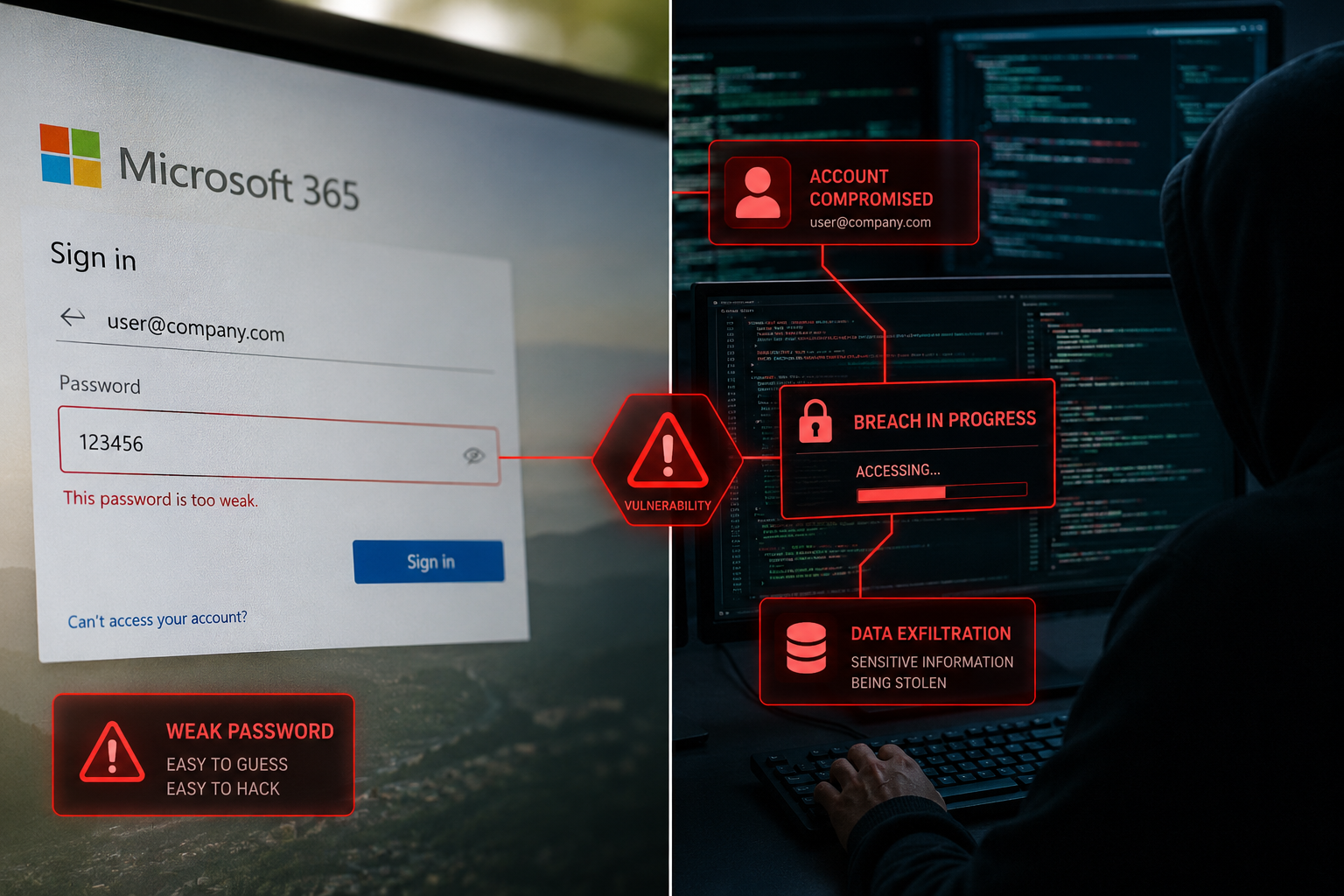
Microsoft 365 contains several critical security vulnerabilities that stem from its default configuration and the shared responsibility model between Microsoft and users. The most dangerous vulnerabilities include weak authentication controls, inadequate email filtering, and overly permissive access settings that most businesses never properly configure.
The primary Microsoft 365 cybersecurity risks include:
Authentication Weaknesses:
- Basic multi-factor authentication that accepts SMS codes (easily intercepted)
- Legacy authentication protocols that bypass modern security controls
- Weak password policies in default configurations
- Inadequate conditional access rules for different user scenarios
Email Security Gaps:
- Limited built-in phishing protection in basic plans
- Insufficient attachment scanning and sandboxing
- Weak anti-spoofing controls that allow impersonation attacks
- Poor integration with advanced threat intelligence feeds
Access Control Issues:
- Default sharing permissions that are too broad
- Guest access is enabled without proper oversight
- Administrative privileges are assigned too liberally
- Lack of regular access reviews and cleanup processes
Data Protection Deficiencies:
- Limited data loss prevention in standard licensing
- Inadequate encryption for sensitive file types
- Poor visibility into data sharing and access patterns
- Insufficient backup and recovery capabilities
A common mistake I see is businesses assuming that because they pay for Microsoft 365, all security features are automatically enabled and configured properly. In reality, most security controls require manual setup and ongoing management to be effective.
How Do Hackers Exploit Microsoft 365 Email and SharePoint
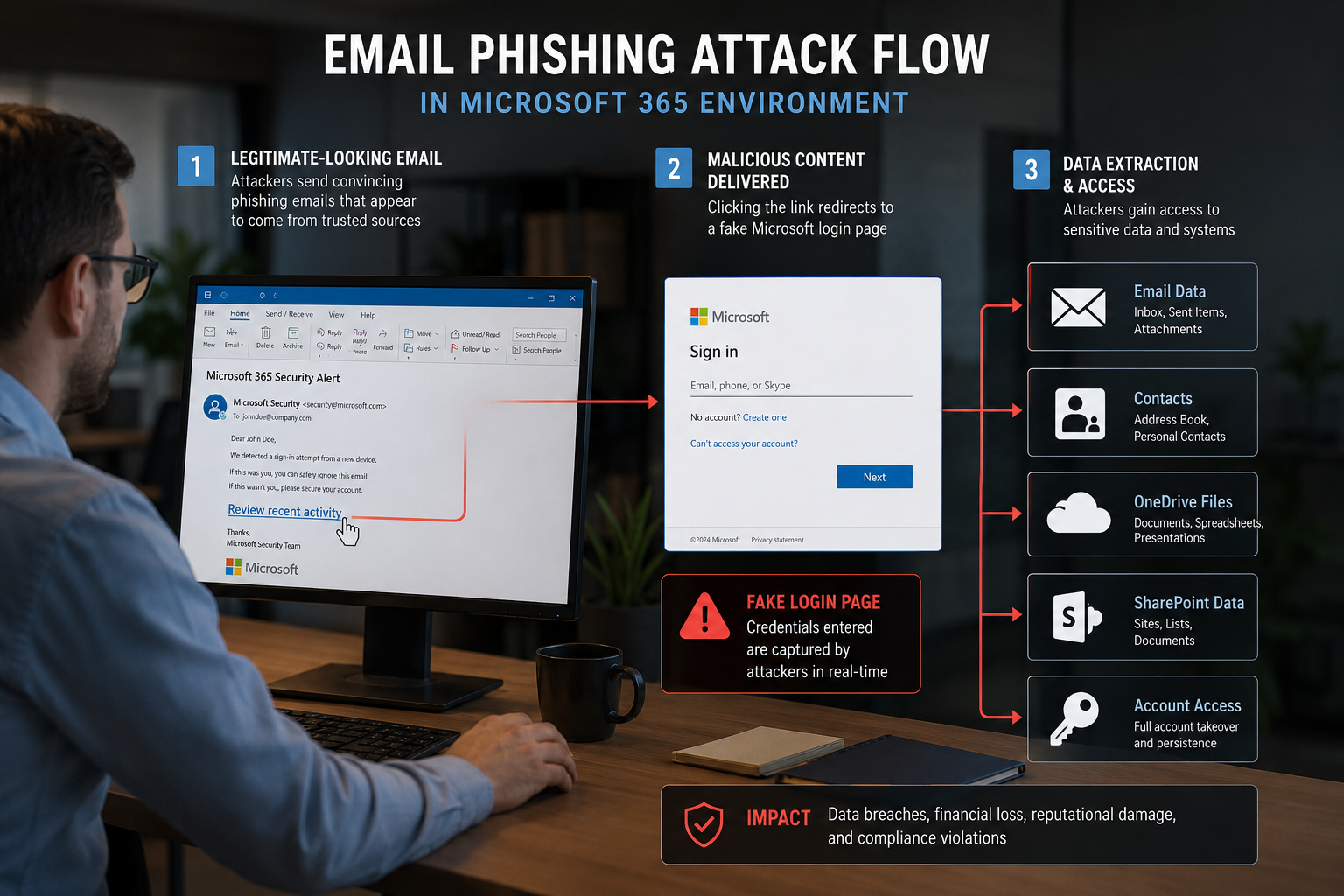
Hackers exploit Microsoft 365 environments primarily through email-based attacks and SharePoint misconfigurations because these platforms handle the most sensitive business communications and data. The most successful attacks combine social engineering with technical vulnerabilities to gain initial access and then move laterally through the organization.
Email Attack Methods:
Business Email Compromise (BEC): Attackers impersonate executives or trusted partners to trick employees into transferring funds or sharing credentials. They often use slight domain variations or compromised accounts to appear legitimate.
Credential Harvesting: Fake Microsoft login pages capture usernames and passwords, which attackers then use to access real accounts. These phishing emails often claim there’s an urgent security issue requiring immediate action.
Malware Distribution: Attackers send documents with embedded macros or links to malicious websites that install ransomware or remote access tools. Office documents are particularly effective because users trust them.
SharePoint Exploitation Techniques:
External Sharing Abuse: Attackers gain access through overly broad sharing permissions, then download sensitive files or plant malicious content for other users to access.
Guest Account Takeover: Compromised guest accounts provide a foothold into the organization’s SharePoint environment, often with fewer security controls than employee accounts.
Version History Exploitation: Attackers modify documents and use SharePoint’s version history to hide malicious changes or recover deleted sensitive information.
The key insight here is that attackers rarely need to break Microsoft’s security directly. Instead, they exploit the human element and configuration weaknesses that businesses create through poor setup and training.
Is Microsoft 365 Really Secure for Small Businesses
Microsoft 365 can be secure for small businesses, but only when properly configured and supplemented with additional security tools and processes. Out of the box, Microsoft 365 provides basic protection that’s insufficient for most business environments, especially those handling sensitive customer data or operating in regulated industries.
What Microsoft 365 Includes by Default:
- Basic anti-malware scanning for email attachments
- Standard spam filtering has moderate effectiveness
- Basic data encryption in transit and at rest
- Simple multi-factor authentication options
- Basic audit logging and reporting
What Small Businesses Actually Need:
- Advanced threat protection with behavioral analysis
- Comprehensive email security with sandboxing
- Data loss prevention with content inspection
- Conditional access policies based on risk factors
- Security information and event monitoring (SIEM)
- Regular security awareness training for employees
- Incident response planning and testing
The reality is that small businesses face the same cyber threats as large enterprises, but often with fewer resources to defend themselves. Attackers specifically target smaller organizations because they typically have weaker security controls and less sophisticated monitoring.
For most small businesses, Microsoft 365 security requires additional investment in third-party tools, managed security services, or dedicated IT expertise to configure and maintain properly. The peace of mind that comes from knowing your data is truly protected is worth this investment.
What Cybersecurity Features Does Microsoft 365 Actually Include
Microsoft 365’s included cybersecurity features vary significantly by licensing plan, with basic plans providing minimal protection and premium plans offering more comprehensive security tools. However, even the most expensive plans require significant configuration and management to be effective.
Microsoft 365 Business Basic/Standard:
- Exchange Online Protection (basic email filtering)
- BitLocker encryption for devices
- Basic multi-factor authentication
- Standard audit logging (90 days)
- Basic mobile device management
Microsoft 365 Business Premium:
- Microsoft Defender for Business (endpoint protection)
- Advanced multi-factor authentication options
- Conditional access policies
- Basic data loss prevention
- Device compliance management
- Extended audit logging (1 year)
Microsoft 365 E3/E5 Plans:
- Microsoft Defender for Office 365 (advanced email protection)
- Microsoft Defender for Identity
- Cloud App Security (CASB functionality)
- Advanced data loss prevention
- Privileged identity management
- Advanced audit and investigation tools
- Microsoft Sentinel (SIEM) capabilities in E5
Critical Limitations Across All Plans:
- No automated security configuration
- Limited threat hunting capabilities
- Minimal security awareness training
- No guaranteed response times for security incidents
- Basic backup and recovery (not comprehensive)
The biggest misconception is that higher-tier licensing automatically means better security. In reality, these plans provide more security tools, but those tools still require expert configuration and ongoing management to deliver protection.
How Much Does It Cost to Properly Secure Microsoft 365
Properly securing Microsoft 365 typically costs 30-50% more than the base licensing fees when you factor in additional security tools, professional services, and ongoing management. For a typical small business with 25 employees, expect to invest $75-150 per user per month for comprehensive protection.
Base Microsoft 365 Costs:
- Business Basic: $6 per user/month
- Business Standard: $12.50 per user/month
- Business Premium: $22 per user/month
- E3 Enterprise: $36 per user/month
Additional Security Investment Required:
- Advanced email security: $3-8 per user/month
- Backup and recovery solution: $2-5 per user/month
- Security awareness training: $2-4 per user/month
- Security monitoring and management: $15-25 per user/month
- Initial security assessment and configuration: $2,000-5,000 one-time
Hidden Costs Often Overlooked:
- Staff time for security management (2-4 hours per week)
- Compliance and audit preparation
- Incident response and recovery costs
- Regular security training and updates
- Legal and regulatory consultation
The straightforward pricing approach we recommend to clients is budgeting 1.5-2x your Microsoft 365 licensing cost for total security investment. This provides the industry expertise and proactive solutions needed to maintain robust protection without constant IT headaches.
Common Mistakes Companies Make with Microsoft 365 Security Settings
The most common Microsoft 365 security configuration mistakes stem from businesses rushing through setup without understanding the security implications of default settings. These misconfigurations create vulnerabilities that attackers actively scan for and exploit.
Authentication and Access Mistakes:
- Enabling SMS-based MFA instead of app-based authentication
- Allowing legacy authentication protocols to remain active
- Creating overly broad conditional access policies
- Failing to implement privileged access management for administrators
- Not requiring MFA for all users, including external partners
Email Security Configuration Errors:
- Accepting default spam confidence levels (too permissive)
- Not configuring anti-spoofing policies for your domain
- Allowing automatic forwarding to external email addresses
- Failing to set up DKIM and DMARC email authentication
- Not enabling advanced threat protection for attachments and links
Sharing and Collaboration Oversights:
- Leaving external sharing enabled organization-wide
- Not setting expiration dates for guest access
- Allowing anonymous sharing links without restrictions
- Failing to classify and label sensitive documents
- Not monitoring who accesses shared files and when
Monitoring and Backup Gaps:
- Relying solely on Microsoft’s limited audit logging
- Not setting up alerts for suspicious activities
- Assuming Microsoft’s retention policies equal backup protection
- Failing to test recovery procedures regularly
- Not documenting security configurations for consistency
The pattern I see repeatedly is that businesses treat Microsoft 365 like a traditional software purchase, where everything works perfectly out of the box. In reality, it’s more like buying a car that requires you to install the seatbelts, airbags, and anti-lock brakes yourself.
Which Types of Businesses Are Most at Risk in Microsoft 365
Professional services firms, healthcare practices, and financial organizations face the highest Microsoft 365 cybersecurity risks due to the sensitive data they handle and their attractive target profile for attackers. However, any business that relies heavily on email communication and cloud file sharing is vulnerable without proper security measures.
Highest Risk Business Types:
Accounting and CPA Firms:
- Handle sensitive financial data for multiple clients
- Frequently targeted for tax fraud and identity theft schemes
- Often have limited IT security expertise in-house
- Face strict regulatory compliance requirements
Healthcare and Dental Practices:
- Store valuable protected health information (PHI)
- Must comply with HIPAA security requirements
- Often targeted for ransomware due to urgent patient care needs
- Frequently, older staff are less familiar with cybersecurity
Legal Practices:
- Manage confidential client communications and documents
- Face attorney-client privilege protection requirements
- Often targeted for corporate espionage and insider information
- High-value targets due to wealthy clientele
Manufacturing Companies:
- Protect intellectual property and trade secrets
- Coordinate with multiple suppliers and partners
- Face industrial espionage threats
- Often have mixed IT environments that are harder to secure
Common Risk Factors Across Industries:
- Heavy reliance on email for business communications
- Frequent file sharing with external partners and clients
- Limited dedicated IT security staff
- Pressure to prioritize convenience over security
- Regulatory compliance requirements that create audit targets
The key insight is that attackers don’t just target large corporations anymore. Small and medium businesses often present easier targets with valuable data, making proper Microsoft 365 security essential regardless of your industry or size.
How to Detect if My Microsoft 365 Account Has Been Compromised
Signs of Microsoft 365 account compromise include unusual login locations, unexpected email rules or forwarding, missing emails, and reports from contacts about receiving suspicious messages from your account. Quick detection and response can prevent attackers from accessing sensitive data or using your account to target others.
Immediate Warning Signs:
- Login notifications from unfamiliar locations or devices
- New inbox rules that forward or delete emails automatically
- Sent items you didn’t create, especially to your contact list
- Missing emails or entire conversations
- Changes to your email signature or account settings
- Unusual activity in your OneDrive or SharePoint files
Advanced Detection Methods:
Review Sign-in Logs:
- Go to portal.office.com and sign in to your account
- Navigate to My Account > Security & Privacy > Sign-in activity
- Look for logins from unexpected locations, times, or devices
- Check for failed login attempts that might indicate brute force attacks
Check Email Rules and Forwarding:
- Open Outlook on the web
- Go to Settings > Mail > Rules
- Review all active rules for suspicious forwarding or deletion
- Check Settings > Mail > Forwarding for unauthorized redirects
Audit File Access:
- In OneDrive or SharePoint, check recent activity logs
- Look for downloads or sharing of files you didn’t initiate
- Review who has access to your shared folders and files
- Check for new external sharing links you didn’t create
What to Do if Compromised:
- Change your password immediately from a clean device
- Enable or strengthen multi-factor authentication
- Remove suspicious email rules and forwarding
- Review and revoke unnecessary file-sharing permissions
- Run a full antivirus scan on all your devices
- Contact your IT support or managed service provider
The most important thing is to act quickly. Attackers often work fast to extract data or set up persistent access before you notice the breach.
Best Practices for Preventing Data Breaches in Microsoft 365
Preventing Microsoft 365 data breaches requires a layered security approach that combines strong technical controls with regular employee training and proactive monitoring. The most effective prevention strategies focus on the most common attack vectors while maintaining usability for daily business operations.

Essential Technical Controls:
Implement Strong Authentication:
- Require app-based MFA for all users, not SMS codes
- Use conditional access to block risky sign-in attempts
- Disable legacy authentication protocols organization-wide
- Implement privileged identity management for administrators
Configure Advanced Email Protection:
- Enable ATP Safe Attachments and Safe Links
- Set up anti-spoofing and anti-impersonation policies
- Configure DKIM and DMARC for your email domain
- Block automatic forwarding to external addresses
Secure File Sharing and Collaboration:
- Disable anonymous sharing links organization-wide
- Set default sharing permissions to internal users only
- Implement data classification and labeling policies
- Enable data loss prevention for sensitive content types
Establish Monitoring and Backup:
- Set up security alerts for suspicious activities
- Implement a comprehensive backup beyond Microsoft’s retention
- Regular access reviews and permission audits
- Document and test incident response procedures
Critical Process Controls:
Security Awareness Training:
- Monthly phishing simulation exercises
- Regular updates on current threat trends
- Clear policies for handling suspicious emails
- Incident reporting procedures that encourage transparency
Access Management:
- Principle of least privilege for all user accounts
- Regular review and cleanup of inactive accounts
- Separate administrative accounts for IT staff
- Time-limited access for temporary workers and contractors
The key is consistency. These controls only work when they’re properly implemented and maintained over time. That’s where having a reliable partner with industry expertise makes the difference between hoping you’re secure and knowing you have peace of mind.
Microsoft 365 Security vs Google Workspace Security
Microsoft 365 and Google Workspace take different approaches to security, with Microsoft providing more built-in enterprise security tools while Google focuses on simplicity and AI-driven threat detection. For most small businesses, Microsoft 365 offers more comprehensive security options, but both platforms require additional configuration and tools for complete protection.
Microsoft 365 Security Strengths:
- More granular conditional access controls
- Better integration with Windows device management
- More comprehensive data loss prevention options
- Stronger privileged identity management tools
- More detailed audit logging and compliance features
Google Workspace Security Advantages:
- Simpler security configuration and management
- Better AI-driven threat detection out of the box
- More intuitive admin console for security settings
- Stronger default security posture with less configuration needed
- Better phishing protection in Gmail by default
Shared Weaknesses:
- Both require significant configuration for optimal security
- Neither provides comprehensive backup and recovery
- Both need additional tools for complete endpoint protection
- Limited security awareness training included
- Incident response support requires premium plans
Cost Comparison for Security:
- Microsoft 365: Higher licensing costs but more included security features
- Google Workspace: Lower base cost, but may require more third-party security tools
- Both platforms: Similar total cost when properly secured with additional tools
For small businesses in Metro Atlanta, Microsoft 365 typically offers better value because it integrates well with existing Windows environments and provides more security features that can be properly configured with the right IT support partner.
What Microsoft 365 Security Tools Do I Actually Need
The Microsoft 365 security tools you actually need depend on your business size, industry, and risk tolerance, but most small businesses require at least Business Premium licensing plus additional email security and backup solutions. The key is focusing on tools that address your most likely attack vectors rather than trying to implement every available security feature.
Essential Tools for Most Small Businesses:
Core Microsoft 365 Security (Business Premium minimum):
- Microsoft Defender for Business (endpoint protection)
- Advanced multi-factor authentication with conditional access
- Basic data loss prevention for email and files
- Device compliance and mobile application management
- Extended audit logging for compliance and investigation
Required Additional Tools:
- Advanced email security solution (beyond basic Exchange Online Protection)
- Comprehensive backup and recovery system
- Security awareness training platform
- Network and endpoint monitoring solution
- Incident response and forensics capabilities
Industry-Specific Additions:
Healthcare/Dental Practices:
- HIPAA-compliant email encryption
- Enhanced audit logging for patient data access
- Medical device network segmentation
- Specialized backup with long-term retention
Financial Services:
- Advanced data classification and labeling
- Privileged access management
- Enhanced fraud detection tools
- Regulatory compliance reporting
Legal Practices:
- Attorney-client privilege protection tools
- Advanced eDiscovery capabilities
- Client portal with secure file sharing
- Litigation hold and document retention management
Tool Selection Criteria:
- Addresses your top 3 security risks
- Integrates well with the existing Microsoft 365 environment
- Provides clear reporting and alerting
- Includes professional support and guidance
- Scales with your business growth
The goal isn’t to have every security tool available, but to have the right tools properly configured and actively managed. This approach provides better protection while avoiding the complexity and cost of over-engineered security solutions.
How to Train Employees on Microsoft 365 Cybersecurity Risks
Effective Microsoft 365 cybersecurity training focuses on practical, scenario-based learning that helps employees recognize and respond to real threats they encounter in their daily work. The most successful training programs combine regular education with simulated attacks and clear, simple policies that employees can actually follow.
Essential Training Components:
Email Security Awareness:
- How to identify phishing emails and suspicious attachments
- Proper procedures for verifying unusual requests, especially financial ones
- Understanding of business email compromise tactics and red flags
- Safe practices for clicking links and downloading files
- When and how to report suspicious emails to IT support
Password and Authentication Security:
- Creating strong, unique passwords for different accounts
- Proper use of multi-factor authentication apps and backup codes
- Recognizing fake login pages and credential harvesting attempts
- Understanding why SMS codes are less secure than app-based MFA
- Safe password sharing practices for team accounts when necessary
File Sharing and Collaboration Safety:
- Understanding different sharing permission levels and when to use each
- Proper procedures for sharing files with external partners and clients
- How to review and manage existing sharing permissions
- Recognizing when unexpected users have accessed files
- Best practices for organizing and protecting sensitive documents
Effective Training Delivery Methods:
Monthly Micro-Learning Sessions (15-20 minutes):
- Focus on one specific topic per session
- Use real examples from current threat intelligence
- Include hands-on practice with Microsoft 365 security features
- Encourage questions and discussion about real workplace scenarios
Quarterly Phishing Simulations:
- Send realistic but safe phishing emails to test awareness
- Provide immediate feedback and additional training for those who click
- Track improvement over time and adjust training based on results
- Celebrate teams that show consistent improvement
Just-in-Time Training:
- Provide quick security tips during software updates or policy changes
- Send alerts about current threats targeting your industry
- Offer refresher training when employees report suspicious activities
- Create easy-to-access resources for common security questions
Making Training Stick:
The key to successful security training is making it relevant and practical. Employees need to understand not just what to do, but why it matters for protecting their work and the business. Regular reinforcement through simulated attacks and real-world examples helps build security awareness into daily habits rather than treating it as a one-time checkbox exercise.
Most importantly, create a culture where reporting suspicious activities is encouraged and rewarded, not treated as a nuisance. When employees feel comfortable asking questions and reporting concerns, you catch threats much earlier and prevent them from becoming major incidents.
FAQ
Q: Does Microsoft automatically secure my Microsoft 365 account?
A: No, Microsoft provides security tools, but you must configure and manage them yourself. Default settings often leave significant vulnerabilities that require manual setup to address properly.
Q: Is the basic Microsoft 365 Business plan secure enough for my small business?
A: Basic plans provide minimal security features and are generally insufficient for businesses handling sensitive data. Most small businesses need at least Business Premium plus additional security tools.
Q: How often should I review my Microsoft 365 security settings?
A: Review security settings monthly for user access and permissions, quarterly for policy updates, and immediately after any security incidents or major software updates.
Q: What’s the difference between Microsoft’s backup and a proper backup solution?
A: Microsoft provides data retention and recovery for accidental deletions, but not comprehensive backup protection against ransomware, extended outages, or malicious data destruction.
Q: Can I use a free antivirus with Microsoft 365 instead of paying for additional security?
A: Free antivirus provides basic protection but lacks the advanced threat detection, email security, and integration needed for comprehensive Microsoft 365 protection.
Q: How do I know if my current Microsoft 365 security is adequate?
A: Conduct a professional security assessment that evaluates your configurations, tests your defenses, and identifies gaps in your current protection strategy.
Q: What should I do first to improve my Microsoft 365 security?
A: Start by enabling strong multi-factor authentication for all users, then review and restrict external sharing permissions, followed by implementing advanced email protection.
Q: Is cyber insurance required if I have good Microsoft 365 security?
A: Cyber insurance is still recommended as it covers costs that security tools cannot prevent, such as business interruption, legal fees, and regulatory fines.
Q: How much time does managing Microsoft 365 security take each week?
A: Proper security management typically requires 2-4 hours per week for small businesses, including monitoring, updates, user management, and incident response.
Q: Should I hire someone in-house or use a managed service for Microsoft 365 security?
A: Most small businesses get better protection and value from managed services that provide 24/7 monitoring, industry expertise, and same-day support without the overhead of full-time staff.
Q: What happens if my Microsoft 365 account gets hacked despite security measures?
A: Having proper incident response procedures, backup systems, and professional support ensures quick containment, recovery, and minimal business disruption.
Q: Are there industry-specific Microsoft 365 security requirements I need to know about?
A: Yes, healthcare (HIPAA), financial services, legal practices, and other regulated industries have specific compliance requirements that affect Microsoft 365 configuration and monitoring needs.
Conclusion
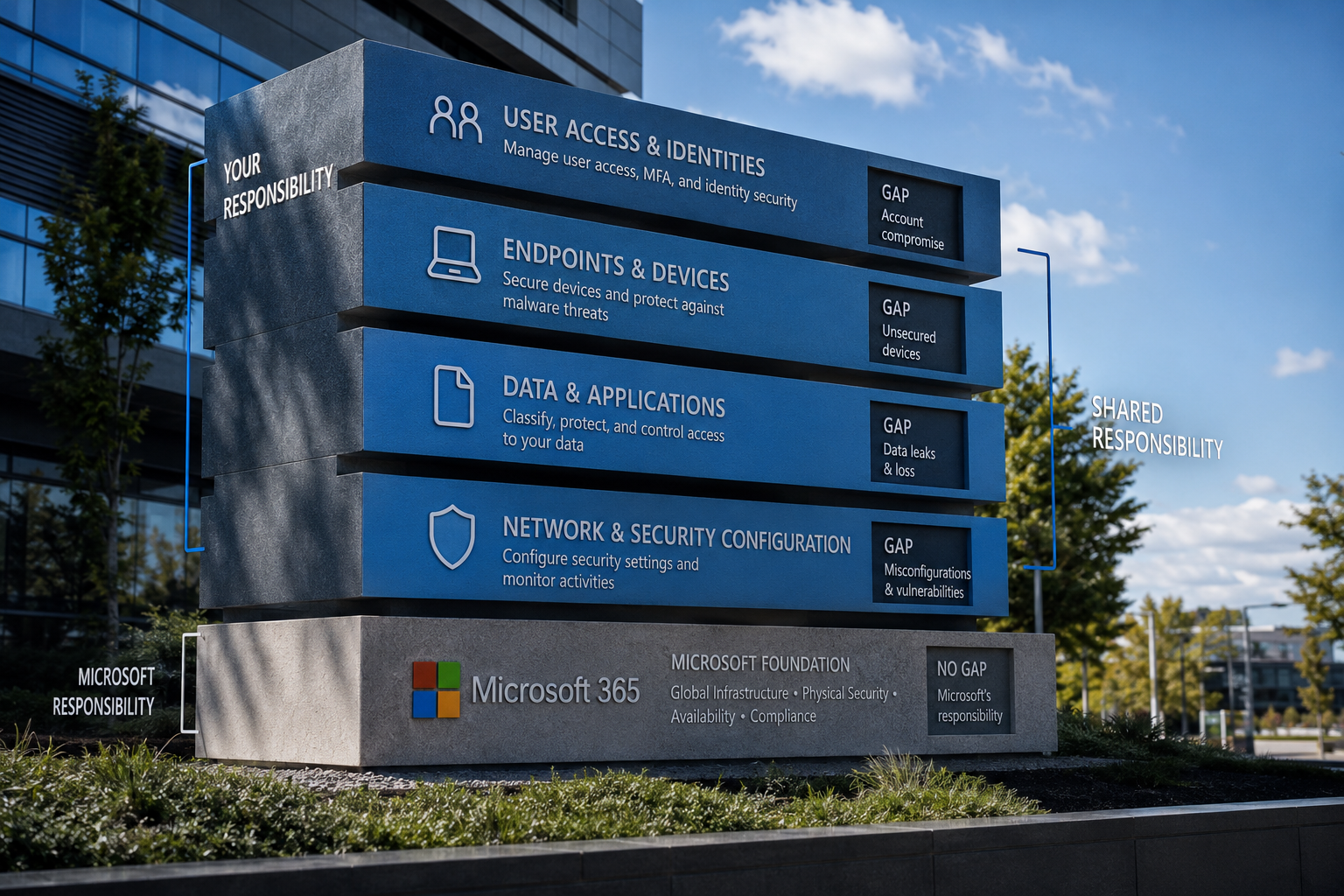
Microsoft 365 cybersecurity risks are far more extensive than most businesses realize, and the consequences of overlooking them can be devastating. The shared responsibility model means that while Microsoft provides the platform and basic security tools, your organization must properly configure, manage, and monitor these protections to be effective.
The hidden risks we’ve covered—from weak MFA setups and misconfigured sharing permissions to inadequate email filtering and backup gaps—represent the most common vulnerabilities that attackers exploit every day. These aren’t theoretical threats; they’re the actual attack vectors being used against businesses just like yours across Metro Atlanta and beyond.
The good news is that with the right approach, Microsoft 365 can be properly secured. It requires investment in additional tools, professional configuration, ongoing monitoring, and regular employee training. But when done correctly, you get the peace of mind that comes from knowing your business data, communications, and operations are truly protected.
Don’t wait until after a security incident to take action. The cost of prevention is always lower than the cost of recovery, both financially and in terms of business reputation. Whether you choose to build internal expertise or partner with a managed service provider, the important thing is to start addressing these Microsoft 365 cybersecurity risks now.
Your business depends on Microsoft 365 for daily operations. Make sure it’s configured and managed with the same level of attention you give to other critical business systems. With proactive solutions, industry expertise, and 24/7 monitoring, you can eliminate IT headaches and focus on what matters most—growing your business with confidence.