

How Much Does Managed IT Support Cost Per Month for a Small Business
Managed IT support typically costs between $100 and $300 per user per month for small businesses, with most companies paying around $150-$200 per user monthly. The total monthly investment usually ranges from $3,000 to $8,000 for businesses with 20-50 employees, depending on service levels and specific needs.
Several factors influence your monthly managed IT costs:
Service Level Tiers:
- Basic monitoring and help desk: $100-$150 per user
- Comprehensive managed services: $150-$250 per user
- Premium with advanced security: $200-$300 per user
Business Size Impact:
- 10-25 employees: $2,500-$5,000 monthly
- 25-50 employees: $4,000-$10,000 monthly
- 50-100 employees: $8,000-$20,000 monthly
The pricing often includes 24/7 monitoring, help desk support, security management, backup services, and software updates. Many providers offer straightforward pricing with no hidden fees, giving you the peace of mind that comes with predictable IT expenses.
Most managed service providers require minimum commitments of 12-36 months, but this actually works in your favor by locking in rates and ensuring consistent service quality throughout your agreement.
What Are the Hidden Costs of Keeping an Internal IT Team
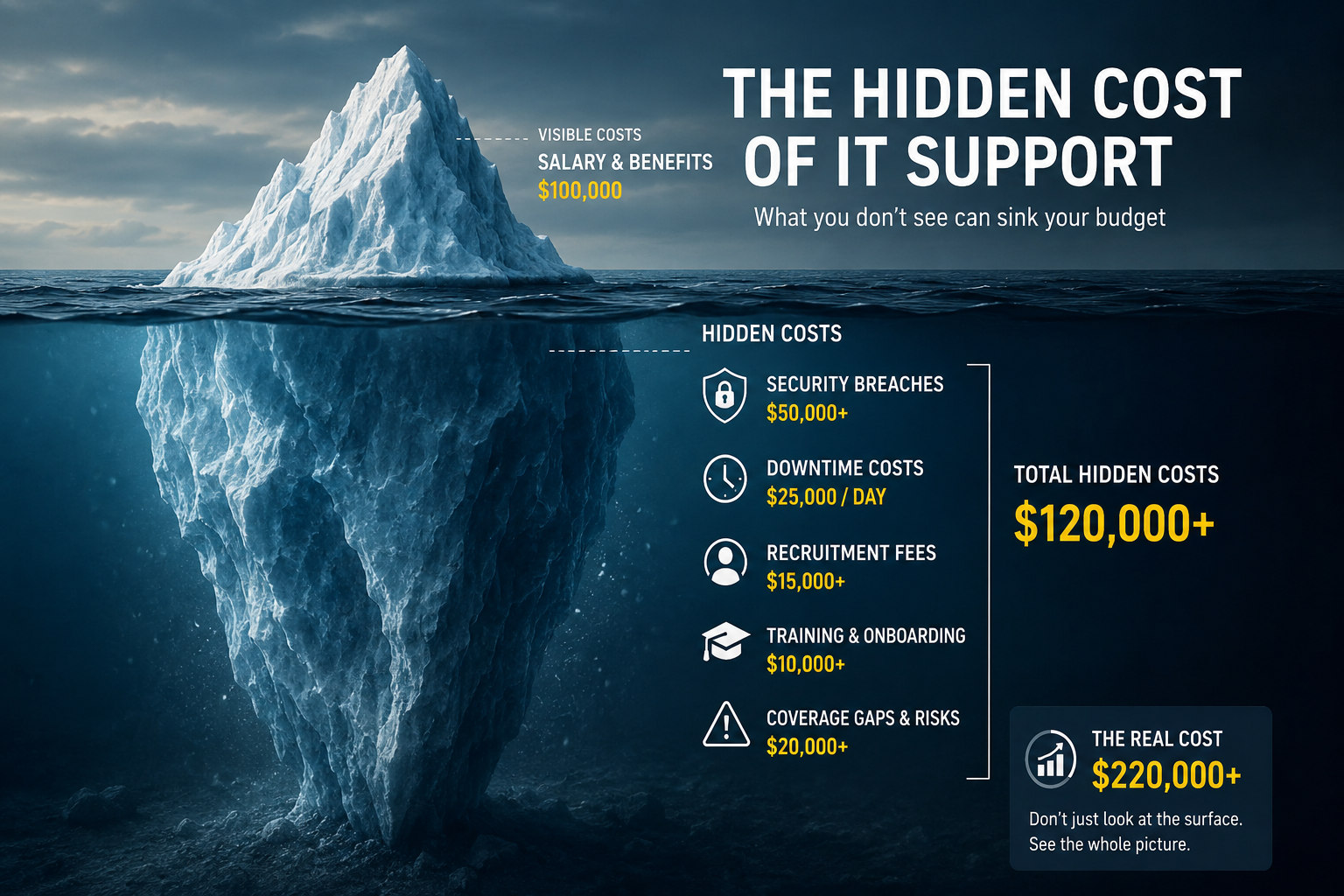
The hidden costs of an in-house IT team can easily double your expected expenses, often adding $40,000-$80,000 annually beyond base salaries. These overlooked expenses include recruitment costs, training investments, coverage gaps during vacations, and the significant expense of security incidents when your team lacks specialized expertise.
Recruitment and Turnover Expenses:
- Average IT recruitment costs: $15,000-$25,000 per hire
- Lost productivity during transitions: $10,000-$20,000
- Training new hires on your systems: $5,000-$15,000
- IT turnover rates average 18% annually, meaning these costs recur frequently
Coverage and Availability Gaps:
- Vacation and sick leave coverage: $8,000-$15,000 annually in contractor costs
- After-hours emergency response: $20,000-$40,000 for on-call arrangements
- Weekend and holiday coverage often goes unaddressed, creating business risk
Security and Compliance Shortfalls:
- Average cost of a small business data breach: $50,000-$200,000
- Compliance violations and fines: $10,000-$100,000+
- Specialized security training and certifications: $5,000-$10,000 annually
Technology and Tools:
- Professional-grade monitoring tools: $3,000-$8,000 annually
- Security software and licenses: $5,000-$15,000 annually
- Backup and disaster recovery solutions: $2,000-$10,000 annually
The reality is that most small businesses need their IT person to be a generalist, but today’s technology landscape demands specialists in security, cloud services, and compliance. This gap creates expensive vulnerabilities that outsourced providers address through their team of experts.
Is Outsourced IT Cheaper Than Hiring Full-Time IT Staff
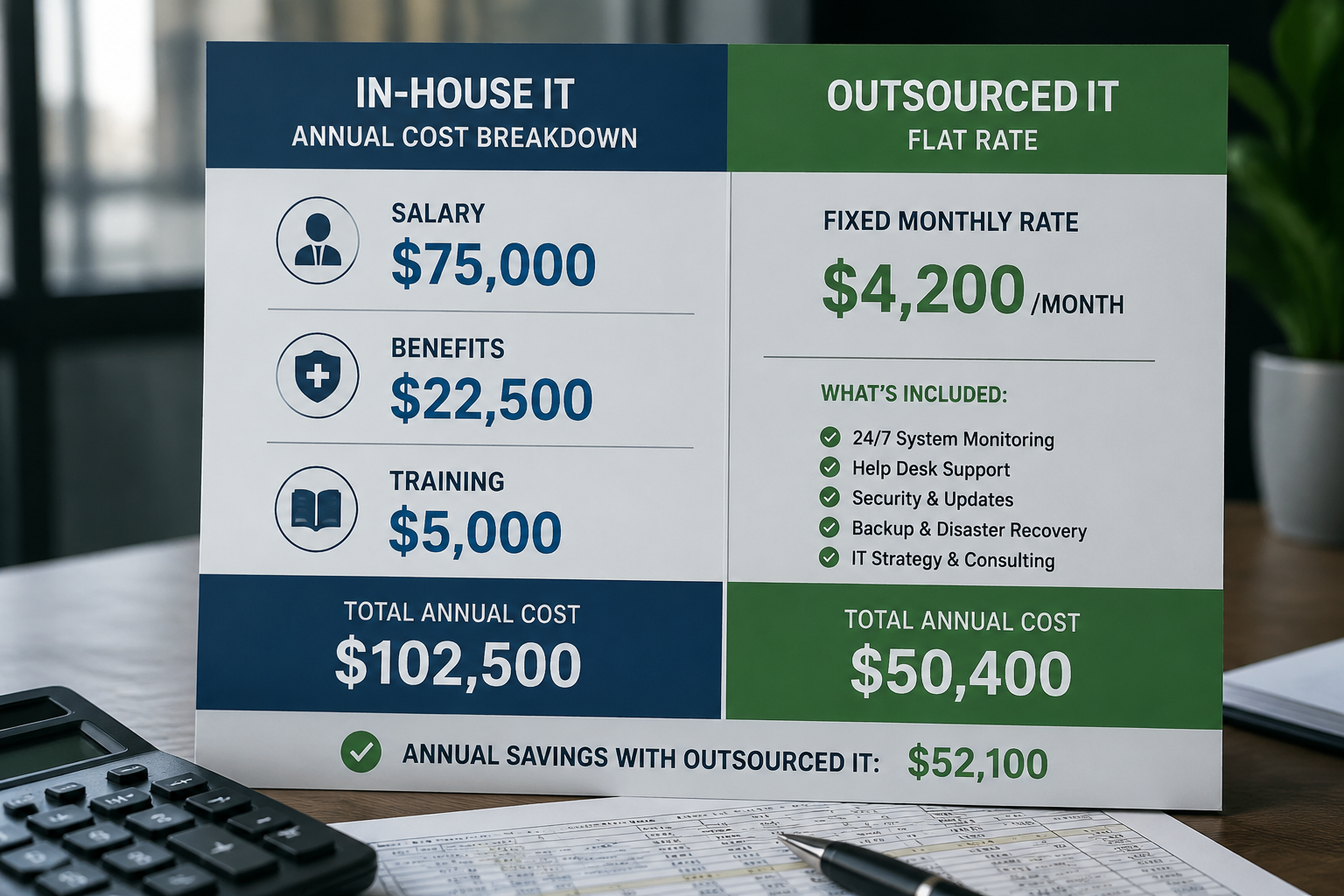
Yes, outsourced IT is typically 30-50% cheaper than hiring full-time IT staff for businesses under 75 employees when comparing total cost of ownership. A comprehensive outsourced IT solution costs $50,000-$80,000 annually for a 25-person business, while an equivalent in-house setup often exceeds $120,000-$150,000 when factoring in all expenses.
Direct Cost Comparison for a 30-Employee Business:
In-House IT Costs:
- IT Manager salary: $75,000-$95,000
- Benefits and payroll taxes: $22,500-$28,500
- Training and certifications: $5,000-$8,000
- Tools and software: $8,000-$12,000
- Total: $110,500-$143,500 annually
Outsourced IT Costs:
- Managed services ($150/user): $54,000 annually
- Additional security services: $6,000-$12,000
- Project work and consulting: $5,000-$10,000
- Total: $65,000-$76,000 annually
The savings become even more significant when you consider what you get with outsourced IT that would be impossible to replicate in-house:
- Access to a team of specialists instead of one generalist
- 24/7 monitoring and same-day support response
- Enterprise-grade security tools and expertise
- Proactive solutions that prevent problems before they impact your business
- Guaranteed service levels with financial backing
For businesses approaching 75-100 employees, the economics begin to shift. At this size, you might justify multiple IT staff members and can spread the overhead costs across more users, making in-house teams more competitive.
However, even larger small businesses often find that a hybrid approach works best, keeping one internal IT coordinator while outsourcing specialized functions like security, backup management, and after-hours support to maintain cost efficiency and comprehensive coverage.
When Does It Make Sense to Switch from In-House to Outsourced IT
It makes sense to switch from in-house to outsourced IT when your current IT costs exceed $8,000-$10,000 monthly, you’re experiencing frequent security concerns, or your business has fewer than 75 employees. The switch becomes urgent when your in-house person becomes a single point of failure or when compliance requirements demand expertise your team lacks.
Clear Indicators It’s Time to Switch:
Financial Red Flags:
- IT-related expenses are unpredictable and increasing
- Downtime costs are mounting due to inadequate coverage
- You’re paying premium rates for emergency contractor support
- Security incidents have created unexpected expenses
Operational Warning Signs:
- Your IT person is overwhelmed and can’t keep up with demands
- You lack coverage during vacations, sick days, or after hours
- Technology projects are delayed or poorly executed
- Users frequently complain about slow response times
Strategic Business Needs:
- You’re planning significant growth and need scalable IT support
- Compliance requirements demand specialized expertise
- Cybersecurity has become a critical business concern
- You want to focus internal resources on core business activities
The Transition Timeline:
Most businesses can complete the switch within 60-90 days with proper planning. The process involves documenting your current environment, selecting a reliable partner with industry expertise, and gradually transitioning responsibilities while maintaining business continuity.
The key is choosing a provider that offers personalized service and takes time to understand your business needs. Look for same-day support commitments and 24/7 monitoring to ensure you’re getting better coverage than your in-house setup provided.
Many business owners tell us the peace of mind alone justifies the switch, knowing that IT headaches are handled by experts who understand their industry and can provide proactive solutions before problems impact operations.
What Skills Should an In-House IT Person Actually Have
An effective in-house IT person for a small business needs expertise in network administration, cybersecurity, cloud services management, and help desk support, a combination that typically requires 5-10 years of diverse experience and costs $85,000-$120,000 annually. However, finding someone with all these skills who’s willing to work as a solo IT department is increasingly difficult in 2026’s competitive job market.
Essential Technical Skills:
- Network infrastructure management and troubleshooting
- Windows Server and Active Directory administration
- Cloud platform management (Microsoft 365, AWS, or Azure)
- Cybersecurity fundamentals and threat response
- Backup and disaster recovery planning
- Help desk and end-user support
Critical Business Skills:
- Project management for technology implementations
- Vendor relationship management
- Budget planning and cost control
- Documentation and process development
- Training and user education capabilities
Industry-Specific Requirements:
- Healthcare: HIPAA compliance and medical software expertise
- Financial services: SOX compliance and banking regulations
- Manufacturing: Industrial network security and ERP systems
- Legal: Confidentiality protocols and document management
The challenge is that technology has become incredibly specialized. A person skilled in cybersecurity might lack cloud expertise, while someone great at help desk support might struggle with network architecture. Most small businesses need someone who can do everything reasonably well, but today’s threats and compliance requirements often demand deep expertise in specific areas.
This is why many businesses find that outsourcing provides better coverage you get access to specialists in each area rather than hoping one person can master everything. A managed IT provider brings network engineers, security specialists, cloud architects, and help desk professionals to support your business.
What Size Company Benefits Most from Outsourced IT Support
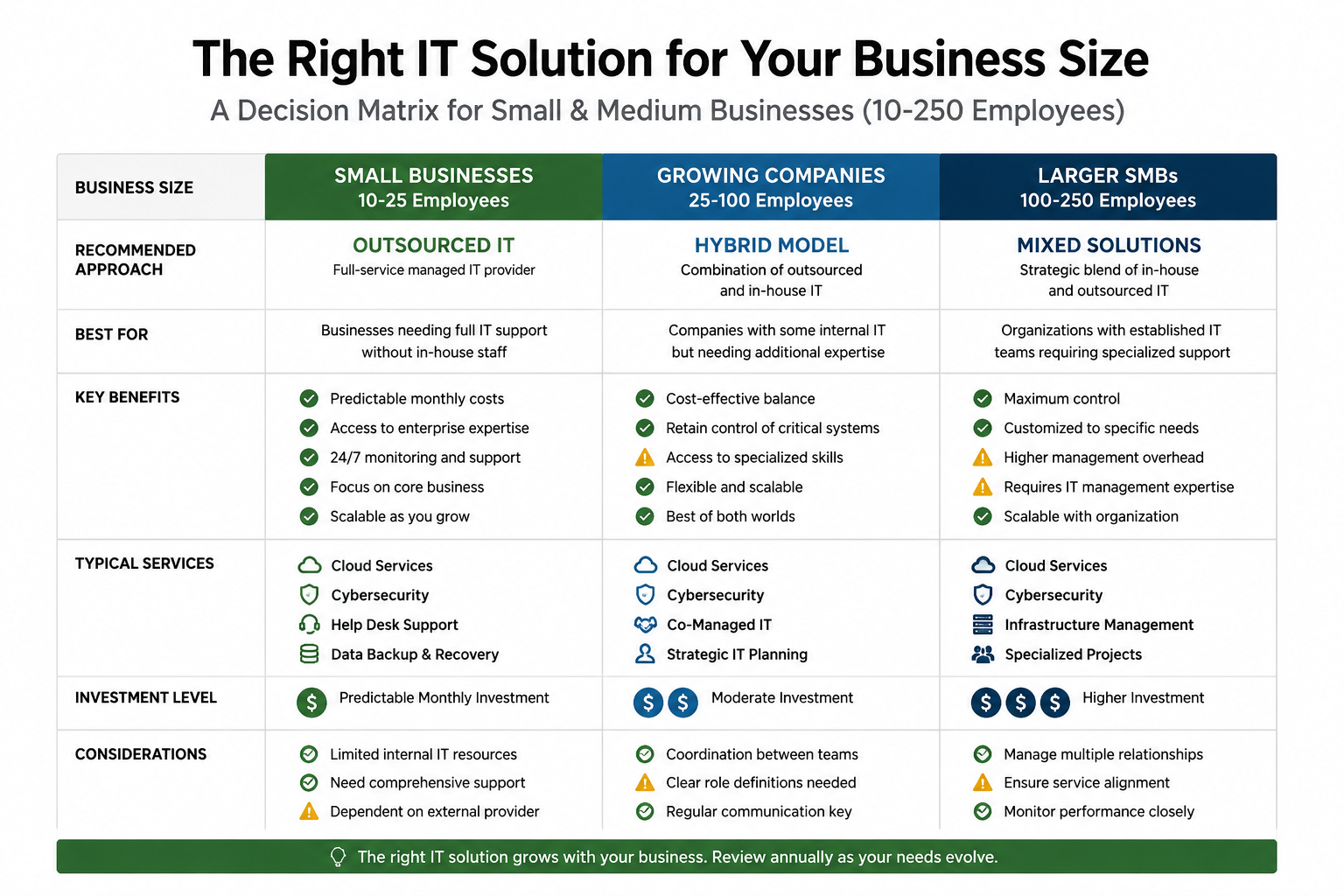
Companies with 10-75 employees benefit most from outsourced IT support, as they’re large enough to need professional IT services but too small to justify multiple in-house specialists. These businesses typically see 40-60% cost savings while gaining access to enterprise-level expertise and 24/7 support that would be impossible to replicate internally.
Optimal Size Ranges:
10-25 Employees:
- Outsourcing provides immediate cost savings of 50-70%
- Access to expertise far beyond what the salary budget allows
- Eliminates the risk of depending on one person’s knowledge
25-50 Employees:
- Sweet spot for managed IT services
- Can justify comprehensive service packages
- Significant productivity gains from proactive monitoring
50-75 Employees:
- Still cost-effective compared to building an internal team
- May benefit from a hybrid approach with one internal coordinator
- Complex enough to need specialized security and compliance support
75-150 Employees:
- Economics becomes more complex
- Hybrid models often work best
- May justify some internal staff with outsourced specialties
Industry Considerations:
Some industries benefit from outsourced IT regardless of size due to specialized compliance or security requirements:
- Healthcare practices need HIPAA expertise
- Financial firms require SOX and banking compliance knowledge
- Legal offices need advanced confidentiality and security measures
- Manufacturing companies benefit from industrial network security expertise
The key factor isn’t just employee count; it’s the complexity of your technology needs versus your ability to attract and retain qualified internal staff. Many 100+ employee companies still choose outsourced IT because finding and keeping good IT professionals has become increasingly challenging and expensive.
Common Mistakes Small Businesses Make with Their IT Strategy
The most common IT strategy mistake small businesses make is treating IT as a cost center rather than a business enabler, leading to underinvestment in critical areas like cybersecurity and backup systems. This reactive approach often results in expensive emergency fixes and security incidents that cost far more than proactive IT management would have required.
Budget and Planning Mistakes:
- Focusing only on upfront costs while ignoring the total cost of ownership
- Delaying IT investments until systems fail completely
- Choosing the cheapest option without considering reliability or support quality
- Failing to budget for regular updates, maintenance, and security improvements
Staffing and Support Errors:
- Expecting one person to handle all IT responsibilities effectively
- Hiring based on technical skills alone, without considering communication abilities
- Not providing adequate training or professional development opportunities
- Lacking backup coverage for vacations, sick days, and emergencies
Security and Compliance Oversights:
- Treating cybersecurity as optional rather than essential
- Using consumer-grade solutions for business-critical applications
- Neglecting employee training on security best practices
- Failing to understand industry-specific compliance requirements
Technology Selection Problems:
- Choosing incompatible systems that don’t integrate well
- Over-engineering solutions for simple business needs
- Under-investing in scalable platforms that support growth
- Ignoring cloud solutions that could reduce costs and improve reliability
Vendor Management Issues:
- Working with multiple vendors without coordination
- Accepting poor service levels because “it’s always been this way”
- Not establishing clear service level agreements or response time expectations
- Failing to regularly review and optimize vendor relationships
The most successful small businesses treat IT as a strategic partner in growth. They invest in reliable systems, maintain strong security, and ensure they have dependable support, whether that comes from a trusted internal person or a reliable partner who provides industry expertise and personalized service.
How Do I Calculate Total Cost of Ownership for My IT Infrastructure
Calculate your IT total cost of ownership by adding direct costs (salaries, software licenses, hardware), indirect costs (training, recruitment, downtime), and hidden costs (security incidents, compliance gaps, opportunity costs) over a 3-5 year period. Most small businesses discover their actual IT costs are 40-80% higher than their initial estimates when using this comprehensive approach.
Direct Cost Categories:
Personnel Expenses:
- Base salaries for all IT staff
- Benefits, payroll taxes, and insurance (typically 30-40% of salary)
- Recruitment and onboarding costs
- Training, certifications, and professional development
Technology Costs:
- Hardware purchases and leasing
- Software licenses and subscriptions
- Network infrastructure and telecommunications
- Security tools and monitoring systems
Indirect Cost Factors:
Operational Expenses:
- Office space and utilities for IT staff
- Contractor and consulting fees
- Vendor management and coordination time
- Internal time spent on IT-related decisions and troubleshooting
Risk and Compliance Costs:
- Cybersecurity insurance premiums
- Compliance auditing and reporting
- Data backup and disaster recovery systems
- Business continuity planning and testing
Hidden Cost Calculations:
Downtime Impact:
- Average hourly revenue × downtime hours × productivity loss percentage
- For a $2M annual revenue business: $1,000/hour × 40 hours downtime = $40,000 annual impact
Security Incident Costs:
- Average small business breach cost: $50,000-$200,000
- Multiply by the probability percentage based on your security maturity
- Include reputation damage and customer loss estimates
Opportunity Costs:
- Management time diverted from core business activities
- Delayed projects due to IT limitations
- Lost productivity from unreliable systems
TCO Comparison Framework:
Create a 5-year spreadsheet comparing your current in-house costs against outsourced alternatives. Include growth projections and factor in how each option scales with your business expansion.
Most businesses find that outsourced IT provides more predictable costs and often delivers better total value when factoring in the comprehensive expertise, 24/7 monitoring, and proactive solutions that eliminate many hidden costs entirely.
What Technology Gaps Might an Outsourced IT Team Not Cover
Outsourced IT teams typically don’t provide hands-on physical support for specialized equipment, custom application development, or highly industry-specific legacy systems that require on-site presence. However, reputable managed service providers clearly communicate these limitations upfront and often partner with specialists to address gaps when needed.
Physical Presence Limitations:
- Hands-on hardware repairs requiring immediate on-site response
- Specialized manufacturing equipment or industrial control systems
- Physical security system management (cameras, access controls)
- On-premise server maintenance in businesses requiring air-gapped systems
Development and Customization Gaps:
- Custom software application development
- Complex database programming and optimization
- Highly specialized legacy system modifications
- Integration projects requiring extensive custom coding
Industry-Specific Limitations:
- Medical device integration and calibration
- Specialized scientific or research equipment
- Custom manufacturing system programming
- Proprietary software that requires certified technicians
Addressing Common Gaps:
Hybrid Solutions:
Many businesses successfully combine outsourced IT with targeted internal resources or specialist contractors for gap areas. This approach maintains cost efficiency while ensuring comprehensive coverage.
Service Level Agreements:
Quality-managed IT providers establish clear response times for different types of issues. While they might not provide immediate hands-on support, they often coordinate with local technicians and maintain relationships with specialized vendors.
Proactive Planning:
The best outsourced IT teams focus on preventing problems that would require an emergency on-site response. Through 24/7 monitoring and proactive maintenance, they often eliminate many situations that would require immediate physical presence.
Questions to Ask Potential Providers:
- How do you handle hardware failures that require on-site support?
- What’s your network of local partners for specialized needs?
- How quickly can you coordinate an emergency on-site response?
- What gaps should we plan to address through other resources?
Most small businesses find that the gaps are manageable and far outweighed by the benefits of professional IT management, comprehensive security, and reliable support for day-to-day operations.
Can a Small Business Really Save Money by Outsourcing IT
Yes, small businesses typically save 30-50% on IT costs by outsourcing, with savings averaging $40,000-$80,000 annually for businesses with 25-75 employees. The savings come not just from lower direct costs, but from avoiding expensive security incidents, reducing downtime, and eliminating the hidden costs of recruitment, training, and coverage gaps.
Real-World Savings Examples:
25-Employee Accounting Firm:
- Previous in-house costs: $135,000 annually (salary, benefits, tools, contractors)
- Outsourced IT investment: $72,000 annually
- Annual savings: $63,000 (47% reduction)
- Added benefits: 24/7 monitoring, compliance expertise, backup coverage
50-Employee Manufacturing Company:
- Previous costs: $180,000 annually (IT manager + part-time help + emergency contractors)
- Outsourced solution: $120,000 annually
- Annual savings: $60,000 (33% reduction)
- Improved uptime reduced production delays by an additional $25,000
Where the Savings Come From:
Eliminated Hidden Costs:
- No more recruitment fees or turnover expenses
- Reduced security incident risks and associated costs
- Eliminated coverage gaps that required expensive emergency support
- Proactive monitoring prevents costly system failures
Improved Efficiency:
- Faster problem resolution reduces productivity losses
- Better system reliability improves overall business operations
- Standardized processes reduce user confusion and support requests
- Strategic planning prevents expensive reactive purchases
Access to Enterprise Tools:
- Professional monitoring and security tools are included in the service
- Enterprise software licenses at lower per-user costs
- Advanced backup and disaster recovery without separate investment
- Compliance management tools and expertise are included
Factors That Maximize Savings:
The businesses that save the most typically have been struggling with unreliable IT support, frequent downtime, or security concerns. They often discover that their “cheaper” in-house approach was actually costing them significantly more when factoring in lost productivity and emergency fixes.
Companies also save substantial management time; business owners and managers can focus on core business activities instead of dealing with IT headaches, vendor coordination, and technology planning.
The key is choosing a reliable partner that provides personalized service and understands your industry. The peace of mind and predictable costs often justify the investment even when direct cost savings are modest.
What Are the Risks of Relying on External IT Support
The primary risks of external IT support include potential service disruptions if the provider fails, reduced control over IT decisions and timing, and possible security concerns from granting outside access to your systems. However, these risks are typically lower than the risks of inadequate in-house IT coverage and can be effectively managed through proper vendor selection and contract terms.
Service Dependency Risks:
- Provider business failure could disrupt your IT support
- Service quality might decline if the provider becomes overextended
- Contract disputes could impact support availability
- Dependency on the provider’s staff turnover and training
Control and Flexibility Concerns:
- Less direct control over IT priorities and project timing
- Potential delays when the provider manages multiple client emergencies
- Limited ability to customize solutions exactly to your preferences
- Reduced flexibility for immediate changes or urgent requests
Security and Access Issues:
- External access to sensitive systems and data
- Potential for data breaches through the provider’s other clients
- Compliance concerns in regulated industries
- Risk of inadequate security practices by the provider
Mitigating External IT Risks:
Careful Provider Selection:
- Choose established providers with a strong local reputation
- Verify insurance coverage and financial stability
- Check references from similar businesses in your industry
- Ensure they understand your specific compliance requirements
Strong Contract Terms:
- Clear service level agreements with financial penalties
- Data security and confidentiality protections
- Termination clauses that protect your business interests
- Regular performance reviews and improvement processes
Backup Planning:
- Maintain documentation of your systems and configurations
- Ensure you retain ownership of all licenses and accounts
- Develop relationships with alternative providers
- Keep some internal IT knowledge for basic troubleshooting
Risk Comparison Reality:
While external IT does involve some dependency risks, consider the alternative risks of inadequate in-house IT:
- Single-person dependency creates major vulnerability
- Limited expertise increases security and compliance risks
- Lack of 24/7 coverage creates business continuity concerns
- Insufficient backup and disaster recovery planning
Most businesses find that working with a reliable partner who provides industry expertise, same-day support, and proactive solutions significantly reduces their overall IT risks while providing better coverage than they could achieve internally.
How Quickly Can an Outsourced IT Team Respond to Emergencies
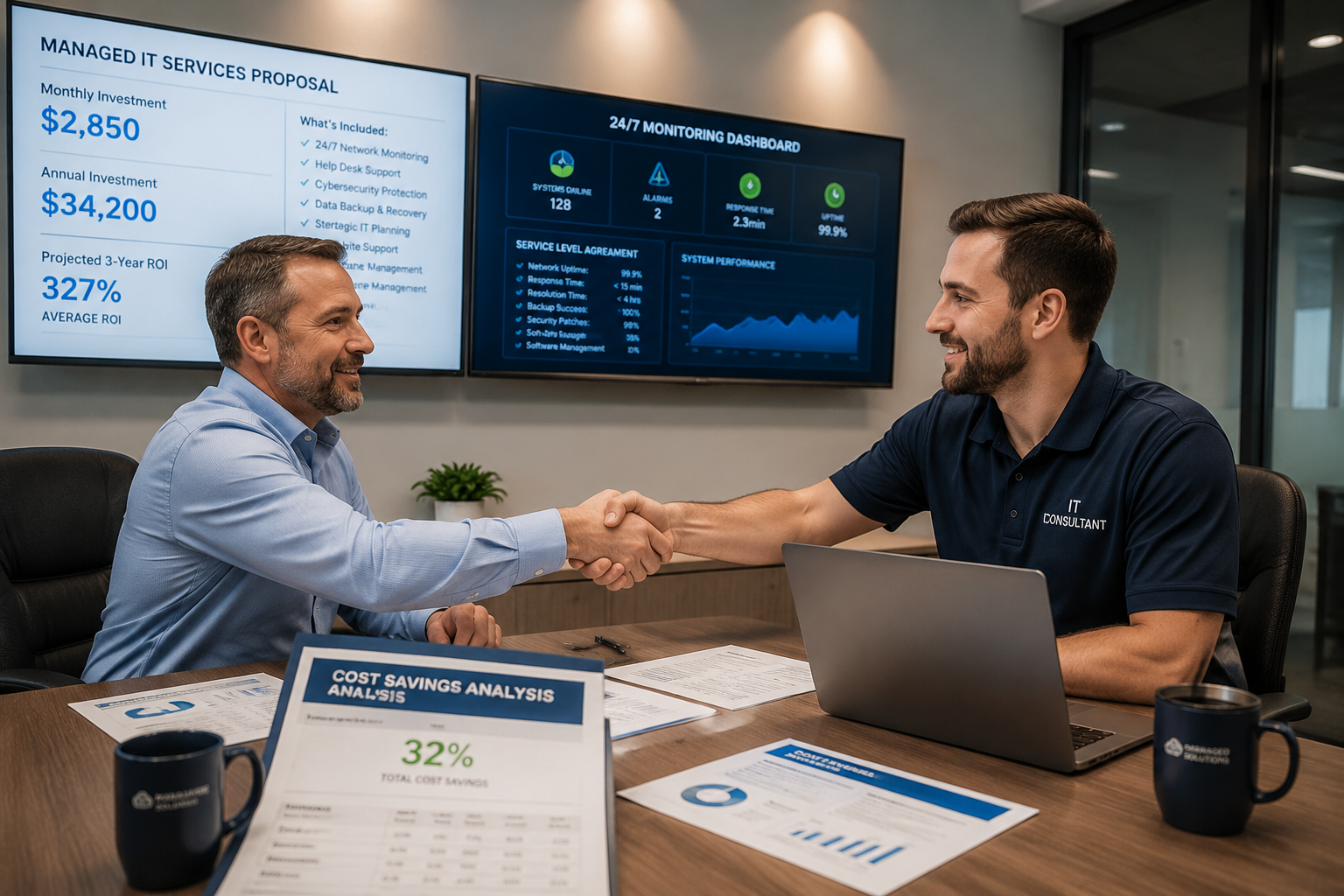
Professional outsourced IT teams typically respond to emergencies within 15-30 minutes for critical issues, with many providers offering guaranteed response times backed by service-level agreements. Most managed service providers maintain 24/7 monitoring that often identifies and resolves problems before they impact your business operations.
Standard Response Time Commitments:
Critical Issues (System Down):
- Initial response: 15-30 minutes
- On-site arrival (when needed): 2-4 hours
- Resolution target: 4-8 hours maximum
High Priority Issues:
- Initial response: 1-2 hours
- Resolution target: Same business day
Standard Support Requests:
- Response time: 4-8 hours
- Resolution target: 24-48 hours
24/7 Monitoring Advantages:
Quality managed IT providers use advanced monitoring tools that watch your systems around the clock. This proactive approach often prevents emergencies entirely:
- Automatic detection of failing hard drives before they crash
- Early warning of network performance issues
- Immediate alerts for security threats or unusual activity
- Automated responses to common problems
Same-Day Support Benefits:
Unlike in-house IT that might be unavailable during vacations or sick days, outsourced teams provide consistent coverage:
- Multiple technicians available to handle simultaneous issues
- Escalation procedures ensure complex problems get expert attention
- No coverage gaps during holidays, weekends, or after hours
- Backup systems and processes maintain service continuity
Emergency Response Process:
Professional providers follow structured emergency protocols:
- Immediate acknowledgment of critical issues
- Rapid assessment and initial troubleshooting
- Escalation to appropriate specialists when needed
- Regular status updates throughout the resolution process
- Post-incident review to prevent recurrence
Industry Expertise Advantage:
Providers specializing in your industry often resolve issues faster because they’ve seen similar problems before. Their experience with common configurations and typical failure points enables quicker diagnosis and resolution.
The combination of proactive monitoring, guaranteed response times, and deep expertise typically provides much faster and more reliable emergency support than most small businesses can achieve with in-house staff.
What Should I Look for in an IT Managed Services Provider
Look for an IT managed services provider with strong local presence, industry-specific experience, and clear service level agreements that guarantee response times and system uptime. The best providers offer straightforward pricing, proactive solutions, and personalized service that makes them feel like an extension of your team rather than just another vendor.
Essential Service Capabilities:
- 24/7 network monitoring and automated threat detection
- Same-day support with guaranteed response times
- Comprehensive cybersecurity management and compliance expertise
- Backup and disaster recovery with tested restoration procedures
- Help desk support that understands your business and users
Business Relationship Factors:
- Local presence with the ability to provide on-site support when needed
- Experience with businesses similar to yours in size and industry
- Clear communication style that avoids technical jargon
- Proactive approach to identifying and solving problems before they impact operations
- Transparent pricing with no hidden fees or surprise charges
Technical Expertise Requirements:
- Current certifications in major technology platforms (Microsoft, Cisco, security frameworks)
- Demonstrated experience with cloud migrations and management
- Strong track record in cybersecurity and compliance management
- Ability to integrate with your existing systems and preferred software
- Scalable solutions that can grow with your business
Evaluation Questions to Ask:
Service Level Commitments:
- What are your guaranteed response times for different priority levels?
- How do you handle coverage during nights, weekends, and holidays?
- What happens if you don’t meet your service level commitments?
- Can you provide references from businesses similar to ours?
Security and Compliance:
- How do you stay current with cybersecurity threats and best practices?
- What experience do you have with our industry’s compliance requirements?
- How do you handle security incidents and breach response?
- What insurance coverage do you carry for cybersecurity and errors?
Business Continuity:
- How quickly can you restore our systems after a major failure?
- What backup and disaster recovery solutions do you recommend?
- How do you ensure business continuity during system migrations or updates?
- What’s your process for documenting our systems and configurations?
The right provider should feel like a reliable partner who understands your business goals and helps you achieve them through stable, secure technology. They should eliminate IT headaches rather than create new ones, giving you peace of mind to focus on growing your business.