
Manufacturing system integration becomes increasingly important as a plant adds more software, equipment, and digital processes. When production, inventory, purchasing, sales, and quality systems operate separately, employees often become the connection between them, manually transferring information and chasing updates across departments. That gap between systems, not the number of systems itself, is usually what slows a plant down.
One Plant, Multiple Systems, and Too Many Information Gaps
Most mid-sized manufacturers run on five, six, or more separate systems: an ERP for orders and financials, a production tracking tool, an inventory platform, a quality management system, maybe a dedicated scheduling tool, and spreadsheets filling in the rest. Having multiple systems isn’t the problem on its own. Plenty of well-run plants use several specialized tools because no single platform does everything well.
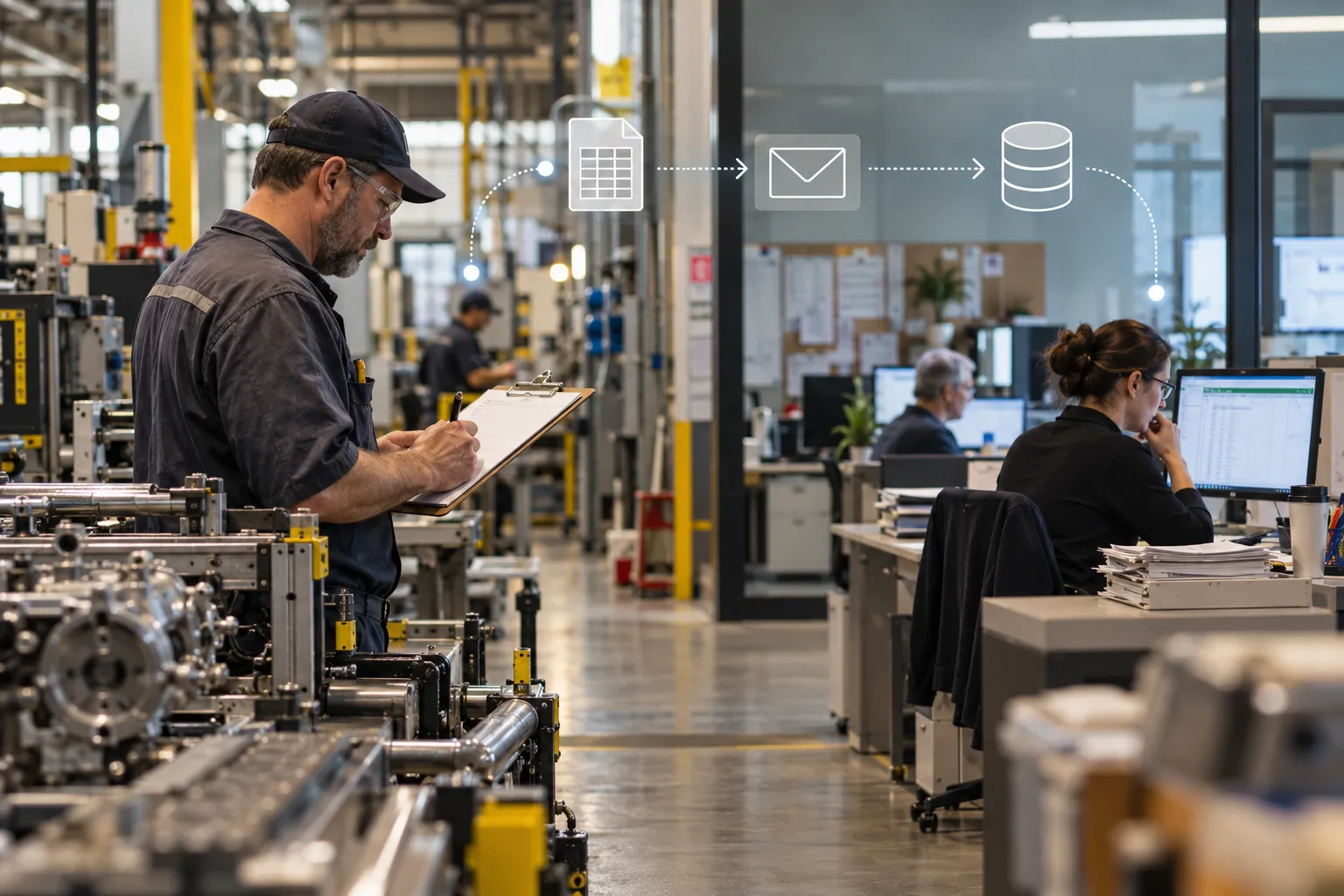
The real problem shows up when information generated in one system has to reach another system before anyone can act on it. A production run finishes, but inventory doesn’t know until someone updates a spreadsheet. A quality issue gets flagged, but purchasing doesn’t find out until a shipment is already late. Each of these gaps adds delay, and delay compounds across a facility running multiple shifts and dozens of open orders.
Manufacturing System Integration: Why Disconnected Workflows Create Problems
Disconnected systems create predictable, repeatable problems: duplicate entry, delayed visibility, and inconsistent records across departments. These problems aren’t one-time annoyances. They repeat every shift, every order, every inventory cycle.
Here’s what typically shows up on the floor and in the office:
- Duplicate data entry: the same order number, quantity, or part detail gets typed into two or three different systems by two or three different people.
- Delayed updates: a change in production status might not reach the sales team or the ERP for hours, sometimes a full shift.
- Inconsistent records: when two systems hold the same information but it’s entered manually in each, small typos or timing differences create records that don’t match.
- Missed notifications: a quality hold or inventory shortage sits in someone’s inbox instead of triggering immediate action.
- Manual reporting: a manager spends an hour each morning pulling numbers from four different screens into one spreadsheet before the production meeting.
- Unnecessary communication: phone calls and hallway conversations exist to fill gaps that a connected system would handle automatically.
- Operational bottlenecks: purchasing waits on production, production waits on inventory, and the whole chain slows down waiting on information that already exists somewhere in the building.
The Employee Becomes the Connection Between Systems
When systems aren’t connected, people fill the gap. That means your production supervisor, inventory clerk, or scheduler spends part of every day acting as a manual data pipeline instead of doing the work that actually requires their judgment.
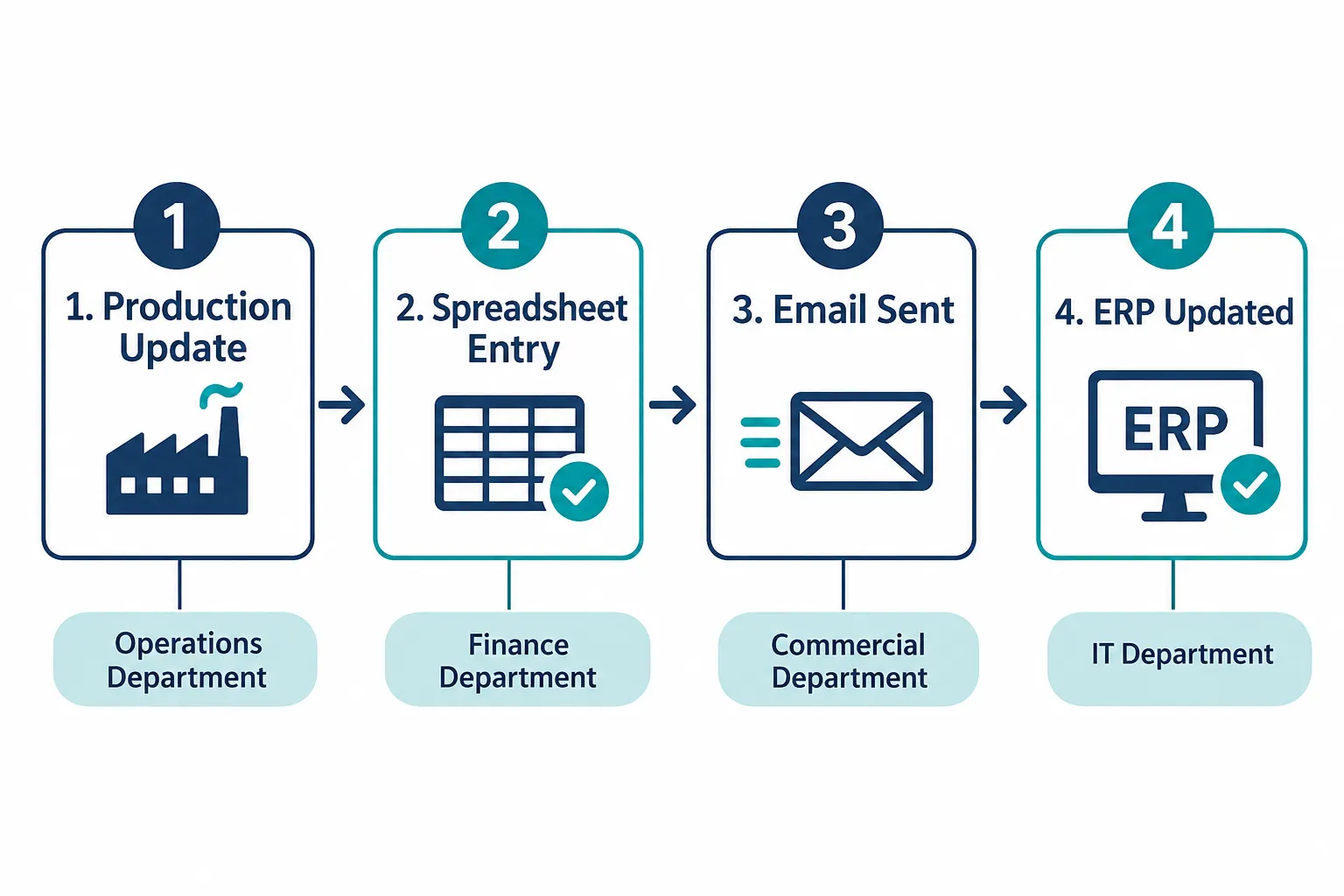
A typical flow looks something like this: Production finishes a run and logs it in a shift report. Someone copies that information into a spreadsheet. The spreadsheet gets emailed to the office. Someone in the office manually enters it into the ERP. Then someone pulls a report from the ERP and sends it to another department that needed the original number in the first place.
By the time the information reaches the person who needed it, it has passed through four or five sets of hands and several hours of delay. None of those steps added value. They just moved the same number from one place to another.
Where Manufacturing Systems Commonly Become Disconnected
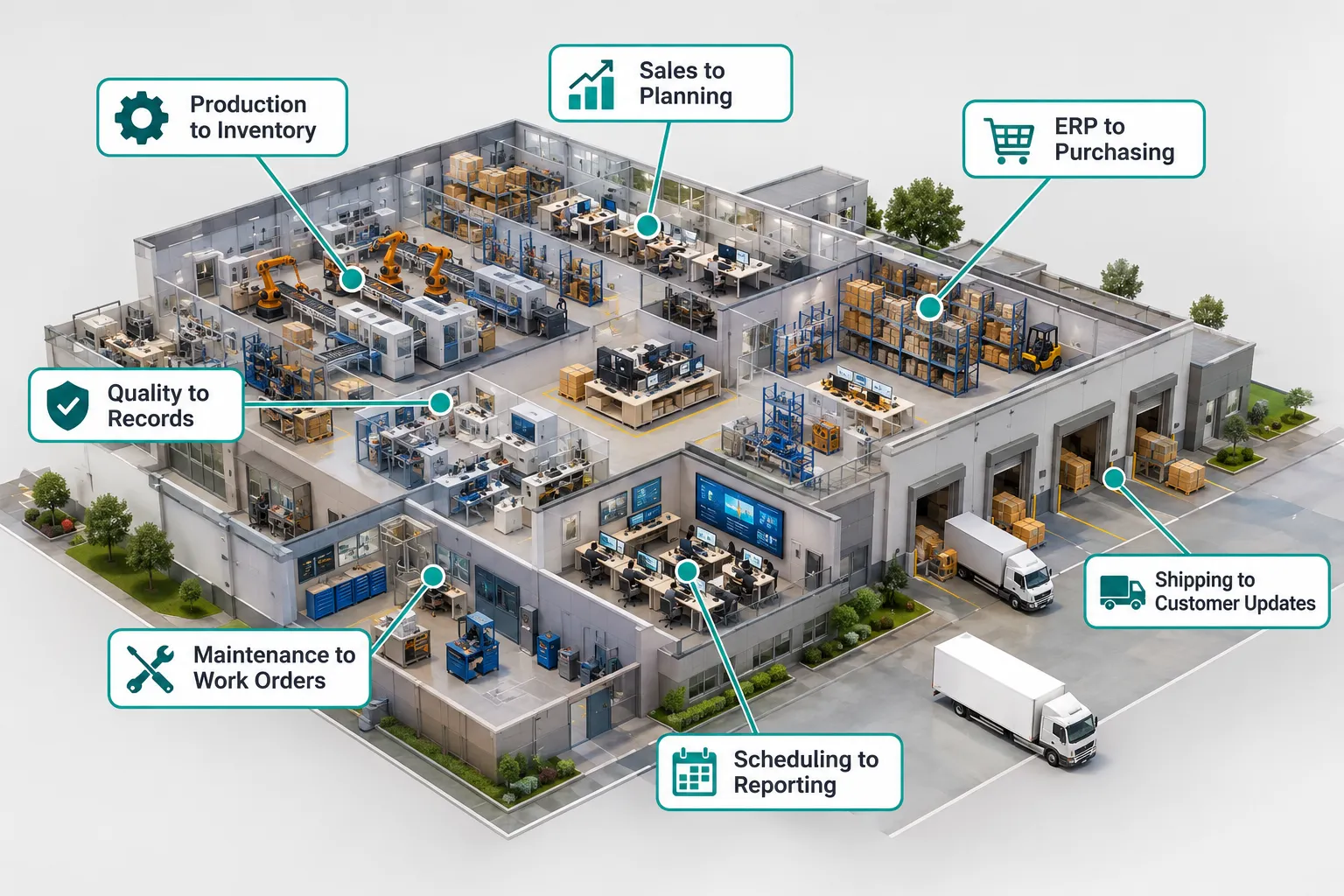
The most common disconnection points sit at the handoffs between production floor activity and office systems, not inside any single platform. Knowing where these gaps typically occur helps you spot them in your own operation.
- Production and inventory: finished goods or raw material consumption isn’t reflected in inventory counts until someone updates it manually.
- Sales and production planning: sales teams promise delivery dates without current visibility into the production schedule.
- ERP and purchasing: purchasing reacts to shortages after they happen instead of getting advance notice from production data.
- Quality and production records: quality holds, inspection results, and nonconformance reports live in a separate system from the production run they relate to.
- Maintenance and work orders: equipment downtime isn’t automatically linked to the production schedule it affects.
- Scheduling and reporting: schedule changes don’t flow into the reports managers use to track performance.
- Shipping and customer updates: shipping status changes, but sales and customer service find out only when a customer calls asking where their order is.
What Manufacturing System Integration Actually Changes
Manufacturing system integration lets appropriate information move between systems automatically, based on rules you define, instead of waiting for someone to notice, remember, and type it. The word “appropriate” matters here. Integration should move the right data to the right place, not every piece of information to every system.
Realistic examples of what this looks like in practice:
- An approved production update flows directly into the daily report, removing the need for a manager to manually compile numbers each morning.
- An inventory change below a set threshold automatically triggers a notification to purchasing.
- A completed order updates the relevant downstream workflow, such as shipping or invoicing, without a manual handoff.
- A quality issue generates a task or escalation notification instead of sitting in an inbox.
- Customer order status becomes available to the sales or customer service team without a phone call to the production floor.
These workflows depend on three things: whether the systems involved offer an interface to connect through, how well-structured the underlying data is, and whether the right permissions and validation rules are in place. A system with no API and no export option limits what’s possible, and that’s worth knowing before you plan a project around it.
Where AI Adds Value Beyond Traditional Integration
Traditional automation moves structured, predictable data: a number from field A to field B, a status change that triggers a notification. AI adds value by interpreting information that doesn’t come in a clean, structured format in the first place.
Traditional integration handles things like:
- Routing a completed work order into the ERP
- Updating inventory counts after a transaction
- Sending a notification when a threshold is crossed
AI can help with the messier, unstructured side of plant communication, including:
- Reading an email from a supplier and pulling out the delivery date and quantity
- Scanning a handwritten production note and converting it into a structured record
- Summarizing a long quality report into the key findings
- Classifying an incoming request so it routes to the right department
- Organizing scattered operational data into a format a workflow can actually use
AI doesn’t replace the controlled, rule-based logic that governs inventory transactions or financial approvals. It works best as a step before a structured workflow takes over, turning messy input into something the rest of the system can act on.
Example: Connecting Production, Inventory, and Purchasing
A realistic version of this workflow starts with a production update, checks it against current inventory, and alerts purchasing only when a real shortage exists. Here’s how it might run step by step:
- A production run finishes and the system logs materials consumed.
- The integration checks that consumption against current inventory levels.
- If a shortage is identified, a task is created for purchasing.
- Purchasing reviews the task and places an order if needed.
- The order status is tracked and visible to production and inventory teams.
AI may help interpret unstructured inputs along the way, such as a supplier email confirming a delivery date that doesn’t match the expected format. But the actual inventory transaction, the quantity adjustment, and the purchase approval stay under the control of the systems and people responsible for them. Integration doesn’t remove accountability. It removes the manual busywork around it.
Example: Connecting Production and Sales
Connecting production status to sales means giving the sales team visibility into real order progress instead of forcing them to call the floor for updates. This changes how quickly a customer-facing team can respond to questions.
A workable version of this flow looks like:
- Production status updates in the system.
- Relevant order information becomes available to sales through a shared dashboard or notification.
- Sales receives an alert when a status change affects a specific customer order.
- A team member reviews the update and prepares a customer communication.
Notice that the last step still involves a person. Automatically sending customer-facing updates without a validation step is risky, because production delays, quality holds, or last-minute changes need a human check before a customer hears about them. Integration should speed up the information sales receives, not remove the judgment call about what to tell a customer.
How Integration Improves Operational Visibility
Integration gives managers a consolidated view of what’s actually happening across the plant instead of a collection of separate screens that each show part of the picture. That visibility only helps if the underlying data feeding it is accurate and current.
Areas where consolidated visibility typically helps the most:
- Order status across production stages
- Inventory availability against upcoming production needs
- Outstanding quality exceptions and their resolution status
- Maintenance activity and its effect on the schedule
- Workflow delays before they become missed deadlines
A dashboard built on inaccurate source data is worse than no dashboard at all, because it gives managers false confidence. Integration projects should include a check on data quality at the source, not just the connection between systems.
Calculate the Cost of Disconnected Manufacturing Systems
You can estimate the cost of manual data transfer with a simple formula: minutes spent per transfer, multiplied by how often it happens each month, multiplied by the number of employees involved, divided by 60 to get monthly hours. Multiply that number by your average labor cost to get a dollar figure.
Example (illustrative, not a universal benchmark): if three employees each spend 20 minutes a day manually transferring production data into the ERP, that’s 60 minutes a day across the team, roughly 20 hours a month. At $28 an hour in fully loaded labor cost, that’s around $560 a month, or close to $6,700 a year, just for one recurring handoff. Multiply that across five or six similar handoffs in a typical plant and the number grows fast.
That calculation doesn’t include the harder-to-measure costs: rework from inaccurate data, delayed decisions, and missed coordination between departments. Those costs are real but harder to pin to a specific dollar figure, so treat the labor calculation as a floor, not a ceiling.
Connect Existing Systems Without Replacing Everything
You don’t need to replace your core systems to connect them. Most integration work happens through connectors, APIs, and platforms built to link systems that were never designed to talk to each other directly.
Common approaches include:
| Approach | Best for |
|---|---|
| Vendor-supported integrations | Systems from major providers with built-in connectors |
| APIs | Custom, direct connections between two systems |
| Webhooks | Real-time alerts triggered by specific events |
| Integration platforms | Connecting several systems without custom coding |
| Structured file exchanges | Legacy systems with no modern interface |
| AI-assisted workflows | Interpreting unstructured emails, notes, and documents |
Unsupported integrations, meaning connections built outside a vendor’s approved methods, can break when a system updates, and poorly designed data syncing can create duplicate or conflicting records. Before building a connection, check whether the vendor offers an approved method and whether the integration will survive a software update on either end.
How to Start Connecting a Manufacturing Operation
Start with one workflow, not the whole plant. A focused first project gives you a measurable win and a reference point before expanding further.
- Map the systems involved in one specific workflow, such as production-to-inventory.
- Identify exactly where employees manually transfer information in that workflow.
- Select the single highest-impact handoff to tackle first.
- Check what integration options the systems involved actually support.
- Define who can approve what, and what validation steps stay in place.
- Build and automate a limited version of the workflow.
- Test it against real operational scenarios, including edge cases.
- Measure the time saved and how reliably it runs.
- Expand to the next workflow using what you learned.
What Is Manufacturing System Integration
Manufacturing system integration is the practice of connecting the separate software and equipment systems a plant uses, like ERP, production tracking, inventory, quality, and scheduling, so data flows between them without manual re-entry. It’s an operational improvement, not a single piece of software you buy once.
How Do You Connect Disconnected Manufacturing Systems
You connect disconnected systems by identifying a specific information handoff, checking what connection methods each system supports, and building a rule-based link between them with clear permissions. Start with one workflow where manual entry is costing the most time, confirm both systems have an API, export tool, or vendor connector, then build and test the connection before expanding to other workflows.
Best Manufacturing System Integration Tools and Software
The right tool depends on which systems you’re connecting and whether they have existing interfaces. Integration platforms (sometimes called iPaaS tools) work well for connecting cloud-based systems without custom coding, while direct API development suits more specific or complex connections, and AI-assisted tools help when the data involved is unstructured, like emails or scanned documents. Choose a platform-based approach if your systems are modern and cloud-hosted. Choose custom development if you need a tightly controlled, specific connection between two systems with unusual requirements.
Manufacturing System Integration Cost and Pricing
Integration costs vary widely based on the number of systems, the complexity of the data involved, and whether existing APIs are available. A single, well-defined workflow connecting two modern cloud systems with existing APIs is far less expensive than connecting a legacy on-premises system with no interface at all. Request a scoped assessment of your specific systems before assuming a cost, since generic pricing estimates rarely reflect your actual environment.
How Long Does Manufacturing System Integration Take
A single, focused integration project connecting two systems with existing APIs typically takes a few weeks from mapping to testing, while a plant-wide integration effort connecting many systems can take several months when phased correctly. Timelines depend heavily on whether your systems have documented interfaces and how much manual testing the workflow requires before going live. Choose a phased approach if you want working results sooner rather than a single long project with no visible progress until the end.
Why Aren’t My Manufacturing Systems Communicating
Manufacturing systems often fail to communicate because they were purchased at different times from different vendors, were never designed with integration in mind, or lack a modern interface like an API. Older, on-premises systems in particular were frequently built before integration was a standard expectation, which is why so many plants still rely on spreadsheets and email to move information between them.
Common Problems with Manufacturing System Integration
Common problems include mismatched data formats between systems, unreliable connections that break after a vendor update, and projects that try to automate too much at once. A frequent edge case: two systems technically connect, but one updates its record format during a software release and the connection silently stops working until someone notices missing data days later.

Manufacturing System Integration Mistakes to Avoid
The most common mistake is trying to integrate every system at once instead of starting with a single high-impact workflow. Other frequent mistakes include skipping validation and permission rules, assuming every system has an API when many legacy tools don’t, and automating a workflow without first testing it against real operational scenarios like partial shipments or rush orders.
Can Older Equipment Work with New Manufacturing Systems
Older equipment and legacy software can sometimes connect to newer systems through structured file exports, middleware, or custom-built interfaces, but not always, and not always reliably. Choose a structured file exchange or a dedicated middleware tool if your legacy equipment has no API. If a system has no export capability at all, manual entry may remain the only realistic option for that specific piece of equipment.
Who Actually Needs Manufacturing System Integration
Manufacturers running three or more separate systems for production, inventory, purchasing, sales, or quality, where employees regularly re-enter the same information across systems, are the clearest candidates for integration work. A plant running a single all-in-one ERP with no separate point solutions has less urgent need, though even single-system shops often still rely on spreadsheets that could be connected.
Manufacturing System Integration vs Manual Data Entry
Manual data entry costs ongoing labor hours and introduces errors every time someone re-types the same information, while integration has an upfront build cost but reduces that recurring labor and error rate over time. Choose integration when the same handoff repeats daily or weekly across multiple employees. Manual entry may still make sense for a rare, one-off data transfer that happens only a few times a year.
Free or Open Source Manufacturing Integration Options
Open source integration tools and free-tier automation platforms exist and can connect some cloud-based systems, but they typically require in-house technical skill to configure and maintain. Choose a free or open source option if you have IT staff comfortable managing APIs and troubleshooting connections. Choose a managed or vendor-supported option if you’d rather not maintain the integration yourselves long-term.
Does Manufacturing System Integration Require Downtime
Most integration projects can be built and tested without taking production systems offline, since connections are typically built and validated in a test environment before going live. Some cutover moments, like switching a workflow from manual to automated, may require a brief pause to confirm data is flowing correctly, but this is usually measured in minutes, not hours.
What Happens If Manufacturing Systems Fail to Integrate
If systems can’t be integrated, the handoff between them stays manual, meaning someone continues transferring data by hand with the same delays and error risk as before. This isn’t a failure of your plant. Some legacy systems genuinely lack any interface to connect through, and in those cases, the realistic fix may be replacing that one system eventually rather than forcing an integration that can’t work reliably.