Your Employees May Be the Bridge Between Your Software
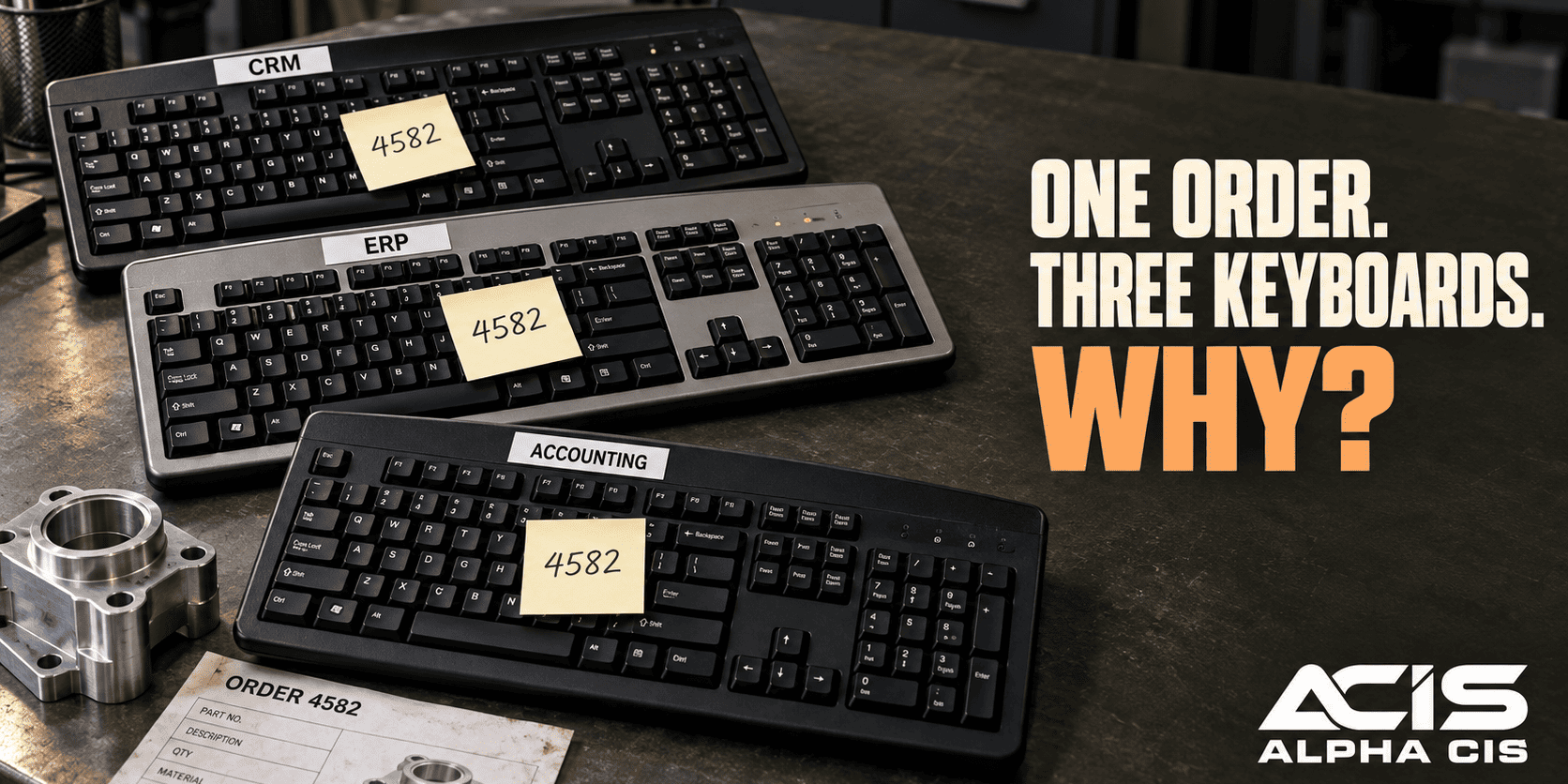
Here’s what probably happened in your office this week, even if nobody noticed it as a problem. A customer filled out a form on your website. Someone on your team saw the email notification, opened it, and typed that customer’s name, phone number, and request into your CRM by hand. Later, someone else pulled the same information to build an invoice, and your accounting software got a third version of that same customer record.
A salesperson may have updated the CRM separately after a phone call, creating a fourth touchpoint for the exact same piece of information. None of your software did anything wrong. The form worked. The CRM worked. The accounting system worked. The breakdown happened in the space between them, where a person had to carry the information from one system to the next.
This is the part most businesses miss when they think about business system integration. You don’t necessarily have a software problem. You may have a staffing cost built around the fact that your tools can’t talk to each other, so your people do the talking for them.

That cost is easy to miss because it’s spread across the day in five-minute increments. One person spends ten minutes a day re-entering leads. Another spends fifteen minutes forwarding emails and flagging them for someone else to act on. None of it feels urgent, but all of it adds up to hours of paid time every week spent moving data instead of creating value.
What Does Business System Integration Actually Mean?
Business system integration means connecting two or more software tools so they automatically share information, instead of relying on an employee to copy data from one to the other. The connection can run through a built-in integration, an API, a middleware tool, or an automation platform. The goal is always the same: information entered once should be available everywhere it’s needed.
For example, when a lead fills out a contact form, integration means that lead automatically becomes a contact in your CRM, without anyone typing it in manually. When a deal closes, integration can mean the customer’s billing details flow straight into your accounting software. The systems stay separate. They just stop operating in isolation.
Why do companies need to integrate their business systems? Companies integrate their systems because manual data transfer is slow, inconsistent, and expensive to maintain as the business grows. A five-person team might get away with copying data by hand. A fifty-person team usually can’t, because the time cost multiplies with every new employee, customer, and transaction. Integration lets a business handle more volume without adding more administrative headcount, which directly supports the goal to scale without adding headcount.
What Changes When Your Systems Start Talking to Each Other
When your systems are connected, a single customer action can trigger a full sequence of automatic steps instead of a single manual one. A basic connected workflow often looks like this:
- Customer submits a form on your website.
- Your CRM automatically creates or updates that contact record.
- The right salesperson or team gets notified immediately.
- The lead is routed into the correct workflow based on what they asked for.
- Accounting receives the information it needs, when it’s actually needed.
- A follow-up task or reminder gets scheduled without anyone setting it manually.
The exact sequence depends on your business and the tools you use, and that’s fine. A dental practice’s workflow will look different from a manufacturer’s or a CPA firm’s. What matters is that the handoffs between steps happen automatically, so no step depends on someone remembering to do it.
CRM Integration With Website Forms: Form Automation in Practice
Connecting your CRM to your website forms means a new lead or inquiry creates a CRM record the moment the form is submitted, instead of waiting for someone to read an email and type it in. This is one of the most common and highest-value integrations for small and mid-sized businesses, because forms generate a steady stream of time-sensitive leads.
The traditional path looks like this: Form submission → email notification → employee reads it → employee manually creates a CRM record. Every step adds delay, and every delay is a chance for the lead to go cold or get missed entirely. The connected path looks like this instead: Form submission → CRM record created automatically → workflow begins.
Once the form and CRM integration for small business is in place, you can typically automate:
- Creating or updating the contact record
- Assigning the lead to the right salesperson or team
- Categorizing the inquiry by type, service, or urgency
- Sending an internal notification to the person who should respond
- Creating a follow-up task with a due date
- Triggering an acknowledgment email to the customer
For straightforward forms with dropdowns and required fields, standard workflow automation handles this well. For forms where customers write in free text, AI can help interpret what they’re actually asking for before the lead gets routed, which we cover below.
Can You Integrate CRM and Email Automatically?
Yes, CRM email integration is one of the more established forms of system integration, and most modern CRMs support it through a direct connection or a simple automation tool. The goal isn’t to automate every conversation your team has with a customer. It’s to stop important information from getting stuck inside someone’s personal inbox.
Common CRM and email integration workflows include:
- New lead notifications sent to the right person automatically
- Follow-up reminders triggered when a deal has gone quiet
- Customer requests logged into the CRM instead of living only in an inbox
- Appointment confirmations sent without manual typing
- Sales communications logged automatically against the right contact record
Think about what happens today when a key employee is out sick and a customer email sits unread for two days. CRM email integration reduces that risk because the information isn’t trapped in one person’s inbox anymore. It’s captured in a shared system the whole team can see.
CRM Integration With Accounting Software: Connecting Customers to Cash Flow
CRM and accounting software integration lets customer and transaction information move between your sales system and your financial system without someone re-entering it. This closes one of the most common and costly gaps in small business operations: the space between “we got the customer” and “we billed the customer.”
Typical workflows include:
- A new customer record created in the CRM automatically appears in accounting once the deal is approved
- An approved deal in the CRM triggers the accounting workflow to generate an invoice
- Invoice status (paid, overdue, pending) flows back into the CRM so sales and service teams can see it without calling accounting
How much does it cost to integrate CRM with accounting software? Cost varies widely depending on the two platforms involved and how many workflows you want connected. A simple connection using a no-code automation tool between popular platforms can sometimes be set up for a modest one-time project fee, often in the low thousands of dollars or less depending on complexity. A deeper, custom integration involving multiple approval steps, legacy accounting software, or complex invoicing rules typically costs more and takes longer to build and test properly. The right way to estimate cost is to map the specific workflow first, then price the integration against that, rather than guessing at a number before you know what you actually need connected.
One important point: financial actions should always keep appropriate controls and approval steps. Integration should move information faster and more accurately. It should not remove the human review that belongs in front of sending an invoice, approving a refund, or writing off a balance.
The Full Picture: Forms, CRM, Email, and Accounting Working Together
The real value shows up when you connect forms, CRM, email, and accounting into one continuous workflow instead of treating each integration as a separate project. A fully connected process might look like this:
Customer submits a form → CRM record is created automatically → the lead is assigned to the right person → sales gets notified instantly → a follow-up task is scheduled → customer information becomes available to accounting at the appropriate stage → status updates continue flowing automatically as the deal and invoice move forward.
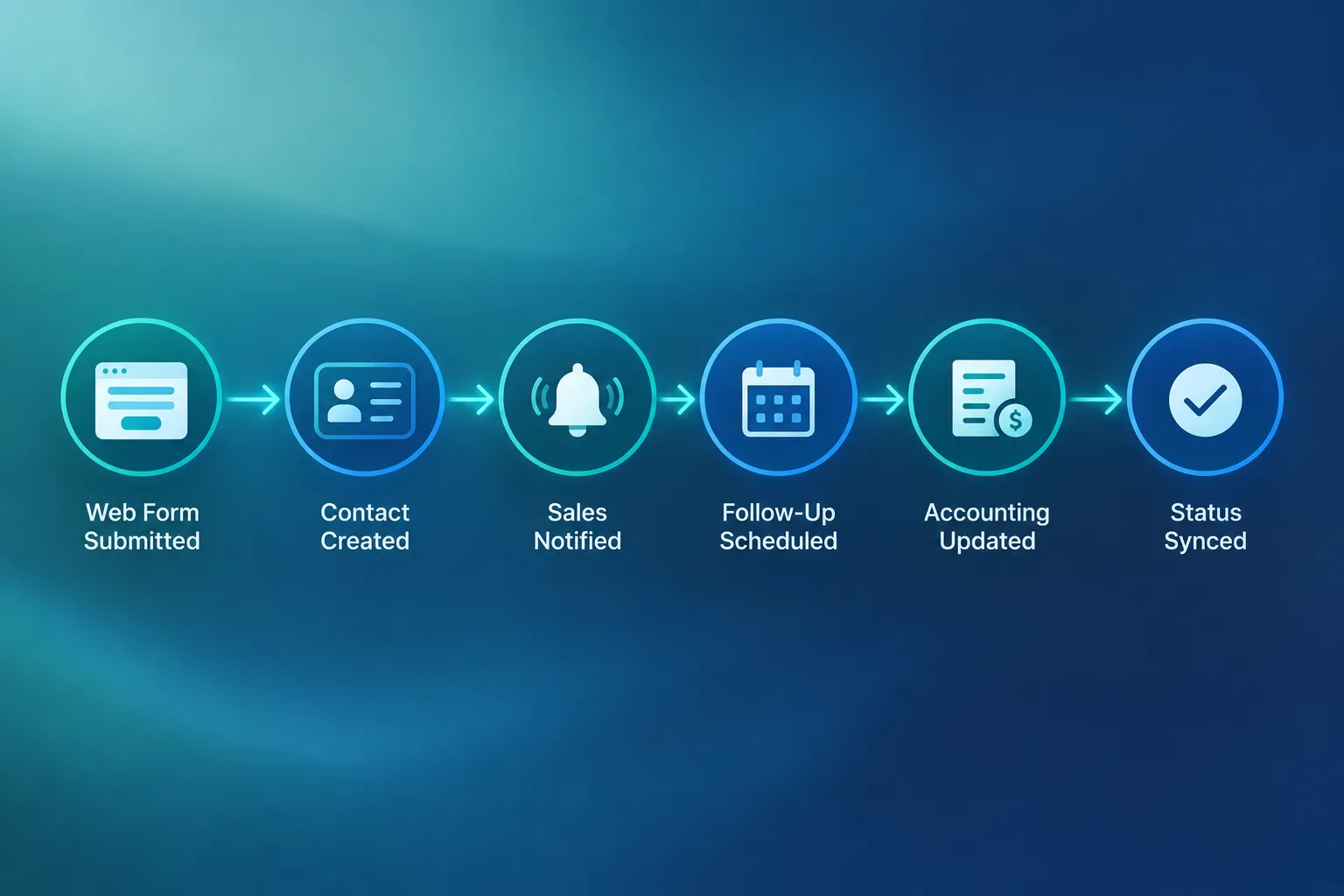
Picture a dental practice where a new patient inquiry comes in through the website. The form automatically creates a patient record, notifies the front desk, schedules a follow-up call, and once the patient is confirmed, passes billing information to the practice management and accounting side. No one retypes the patient’s name four times. That’s automated business workflows doing what your employees used to do by hand.
Where AI Workflow Automation Adds Value
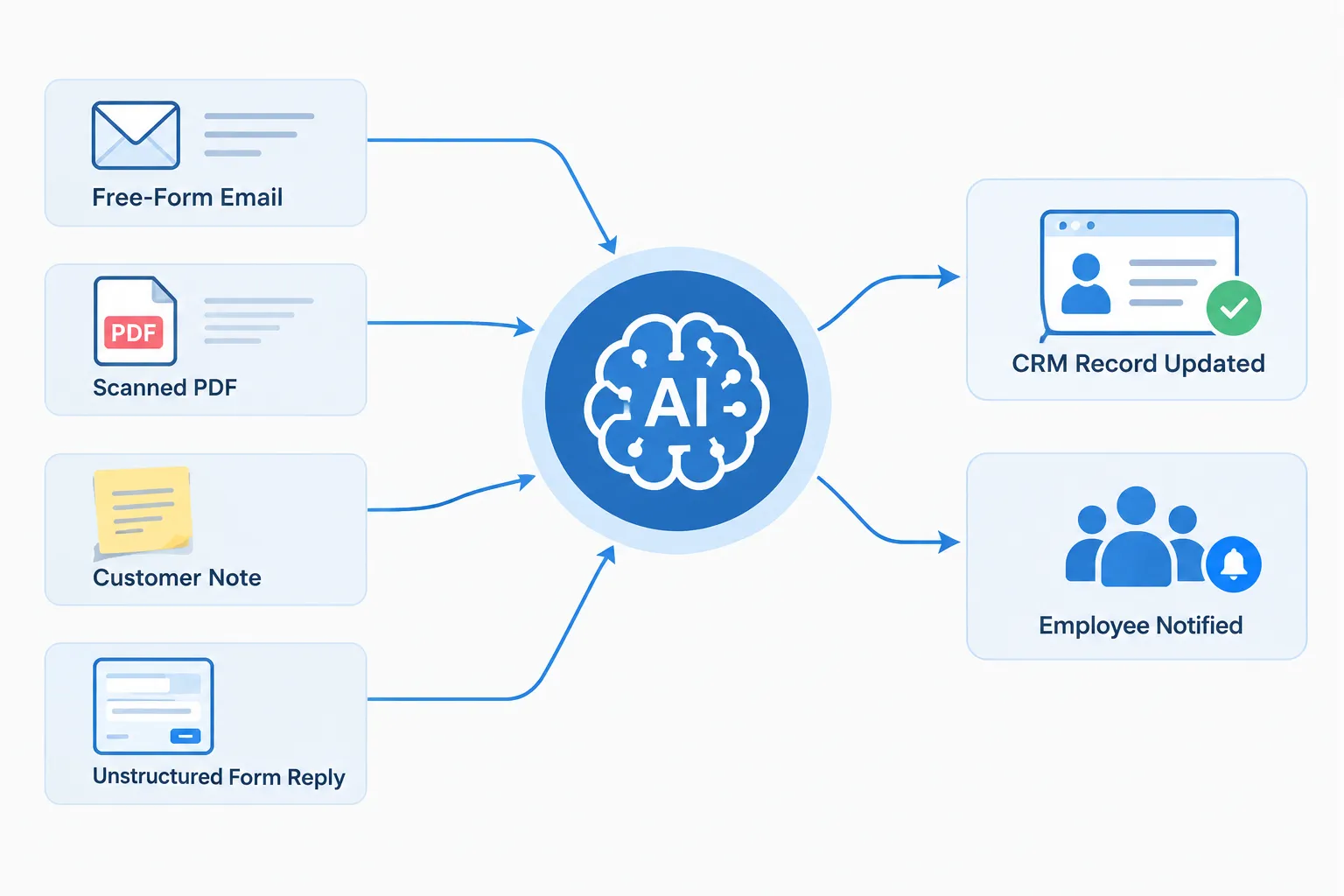
AI adds value specifically when the information coming into your business is messy or unstructured, not when it’s already organized into clean fields. Standard workflow automation handles structured data like form fields and dropdown selections perfectly well on its own, so you don’t need AI for every connection.
AI becomes genuinely useful when your business receives:
- Free-form emails with requests buried in paragraphs
- PDFs like purchase orders, applications, or contracts
- Customer notes written in plain language
- Scanned documents that need to be read and categorized
- Open-ended form responses that don’t fit neatly into a field
A practical example: a customer emails a general inbox describing a problem with their account. AI reads the email, identifies what the customer is actually requesting, decides which workflow it belongs in, updates the CRM record, and notifies the right employee to take it from there. The employee still makes the judgment call. AI just removes the step of reading, sorting, and manually entering the request.
This is where AI workflow automation connects naturally to broader business process automation, and it’s an area worth exploring carefully rather than applying everywhere by default.
What Your Employees Stop Doing Once Systems Are Connected
When systems are connected, employees stop spending time on the manual bridge work between applications and start spending that time on work that actually requires a person. This shift is the clearest, most measurable benefit of integration.
Here’s what tends to disappear from an employee’s day:
- Copying customer information from one system to another
- Creating duplicate records because nobody was sure if one already existed
- Updating the same information in two or three places
- Forwarding routine emails to the person who should handle them
- Double-checking whether something was actually entered correctly
- Manually creating repetitive follow-up tasks
- Chasing down whether a next step ever happened
And here’s where that freed-up time tends to go instead:
- Talking with customers
- Working active sales opportunities
- Solving problems that actually need judgment
- Making decisions instead of managing paperwork
- Higher-value work the business has been needing more hours for
This is what it means to free your team for higher-value work. It’s not about doing less. It’s about doing less of the work that never needed a human in the first place.
What Happens If Your Business Systems Aren’t Integrated
When business systems aren’t integrated, the cost shows up as duplicate records, missed follow-ups, inconsistent customer information, and slower response times, not just as extra labor hours. These problems compound as the business grows, because more volume means more chances for something to fall through a manual gap.
Disconnected systems commonly create:
- Duplicate customer or contact records
- Inconsistent information across departments
- Missed or delayed follow-ups on active leads
- Slower response times to customer requests
- Data-entry errors that cause billing or service mistakes
- Delayed invoicing that slows down cash flow
- Poor visibility into what’s actually happening across the business
- Administrative work that never shows up as its own budget line

Here’s a simple way to see the real size of the problem: multiply minutes spent moving data by the number of transactions per month, then by the number of employees involved, then by the average hourly labor cost. A business moving data manually for fifteen minutes, fifty times a month, across three employees at twenty-five dollars an hour, is spending roughly 937 dollars a month, or over 11,000 dollars a year, just shuttling information between systems that could pass it along automatically. That’s before counting the cost of the mistakes that manual entry causes.
Integration Doesn’t Mean Replacing Everything You Already Own
Integration almost never requires replacing your CRM, accounting software, or website. It usually means connecting the tools you already pay for so they share information automatically. Before buying anything new, the better question is: can the systems we already use be connected?
Most modern business software offers one of these connection methods:
- An API, which lets two systems exchange information directly and in real time.
- A webhook, which notifies a system the instant something happens, like a new form submission.
- Middleware or an automation platform, which sits between systems and moves data according to rules you set.
System Integration for Companies With Legacy Software
Older or industry-specific software can still often be integrated, even without a modern API. Many legacy systems support file-based exports, scheduled data syncs, or middleware connectors built specifically to work around older architecture. If a direct connection isn’t available, a scheduled or semi-automated sync is usually still far better than fully manual entry, and it’s worth asking a specialist before assuming an older system can’t be connected at all.
API Integration vs Middleware: What’s the Difference
API integration connects two systems directly, so data moves between them in real time with no extra software in between. Middleware sits between two or more systems and manages the data flow, translating formats and applying rules, which is useful when the systems involved weren’t designed to talk to each other directly. Choose a direct API connection when both systems support it and the workflow is simple. Choose middleware when you’re connecting several systems at once, or when one of your tools has limited native integration options.
Zapier vs Make vs Native Integrations: Which Is Better
There’s no single winner here. The right choice depends on your tools, your budget, and how complex your workflow is.
| Option | Best for | Setup complexity | Flexibility |
|---|---|---|---|
| Native integration | Two popular platforms with a built-in connector | Low | Limited to what the vendor built |
| Zapier | Quick, simple automations across many common apps | Low to medium | Good for straightforward workflows |
| Make | More complex, multi-step, or conditional workflows | Medium | High, with more control over logic |
| Custom API/middleware | Legacy software or very specific business rules | Higher | Highest, built around your exact process |
Choose a native integration if one already exists and does what you need. Choose Zapier for fast, simple connections. Choose Make when your workflow has multiple conditions or branches. Choose a custom build when your software doesn’t offer any of the above, or your workflow involves financial approvals that need careful control.
Do You Need a Developer to Integrate Business Systems
Not always. Many integrations between popular CRM, email, and form tools can be built using no-code or low-code automation platforms without writing custom code. A developer or integration specialist becomes necessary when you’re working with legacy software, complex approval logic, custom APIs, or a workflow that touches sensitive financial data and needs tighter security controls.
Best CRM Integration Tools for Small Business
The best CRM integration tools for a small business depend on which CRM, accounting platform, and form tools you already use, since compatibility matters more than brand reputation. That said, a few categories consistently work well for small and mid-sized teams:
- No-code automation platforms (like Zapier or Make) for connecting popular CRMs, email tools, and forms without custom development
- Native connectors built directly into your CRM or accounting software, when available, since they tend to be the most stable option
- Managed integration and automation services, where a partner maps your specific workflow and builds or maintains the connection for you
A good decision rule: start with the simplest option that actually solves the problem. If a native integration or a basic Zapier connection covers 90 percent of what you need, there’s rarely a reason to build something more complex.
How Long Does It Take to Set Up System Integration
A single, simple integration between two common platforms, like a form and a CRM, can often be set up in a few days once the workflow is mapped out. A full multi-system workflow connecting forms, CRM, email, and accounting typically takes a few weeks, because it involves mapping each handoff, deciding what triggers what, and testing with real data before going live. Legacy software, custom approval logic, or security requirements can extend that timeline further. The biggest time factor usually isn’t the technical build. It’s how clearly the business has defined what should happen at each step before work starts.
Common Mistakes When Integrating Business Software
The most common mistake is automating a workflow before mapping it clearly, which just moves confusion faster instead of removing it. Other frequent mistakes include:
- Giving an automation more system access than the task actually requires
- Skipping approval steps on financial or customer-facing actions
- Connecting systems without a plan for what happens when something fails
- Trying to automate everything at once instead of starting with one workflow
- Assuming a tool’s advertised integration covers a specific business rule it doesn’t actually support
- Not assigning anyone to monitor or maintain the integration after launch
A quick example: a business connects its form directly to an automatic invoice-send action without a review step. A typo in a form field now triggers an incorrect invoice automatically, with no one checking it first. The fix isn’t to avoid automation. It’s to build the review step into the workflow itself.
System Integration Security Risks and How to Avoid Them
The main security risk in system integration is over-permissioned access, where a connected tool can see or change more data than the workflow actually requires. A secondary risk is skipping human approval on sensitive actions like payments, refunds, or data deletion. To keep an integration secure and compliant:
- Grant each connected tool only the access it needs for its specific job
- Keep approval steps in place for financial transactions and sensitive customer data changes
- Review connected apps and API keys periodically and remove ones you no longer use
- Log what automations are doing so you can trace an error back to its source
- Work with a partner who understands both the business workflow and the security side, so integration supports being secure and compliant rather than working against it
Start With One Broken Handoff
You don’t need to automate your entire business at once. Start by identifying one workflow where the manual handoff is clearly costing time or causing mistakes, and fix that first.
Ask your team these five questions:
- Where is information entered more than once?
- Where does someone copy data between applications by hand?
- Where do employees sit and wait on another department before they can move forward?
- Where are leads, requests, or follow-ups getting lost or delayed?
- Which repetitive task costs the most combined employee time each month?
Whichever answer comes up most often across your team is usually your best starting point. Fix that one handoff, measure the time it saves, and use that result to decide what to connect next.
What a Connected Business Looks Like
Before: Customer → Form → Email → Employee → CRM → Spreadsheet → Accounting → Employee. Every arrow in that chain represents a place where a person has to notice, remember, and act, and every one of those places is a chance for delay or error.
After: Customer → Connected Workflow → CRM → Accounting → Follow-up. The information moves on its own, and your employees step in exactly where judgment, approval, or a real conversation is needed, not before.
That’s the actual shift integration creates. It’s not about removing people from the process. It’s about putting people only where they add value, instead of where a system could have handled it.
Interactive Tool: Calculate Your Manual Data Entry Cost
Use the calculator below to estimate how much manual data entry between your systems is costing your business each month and each year.