

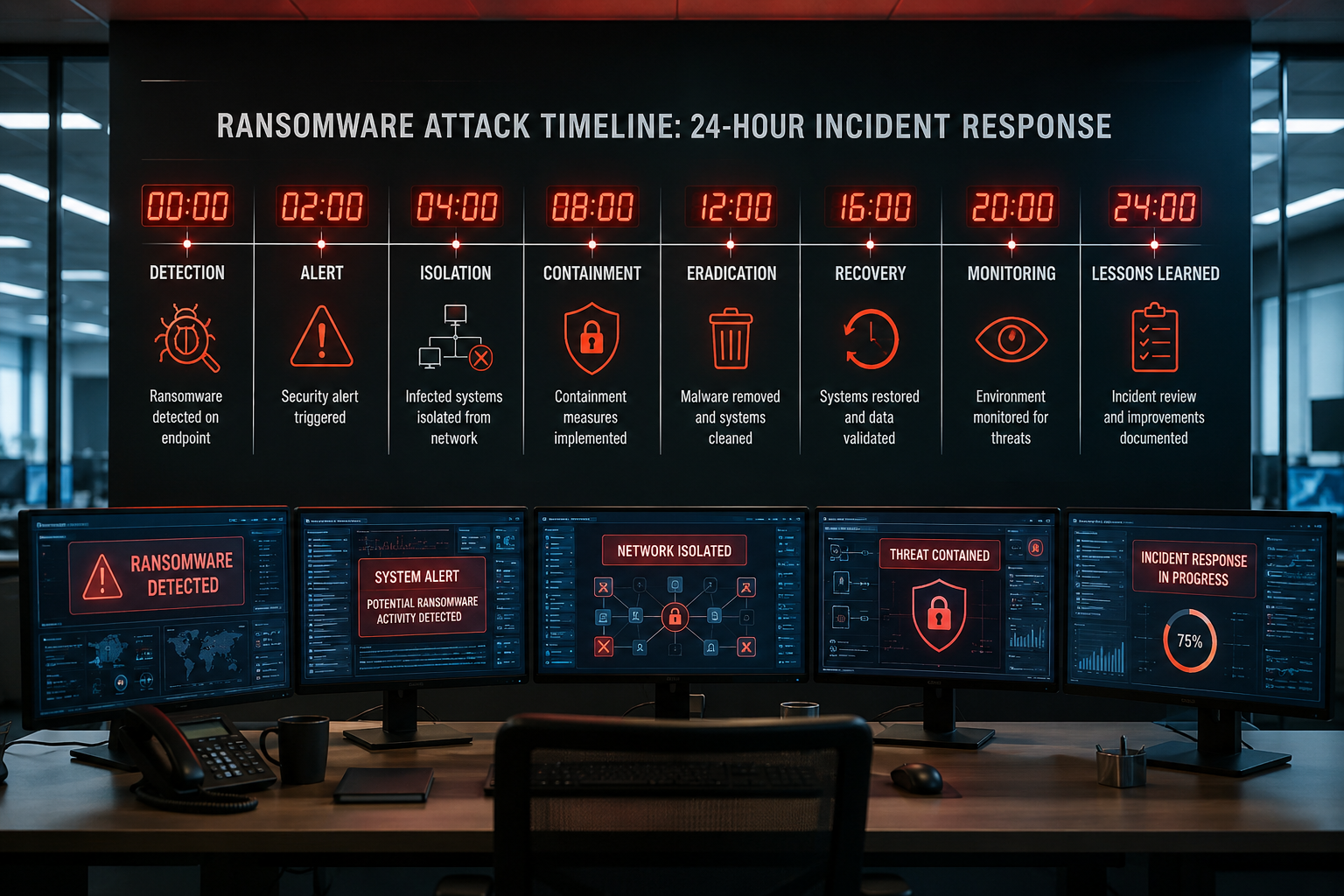
What Immediate Steps Should I Take When I Realize I’ve Been Hit with Ransomware
The moment you discover a ransomware attack, your response in the next few minutes can save your entire network. Disconnect the infected device from your network; immediately unplug Ethernet cables or disable Wi-Fi to prevent the malware from spreading to other systems. Take photos of ransom messages and error screens before touching anything else.
Your priority is stopping the attack’s progression, not fixing what’s already damaged. Many business owners make the mistake of trying to “see how bad it is” by checking other computers, which often helps the ransomware spread faster. Instead, power down suspicious systems and document what you observe.
Critical first-hour actions:
- Physically disconnect infected devices from the network
- Document ransom messages and affected file types with photos
- Identify patient zero – the first infected system or entry point
- Alert your IT support team or managed service provider immediately
- Activate your incident response plan if you have one
The key is moving fast but staying methodical. Panic leads to poor decisions that can make recovery much more expensive and time-consuming.
How Do I Know If My Entire Network Is Compromised
Network-wide compromise isn’t always immediately obvious, but certain signs indicate widespread infection. If you see ransom messages on multiple computers, encrypted files across different departments, or network drives becoming inaccessible, the attack has likely spread beyond the initial entry point. Modern ransomware often moves laterally through networks before activating, so visible symptoms may appear simultaneously across your entire infrastructure.
Check your file servers, shared drives, and backup systems first; these are primary targets for ransomware operators. If your main server or domain controller shows signs of infection, assume network-wide compromise until proven otherwise. Look for unusual network activity, slow performance across multiple systems, or employees reporting similar file access problems.
Signs of network-wide infection:
- Multiple computers displaying ransom messages
- Shared drives and network folders are becoming encrypted
- Domain controllers or file servers showing infection signs
- Backup systems reporting errors or becoming inaccessible
- Unusual network traffic patterns or performance degradation
Don’t assume isolated infection just because you only see problems on one computer. Ransomware often operates silently for days or weeks before revealing itself, using that time to spread and encrypt as much data as possible.

Should I Pay the Ransom or Try to Recover My Data Another Way
Never pay the ransom as your first response. Exhausting other recovery options first gives you better outcomes and avoids funding criminal operations. FBI statistics show that paying doesn’t guarantee data recovery, and businesses that pay are often targeted for repeat attacks. Focus initially on assessing your backup systems, consulting with cybersecurity experts, and exploring free decryption tools that may exist for your specific ransomware variant.
Payment should only be considered after confirming that backups are unusable, recovery costs exceed ransom demands significantly, and business survival depends on rapid data restoration. Even then, involve law enforcement and cybersecurity professionals in the decision-making process, as they may have intelligence about the specific threat actors or alternative recovery methods.
Factors to consider before paying:
- Backup system integrity and restoration timeframes
- Business impact of extended downtime versus ransom costs
- Legal and regulatory implications in your industry
- Historical success rates for the specific ransomware family
- Potential for repeat attacks after payment
Remember that paying the ransom often leads to additional costs for system rebuilding, security improvements, and ongoing monitoring that you’ll need anyway. Many businesses find that comprehensive recovery and security hardening cost less than ransom payments while providing long-term protection.
What Are the First Signs That a Ransomware Attack Is Happening
Early ransomware detection often happens through subtle system behavior changes before obvious ransom messages appear. Files becoming inaccessible, unusual hard drive activity during off-hours, or employees reporting that documents won’t open properly can indicate active encryption processes. Network monitoring tools may show suspicious data movement patterns or connections to unknown external servers.
Many ransomware variants operate quietly for extended periods, mapping your network and identifying valuable data before beginning encryption. During this reconnaissance phase, you might notice slower system performance, unexpected authentication failures, or unusual process activity in the task manager. Security software alerts about suspicious file modifications or network connections should trigger immediate investigation.
Pre-encryption warning signs:
- Unusual network traffic or external connections
- Files becoming corrupted or inaccessible gradually
- Unexpected system slowdowns or high CPU usage
- Security software reports suspicious file modifications
- Authentication errors or unexpected account lockouts
The challenge is distinguishing ransomware activity from normal system issues or other malware types. When multiple warning signs appear simultaneously, especially involving file access problems and network anomalies, treat the situation as a potential ransomware incident until proven otherwise.
How Quickly Can Cybersecurity Experts Help Me During a Ransomware Incident
Professional cybersecurity incident response teams can typically begin remote assessment within 1-2 hours of initial contact, with on-site assistance available within 4-6 hours for critical situations. Many managed service providers offer same-day support for ransomware incidents, recognizing that rapid response significantly improves recovery outcomes and reduces business impact.
The speed of expert assistance depends on your existing relationships and service agreements. Businesses with established managed IT services or cybersecurity partnerships receive priority response, while companies seeking help during an active incident may face longer wait times. Having pre-negotiated incident response agreements ensures immediate access to specialized expertise when you need it most.
Response timeframes for different support types:
- Managed service providers with existing contracts: 1-2 hours
- Cybersecurity firms with incident response retainers: 2-4 hours
- Emergency consulting services: 4-8 hours
- Law enforcement cyber crime units: 24-48 hours
- Insurance company recommended vendors: 6-12 hours
Don’t wait to establish these relationships during an active attack. Proactive partnerships with cybersecurity experts provide 24/7 monitoring, faster incident response, and often prevent ransomware attacks from succeeding in the first place.
What Systems Are Most Likely to Be Affected in the First 24 Hours
File servers, domain controllers, and shared network drives typically suffer the most damage during the first 24 hours of a ransomware attack. These systems contain the most valuable business data and often lack the endpoint protection found on individual workstations. Backup systems are frequently targeted early to prevent easy recovery, making them critical to check and protect immediately.
Email servers and databases face high risk because they contain large amounts of structured data that’s expensive to recreate. Cloud storage systems connected through synchronized folders can also become encrypted rapidly, especially if users have local sync folders on infected machines. Manufacturing and operational technology systems increasingly face ransomware threats as attackers target industrial control systems.
High-priority systems to check immediately:
- File servers and network-attached storage devices
- Domain controllers and directory services
- Email servers and communication systems
- Database servers containing business-critical information
- Backup and disaster recovery systems
- Cloud storage with local synchronization
- Industrial control and operational technology systems
Individual workstations often show visible ransomware symptoms first, but the real business impact comes from server and infrastructure compromise. Prioritize protecting and assessing these critical systems before focusing on individual computer recovery.
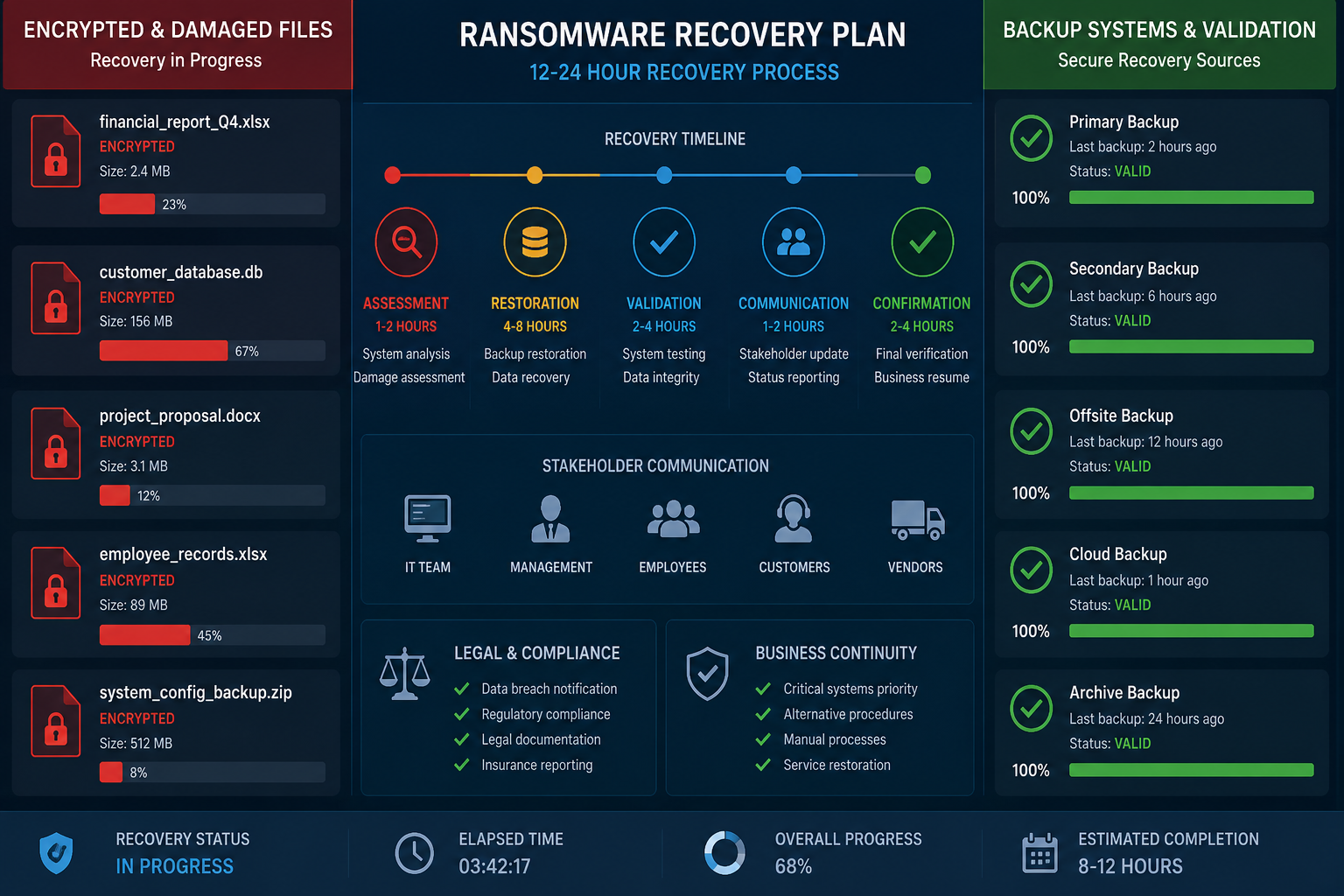
How Do I Prevent the Ransomware From Spreading to Other Devices
Network segmentation and immediate isolation are your primary defenses against ransomware spread during an active incident. Disconnect infected systems physically by unplugging network cables, then use firewall rules or network switches to isolate suspicious network segments from clean areas. Many businesses successfully contain ransomware by quickly creating network barriers between infected and clean systems.
Disable remote access services like RDP, VPN connections, and file sharing protocols that ransomware commonly exploits for lateral movement. Change administrative passwords immediately, especially for service accounts that might be compromised. Monitor network traffic for unusual patterns that might indicate ongoing spread attempts to systems you haven’t identified yet.
Immediate containment actions:
- Physically disconnect infected devices from the network
- Create firewall rules blocking suspicious network segments
- Disable remote desktop and VPN access temporarily
- Change all administrative and service account passwords
- Monitor network logs for lateral movement indicators
- Isolate critical servers behind additional security layers
Speed matters more than perfection during containment. It’s better to temporarily disrupt normal operations by isolating too many systems than to allow ransomware to continue spreading while you investigate each potential infection carefully.
What Legal Obligations Do I Have to Report a Ransomware Attack
Most industries have specific data breach notification requirements that apply to ransomware attacks, typically requiring notification within 24-72 hours of discovery. Healthcare organizations must comply with HIPAA breach notification rules, while financial institutions face regulatory requirements from banking authorities. State laws often mandate customer notification within specific timeframes, regardless of federal industry regulations.
Law enforcement agencies, particularly the FBI’s Internet Crime Complaint Center, strongly encourage ransomware reporting to help track threat actors and potentially assist with recovery. While reporting isn’t always legally required, it provides access to threat intelligence and may help other businesses avoid similar attacks. Cyber insurance policies often require prompt notification to maintain coverage for recovery costs.
Common reporting requirements:
- State data breach notification laws: 24-72 hours
- HIPAA (healthcare): 60 days for individuals, 60 days for HHS
- Financial services regulations: 24-48 hours to regulators
- Cyber insurance providers: Immediate notification required
- Law enforcement (FBI IC3): Encouraged but not mandatory
- Customer notifications: Varies by state, typically 30-60 days
Consult with legal counsel familiar with your industry’s requirements, as notification timing and content requirements vary significantly. Proper legal guidance helps ensure compliance while protecting your business interests during recovery.
How Much Does a Typical Ransomware Recovery Cost on the First Day
Initial ransomware response costs typically range from $5,000 to $25,000 for small businesses during the first 24 hours, covering emergency cybersecurity consultation, forensic analysis, and immediate containment efforts. These costs don’t include ransom payments, which can range from thousands to millions of dollars depending on your business size and the attackers’ assessment of your ability to pay.
The biggest first-day expense is often emergency cybersecurity expertise, with incident response specialists charging $200-500 per hour for immediate assistance. Forensic analysis to determine attack scope and preserve evidence adds high costs, especially if legal proceedings seem likely. Many businesses also face immediate revenue losses from operational disruption that can exceed direct response costs.
Typical first-day cost breakdown:
- Emergency cybersecurity consultation: $2,000-8,000
- Forensic analysis and evidence preservation: $3,000-10,000
- Legal consultation for compliance issues: $1,000-3,000
- Communication and public relations support: $1,000-5,000
- Immediate operational losses: Varies widely by business
Having cyber insurance significantly reduces out-of-pocket costs, with many policies covering incident response expenses from the first hour. The key is understanding your coverage limits and approved vendor requirements before an incident occurs.
What Are Common Mistakes Companies Make Right After a Ransomware Attack
The most costly mistake is attempting to restore systems from backups without first removing the ransomware, leading to immediate re-infection and extended recovery times. Many businesses also make the error of not preserving evidence before cleanup efforts, which can complicate insurance claims and prevent law enforcement assistance. Paying ransoms immediately without exploring other options often results in incomplete data recovery and repeat attacks.
Poor communication during the crisis creates additional problems, with employees, customers, and partners learning about the attack through rumors rather than official channels. Some businesses also make the mistake of not involving cybersecurity experts early, believing they can handle the situation internally and discovering too late that they lack the specialized knowledge for an effective response.
Critical mistakes to avoid:
- Restoring from backups before confirming ransomware removal
- Not preserving evidence and system images for investigation
- Paying ransom demands without exploring alternatives first
- Failing to communicate clearly with stakeholders during the crisis
- Attempting internal recovery without cybersecurity expertise
- Not documenting the incident timeline and response actions
- Rushing system restoration without proper security validation
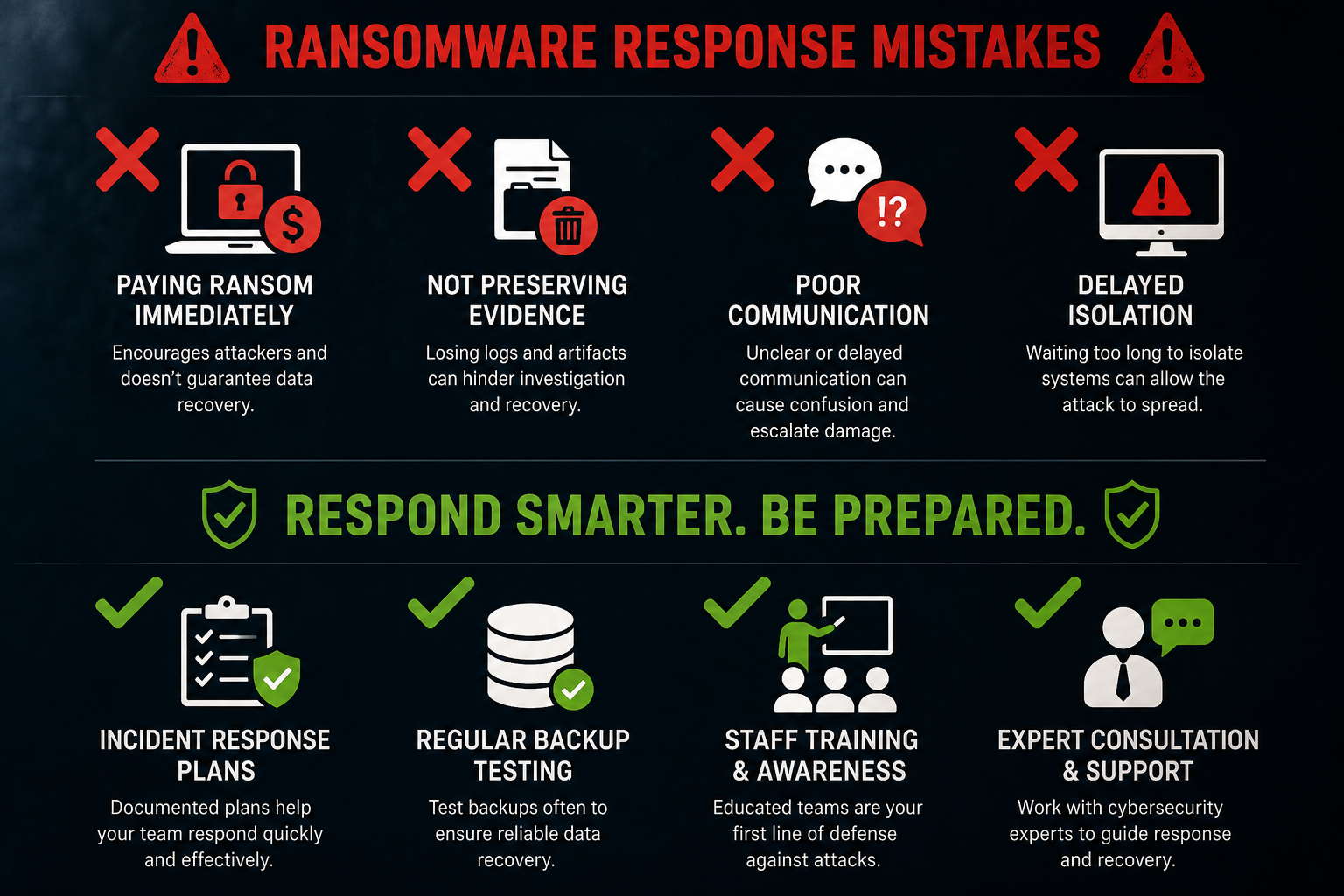
The pressure to restore operations quickly leads to shortcuts that often extend recovery time and increase costs. Taking time for proper assessment and expert consultation in the first few hours prevents much larger problems later in the recovery process.
How Do I Communicate With My Team and Customers During a Ransomware Crisis
Establish clear, honest communication immediately while being careful not to provide information that could help attackers or create legal liability. Notify your team about the incident quickly to prevent them from unknowingly spreading the infection or compromising recovery efforts. Create simple guidelines about what employees should and shouldn’t do with their computers and network access during the response.
Customer communication requires more careful consideration, balancing transparency with legal and business protection needs. Focus on what you’re doing to resolve the situation and protect their data rather than technical details about the attack. Many businesses find that proactive, honest communication maintains customer trust better than trying to hide the incident until recovery is complete.
Communication priorities by audience:
- Internal team: Immediate notification with clear action items
- Customers: Prompt disclosure focusing on protection measures
- Vendors and partners: Quick notification of potential service impacts
- Insurance providers: Immediate notification per policy requirements
- Legal counsel: Early involvement for compliance guidance
- Public relations: Coordinated messaging strategy for media inquiries
Prepare template communications in advance as part of your incident response planning. Having pre-approved messaging frameworks allows faster, more consistent communication when you’re under pressure during an actual incident.
What Evidence Should I Preserve for Potential Law Enforcement Investigation
Document everything before making any changes to infected systems, including screenshots of ransom messages, file directory listings showing encrypted files, and network logs indicating attack timing and scope. Create forensic images of infected hard drives when possible, as this preserves evidence while allowing you to proceed with recovery efforts on clean systems.
Preserve email logs, firewall records, and any security software alerts from the period leading up to and during the attack. This information helps investigators understand attack vectors and may provide leads for tracking the threat actors. Many businesses overlook the importance of preserving evidence from clean systems that might show lateral movement attempts or reconnaissance activity.
Critical evidence to preserve:
- Screenshots of ransom messages and encrypted file listings
- System logs from firewalls, servers, and security software
- Email headers and attachment information from suspicious messages
- Network traffic logs showing unusual connection patterns
- Forensic disk images from infected systems when possible
- Timeline documentation of when symptoms first appeared
Work with cybersecurity professionals to ensure evidence preservation doesn’t interfere with recovery efforts. Proper evidence handling also protects your legal interests if the incident leads to litigation or regulatory enforcement actions.
How Can I Assess the Initial Damage and Data Loss
Start damage assessment by identifying which systems show obvious encryption symptoms, then systematically check file servers, databases, and backup systems for accessibility and data integrity. Focus first on business-critical systems and data that would cause immediate operational problems if permanently lost. Document what you find with screenshots and file listings before attempting any recovery actions.
Test backup system integrity immediately, as ransomware often targets backup files to prevent easy recovery. Try accessing recent backup files from different dates to determine if you have clean recovery points available. Many businesses discover during ransomware incidents that their backup systems weren’t working properly for weeks or months before the attack.
Systematic damage assessment steps:
- Catalog all systems showing encryption or access problems
- Test backup accessibility and integrity from multiple dates
- Identify business-critical data that’s currently inaccessible
- Document file types and systems affected with timestamps
- Check cloud storage and off-site backup systems for impact
- Assess operational capabilities with currently available systems
Don’t assume that systems appearing normal are actually clean – ransomware often remains hidden on systems while actively encrypting files. Professional forensic analysis can identify infected systems that don’t yet show obvious symptoms.