

Why Small Businesses Are Prime Targets for Hackers in 2026
Small businesses represent the perfect storm for cybercriminals. You have valuable data like customer records, financial information, and business bank accounts, but you typically lack the dedicated IT security teams that large corporations employ.
The numbers tell the story clearly. While enterprise companies invest millions in cybersecurity and employ full-time security specialists, most small businesses rely on basic antivirus software and hope for the best. This creates an opportunity gap that hackers exploit ruthlessly.
Criminals also know that small businesses often have less sophisticated backup systems and incident response plans. When ransomware hits, you’re more likely to pay the ransom to get back online quickly rather than endure weeks of downtime while rebuilding systems from scratch.
Your business relationships make you valuable, too. Hackers use compromised small business email accounts to launch attacks against your customers, vendors, and partners. A trusted email from your company asking for wire transfers or sensitive information has a much higher success rate than random spam.
The reality is that understanding how hackers target small businesses isn’t just about protecting your own company; it’s about protecting your entire business ecosystem from increasingly sophisticated attacks.
The Five-Step Process: How Hackers Target Small Businesses
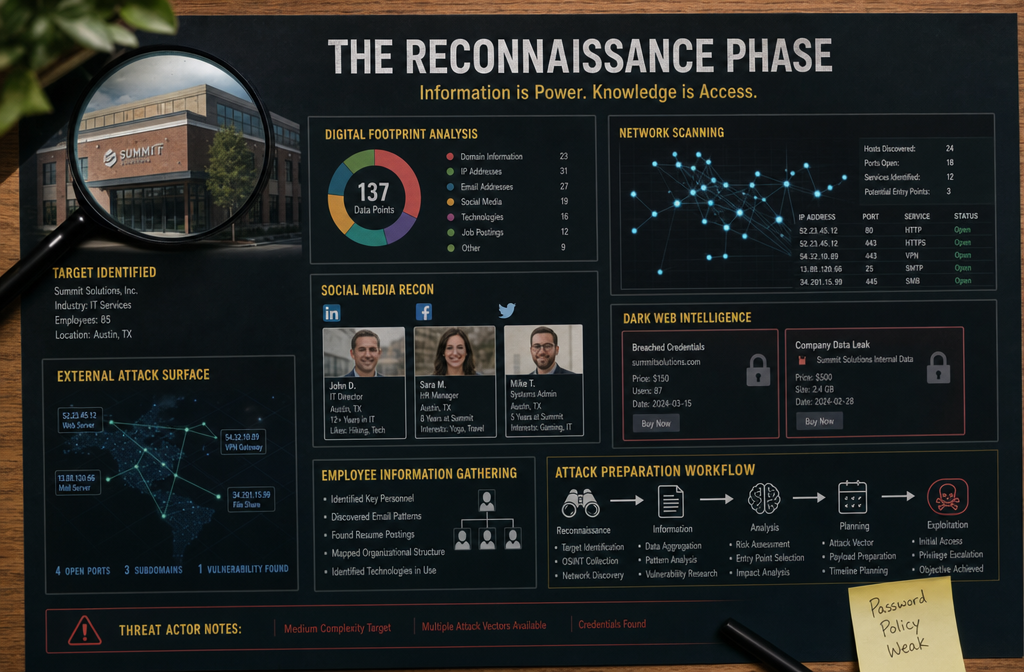
Step 1: Reconnaissance and Information Gathering
Hackers don’t start by randomly trying to break into your systems. They begin with careful research to understand your business, identify potential vulnerabilities, and gather information that will make their attacks more convincing and effective.
This reconnaissance phase typically includes:
• Website and social media analysis – Hackers study your company website, LinkedIn profiles, Facebook pages, and other online presence to learn about your business structure, key employees, and technology systems
• Email harvesting – They collect employee email addresses from your website, social media, and public databases to build target lists for phishing campaigns
• Technology fingerprinting – Automated tools scan your web presence to identify what software, servers, and security systems you’re using
• Vendor and partner research – Criminals research your business relationships to craft convincing impersonation attacks
The information they’re looking for includes:
- Employee names, titles, and email addresses (especially executives and accounting staff)
- Business banking relationships and accounting software are used
- Key vendor and customer relationships
- Technology systems and software versions
- Business processes and communication patterns
This research phase can take anywhere from a few days to several weeks. Hackers are patient because thorough reconnaissance dramatically increases their success rates in later attack phases.
Common mistake: Many business owners assume they’re “flying under the radar” because they haven’t been attacked yet. In reality, automated tools are constantly scanning and cataloging information about businesses of all sizes.
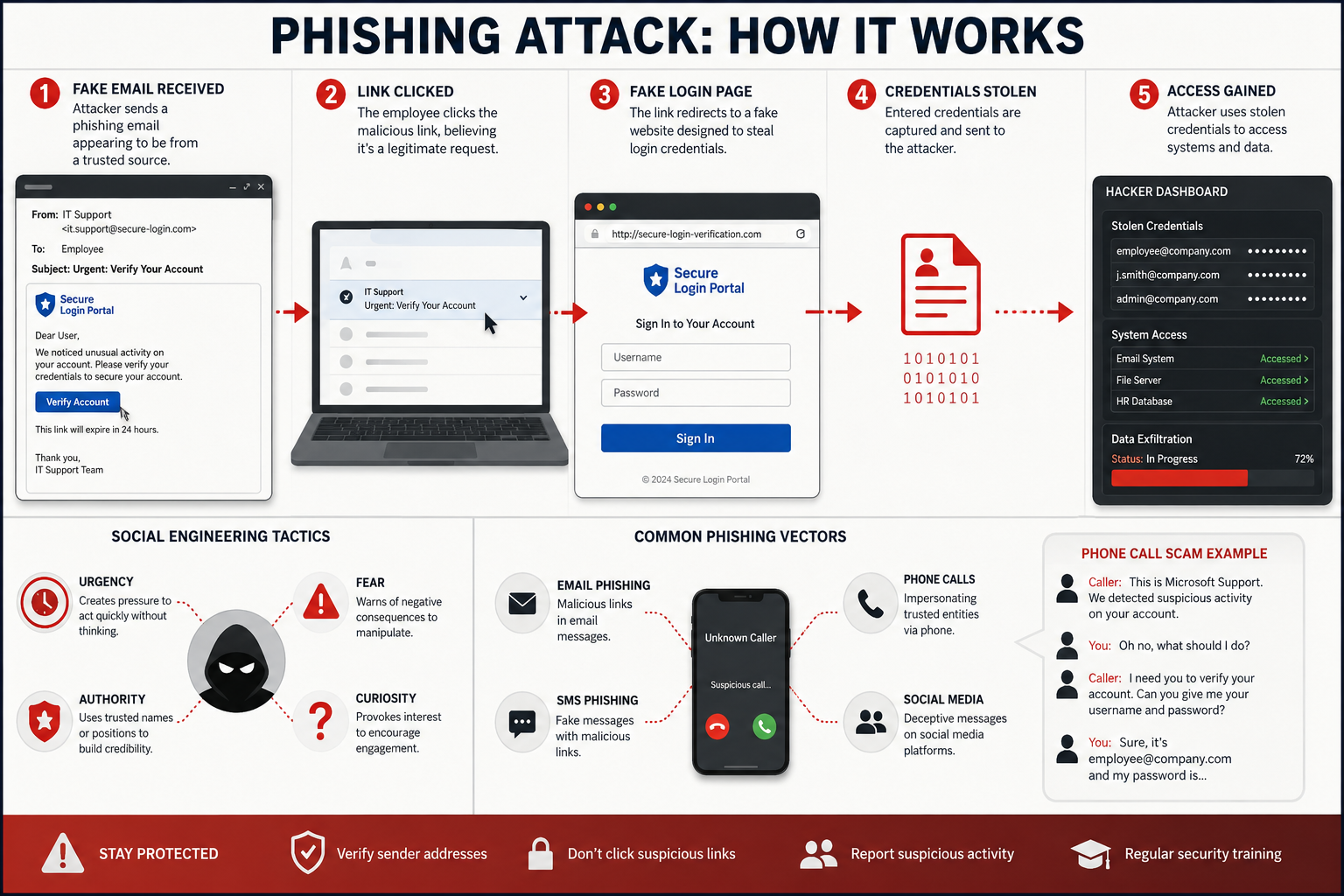
Step 2: Phishing and Social Engineering Attacks
Armed with detailed information about your business, hackers launch targeted phishing campaigns designed to steal employee login credentials or trick staff into taking dangerous actions.
Modern phishing attacks are highly sophisticated and personalized. Instead of generic “Nigerian prince” emails, criminals craft messages that reference your actual vendors, use your company’s communication style, and target specific employees based on their roles and responsibilities.
Common phishing tactics include:
• Vendor impersonation – Fake emails appearing to come from your bank, accounting software provider, or other trusted vendors requesting login verification
• Executive impersonation – Messages appearing to come from your CEO or other executives requesting urgent wire transfers or sensitive information
• IT support scams – Phone calls or emails claiming to be from your IT provider requesting remote access to “fix security issues”
• Invoice fraud – Fake invoices or payment requests that look legitimate but redirect money to criminal accounts
The goal is always the same: Get employees to either reveal their login credentials on fake websites or take actions that give hackers access to your systems.
What makes these attacks successful:
- They arrive during busy periods when employees are rushing and are less likely to scrutinize carefully
- They create artificial urgency (“Your account will be suspended in 24 hours”)
- They use information gathered during reconnaissance to appear legitimate
- They target human psychology rather than technical vulnerabilities
Choose immediate employee training if: Your staff hasn’t received cybersecurity awareness training in the past 12 months, or if employees regularly handle financial transactions, customer data, or have administrative access to business systems.
Step 3: Credential Theft and Initial Access
Once an employee falls for a phishing attack, hackers quickly move to establish a foothold in your business systems. This typically happens within minutes or hours of stealing login credentials.
The initial access process works like this:
- Credential validation – Hackers immediately test stolen usernames and passwords to confirm they work
- Account enumeration – They explore what systems and data the compromised account can access
- Persistence establishment – Criminals create additional access methods (backdoors) so they can return even if you change the compromised password
- Privilege escalation – They attempt to gain administrative access or compromise accounts with higher-level permissions
Warning signs of initial compromise include:
• Unusual login locations or times in system logs
• Employees reporting they can’t access accounts or that passwords have changed
• Unexpected password reset requests
• Unusual email activity or sent items employees don’t remember sending
The challenge for small businesses is that these warning signs often go unnoticed without proper monitoring systems in place. Many business owners only discover the breach weeks later when ransomware appears or customers report suspicious emails.
Critical timeframe: You typically have 24-48 hours from initial credential theft to detect and stop the attack before hackers establish persistent access and begin lateral movement through your network.
Step 4: Lateral Movement and Network Exploration
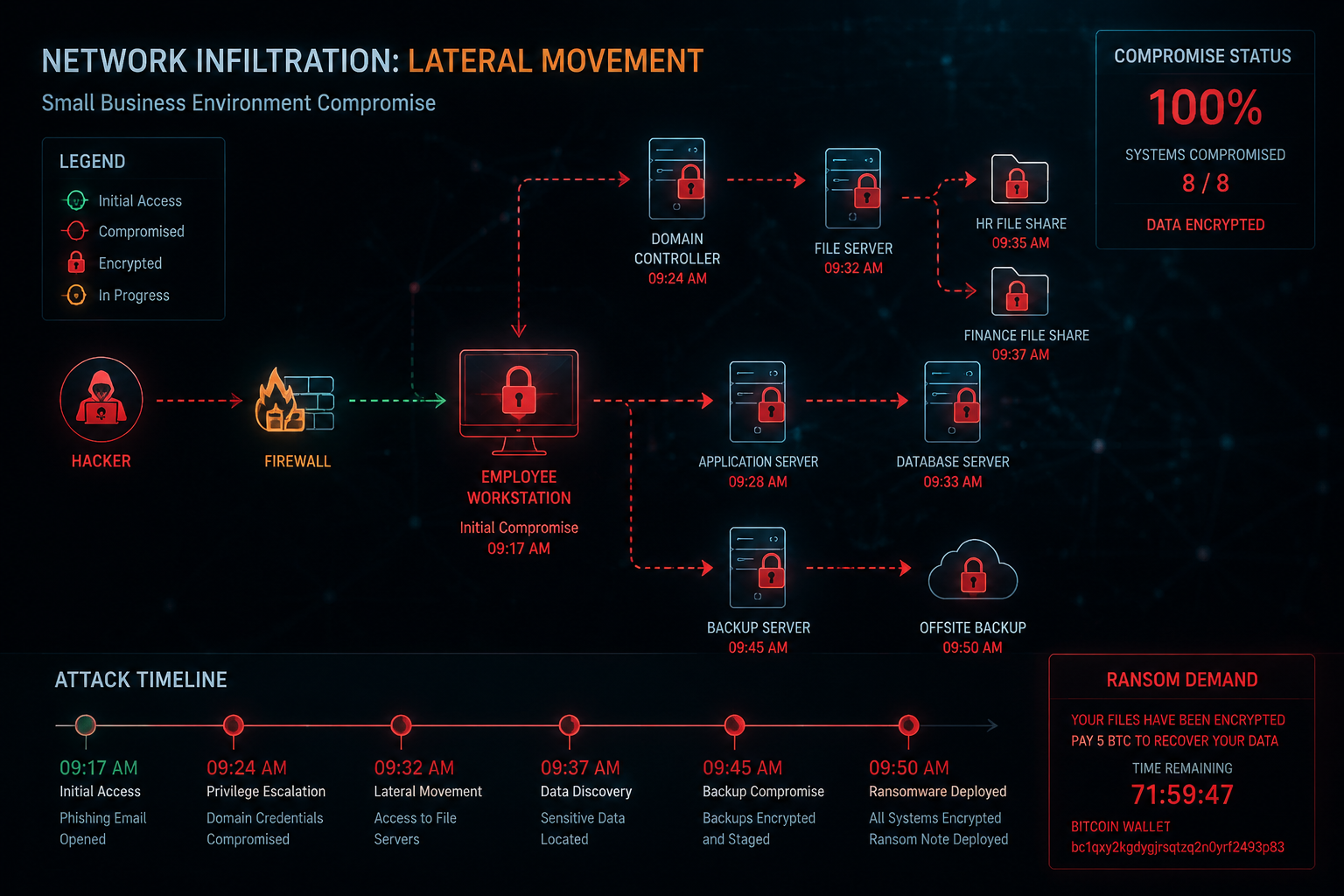
With initial access secured, hackers begin exploring your network to find valuable data and identify critical systems for their final attack. This lateral movement phase is where criminals do the most damage to your business operations.
During lateral movement, hackers systematically access:
• File servers and shared drives containing customer data, financial records, and business documents
• Email systems to steal communications and launch attacks against your contacts
• Accounting and business software to access financial information and payment systems
• Backup systems to delete or encrypt your recovery options
• Additional employee accounts to expand their access and create multiple entry points
They’re specifically looking for:
- Customer databases and personal information
- Financial records and banking access
- Intellectual property and business plans
- Email contacts for future attacks
- System administrator accounts with full network access
The exploration process is methodical and patient. Hackers often spend days or weeks mapping your network, copying valuable data, and preparing for their final attack. They work during off-hours to avoid detection and use legitimate administrative tools to blend in with normal network activity.
Most concerning: During this phase, criminals are actively stealing your data even before deploying ransomware. This means that even if you have good backups and can recover from ransomware, your sensitive business and customer information has already been compromised.
Edge case to consider: Some hackers establish long-term access without deploying ransomware, instead choosing to steal data continuously or use your systems to launch attacks against other businesses. This can continue for months without detection.
Step 5: Ransomware Deployment and Data Theft
The final phase brings the attack into the open as hackers deploy ransomware to encrypt your business files and demand payment for the decryption keys. By this point, they’ve already stolen your most valuable data and mapped your entire network.
Modern ransomware attacks follow a coordinated deployment pattern:
• Simultaneous encryption across all accessible systems, including workstations, servers, and network drives
• Backup destruction to eliminate your ability to recover files independently
• Ransom note delivery with payment instructions and threats to publish stolen data
• Communication establishment through encrypted channels to negotiate payment
The double extortion model has become standard in 2026. Criminals don’t just encrypt your files; they threaten to publish stolen customer data, financial records, and business documents online if you don’t pay. This creates pressure even for businesses with good backup systems.
Typical ransom demands for small businesses:
- $25,000 to $100,000 for basic file decryption
- Additional fees for data deletion guarantees
- Escalating costs if payment is delayed
- Separate charges for “security consulting” to prevent future attacks
Recovery timeline without backups: 2-6 weeks to rebuild systems and restore operations, assuming you can recover data at all. Many small businesses that lose their data permanently are forced to close within six months.
Recovery timeline with proper backups: 24-72 hours to restore systems and resume operations, though you’ll still need to address the data theft component and notify affected customers.
Critical decision point: Paying ransoms doesn’t guarantee data recovery and often makes your business a target for repeat attacks. FBI statistics show that 40% of businesses that pay ransoms are targeted again within 12 months.
Real-World Attack Scenario: Metro Atlanta Accounting Firm
Let me walk you through exactly how these attacks unfold using a realistic scenario based on actual incidents we’ve seen in the Metro Atlanta area.
The Target: A 12-employee CPA firm preparing for tax season with minimal IT security measures beyond basic antivirus software.
Week 1 – Reconnaissance:
Hackers discovered the firm’s website listed all employee names and specialties. LinkedIn profiles revealed the office manager’s name (Sarah) and that the firm used QuickBooks and Microsoft 365. Social media posts showed the managing partner was traveling to a conference.
Week 2 – Initial Attack:
Sarah received an email appearing to come from Microsoft stating her Office 365 account would be suspended due to suspicious activity. The email included a link to a fake Microsoft login page that captured her username and password when she tried to “verify” her account.
Week 2-3 – Lateral Movement:
Using Sarah’s credentials, hackers accessed the firm’s email system and file shares. They discovered client tax documents, bank account information, and employee records. The criminals spent two weeks copying sensitive data while planning their ransomware deployment.
Week 4 – Ransomware Deployment:
On a Friday evening, ransomware encrypted all client files, tax returns, and business documents across the network. The ransom note demanded $75,000 in Bitcoin and threatened to publish client’s tax information online if payment wasn’t received within 72 hours.
The Impact:
- 3 weeks of business closure during peak tax season
- $180,000 in lost revenue and recovery costs
- Mandatory client notifications and potential regulatory fines
- Permanent damage to professional reputation
- 18 months of credit monitoring costs for affected clients
What could have prevented this: Multi-factor authentication would have blocked the initial access, even with Sarah’s compromised password. Employee training would have helped Sarah recognize the phishing email. Proper monitoring would have detected the unusual file access patterns during lateral movement.
Most Common Weak Points Hackers Exploit
Understanding where hackers typically find success helps you prioritize your security improvements for maximum protection with limited resources.
The top vulnerabilities we see in small businesses:
Weak Password Practices
• Single passwords across multiple systems – When one account is compromised, hackers gain access to everything
• Shared administrative accounts – Multiple employees using the same login credentials
• Default passwords on networking equipment – Routers, firewalls, and other devices still using manufacturer defaults
• No password expiration policies – Compromised credentials remain valid indefinitely
Inadequate Email Security
• Missing spam filtering – Phishing emails reach employee inboxes without warning
• No email encryption – Sensitive communications travel unprotected
• Unrestricted email forwarding – Hackers can redirect emails to external accounts
• Lack of email authentication – No protection against domain spoofing attacks
Unpatched Software and Systems
• Outdated operating systems – Missing critical security updates
• Legacy business software – Applications that no longer receive security patches
• Unmanaged personal devices – Employee phones and laptops accessing business data
• Ignored update notifications – Security patches delayed or skipped entirely
Insufficient Access Controls
• Excessive user permissions – Employees have access to systems they don’t need for their jobs
• No network segmentation – Compromise of one system leads to access to all systems
• Missing activity monitoring – No visibility into who accesses what data and when
• Weak vendor access controls – Third-party providers have unrestricted network access
Choose a professional IT security assessment if: Your business handles customer financial data, healthcare records, or other regulated information, or if you’re unsure about the current state of your cybersecurity defenses.
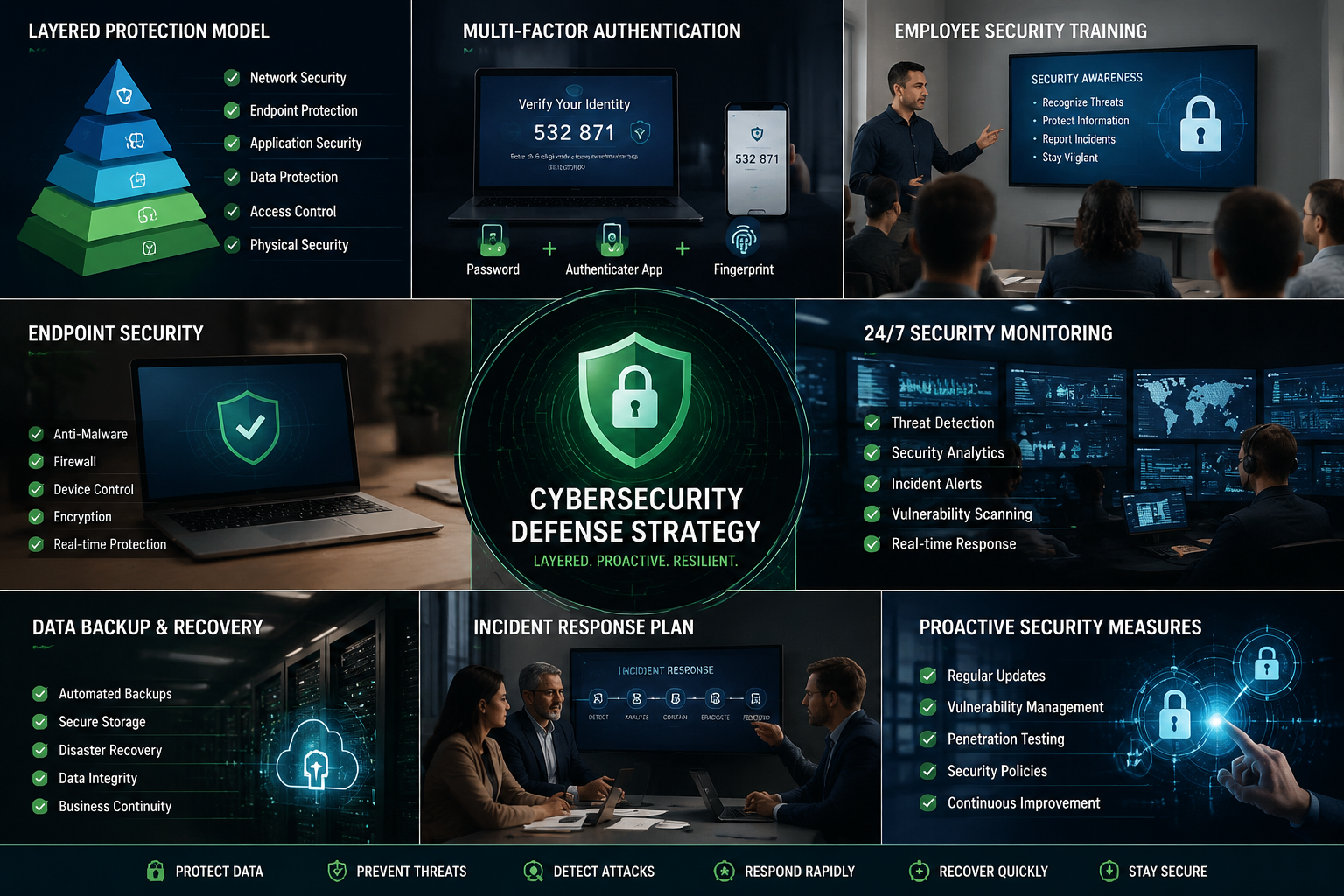
How to Break the Attack Chain: Practical Defense Strategies
The good news is that you don’t need enterprise-level budgets to significantly improve your cybersecurity posture. Focus on these proven strategies that provide maximum protection for your investment.
Multi-Factor Authentication (MFA): Your First Line of Defense
MFA blocks 99.9% of automated attacks even when hackers have stolen employee passwords. This single security measure provides more protection than any other investment you can make.
Implement MFA immediately for:
- Email and Microsoft 365/Google Workspace accounts
- Banking and financial software access
- Administrative access to business systems
- VPN and remote access connections
- Cloud storage and backup systems
Choose app-based authentication over SMS when possible. Apps like Microsoft Authenticator or Google Authenticator are more secure than text message codes and work even without cell phone coverage.
Common implementation mistake: Only protecting some accounts while leaving others vulnerable. Hackers will simply target the unprotected systems to gain initial access.
Employee Security Training: Building Human Firewalls
Regular training reduces successful phishing attempts by 70% within the first year. Your employees are either your strongest defense or your weakest link – training determines which.
Essential training topics include:
• Phishing recognition – How to identify suspicious emails, links, and attachments
• Password security – Creating strong passwords and using password managers
• Social engineering awareness – Recognizing phone and in-person manipulation attempts
• Incident reporting – What to do when something seems suspicious
Make training practical and relevant by using examples specific to your industry. Healthcare practices need different scenarios than manufacturing companies or professional services firms.
Schedule monthly 15-minute security discussions rather than annual hour-long sessions. Frequent, brief reinforcement is more effective than infrequent, comprehensive training.
Endpoint Protection: Beyond Basic Antivirus
Modern endpoint protection goes far beyond traditional antivirus to include behavior monitoring, application control, and automated threat response.
Key capabilities to look for:
- Real-time malware detection and removal
- Ransomware behavior blocking
- Web filtering to block malicious websites
- Application whitelisting for critical systems
- Automatic security updates and patch management
Ensure protection covers all devices, including employee laptops, mobile phones, and tablets that access business data. Remote work has expanded your security perimeter beyond the office walls.
Budget consideration: Enterprise-grade endpoint protection typically costs $5-15 per device per month, a small investment compared to ransomware recovery costs.
24/7 Network Monitoring: Early Warning Systems
Continuous monitoring detects attacks during the lateral movement phase before ransomware deployment. This gives you time to respond and minimize damage.
Effective monitoring includes:
• Network traffic analysis – Identifying unusual data flows and communication patterns
• User behavior monitoring – Detecting when accounts are used in abnormal ways
• File access tracking – Monitoring who accesses sensitive data and when
• System log analysis – Automated review of security events across all systems
Response capabilities matter as much as detection. Monitoring is only valuable if someone qualified can investigate alerts and take immediate action to contain threats.
For small businesses: Managed security services provide enterprise-level monitoring at a fraction of the cost of hiring internal security staff.
Backup Strategy: Your Safety Net
Proper backups are your last line of defense when other security measures fail. However, modern ransomware specifically targets backup systems, so your strategy must account for this threat.
Implement the 3-2-1 backup rule:
- 3 copies of important data
- 2 different storage types (local and cloud)
- 1 offline or immutable backup that hackers can’t access
Test backup restoration monthly to ensure your data is actually recoverable. Many businesses discover their backups are corrupted or incomplete only when they need them most.
Separate backup credentials from your main business accounts. If hackers compromise your primary systems, they shouldn’t be able to access your backup systems using the same credentials.
Why Proactive Cybersecurity Matters More Than Ever in 2026
The cybersecurity landscape has fundamentally shifted. Reactive approaches – waiting for attacks to happen and then responding – are no longer sufficient to protect small businesses from increasingly sophisticated threats.
The cost of reactive cybersecurity:
- Average ransomware recovery costs: $185,000 for small businesses
- Average business downtime: 22 days for full recovery
- Customer trust rebuilding: 12-18 months minimum
- Regulatory fines and legal costs: $50,000-$500,000, depending on data types
- Permanent business closure rate: 25% within 12 months of major cyber incidents
Proactive security provides measurable business benefits:
Peace of mind comes from knowing your business can continue operating even when cyber threats emerge. You can focus on growing your business rather than constantly worrying about the next potential attack.
Same-day support from qualified cybersecurity professionals means threats are addressed immediately rather than lingering in your systems for weeks or months while you try to find help.
Industry expertise ensures your security measures address the specific threats facing your type of business. Healthcare practices face different risks than manufacturing companies or professional services firms.
Proactive solutions identify and address vulnerabilities before criminals can exploit them. This approach prevents incidents rather than just responding to them after damage is done.
The reality is simple: Cybersecurity is no longer optional for businesses of any size. The question isn’t whether you’ll face cyber threats – it’s whether you’ll be prepared when they arrive.
Investment perspective: Comprehensive cybersecurity typically costs 2-5% of your annual IT budget but can prevent losses that exceed your entire annual revenue. The return on investment becomes clear when you avoid even a single successful attack.
Competitive advantage: Customers increasingly choose vendors based on their cybersecurity practices. Strong security becomes a differentiator that helps you win business and maintain customer trust.
Frequently Asked Questions
Q: How can I tell if my business has already been compromised?
Signs include unusual network activity, unexpected password resets, employees reporting account access issues, suspiciously sent emails, or unexplained system slowdowns. Professional network monitoring can detect compromise even when obvious symptoms aren’t present.
Q: Should small businesses pay ransoms when attacked?
No. Payment doesn’t guarantee data recovery, often makes you a target for repeat attacks, and may be illegal depending on who the criminals are. Focus on prevention and backup strategies instead.
Q: How much should a small business spend on cybersecurity?
Most experts recommend 3-5% of your total IT budget for cybersecurity. For a typical small business, this translates to $200-800 per month, depending on your size and industry requirements.
Q: Can cyber insurance replace good cybersecurity practices?
No. Cyber insurance requires you to meet minimum security standards and won’t cover losses from preventable attacks. Think of insurance as a supplement to, not a replacement for, proper security measures.
Q: How often should employees receive security training?
Monthly brief sessions (15-20 minutes) are more effective than annual comprehensive training. Include simulated phishing tests quarterly to reinforce learning and identify employees who need additional support.
Q: What’s the difference between antivirus and endpoint protection?
Traditional antivirus software only detects known malware signatures. Modern endpoint protection includes behavior analysis, application control, web filtering, and automated threat response to stop unknown and advanced attacks.
Q: How quickly can hackers move from initial access to ransomware deployment?
Most attacks progress from initial compromise to ransomware in 4-5 days for small business networks. Some automated attacks can deploy ransomware within hours of gaining access.
Q: Do I need a full-time IT security person for my small business?
Most small businesses benefit more from managed security services than hiring internal staff. Managed providers offer 24/7 monitoring and response capabilities that would cost significantly more to build internally.
Q: Can working from home increase cybersecurity risks?
Yes, if not properly managed. Remote work expands your security perimeter to include employee home networks and personal devices. Implement VPN access, endpoint protection, and clear remote work security policies.
Q: What should I do immediately after discovering a potential cyberattack?
Disconnect affected systems from the network, preserve evidence, contact your IT provider or cybersecurity professional, notify your cyber insurance carrier, and begin documenting the incident for potential regulatory reporting requirements.
Q: How do I know if my current IT provider has adequate cybersecurity expertise?
Ask about their security certifications, incident response procedures, monitoring capabilities, and experience with businesses in your industry. They should be able to explain current threats and recommend specific protections for your business type.
Q: What’s the biggest cybersecurity mistake small businesses make?
Assuming they’re “too small to be targeted.” Automated attacks don’t discriminate by business size, and small businesses often have weaker defenses while still possessing valuable data that criminals can monetize.
Conclusion
Understanding how hackers target small businesses in 2026 reveals a sobering truth: these attacks follow predictable patterns that you can disrupt with the right security measures. The five-step process from reconnaissance to ransomware deployment typically takes weeks, giving you multiple opportunities to detect and stop attacks before they cause devastating damage.
The key insight is that cybersecurity isn’t about perfect protection – it’s about making your business a harder target than your competitors. Hackers choose the path of least resistance, and implementing multi-factor authentication, employee training, proper backups, and professional monitoring creates enough friction to send most criminals looking for easier targets.
Your next steps should be immediate and practical:
- Enable multi-factor authentication on all business email and financial systems within the next 48 hours
- Schedule employee security training for the next 30 days, focusing on phishing recognition and incident reporting
- Assess your current backup system and ensure you can actually restore data quickly if needed
- Consider a professional cybersecurity partnership if you’re handling customer data or facing regulatory requirements
The reality is that cybersecurity has become as essential as business insurance or accounting services. You wouldn’t operate without proper financial controls or liability coverage – and in 2026, you can’t operate safely without proper cybersecurity measures.
Remember that achieving peace of mind doesn’t require perfect security – it requires appropriate security for your business size and risk profile. Working with a reliable partner who provides same-day support and 24/7 monitoring can eliminate IT headaches while letting you focus on what you do best: growing your business.
The threats are real and growing, but they’re not insurmountable. Take action now, before you become another cautionary tale about how hackers target small businesses.